Top Password Manager Plugin
Password Protected Coupon Code – 2026


The Password Protected plugin lets you easily password-protect your entire WordPress site, specific pages, posts, categories, and even WooCommerce products.
Top Password Manager Plugin
Password Protected Coupon Code – 2026
The Password Protected plugin lets you easily password-protect your entire WordPress site, specific pages, posts, categories, and even WooCommerce products.
Black Friday 2025
Exclusive Discount
Only for WPdiscounts.io visitors.
Lifetime Deal
Pay Once, Use Forever.
Starts from $149.99/one time
Limited Time Offer
Claim this offer before it ends.
Save up to 80% OFF on Password Protected (Expired)
Table of Content
About
Founder: Saad Iqbal
Website: passwordprotected.com

What is Password Protected?
View Password Protected Coupons, Discounts, and Pricing Plans below.
The Password Protected plugin lets you easily password-protect your entire WordPress site, specific pages, posts, categories, and even WooCommerce products. Whether you’re a blogger, business owner, or developer, this plugin provides comprehensive security with a user-friendly interface.
On top of that, you can add an extra layer of security to your WordPress login page (wp-admin).
Key Features of Password Protected
Here are some key features of the Password Protected you should know:
- Complete Site Protection: Password-protect your entire WordPress site with a single master password. Control access, set usage limits, and define permissions.
- WP-Admin Protection: Add an extra layer of security for your WordPress login page to secure sensitive site settings, user data, and administrative functions.
- Passwordless Admin Access: Admins can bypass the password requirement, which improves site management and enhances security by reducing the risk of unauthorized access.
- Google reCAPTCHA Integration: Add Google reCAPTCHA to make your password-protected page more secure. This prevents automated bots and spam from accessing the protected content.
- Specific Post/Page Protection: Easily restrict premium or sensitive content access. Offer exclusive content to subscribers or conduct private testing before publication.
- IP Address Whitelisting: Specify which IP addresses can access protected content so that only authorized users can view password-protected content.
Password Protected Coupons, Discounts, and Pricing Plan
Password Protected also has a very straightforward pricing plan. With the paid version you get additional features and support.
| Basic | Pro | Agency | Ultimate |
| $49.99/yr | $249.95/yr | $1,499.7/yr | $4,999/yr |
| Single Site Unlimited Support All Basic Features Included All Premium Features Included |
5 Sites Unlimited Support All Basic Features Included All Premium Features Included |
30 Sites Unlimited Support All Basic Features Included All Premium Features Included |
100 Sites Unlimited Support All Basic Features Included All Premium Features Included |
Password Protected Discounts and Coupon Code
Click below to get an Exclusive 10% discount on all pricing plans of Password Protected
Password Protected Lifetime deal
There are 4-lifetime deals available for Password Protected.
- Basic $149.99 (1 Site)
- Pro $749.95 (5 Site)
- Agency $4,499.7 (30 Site)
- Ultimate $14,999 (100 Site)
How To Avail The Password Protected Coupon?
Step 1: Go to the pricing page and select the plan you want to buy.
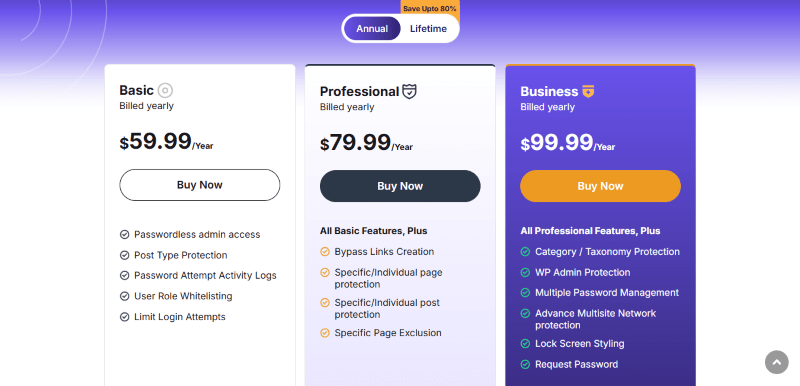
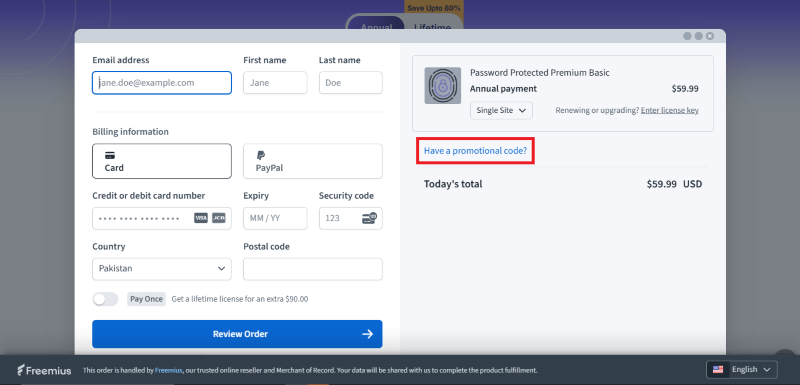
Step 2: On the Password Protected checkout page, click on “Have a coupon”
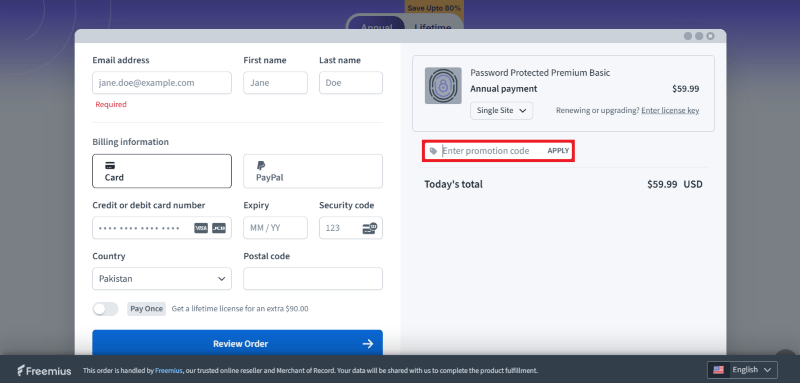
Step 3: Add the discount code in the field and click “Apply” to get the discount.
How To Install the Password Protected Plugin on WordPress?
Step 1: Visit the Password Protected website, choose the Pro or Free version, and download the plugin. You may receive the plugin as a zip file in your email or elsewhere.
Step 2: Log in to your WordPress dashboard
Step 3: Navigate to Plugins > Add New
Step 4: Click on Upload Plugin and select the Password Protected ZIP file you downloaded.
Step 5: Click Install Now.
Step 6: After installation, go to Plugins > Installed Plugins and activate Password Protected.
Step 7: Follow the prompts to configure Password Protected initial settings after activation. The plugin is now configured to be utilized.
For Whom Your Product Is Built For?
- WordPress website owners seeking enhanced security measures.
- Bloggers, business owners, and developers looking for easy-to-use security solutions.
- Administrators concerned about unauthorized access to sensitive site areas.
- Content creators aiming to restrict access to premium or sensitive content.
- Site managers interested in streamlining site management and reducing security risks.
Integrations or Addons
These are some Password Protected Addons:
- Compatibility with FunnelKit
- Compatibility with Square Terminal
- Compatibility With WooCommerce Pre-Orders Extension
- Compatibility with Cartflows
Password Protected Alternatives
Here are some alternatives to the Password Protected plugin.
- Passster plugin
- Password Strength Settings Plugin
- Frontend Reset Password Plugin
- Access Category Password Plugin
We’d love to hear your thoughts and opinions on Password Protected. Share your experiences and insights in the comments below.

You Might Also Like

Surfer Coupon – 2026

Rytr Coupon – 2026

Writesonic Coupon – 2026
From the WPdiscounts Blog
 A website can have a good design and still struggle if its content is weak. Product pages, blog posts, landing pages, emails, social posts, and…
September 8, 2026
- Running a marketplace on WordPress is different from running a standard online store. A regular WooCommerce setup is usually managed by one store owner, while…
September 4, 2026
- Introduction Artificial intelligence is no longer limited to chatbots or content generators. It is now being built directly into WordPress tools, website builders, coding platforms,…
August 26, 2026