The Complete Community Platform for WordPress
BuddyNext Coupon – 2026
BuddyNext is a WordPress community plugin that helps you build a social network directly on your website.
The Complete Community Platform for WordPress
BuddyNext Coupon – 2026
BuddyNext is a WordPress community plugin that helps you build a social network directly on your website.
Exclusive Discount
Only for WPdiscounts.io visitors.
Limited Time Offer
Claim this offer before it ends.
Table of Content
About
Founder: Varun Dubey
Website: buddynext.com

What is BuddyNext?
View BuddyNext Coupons, Discounts, Promo Codes, & Pricing Plans below.
BuddyNext is a WordPress community plugin that helps you build a social network directly on your website. It lets members create profiles, publish posts, react to content, send private messages, and join different community spaces. Think of it as a way to bring social networking features to your own website without sending your audience to another platform.
You can use BuddyNext to build a community around your brand, online courses, business, or shared interest. Members can join open, private, or secret spaces, participate in discussions, and interact with other users. Built-in moderation tools also help administrators review reports and manage member activity.
BuddyNext is self-hosted, so your community runs on your WordPress website, and your data remains in your own database. The free version covers the main community features, while BuddyNext Pro adds tools for paid memberships, AI-powered features, analytics, email broadcasts, and real-time updates. This makes it worth considering for creators, businesses, and website owners seeking greater control over their online communities.
Key Features of BuddyNext
Here are some key features of BuddyNext you should know:
- Community Spaces: Create open, private, and secret spaces for different topics, interest groups, or membership levels.
- Member Profiles and Directory: Give members personal profiles with custom fields, connections, and a searchable directory.
- Private Messaging: Allow members to communicate directly through private messages and receive notifications about community activity.
- Moderation Tools: Review reported content, manage moderation queues, and take action against members who break community rules.
- Gamification: Encourage participation with points, badges, levels, and leaderboards.
- Paid Memberships: BuddyNext Pro supports membership plans, Stripe checkout, paid community spaces, and restricted content. You can charge members for access to selected features.
- AI and Analytics: Use Pro tools for AI-assisted feed ranking, moderation, reply suggestions, member insights, and community growth reports.
- Developer Tools: Use its REST API, developer hooks, and Gutenberg blocks to extend the platform or add community elements to WordPress pages.
- Installable Web App: Let members add your community to their device’s home screen for an app-like experience. Pro also adds real-time delivery and web push notifications.
BuddyNext Coupons, Discounts, and Pricing Plan
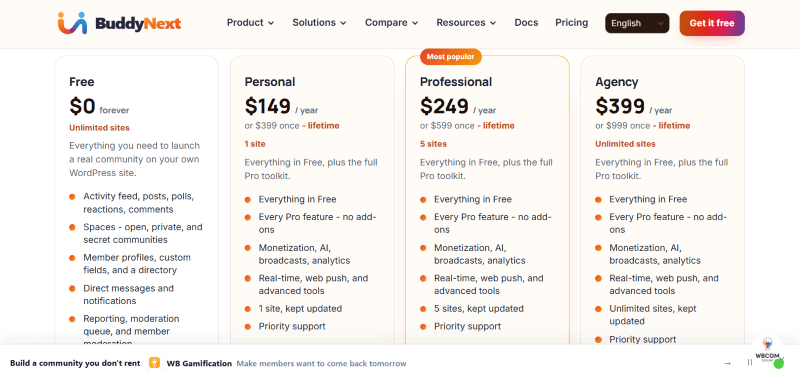
BuddyNext has a very straightforward pricing plan.
| Free | Personal | Professional | Agency |
| $0/forever | $149/year | $249/year | $399/year |
| Unlimited sites | 1 site | 5 sites | Unlimited sites |
| Everything you need to launch a real community on your own WordPress site. | Everything in Free, plus the full Pro toolkit. | Everything in Free, plus the full Pro toolkit. | Everything in Free, plus the full Pro toolkit. |
| Activity feed, posts, polls, reactions, comments | Everything in Free | Everything in Free | Everything in Free |
| Spaces – open, private, and secret communities | Every Pro feature – no add-ons | Every Pro feature – no add-ons | Every Pro feature – no add-ons |
| Member profiles, custom fields, and a directory | Monetization, AI, broadcasts, analytics | Monetization, AI, broadcasts, analytics | Monetization, AI, broadcasts, analytics |
| Direct messages and notifications | Real-time, web push, and advanced tools | Real-time, web push, and advanced tools | Real-time, web push, and advanced tools |
| Reporting, moderation queue, and member moderation | 1 site, kept updated | 5 sites, kept updated | Unlimited sites, kept updated |
| Gamification, leaderboard | Priority support | Priority support | Priority support |
BuddyNext Discounts
There is no discount available on the BuddyNext yearly pricing plan.
BuddyNext Lifetime Deals
There are three lifetime deals available for BuddyNext.
| Free | Personal | Professional | Agency |
| $0/forever | $399/Lifetime | $599/Lifetime | $999/Lifetime |
| Unlimited sites | 1 site | 5 sites | Unlimited sites |
| Everything you need to launch a real community on your own WordPress site. | Everything in Free, plus the full Pro toolkit. | Everything in Free, plus the full Pro toolkit. | Everything in Free, plus the full Pro toolkit. |
| Activity feed, posts, polls, reactions, comments | Everything in Free | Everything in Free | Everything in Free |
| Spaces – open, private, and secret communities | Every Pro feature – no add-ons | Every Pro feature – no add-ons | Every Pro feature – no add-ons |
| Member profiles, custom fields, and a directory | Monetization, AI, broadcasts, analytics | Monetization, AI, broadcasts, analytics | Monetization, AI, broadcasts, analytics |
| Direct messages and notifications | Real-time, web push, and advanced tools | Real-time, web push, and advanced tools | Real-time, web push, and advanced tools |
| Reporting, moderation queue, and member moderation | 1 site, kept updated | 5 sites, kept updated | Unlimited sites, kept updated |
| Gamification, leaderboard, | Priority support | Priority support | Priority support |
How To Avail The BuddyNext Coupon?
Step 1: Go to the pricing page and select the plan you want to buy.
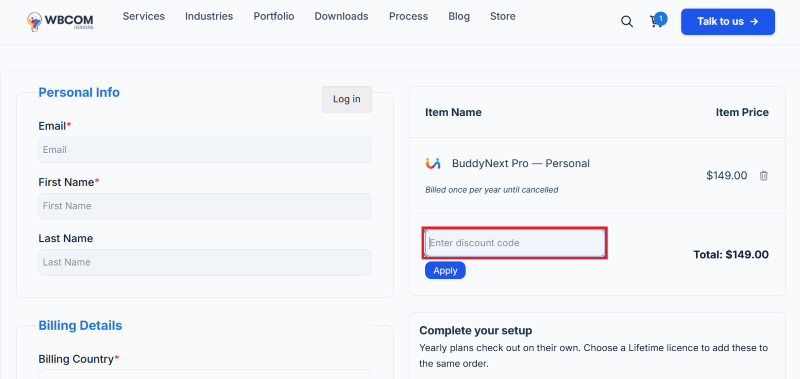
Step 2: On the BuddyNext checkout page, click on “Have a discount code”
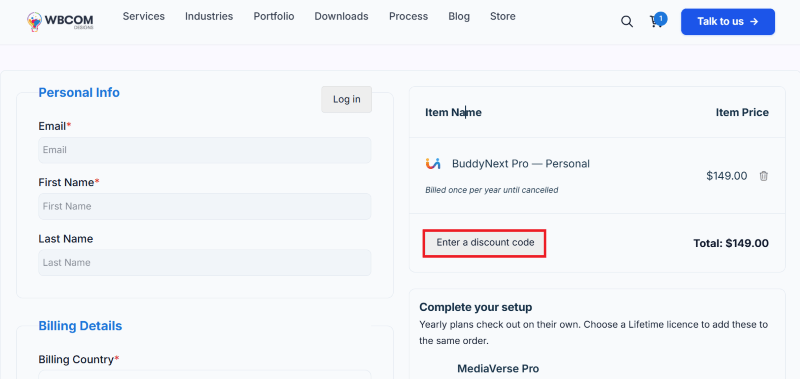
Step 3: Add the discount code in the field and click “Apply” to get the discount.
How To Install The BuddyNext Plugin on WordPress?
Step 1: Visit the BuddyNext website, choose the Pro or Free version, and download the plugin. You may receive the plugin as a zip file in your email or elsewhere.
Step 2: Log in to your WordPress dashboard
Step 3: Navigate to Plugins > Add New
Step 4: Click on Upload Plugin and select the BuddyNext ZIP file you downloaded.
Step 5: Click Install Now.
Step 6: After installation, go to Plugins > Installed Plugins and activate BuddyNext.
Step 7: Follow the prompts to configure BuddyNext’s initial settings after activation. The plugin is now configured to be utilized.
For Whom This Product Is Built For?
This product is built for:
- Business owners: Build a private space where customers can ask questions, share feedback, and connect with your brand.
- Course creators: Give students a place to discuss lessons and interact with other learners.
- Membership website owners: Offer paid access to selected spaces and content with BuddyNext Pro.
- Creators and influencers: Build a community around your content and keep your audience on your own website.
- Associations and alumni groups: Organize members into topic-based spaces and encourage discussions.
- Agencies and developers: Create community websites for clients, using a license that matches the number of sites you manage.
BuddyNext Alternatives
Here are some alternatives to the BuddyNext plugin.
- BuddyBoss: A commercial community platform for WordPress. Consider it if you want a mature ecosystem for building membership communities and online learning experiences.
- BuddyPress: A free, open-source WordPress plugin for creating social networks. It is worth considering if you want a community foundation and are comfortable adding extensions as your needs grow.
- PeepSo: A WordPress community plugin focused on member profiles, social feeds, and user interaction. It is another option for creating a social-network-style website.
- Circle: A hosted community platform for creators, businesses, and membership communities. It may suit users who prefer a separate service rather than running everything inside WordPress.
- Skool: A hosted community and learning platform aimed at creators, educators, and businesses that want to bring discussions and courses together.
We’d love to hear your thoughts and opinions on BuddyNext. Share your experiences and insights in the comments below.
BuddyNext
Get 20% OFF
You Might Also Like
{post_title: link}

{post_title: link}

{post_title: link}
From the WPdiscounts Blog
 Introduction Moving a WordPress website can look simple from the outside, but a working site includes more than pages and images. WordPress’s own documentation explains…
October 15, 2026
 WordPress is becoming easier for AI agents to work with. WordPress 6.9 introduced the Abilities API, which gives WordPress, themes, and plugins a standard way…
October 2, 2026
- WordPress gives website owners a large amount of control over how their sites look and work. According to WordPress.org, themes control the visual presentation of…
September 19, 2026