Build, Edit, Optimize and Manage WordPress with AI
GoBuildWP Coupon – 2026
GoBuildWP is a WordPress plugin that uses the MCP to let compatible AI applications read and work with your website’s content, settings, and supported plugins.
Build, Edit, Optimize and Manage WordPress with AI
GoBuildWP Coupon – 2026
GoBuildWP is a WordPress plugin that uses the MCP to let compatible AI applications read and work with your website’s content, settings, and supported plugins.
Exclusive Discount
Only for WPdiscounts.io visitors.
Limited Time Offer
Claim this offer before it ends.
Table of Content
About
Website: gobuildwp.com

What is GoBuildWP?
View GoBuildWP Coupons, Discounts, Promo Codes, & Pricing Plans below.
GoBuildWP is a WordPress plugin that connects your website with AI assistants. It uses the MCP to let compatible AI applications read and work with your website’s content, settings, and supported plugins.
Think of it as a connection between your WordPress dashboard and your favorite AI assistant. Instead of asking an AI tool how to edit a page and then making all the changes yourself, you can give it a task and let it work with your website’s available tools. For example, you can ask it to create a draft page, update a product description, or review your website’s SEO settings.
GoBuildWP also works with different WordPress page builders and plugins. Its Pro version adds integrations for tools such as Elementor, Bricks, Divi, WooCommerce, WPForms, and Yoast SEO. These integrations allow AI assistants to work with the actual data and structure of supported plugins instead of simply generating code or generic instructions.
Key Features of GoBuildWP
Here are some key features of GoBuildWP you should know:
- AI-Powered WordPress Management: Connect your WordPress website with ChatGPT, Claude, Codex, Cursor, and other supported AI clients to manage website tasks through conversations.
- Content and Page Editing: Create pages, update existing content, manage menus, and work with supported WordPress page structures.
- Page Builder Integrations: Connect with Elementor, Bricks, Divi, Oxygen, Breakdance, and other supported builders to make structured page edits.
- WooCommerce Management: Read products and manage supported store operations, including product variations, pricing, stock, orders, and coupons with the appropriate Pro features.
- SEO Automation: Update SEO titles, descriptions, schema, redirects, and other supported metadata. Pro also offers bulk SEO operations.
- Website Performance Optimization: Work with supported caching and speed plugins to inspect settings, make changes, clear caches, and check the results.
- Safety and Approval Controls: Set permissions, use read-only access, review changes, and require approval for supported write operations.
- AI Memory and Skills: Use persistent memory and plugin-aware guidance to help your AI assistant work with your website and repeat tasks more consistently.
GoBuildWP Coupons, Discounts, and Pricing Plan
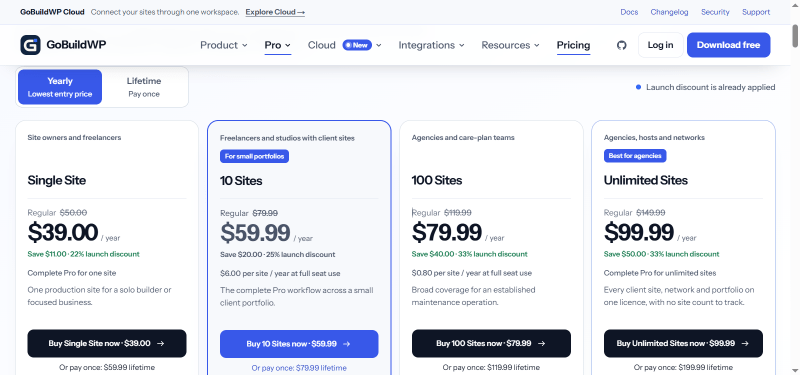
GoBuildWP has a very straightforward pricing plan.
| Single Site | 10 Sites | 100 Sites | Unlimited Sites |
| $39.00/year | $59.99/year | $79.99/year | $99.99/year |
| All 97 specialized integration families | All 97 specialized integration families | All 97 specialized integration families | All 97 specialized integration families |
| Plugin-aware skills and workflow guidance | Plugin-aware skills and workflow guidance | Plugin-aware skills and workflow guidance | Plugin-aware skills and workflow guidance |
| Persistent memory across conversations | Persistent memory across conversations | Persistent memory across conversations | Persistent memory across conversations |
| Human approval queue for agent writes | Human approval queue for agent writes | Human approval queue for agent writes | Human approval queue for agent writes |
| Approval email notifications | Approval email notifications | Approval email notifications | Approval email notifications |
GoBuildWP Discounts
There is up to a 33% discount available on the GoBuildWP pricing plan.
| Single Site | 10 Sites | 100 Sites | Unlimited Sites |
| $59.99/one-time | $79.99/one-time | $119.99/one-time | $199.99/one-time |
| All 97 specialized integration families | All 97 specialized integration families | All 97 specialized integration families | All 97 specialized integration families |
| Plugin-aware skills and workflow guidance | Plugin-aware skills and workflow guidance | Plugin-aware skills and workflow guidance | Plugin-aware skills and workflow guidance |
| Persistent memory across conversations | Persistent memory across conversations | Persistent memory across conversations | Persistent memory across conversations |
| Human approval queue for agent writes | Human approval queue for agent writes | Human approval queue for agent writes | Human approval queue for agent writes |
| Approval email notifications | Approval email notifications | Approval email notifications | Approval email notifications |
GoBuildWP Lifetime Deals
There are four lifetime deals available for GoBuildWP.
How To Avail The GoBuildWP Coupon?
Step 1: Go to the pricing page and select the plan you want to buy.
Step 2: On the GoBuildWP checkout page, click on “Have a discount code”
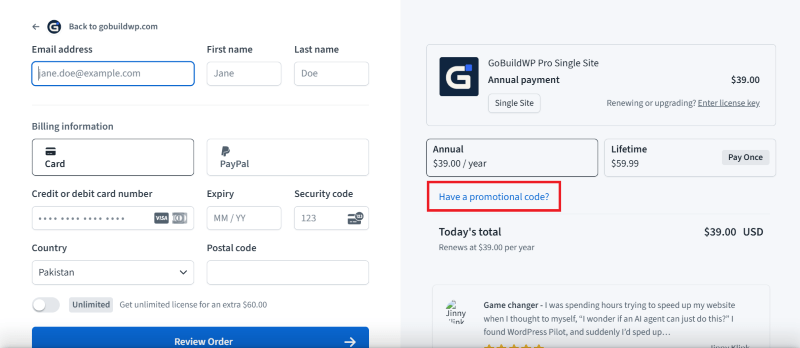
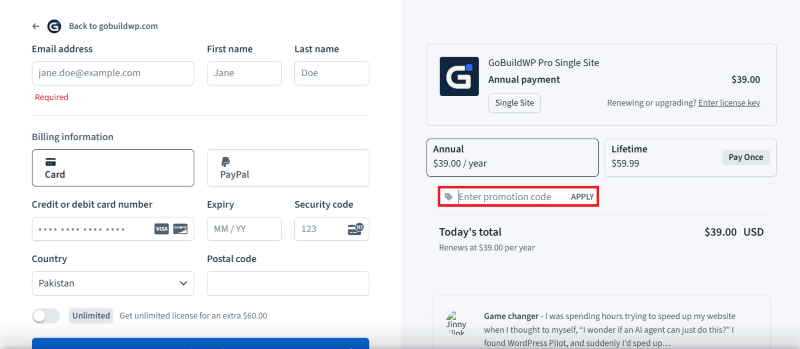
Step 3: Add the discount code in the field and click “Apply” to get the discount.
How To Install The GoBuildWP Plugin on WordPress?
Step 1: Visit the GoBuildWP website, choose the Pro or Free version, and download the plugin. You may receive the plugin as a zip file in your email or elsewhere.
Step 2: Log in to your WordPress dashboard
Step 3: Navigate to Plugins > Add New
Step 4: Click on Upload Plugin and select the GoBuildWP ZIP file you downloaded.
Step 5: Click Install Now.
Step 6: After installation, go to Plugins > Installed Plugins and activate GoBuildWP.
Step 7: Follow the prompts to configure GoBuildWP’s initial settings after activation. The plugin is now configured to be utilized.
For Whom This Product Is Built For?
This product is built for:
- WordPress Website Owners: Manage website content, update pages, and handle routine tasks through an AI assistant.
- Freelancers: Save time when working on client websites and managing multiple WordPress projects.
- Digital Agencies: Use its multi-site licensing, plugin integrations, and approval features to manage client websites.
- WooCommerce Store Owners: Work with product information, variations, stock, orders, and other supported store operations.
- SEO Professionals: Review and update website metadata, redirects, and other supported SEO settings.
- Web Designers and Developers: Work with page builders, themes, custom fields, and other supported WordPress tools.
- Website Maintenance Teams: Inspect caching settings, review backups, and perform supported maintenance tasks.
GoBuildWP Alternatives
Here are some alternatives to the GoBuildWP plugin.
- WPVibe: A WordPress MCP plugin that connects AI assistants with website content, settings, and supported functions.
- AI Engine: A WordPress AI plugin for creating chatbots, generating content, and connecting AI assistants through MCP.
- Easy MCP AI: An MCP plugin that lets AI assistants interact with WordPress content and supported website functions.
- Royal MCP: A WordPress MCP server that offers AI-powered website management with activity logging and undo support.
- miniOrange Secure MCP Server: A security-focused MCP plugin that connects AI applications with WordPress through controlled access.
- Respira: An AI-powered WordPress management platform for handling website content and supported page builders.
- WordPress MCP Adapter: An official WordPress tool that connects the Abilities API with MCP for building AI-powered workflows.
We’d love to hear your thoughts and opinions on GoBuildWP. Share your experiences and insights in the comments below.
GoBuildWP
You Might Also Like
{post_title: link}

{post_title: link}

{post_title: link}
From the WPdiscounts Blog
 Introduction Moving a WordPress website can look simple from the outside, but a working site includes more than pages and images. WordPress’s own documentation explains…
October 15, 2026
 WordPress is becoming easier for AI agents to work with. WordPress 6.9 introduced the Abilities API, which gives WordPress, themes, and plugins a standard way…
October 2, 2026
- WordPress gives website owners a large amount of control over how their sites look and work. According to WordPress.org, themes control the visual presentation of…
September 19, 2026