Supercharge WooCommerce with the all-New Modern Cart
Modern Cart Coupon – 2026
Modern Cart delivers a fast, intuitive shopping experience that makes adding items, updating quantities, and checking out a breeze.
Supercharge WooCommerce with the all-New Modern Cart
Modern Cart Coupon – 2026
Modern Cart delivers a fast, intuitive shopping experience that makes adding items, updating quantities, and checking out a breeze.
Exclusive Discount
Only for WPdiscounts.io visitors.
Limited Time Offer
Claim this offer before it ends.
Save 28% OFF on all plans on Modern Cart (Expired)
Table of Content
About
Founder: Sujay Pawar
Website: cartflows.com
Community: Community

What is Modern Cart?
View Modern Cart Coupons, Discounts, Promo Codes, & Pricing Plans below.
Modern Cart is a clever WordPress plugin that gives your online store a much-needed facelift. For a long time, the standard way people shopped on WooCommerce was a bit slow because customers had to go to a separate page just to see what they picked out. This plugin fixes that problem by adding a sleek “side cart” that slides out from the edge of the screen like a hidden drawer.
When you use this tool, your shoppers can see their items, change quantities, or even apply a coupon without ever leaving the page they are on. This keeps them focused on your products instead of getting lost in extra steps. It makes the whole shopping experience feel smooth and professional, which is exactly what people expect when they shop online today.
Since so many people buy things on their phones while they are on the go, having a cart that fits small screens is a huge advantage. It is very easy to set up and customize so that it matches the colors and style of your specific brand perfectly.
Modern Cart Usage Statistics
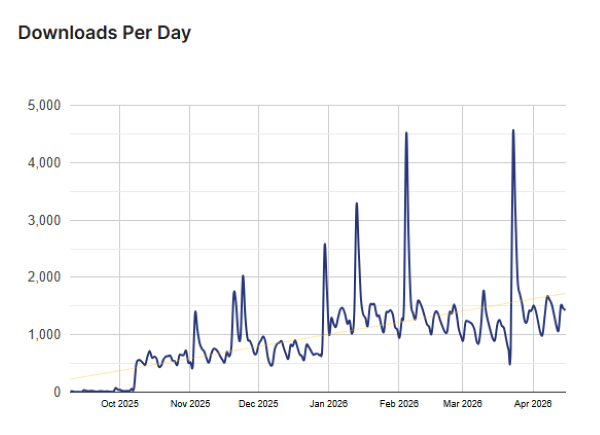
Key Features of Modern Cart
Here are some key features of Modern Cart you should know:
- Slide Out Cart Tray: A stylish panel that appears whenever a customer adds an item to their cart so they can see their progress instantly.
- Free Shipping Progress Bar: You can show customers exactly how much more they need to spend to get free shipping, which encourages them to buy more.
- In-Cart Product Recommendations: The plugin can suggest related items right inside the cart tray to help increase your average order value.
- Customizable Buttons and Icons: You have the power to change the colors, labels, and even the icon of the floating cart to fit your site design.
- Ajax Speed Technology: Every change happens instantly without the page needing to refresh, which makes your website feel much faster to the user.
Modern Cart Coupons, Discounts, and Pricing Plan
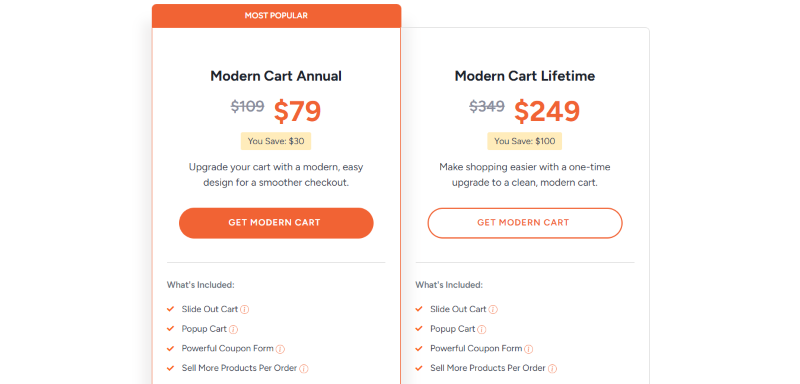
Modern Cart has a very straightforward pricing plan.
| Modern Cart Annual | Modern Cart Lifetime |
$79/yr |
$249/One Time |
| Slide Out Cart Popup Cart Powerful Coupon Form Sell More Products per Order Offer Upsells & Cross-sells Shop for Rewards Cart Customization Use on 10 Websites Regular Product Updates Premium Support Great Documentation 14-Days Refund Guarantee |
Slide Out Cart Popup Cart Powerful Coupon Form Sell More Products per Order Offer Upsells & Cross-sells Shop for Rewards Cart Customization Use on 30 Websites Regular Product Updates Premium Support Great Documentation 14-Days Refund Guarantee |
Modern Cart Discounts
There is a 28% discount available on the Modern Cart yearly pricing plan.
Modern Cart Lifetime Deals
There is one lifetime deal available for Modern Cart.
- Get Modern Cart Plus for
$349$249
How To Avail The Modern Cart Coupon?
Step 1: Go to the pricing page and select the plan you want to buy.
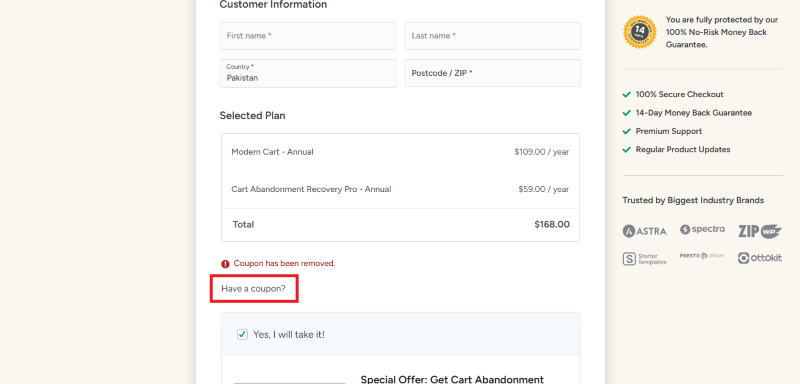
Step 2: On the Modern Cart checkout page, click on “Have a coupon?”
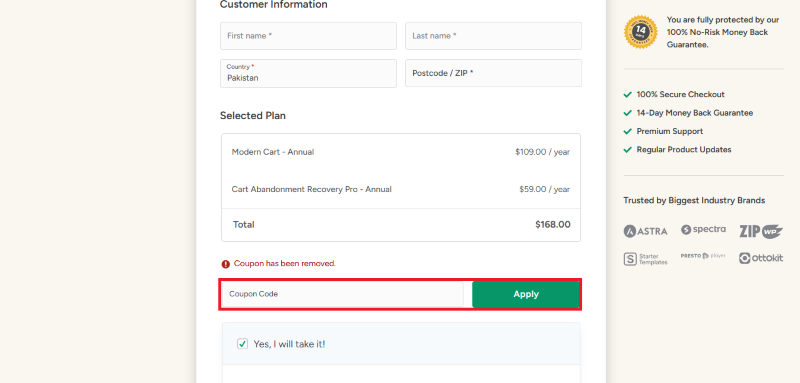
Step 3: Add the discount code in the field and click “Apply” to get the discount.
How To Install The Modern Cart Plugin on WordPress?
Step 1: Visit the Modern Cart website, choose the Pro or Free version, and download the plugin. You may receive the plugin as a zip file in your email or elsewhere.
Step 2: Log in to your WordPress dashboard
Step 3: Navigate to Plugins > Add New
Step 4: Click on Upload Plugin and select the Modern Cart ZIP file you downloaded.
Step 5: Click Install Now.
Step 6: After installation, go to Plugins > Installed Plugins and activate Modern Cart.
Step 7: Follow the prompts to configure Modern Cart’s initial settings after activation. The plugin is now configured to be utilized.
For Whom This Product Is Built For?
This product is built for:
- Small, Medium, and Enterprise Businesses
- E-commerce Store Owners
- Local Community Leaders
- Niche Bloggers
- Marketing Agencies
- Chambers of Commerce
- Event Organizers
Modern Cart Alternatives
Here are some alternatives to the Modern Cart plugin.
- Side Cart WooCommerce
- WooCommerce Fast Cart
- WPC Fly Cart
- Smart Cart for WooCommerce
| Product Name | Side Cart WooCommerce | WooCommerce Fast Cart | WPC Fly Cart |
| Number of Websites | 80,000+ | 200+ | 10,000+ |
What Modern Cart Customers Say
“Modern Cart is a great upgrade to Woocommerce. I previously used the WooLentor (WooShop) cart drawer and like Modern Cart much better. Feels like Shopify (my goal was to replicate a Shopify store feel). Good work – keep it up. Love the up sell options too and how it integrates with Cartflows and Astra.”
“This plugin works as expected, is easy to install, and the service they provide stands out among all the other wordpress plugins we have ever used for any purpose.”
Read more Modern Cart reviews on WordPress.org
We’d love to hear your thoughts and opinions on Modern Cart. Share your experiences and insights in the comments below.
Modern Cart
You Might Also Like

Surfer Coupon – 2026

Rytr Coupon – 2026

Writesonic Coupon – 2026
From the WPdiscounts Blog
 A website can have a good design and still struggle if its content is weak. Product pages, blog posts, landing pages, emails, social posts, and…
September 8, 2026
- Running a marketplace on WordPress is different from running a standard online store. A regular WooCommerce setup is usually managed by one store owner, while…
September 4, 2026
- Introduction Artificial intelligence is no longer limited to chatbots or content generators. It is now being built directly into WordPress tools, website builders, coding platforms,…
August 26, 2026