#1 Email Opt-In & Lead Generation Plugin
Convert Pro Coupon – 2026
Convert Pro is a specialized WordPress plugin designed to help website owners grow their email lists and boost sales through clever popups.
#1 Email Opt-In & Lead Generation Plugin
Convert Pro Coupon – 2026
Convert Pro is a specialized WordPress plugin designed to help website owners grow their email lists and boost sales through clever popups.
Exclusive Discount
Only for WPdiscounts.io visitors.
Limited Time Offer
Claim this offer before it ends.
Save up to 12% OFF on Convert Pro (Expired)
Table of Content
About
Founder: Sujay Pawar
Website: convertpro.net
Community: Community

What is Convert Pro?
View Convert Pro Coupons, Discounts, Promo Codes, & Pricing Plans below.
Convert Pro is a specialized WordPress plugin designed to help website owners grow their email lists and boost sales through clever pop-ups. It acts like a digital magnet for your site, catching the attention of visitors before they leave and turning them into loyal subscribers. Instead of annoying people with boring ads, it lets you create beautiful forms that actually look like they belong on your page.
What makes this tool special is how easy it is to use. You do not need to be a tech genius or a coder to make things look professional because it uses a simple drag-and-drop system. You can move elements around like you are playing with digital blocks, which gives you total freedom over how your lead magnets look.
The plugin is also built to be very lightweight, so it won’t slow down your website. This is a big deal because a fast site is better for both your visitors and your ranking on Google. It essentially takes care of all the heavy lifting in the background so you can focus on running your business and talking to your new fans.
Key Features of Convert Pro
Here are some key features of Convert Pro you should know:
- Drag and Drop Builder: You can design your own pop-ups from scratch without touching any code by just clicking and dragging elements.
- Exit Intent Technology: This smart feature tracks when a user is about to close their tab and shows them a special offer at that exact moment to keep them interested.
- Huge Template Library: If you are not a designer, you can pick from dozens of ready-to-use templates that are already optimized to get high conversion rates.
- Multi-Step Popups: You can create forms with several steps, like a quick quiz or a yes/no question, which makes users much more likely to finish the process.
- Advanced Targeting: You have the power to show specific messages to people based on where they came from or which page they are currently reading.
Convert Pro Coupons, Discounts, and Pricing Plan
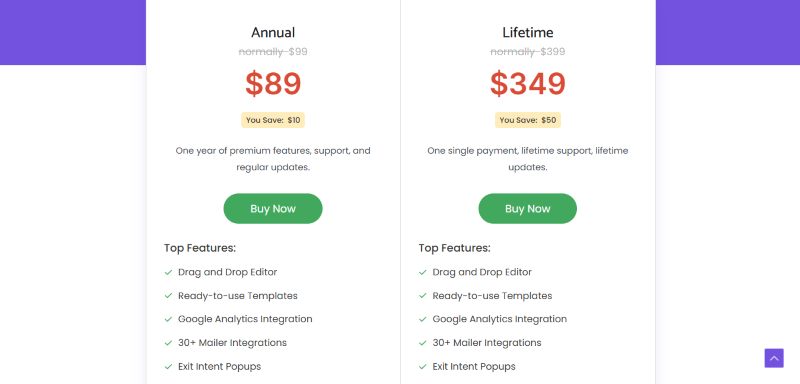
Convert Pro has a very straightforward pricing plan.
| Annual | Lifetime |
$89/yr |
$349/One Time |
| Drag and Drop Editor Ready-to-use Templates Google Analytics Integration 30+ Mailer Integrations Exit Intent Popups On-Click Popups Info-bar / Slide-in After Post / Inline CTA’s |
Drag and Drop Editor Ready-to-use Templates Google Analytics Integration 30+ Mailer Integrations Exit Intent Popups On-Click Popups Info-bar / Slide-in After Post / Inline CTA’s |
Convert Pro Discounts
There is up to 12% discount available on the Convert Pro yearly pricing plan.
Convert Pro Lifetime Deals
There is one lifetime deal available for Convert Pro.
- Get Convert Pro Plus for
$399$349
How To Avail The Convert Pro Coupon?
Step 1: Go to the pricing page and select the plan you want to buy.
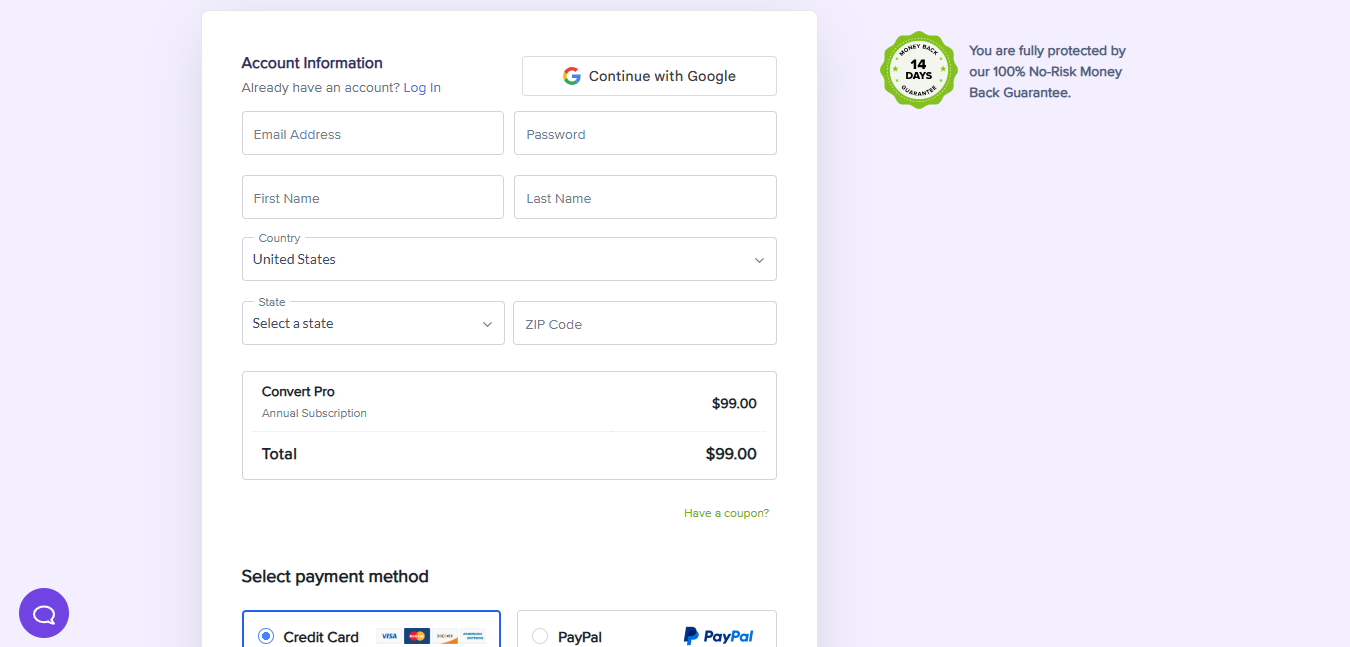
Step 2: On the Convert Pro checkout page, click on “Have a coupon?”
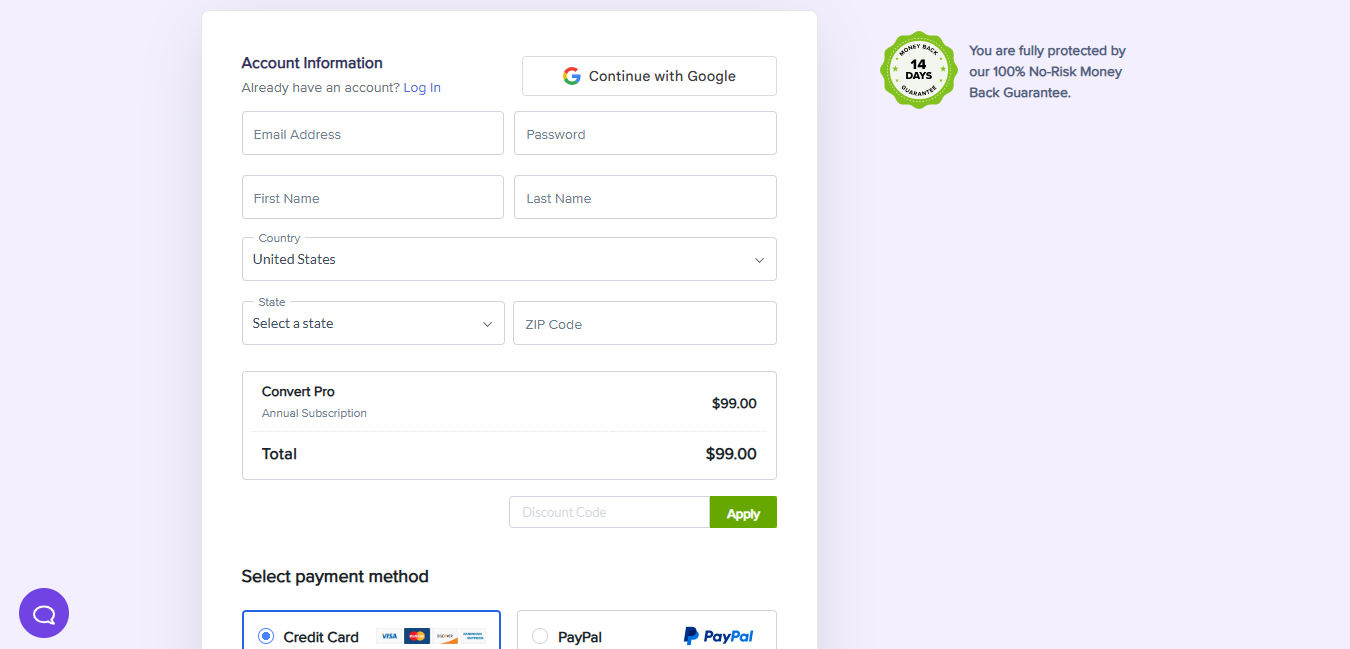
Step 3: Add the discount code in the field and click “Apply” to get the discount.
How To Install The Convert Pro Plugin on WordPress?
Step 1: Visit the Convert Pro website, choose the Pro or Free version, and download the plugin. You may receive the plugin as a zip file in your email or elsewhere.
Step 2: Log in to your WordPress dashboard
Step 3: Navigate to Plugins > Add New
Step 4: Click on Upload Plugin and select the Convert Pro ZIP file you downloaded.
Step 5: Click Install Now.
Step 6: After installation, go to Plugins > Installed Plugins and activate Convert Pro.
Step 7: Follow the prompts to configure Convert Pro’s initial settings after activation. The plugin is now configured to be utilized.
For Whom This Product Is Built For?
This product is built for:
- Small, Medium, and Enterprise Businesses
- E-commerce Store Owners
- Local Community Leaders
- Niche Bloggers
- Marketing Agencies
- Chambers of Commerce
- Event Organizers
Convert Pro Alternatives
Here are some alternatives to the Convert Pro plugin.
- OptinMonster
- Thrive Leads
- Bloom
- Poptin
We’d love to hear your thoughts and opinions on Convert Pro. Share your experiences and insights in the comments below.
Convert Pro
You Might Also Like

Surfer Coupon – 2026

Rytr Coupon – 2026

Writesonic Coupon – 2026
From the WPdiscounts Blog
 A website can have a good design and still struggle if its content is weak. Product pages, blog posts, landing pages, emails, social posts, and…
September 8, 2026
- Running a marketplace on WordPress is different from running a standard online store. A regular WooCommerce setup is usually managed by one store owner, while…
September 4, 2026
- Introduction Artificial intelligence is no longer limited to chatbots or content generators. It is now being built directly into WordPress tools, website builders, coding platforms,…
August 26, 2026