The most innovative WordPress Form Builder
IvyForms Coupon – 2026
IvyForms is a modern WordPress plugin designed to help website owners create beautiful and interactive forms.
The most innovative WordPress Form Builder
IvyForms Coupon – 2026
IvyForms is a modern WordPress plugin designed to help website owners create beautiful and interactive forms.
Exclusive Discount
Only for WPdiscounts.io visitors.
Limited Time Offer
Claim this offer before it ends.
Save up to 70% OFF on IvyForms (Expired)
Table of Content
About
Founder: Alexander Gilmanov
Website: ivyforms.com
Community: Community

What is IvyForms?
View IvyForms Coupons, Discounts, Promo Codes, & Pricing Plans below.
IvyForms is a modern WordPress plugin designed to help website owners create beautiful and interactive forms. Unlike old-fashioned forms that just sit there, these forms are built to engage your visitors. The plugin focuses on making the user experience smooth, which helps you collect more leads and feedback from your audience.
Setting up a form usually feels like a chore, but this tool changes that. It offers a visual builder that lets you see exactly what you are creating in real time. You do not need to know a single line of code to make something that looks like it was designed by a pro. It is all about simplicity and speed for busy business owners.
This product stands out because it blends style with power. Whether you need a simple contact form or a complex survey, IvyForms handles it with ease. It is lightweight, meaning it won’t slow down your website, which is a big win for your SEO and user happiness.
IvyForms Usage Statistics

Key Features of IvyForms
Here are some key features of IvyForms you should know:
- The drag-and-drop builder makes it easy to move elements around and design your form in minutes.
- Interactive fields allow you to ask questions in a way that feels like a conversation instead of a test.
- Mobile responsive designs ensure that your forms look perfect on iPhones, Androids, and tablets.
- Conditional logic lets you show or hide specific questions based on the answers your visitor provides.
- Pre-built templates give you a head start so you never have to start your design from a blank white page.
IvyForms Coupons, Discounts, and Pricing Plan
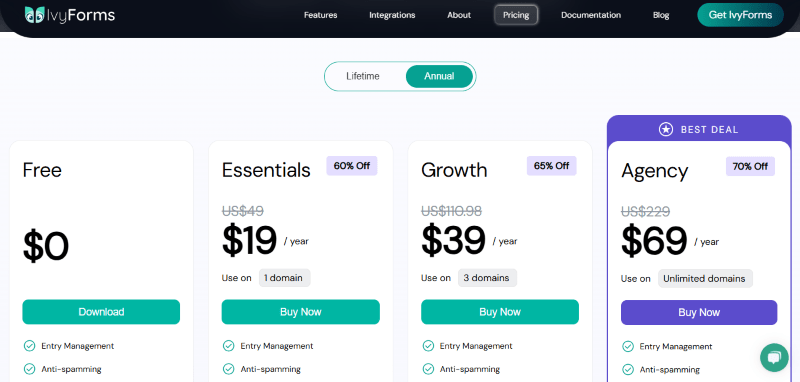
IvyForms has a very straightforward pricing plan.
| Free | Essentials | Growth | Agency |
| $0 | $19/yr |
$39/yr |
$69/yr |
| Entry Management Anti-spamming Multiple Notifications Confirmation Submission Message Standard Templates Drag & Drop wpDataTables Integration Standard Fields |
Entry Management Anti-spamming Multiple Notifications Confirmation Submission Message Standard Templates Drag & Drop wpDataTables Integration Standard Fields Password Field Digital Signature Mailchimp Conditional Logic Pro Templates |
Entry Management Anti-spamming Multiple Notifications Confirmation Submission Message Standard Templates Drag & Drop wpDataTables Integration Standard Fields Password Field Digital Signature Mailchimp Conditional Logic Pro Templates |
Entry Management Anti-spamming Multiple Notifications Confirmation Submission Message Standard Templates Drag & Drop wpDataTables Integration Standard Fields Password Field Digital Signature Mailchimp Conditional Logic Pro Templates |
IvyForms Discounts
There is up to a 70% discount available on the IvyForms pricing plan.
IvyForms Lifetime Deals
There is one lifetime deal available for IvyForms.
- Get unlimited domains for $249
$829
How To Avail The IvyForms Coupon?
Step 1: Go to the pricing page and select the plan you want to buy.
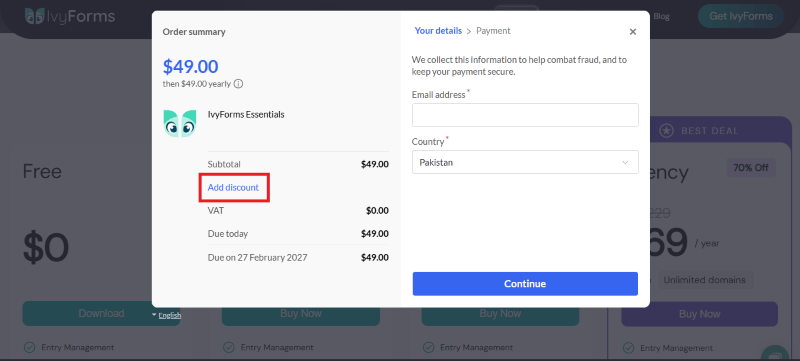
Step 2: On the IvyForms checkout page, click on “Have discount”
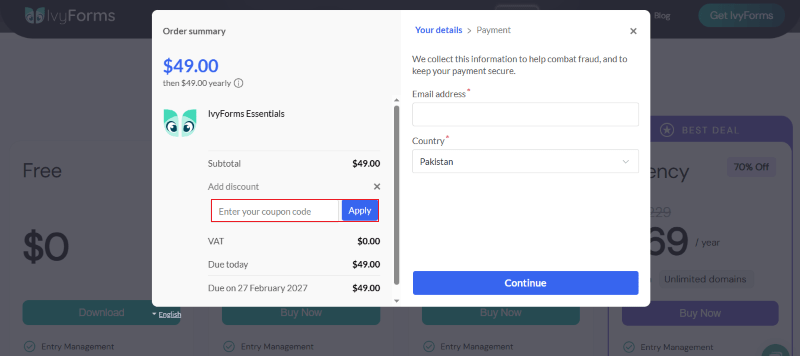
Step 3: Add the discount code in the field and click “Apply” to get the discount.
How To Install The IvyForms Plugin on WordPress?
Step 1: Visit the IvyForms website, choose the Pro or Free version, and download the plugin. You may receive the plugin as a zip file in your email or elsewhere.
Step 2: Log in to your WordPress dashboard
Step 3: Navigate to Plugins > Add New
Step 4: Click on Upload Plugin and select the IvyForms ZIP file you downloaded.
Step 5: Click Install Now.
Step 6: After installation, go to Plugins > Installed Plugins and activate IvyForms.
Step 7: Follow the prompts to configure IvyForms’s initial settings after activation. The plugin is now configured to be utilized.
For Whom This Product Is Built For?
This product is built for:
- Small, Medium, and Enterprise Businesses
- E-commerce Store Owners
- Government & Public Sector Organizations
- Educational Institutions (Schools, Colleges, Universities)
- Healthcare Providers
- Financial & Insurance Companies
- SaaS & Technology Companies
- Digital Agencies & Web Developers
- Non-Profit Organizations
- CMS, LMS, CRM & E-learning Platform Owners
IvyForms Alternatives
Here are some alternatives to the IvyForms plugin.
- Bit Form
- Fluent Forms
- WS Form
- Quill Forms
- Formidable Forms
- Ninja Forms
- WPForms
- MetForm
- SureForms
- Gravity Forms
| Product Name | Bit Form | Fluent Forms | WS Form |
| Number of Websites | 80,000+ | 10,000+ | 60,000+ |
What IvyForms Customers Say
“Liked it a lot, it is very limited yet, but as as a regular user of other plugins, I can only expect great results. It is already beautiful. I hope this can be connected with amelia, but being able to use it with datatables is already a great feature.”
“Promising concept and clean early execution. Still in beta, but knowing the team, I’m confident it will grow into a powerful and useful addition to the ecosystem.”
Read more IvyForms reviews on WordPress.org
We’d love to hear your thoughts and opinions on IvyForms. Share your experiences and insights in the comments below.
IvyForms
You Might Also Like

Surfer Coupon – 2026

Rytr Coupon – 2026

Writesonic Coupon – 2026
From the WPdiscounts Blog
 A website can have a good design and still struggle if its content is weak. Product pages, blog posts, landing pages, emails, social posts, and…
September 8, 2026
- Running a marketplace on WordPress is different from running a standard online store. A regular WooCommerce setup is usually managed by one store owner, while…
September 4, 2026
- Introduction Artificial intelligence is no longer limited to chatbots or content generators. It is now being built directly into WordPress tools, website builders, coding platforms,…
August 26, 2026