Build Custom Fields with ECM For Any WordPress Sites
Easy Content Manager Coupon – 2026
Easy Content Manager is a versatile WordPress plugin designed to simplify content management for website owners, bloggers, and agencies.
Build Custom Fields with ECM For Any WordPress Sites
Easy Content Manager Coupon – 2026
Easy Content Manager is a versatile WordPress plugin designed to simplify content management for website owners, bloggers, and agencies.
Exclusive Discount
Only for WPdiscounts.io visitors.
Limited Time Offer
Claim this offer before it ends.
Offer Expired - Check back soon!
Table of Content
About
Founder: Tushar Imran
Website: easycontentmanager.pro
Community: Community

What is Easy Content Manager?
View Easy Content Manager Coupons, Discounts, Promo Codes, & Pricing Plans below.
Easy Content Manager is a versatile WordPress plugin designed to simplify content management for website owners, bloggers, and agencies. It allows users to create, organize, and display content dynamically without any coding knowledge. With Easy Content Manager, you can manage posts, pages, custom post types, media, and other website content from a single intuitive dashboard.
The plugin provides a drag-and-drop interface, advanced filtering, and layout customization options to ensure your content is visually appealing and easy to navigate. Users can create dynamic content blocks, set conditional display rules, and schedule content publishing effortlessly. It also integrates seamlessly with popular page builders, eCommerce plugins, and membership systems, enabling powerful content-driven websites for any niche.
Easy Content Manager is lightweight, fast, and optimized for performance. It supports responsive designs, SEO-friendly layouts, and multilingual setups, making it suitable for global audiences. Extensive documentation, tutorials, and responsive support ensure users of all levels can get started quickly. Whether you are managing a blog, corporate site, online store, or portfolio, Easy Content Manager provides the tools to organize and display your content effectively.
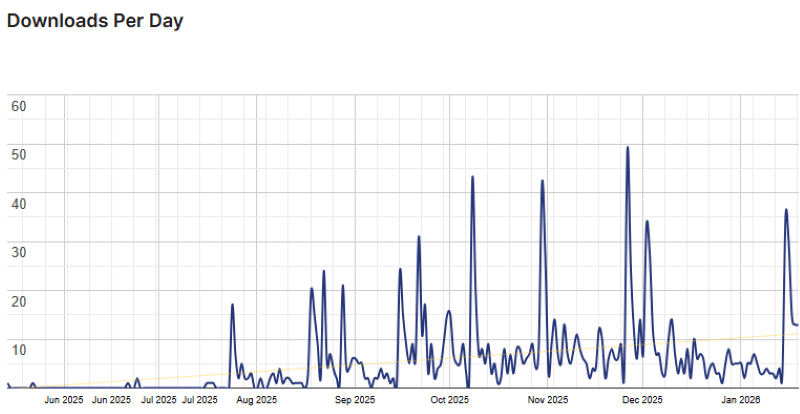
Easy Content Manager Usage Statistics
Key Features of Easy Content Manager
Here are some key features of Easy Content Manager you should know:
- Intuitive drag-and-drop content manager
- Create and manage posts, pages, and custom post types
- Dynamic content blocks with conditional display
- Advanced filtering and sorting options
- Content scheduling and automation
- Integrates with page builders and eCommerce plugins
- Multi-language and SEO-friendly support
- Fully responsive and mobile-friendly design
- Lightweight and performance-optimized
- Add-on based architecture for extended functionality
- Detailed documentation and tutorials
- Dedicated support for all users
Easy Content Manager Coupons, Discounts, and Pricing Plan
Easy Content Manager has a very straightforward pricing plan.
| Starter | Professional | Agency |
| $39/yr | $99/yr | $149/yr |
| 3 Sites Usage All features unlocked Yearly updates Priority support |
10 Sites Usage All features unlocked Yearly updates Priority support |
Unlimited Sites All features unlocked Yearly updates Priority support |
Easy Content Manager Discounts
There is no discount available on the Easy Content Manager pricing plan.
Easy Content Manager Lifetime Deals
There are three lifetime deals available for Easy Content Manager.
- Get 1 site for $59
- Get 10 sites for $129
- Get unlimited sites for $249
How To Avail The Easy Content Manager Coupon?
Step 1: Go to the pricing page and select the plan you want to buy.

Step 2: On the Easy Content Manager checkout page, click on “Have a promotional code”
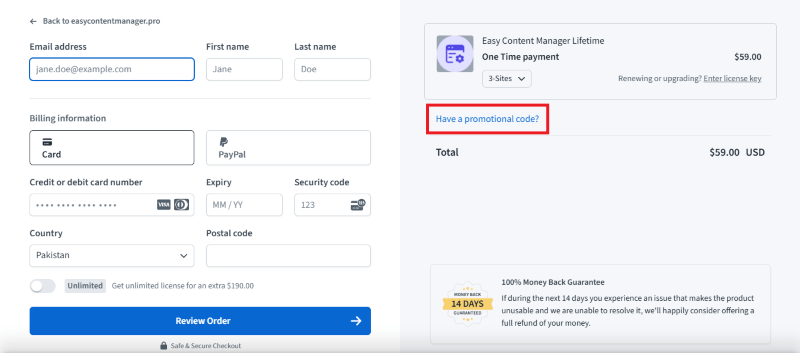
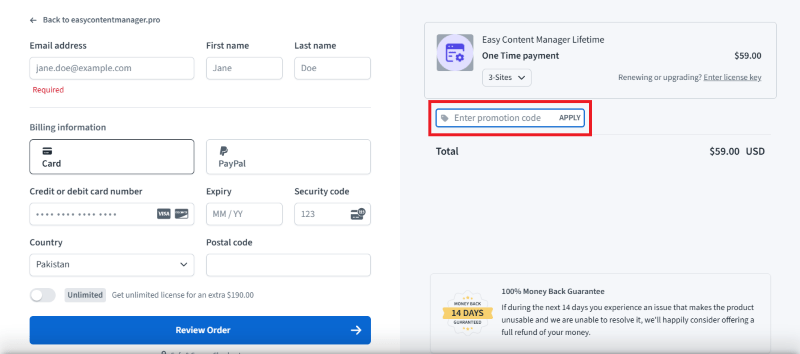
Step 3: Add the discount code in the field and click “Apply” to get the discount.
How To Install The Easy Content Manager Plugin on WordPress?
Step 1: Visit the Easy Content Manager website, choose the Pro or Free version, and download the plugin. You may receive the plugin as a zip file in your email or elsewhere.
Step 2: Log in to your WordPress dashboard
Step 3: Navigate to Plugins > Add New
Step 4: Click on Upload Plugin and select the Easy Content Manager ZIP file you downloaded.
Step 5: Click Install Now.
Step 6: After installation, go to Plugins > Installed Plugins and activate Easy Content Manager.
Step 7: Follow the prompts to configure Easy Content Manager’s initial settings after activation. The plugin is now configured to be utilized.
For Whom This Product Is Built For?
This product is built for:
- Website Owners
- Agencies
- Web Designers
- Small Businesses
- Developers
- Freelancer
- E-commerce
- Content Creators
- Marketing Professionals
Easy Content Manager Alternatives
Here are some alternatives to the Easy Content Manager plugin.
We’d love to hear your thoughts and opinions on Easy Content Manager. Share your experiences and insights in the comments below.
Easy Content Manager
You Might Also Like

Surfer Coupon – 2026

Rytr Coupon – 2026

Writesonic Coupon – 2026
From the WPdiscounts Blog
 A website can have a good design and still struggle if its content is weak. Product pages, blog posts, landing pages, emails, social posts, and…
September 8, 2026
- Running a marketplace on WordPress is different from running a standard online store. A regular WooCommerce setup is usually managed by one store owner, while…
September 4, 2026
- Introduction Artificial intelligence is no longer limited to chatbots or content generators. It is now being built directly into WordPress tools, website builders, coding platforms,…
August 26, 2026