Making Email Deliverability Easy for WordPress
WP Mail SMTP Coupon – 2026
WP Mail SMTP is a WordPress plugin designed to improve the reliability of emails sent by your website.
Best Alternate

WPDiscounts
Exclusive Discount
Only for WPdiscounts.io visitors.
Limited Time Offer
Claim this offer before it ends.
Save up to 50% OFF on WP Mail SMTP (Expired)
Alternatives of WP Mail SMTP

No Coupon Available

WPDiscounts
Table of Content
About
Founder: Syed Balkhi
Website: wpmailsmtp.com
Community: Community

What is WP Mail SMTP?
View WP Mail SMTP Coupons, Discounts, Promo Codes, & Pricing Plans below.
WP Mail SMTP is a WordPress plugin designed to improve the reliability of emails sent by your website. WordPress normally uses PHP mail to send messages, which can cause delivery problems depending on your hosting setup. WP Mail SMTP lets you connect your site to a dedicated mailer or SMTP service instead.
Once connected, your WordPress emails are sent through the mail service you choose. This can make a big difference for websites that depend on email notifications, especially stores, membership sites, lead-generation websites, and business websites where a missed email can mean a missed customer.
The plugin is not limited to one email provider. It supports services such as SendLayer, SMTP.com, Brevo, Google Workspace, Gmail, Mailgun, Mailjet, Postmark, SendGrid, SMTP2GO, SparkPost, Zoho Mail, Amazon SES, Microsoft 365, and others.
There is also a free version for basic SMTP needs, while the paid plans add tools for monitoring, reporting, routing, and managing email delivery. You do not need coding skills to use it, which makes it a practical choice for WordPress users who would rather fix their email problems than learn how mail servers work.
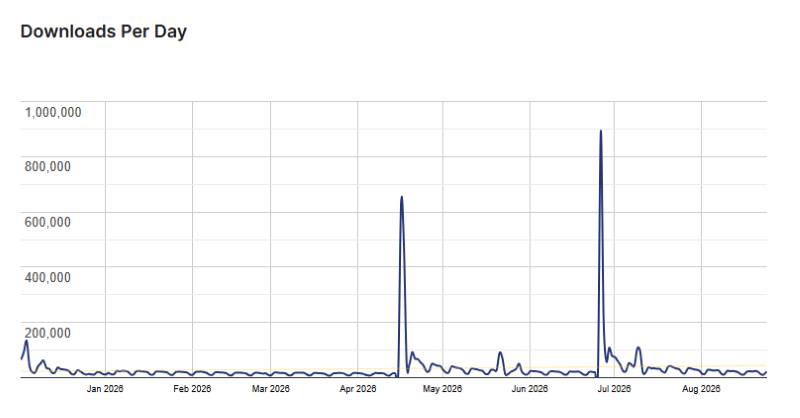
WP Mail SMTP Usage Statistics
Key Features of WP Mail SMTP
Here are some key features of WP Mail SMTP you should know:
- Improved Email Deliverability: Connect WordPress to a professional mailer instead of relying on the default PHP mail system.
- Email Logging: Keep records of emails sent from your website and check whether messages were successfully delivered.
- Email Reports: View useful delivery metrics, including sent and failed emails, so you can spot problems faster.
- Email Tracking: Track email activity and get a better idea of what happens after messages leave your website.
- Email Failure Alerts: Get notified when your website encounters an email sending problem.
- Backup Connections: Set up another mailer that can take over if your primary connection fails.
- Smart Email Routing: Send different types of WordPress emails through different connections based on your rules.
- Multiple Mailer Support: Choose from a large selection of popular email services and SMTP providers.
- White Glove Setup: Elite customers can have the WP Mail SMTP team install, configure, test, and verify the setup for them.
- WordPress Multisite Support: Manage WP Mail SMTP across a multisite network with network-wide or individual site settings.
WP Mail SMTP Coupons, Discounts, and Pricing Plan
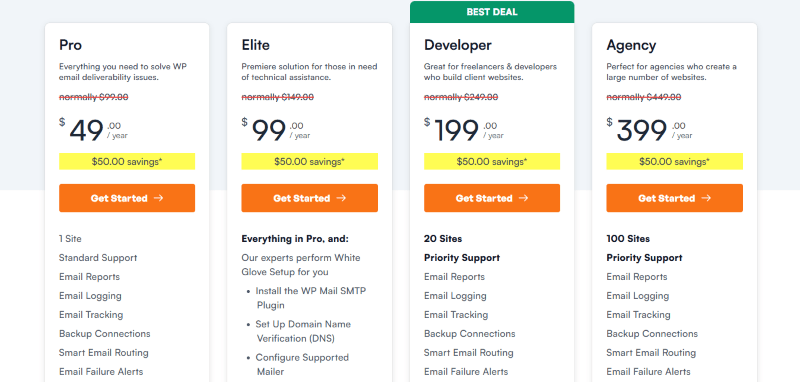
WP Mail SMTP has a very straightforward pricing plan.
| Pro | Elite | Developer | Agency |
$49/yr |
$99/yr |
$199/yr |
$399/yr |
| 1 Site | Everything in Pro, and: | 20 Sites | 100 Sites |
| Standard Support | Priority Support | Priority Support | Priority Support |
| All Other SMTP Services | All Other SMTP Services | All Other SMTP Services | All Other SMTP Services |
| 1 Year of Downloads, Support, and Updates | 1 Year of Downloads, Support, and Updates | 1 Year of Downloads, Support, and Updates | 1 Year of Downloads, Support, and Updates |
WP Mail SMTP Discounts
There is up to a 50% discount available on the WP Mail SMTP yearly pricing plan.
WP Mail SMTP Lifetime Deals
There are no lifetime deals available for WP Mail SMTP.
How To Avail The WP Mail SMTP Coupon?
Step 1: Go to the pricing page and select the plan you want to buy.
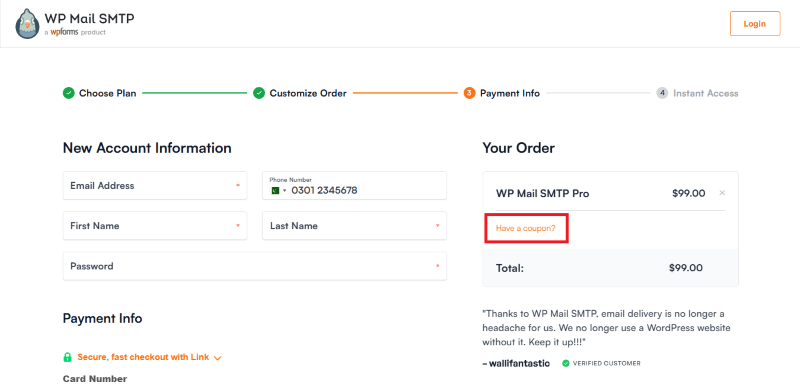
Step 2: On the WP Mail SMTP checkout page, click on “Have a discount code”
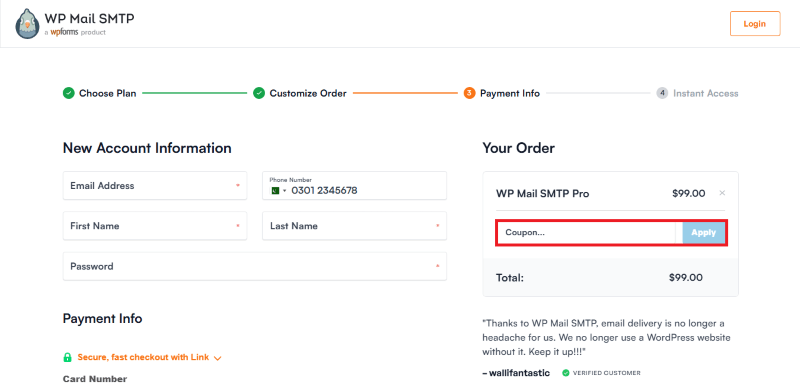
Step 3: Add the discount code in the field and click “Apply” to get the discount.
How To Install The WP Mail SMTP Plugin on WordPress?
Step 1: Visit the WP Mail SMTP website, choose the Pro or Free version, and download the plugin. You may receive the plugin as a zip file in your email or elsewhere.
Step 2: Log in to your WordPress dashboard
Step 3: Navigate to Plugins > Add New
Step 4: Click on Upload Plugin and select the WP Mail SMTP ZIP file you downloaded.
Step 5: Click Install Now.
Step 6: After installation, go to Plugins > Installed Plugins and activate WP Mail SMTP.
Step 7: Follow the prompts to configure WP Mail SMTP’s initial settings after activation. The plugin is now configured to be utilized.
For Whom This Product Is Built For?
This product is built for:
- Business Website Owners: Keep important contact forms, notifications, and customer emails moving reliably.
- WooCommerce Store Owners: Improve the delivery of order confirmations, receipts, account emails, and other store notifications.
- Bloggers and Content Creators: Make sure subscriber and website notification emails have a reliable sending method.
- Freelancers: Manage email delivery across client websites with the Developer plan and support for multiple sites.
- WordPress Agencies: The Agency plan supports up to 100 sites, making it more practical for larger client portfolios.
- Non-Technical WordPress Users: You do not need coding knowledge to configure the plugin, and detailed setup documentation is available for different mailers.
WP Mail SMTP Alternatives
Here are some alternatives to the WP Mail SMTP plugin.
- Post SMTP: Another established WordPress mail solution for sites looking for additional tools to improve email delivery and monitor outgoing messages.
- FluentSMTP: A free WordPress SMTP option that includes email logging, conditional routing, and secondary connections.
- Easy WP SMTP: A simpler alternative for WordPress users who mainly want to connect their website to an SMTP service without a large collection of advanced management tools.
| Product Name | Post SMTP | FluentSMTP | WP Mail SMTP |
| Number of Websites | 300,000+ | 600,000+ | 4+ million |
What WP Mail SMTP Customers Say
“Works great and really helps me make sure my website is compliant with my domain’s SPF, DKIM and DMARC setup to block hackers from Spoofing my domain, as well as improve deliverability of my own email.”
“A fundamental tool for managing transactional emails in WordPress. The configuration is straightforward, the interface is efficient, and the routing is perfectly stable in a production environment. I integrate it systematically to ensure deliverability. It does exactly what is required without unnecessary bloat. 5 stars for technical stability.”
Read more WP Mail SMTP reviews on WordPress.org
We’d love to hear your thoughts and opinions on WP Mail SMTP. Share your experiences and insights in the comments below.
WP Mail SMTP
You Might Also Like

{post_title: link}

{post_title: link}

{post_title: link}
From the WPdiscounts Blog
 Introduction Moving a WordPress website can look simple from the outside, but a working site includes more than pages and images. WordPress’s own documentation explains…
October 15, 2026
 WordPress is becoming easier for AI agents to work with. WordPress 6.9 introduced the Abilities API, which gives WordPress, themes, and plugins a standard way…
October 2, 2026
- WordPress gives website owners a large amount of control over how their sites look and work. According to WordPress.org, themes control the visual presentation of…
September 19, 2026