A Complete Service Platform
Tidio Coupon – 2026
Tidio is a customer service platform that blends live chat, an AI chatbot, and help desk tools into one dashboard.
A Complete Service Platform
Tidio Coupon – 2026
Tidio is a customer service platform that blends live chat, an AI chatbot, and help desk tools into one dashboard.
Exclusive Discount
Only for WPdiscounts.io visitors.
Limited Time Offer
Claim this offer before it ends.

What is Tidio?
View Tidio Coupons, Discounts, Promo Codes, and Pricing Plans below.
Tidio is a customer service platform that blends live chat, an AI chatbot, and help desk tools into one dashboard. If you run a WordPress site and want to talk to visitors in real time, answer common questions automatically, or turn browsers into buyers, Tidio gives you the tools to do all three without hiring extra staff. Over 300,000 businesses use it today, and a dedicated WordPress plugin connects your account to your site in just a few clicks.
At the center of Tidio sits Lyro, an AI agent that can resolve up to 67 percent of customer questions on its own. Lyro reads through your help articles, FAQs, and website pages, then answers visitor questions in a natural, human-sounding way, no scripting required. When a question gets too tricky, Lyro hands the conversation off to a real person so nobody gets stuck talking to a bot that cannot help.
What makes Tidio a favorite among WordPress site owners is how little setup it demands. You do not need to touch a single line of code. Install the plugin, connect your account, and the chat widget shows up on your site right away. Tidio also pulls messages from Facebook Messenger, Instagram, WhatsApp, and email into one inbox, so your team is not jumping between five different apps just to answer one customer.
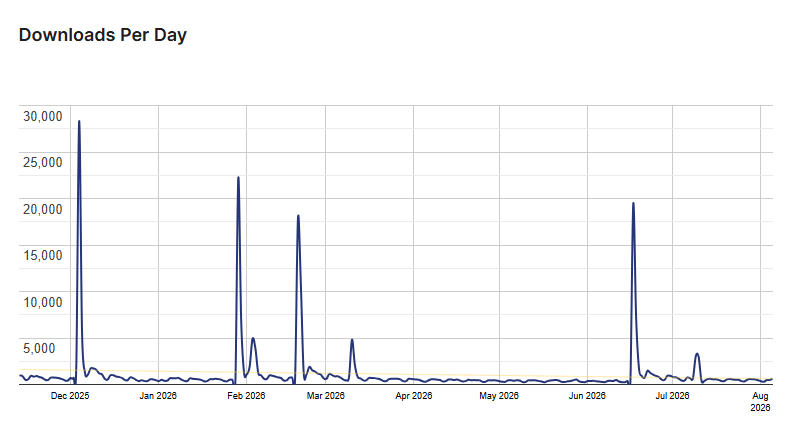
Tidio Usage Statistics
Key Features of Tidio
Here are some key features of Tidio you should know:
- Lyro AI Agent: Automatically answers up to 67 percent of customer questions using your own website content, no training or coding required.
- Live Chat Widget: Talk to visitors in real time, fully customizable to match your brand colors and voice.
- Unified Inbox: Manage live chat, email, Messenger, Instagram, and WhatsApp messages from a single screen.
- Help Desk and Ticketing: Turn conversations into tickets, assign them to the right agent, and track every issue until it gets solved.
- WooCommerce Integration: See a visitor’s cart and order history right inside the chat window, then recommend products or recover abandoned carts.
- Flows Automation: Build no-code chat sequences that collect leads, answer FAQs, or nudge visitors toward checkout, even while your team is offline.
- Chatbot Templates: Pick from dozens of prebuilt bots or design your own with the drag and drop builder.
- Multi-Language Widget: Serve visitors in English, French, German, Spanish, Italian, or Portuguese automatically.
- Mobile Apps: Reply to customers from your phone using the iOS or Android app, so you are never stuck at your desk.
Tidio Coupons, Discounts, and Pricing Plan
Tidio runs on usage-based pricing, so your monthly cost depends on how many conversations or website visitors you need. Tidio has a very straightforward pricing plan.
| Free | Starter | Growth | Plus | Premium |
| $0/mo | $29/mo or $24.17/mo billed yearly |
$59/mo or $49.17/mo billed yearly |
Starts at $300/mo+ usage | Contact for pricing |
| Live chat & ticketing 50 free Lyro AI chats 100 Flows visitors Basic analytics |
Everything in Free Live visitor list Operating hours 100 billable conversations |
Everything in Starter Advanced analytics Auto chat assignment 250+ billable conversations |
Everything in Growth Dedicated success manager Custom branding Departments |
Everything in Plus Guaranteed 50% Lyro resolution SSO access Mobile SDK |
Tidio Discounts
There is no discount available on the Tidio pricing plan.
Tidio Lifetime Deals
There are no lifetime deals available for Tidio.
How To Install the Tidio Plugin on WordPress
Step 1: Log in to your WordPress dashboard.
Step 2: Go to Plugins > Add New.
Step 3: Type Tidio into the search bar and hit enter.
Step 4: Click Install Now next to the Tidio Live Chat & AI Chatbots plugin.
Step 5: Once installed, click Activate.
Step 6: A new Tidio icon appears in your WordPress sidebar. Click it to create or connect your account.
Step 7: Follow the short setup wizard to customize your chat widget, and you are ready to start chatting.
For Whom This Product Is Built For?
This product is built for:
- Ecommerce Store Owners
- Small Business Owners
- Customer Support Teams
- SaaS Companies
- Marketing Agencies
- Bloggers and Content Creators
- Solopreneurs and Freelancers
Tidio Integrations
Tidio connects with more than 120 tools right out of the box, plus thousands more through Zapier. Some of the most popular integrations include:
- WordPress
- WooCommerce
- Shopify
- Facebook Messenger
- Zapier
- HubSpot
- Zendesk
- Salesforce
- Mailchimp
- Squarespace
Tidio Alternatives
Here are some alternatives to Tidio worth checking out:
- LiveChat
- Intercom
- Zendesk
- Tawk.to
- Gorgias
- Manychat
What Tidio Customers Say
“The developer was extremely responsive and quickly updated their plugin to ensure full compatibility with ours. Communication was smooth, the solution was implemented fast, and everything worked perfectly right away. This kind of cooperation makes working with third-party developers a real pleasure. Highly recommended!”
“I wanted a simple and well-designed live chat for my website. Managed to get 95% of what I wanted through Tidio and I am sure I can use it for much more if needed. The customer support on Pro was fast and effective, helped me resolve a billing issue at no time. Definitely coming back in the future.”
Read more Tidio reviews on WordPress.org
We’d love to hear your thoughts and opinions on Tidio. Share your experiences and insights in the comments below.
Tidio
You Might Also Like
Tidio Coupon – 2026

Hetzner Coupon – 2026

Oracle Cloud Coupon – 2026
From the WPdiscounts Blog
 Selecting the right Learning Management System (LMS) plugin for your WordPress site can be a game-changer. Whether you’re an educator, business owner, or entrepreneur, having…
July 28, 2026
- Many creators find themselves trapped between two difficult paths: paying expensive monthly fees to hosted platforms that eat into their profits, or patching together a…
June 19, 2026
- Did you know that the average website form abandonment rate is nearly 68 percent? That means for every 100 people who start filling out a…
June 11, 2026