
Did you know that the average website form abandonment rate is nearly 68 percent? That means for every 100 people who start filling out a form on your website, only about 32 of them actually finish it. This is a massive problem for website owners, course creators, and business owners who rely on forms to capture leads, process payments, or register new users.
This is where Fluent Forms comes into play. Developed by WPManageNinja, the same team behind popular tools like FluentCRM and FluentCommunity, this plugin is built specifically to address form abandonment and website performance.
In this review, we will look at how Fluent Forms works, explore its stand-out features, go through advanced tutorials, and compare its cost to other popular form builders to see if it is the right choice for your WordPress website.
The True Cost of Form Builders: Why Speed and Design Matter
If you run a website, you might think any form builder will do the job. After all, a form is just a collection of boxes for names and email addresses. However, using the wrong form builder can silently hurt your business in several ways.
The Realities of Using a Clunky Form Builder
When you use an older, poorly optimized form builder, you often pay a steep price in performance and conversions:
- Slower Page Loading Times: Many popular form plugins load heavy styles and scripts on every single page of your website, even on pages that do not have a form. This slows down your entire site, which hurts your Google search rankings.
- Higher Mobile Abandonment: More than half of all web traffic comes from mobile devices. If your form does not scale properly or has fields that are hard to tap on a smartphone, mobile users will leave immediately.
- Complex Setup Hurdles: Many form builders require you to install multiple add-ons just to perform basic tasks like styling a button, adding an upload files field, or connecting a payment gateway. This creates a messy backend and increases the risk of plugin conflicts.
The Benefits of Upgrading to a Modern Form Builder
Switching to a modern, lightweight form builder like Fluent Forms changes the experience entirely:
- Clean Code Structure: Fluent Forms is built to load only when and where it is needed. It uses minimal CSS and lightweight JavaScript, keeping your pages running fast.
- Conversational Layouts: You can turn long, intimidating forms into a one-question-at-a-time experience. This interactive style keeps users engaged and has been proven to increase form completion rates.
- Everything in One Package: Instead of managing ten different add-ons for payments, email marketing, and styling, you get a cohesive ecosystem where everything works together seamlessly.
What is Fluent Forms?
Get 20% OFF on Fluent Forms
WPdiscounts
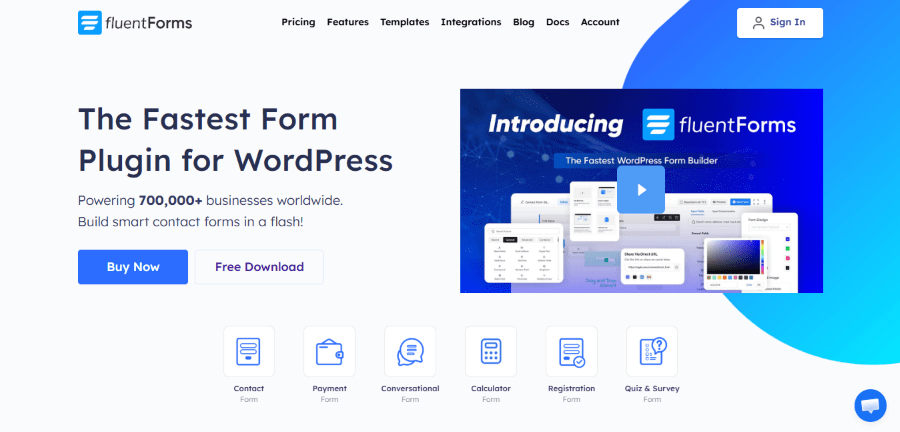
Fluent Forms is a drag-and-drop form builder plugin for WordPress designed for speed and simplicity. It allows you to build everything from a simple contact form to advanced calculators, customer surveys, and automated payment forms.
Unlike traditional builders that rely heavily on page reloads and slow backend queries, Fluent Forms uses modern web components to ensure that the interface is fast for both you and your website visitors. It is designed to sit directly inside your WordPress dashboard, giving you complete ownership of your data without requiring any monthly subscription fees.
Key Features of Fluent Forms
To understand why this tool is highly regarded in the WordPress community, we need to look closely at its core features. Here are the tools that make Fluent Forms a powerful asset for online businesses.
1. Drag-and-Drop Visual Builder
You do not need to know a single line of code to build a form. The drag-and-drop builder allows you to select from over 65 ready-to-use input fields in the pro version and 36+ fields in the free Fluent Forms version, pull them into the editor, and arrange them in columns. You can easily create multi-column layouts to save screen space and make your forms look highly professional.
2. Conversational Forms
Conversational forms present your questions one by one, similar to how Typeform operates. Instead of facing a long page of blank fields, users see a single question with large, easy-to-click buttons. They can navigate through the form using their keyboard. This format is highly effective for surveys, onboarding questionnaires, and customer feedback.
3. Native AI-Powered Form Builder
If you are short on time, you can use the built-in AI assistant to generate forms. By typing a simple prompt, such as “create a registration form for a local cooking class with dietary preference options,” the plugin will automatically select the correct fields, set up the labels, and build the form structure for you in seconds.
4. Direct Payment Integrations
For service providers and digital creators, accepting payments directly through a form is incredibly convenient. Fluent Forms integrates natively with major payment processors, including Stripe, PayPal, Mollie, and Razorpay. You can set up single payments, subscription renewals, or allow users to input a custom donation amount.
5. Smart Conditional Logic
Conditional logic allows your forms to adapt dynamically based on what the user types or selects. For example, if a user selects “Business Coaching” from a dropdown menu, the form can automatically display a new field asking for their company size. If they select “Personal Coaching,” that field remains hidden. This keeps your forms clean and relevant to each individual user.
6. Built-In PDF Generator
With the PDF generator feature, you can automatically turn form submissions into professional PDF documents. This is incredibly useful for sending booking confirmations, generating custom invoices, or delivering certificates to students after they complete a registration form.
How to Install and Set Up Fluent Forms (Free Version)
Here is a detailed, step-by-step tutorial to get your first form up and running in just a few minutes.
Step 1: Find the Plugin in WordPress
- Log in to your WordPress Admin Dashboard. Look at the left-hand sidebar and hover over the Plugins menu.
- Click on Add Plugin. In the search bar at the top right corner, type “Fluent Forms”. Look for the official plugin developed by WPManageNinja.
Step 2: Install and Activate
Click the blue Install Now button next to the plugin name. WordPress will automatically download and extract the files for you. Once the installation finishes, the button will change to say Activate. Click it to turn the plugin on. You will now see a new Fluent Forms menu item in your main sidebar.
Building a Multi-Step Conversational Booking Form with Price Calculations
In this tutorial, we will build a multi-step booking form for a consulting business. The form will ask the client to choose their service, calculate the total cost in real-time, and split the questions into separate steps to keep the form engaging.
Step 1: Create a New Form and Enable Multi-Step Layout
1. Log in to your WordPress Admin Dashboard.
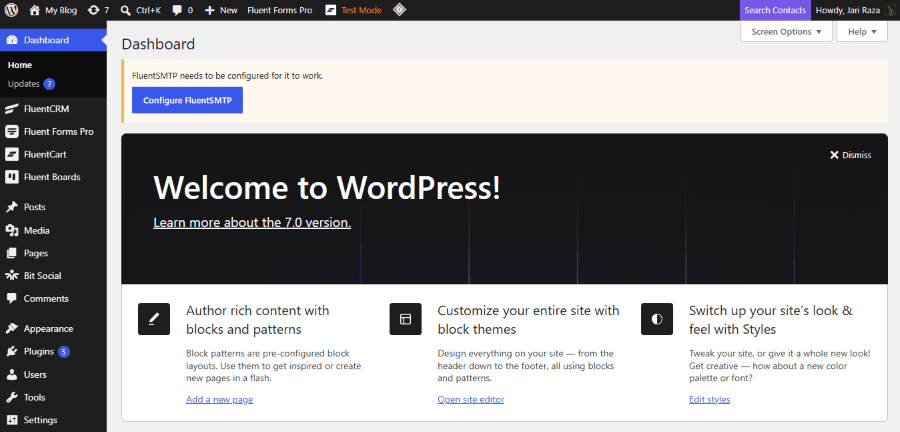
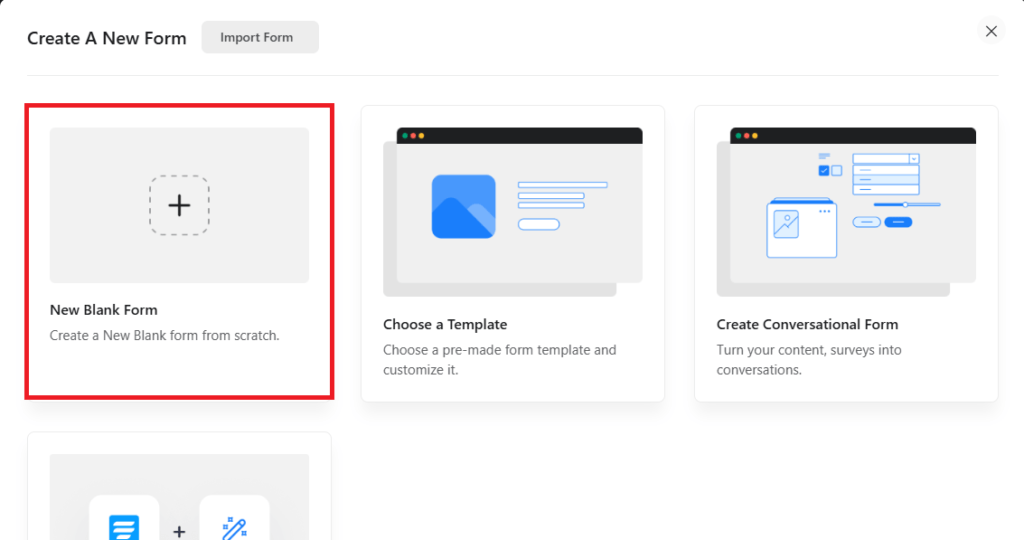
2. Hover over Fluent Forms in your sidebar and click New Form.
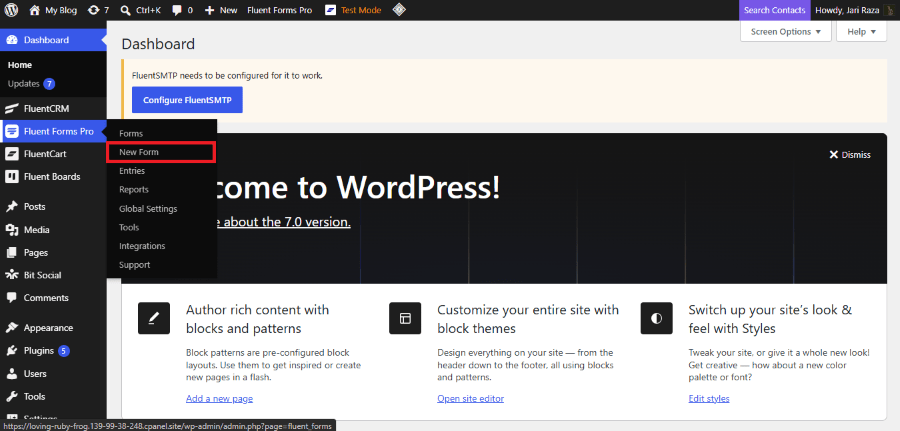
3. Select the Blank Form option to start with a clean canvas.
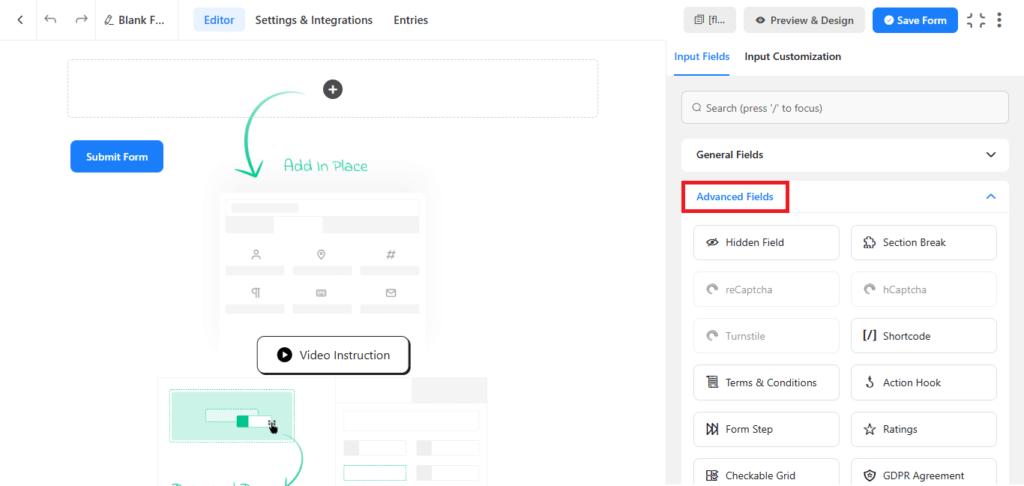
4. On the right-side panel, look for the Advanced Fields section.
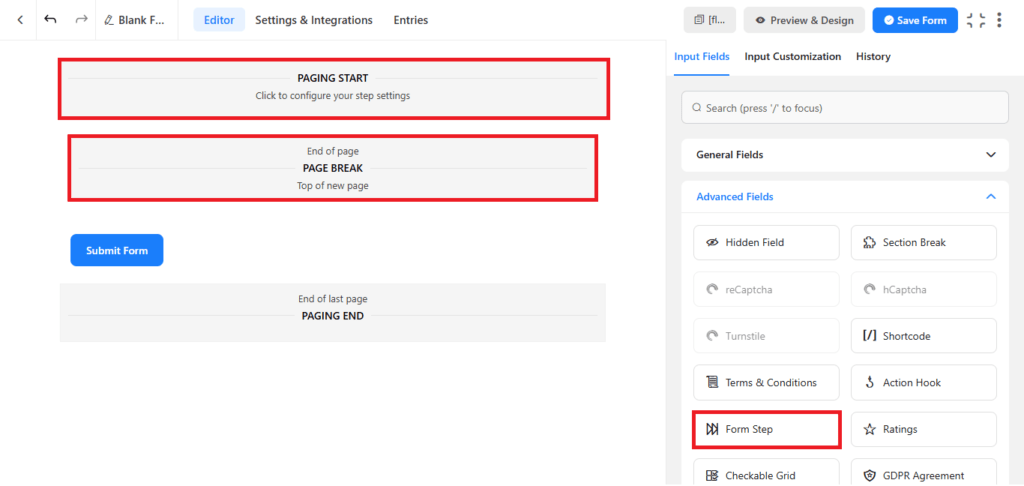
5. Drag the Form Step field into your editor. You will see two steps appear, labeled “Paging Start” and “Page Break.”
Step 2: Add Service Options with Payment Values
1. On the right-side panel, look for the General Fields section.
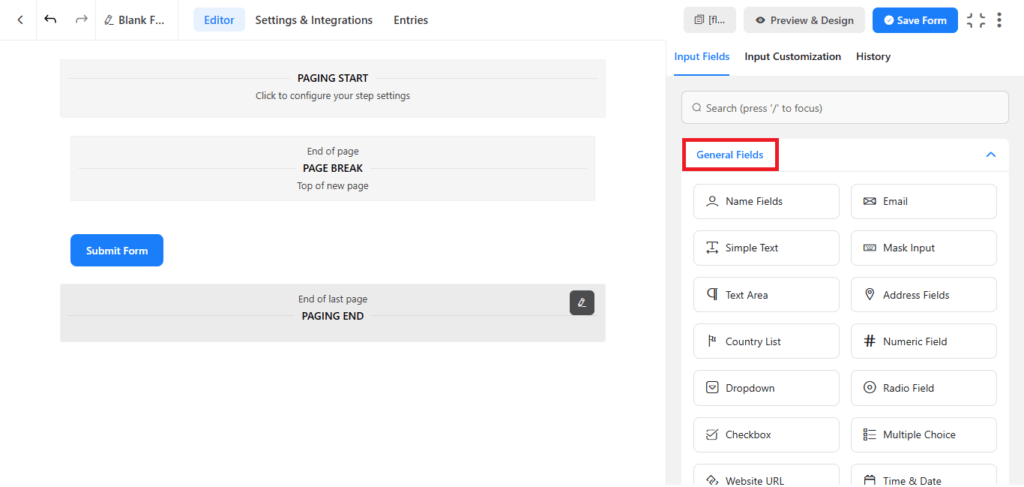
2. Drag a Radio Field into the first step of your form.
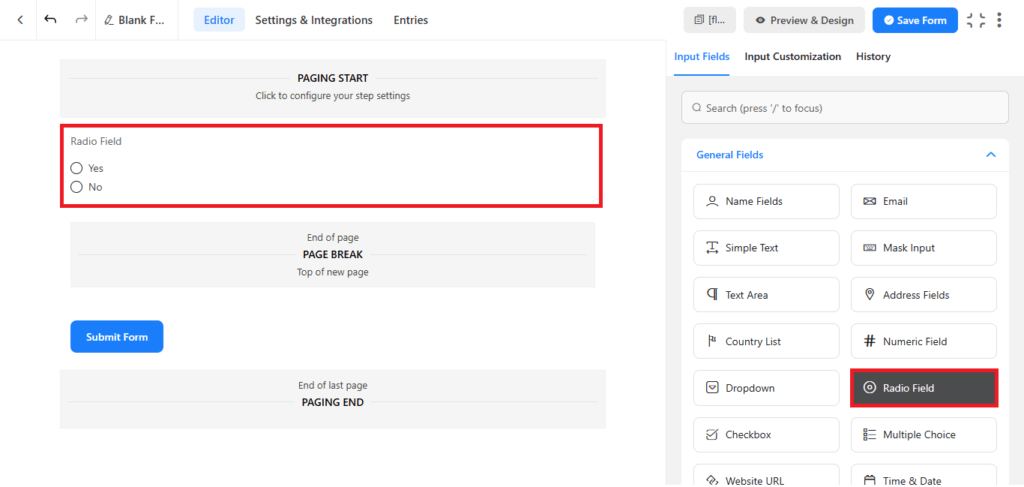
3. Click on the Radio Field to open its settings on the right.
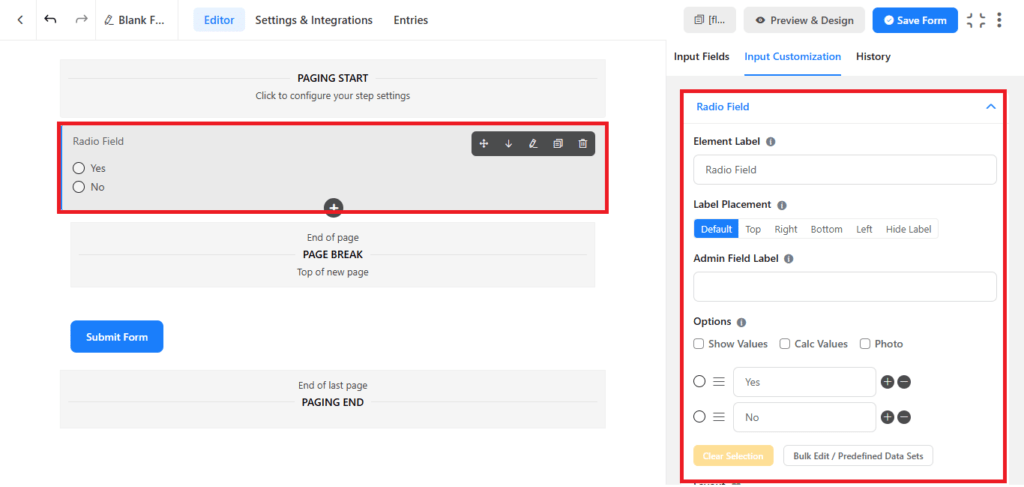
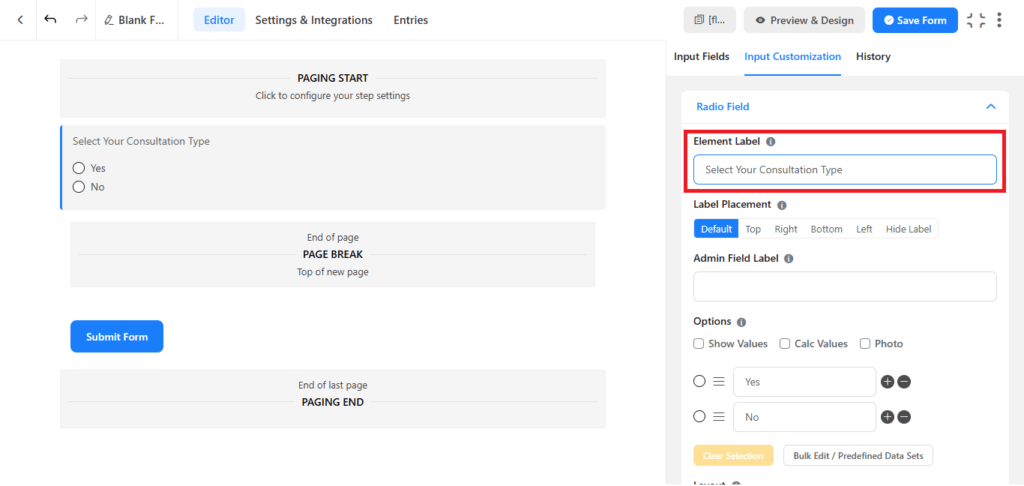
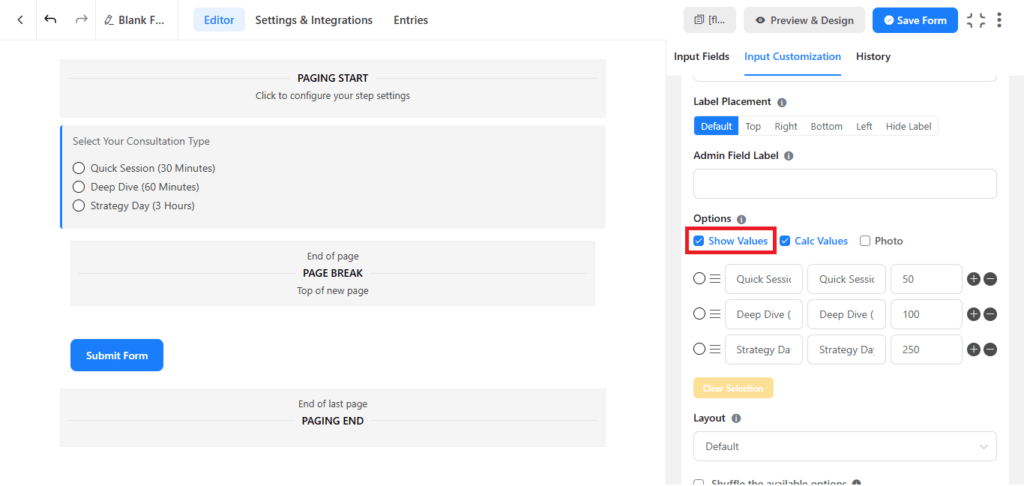
4. Change the Element Label to “Select Your Consultation Type.”
5. Scroll down to the options list. We will add three options and assign a specific price value to each:
- Option 1: Quick Session (30 Minutes) (Value: 50)
- Option 2: Deep Dive (60 Minutes) (Value: 100)
- Option 3: Strategy Day (3 Hours) (Value: 250)
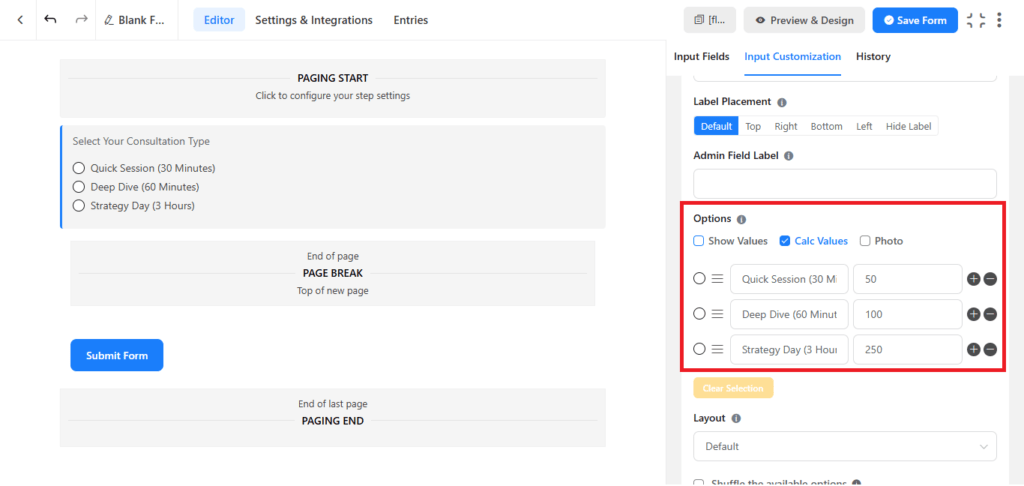
6. Check the box that says Show Values to ensure the numbers are stored correctly.
Step 3: Add the Real-Time Price Calculator
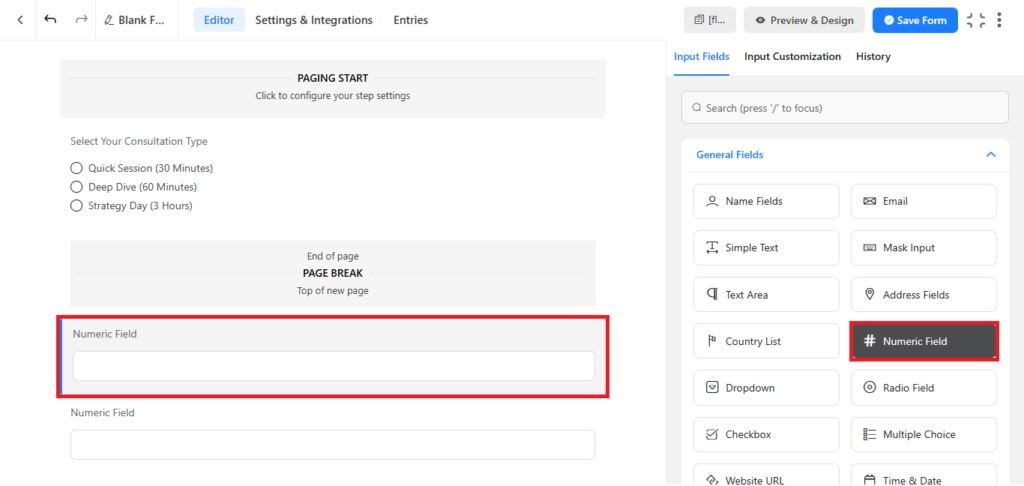
1. In the General Fields, drag a Numeric Calculation field into the second step of your form.
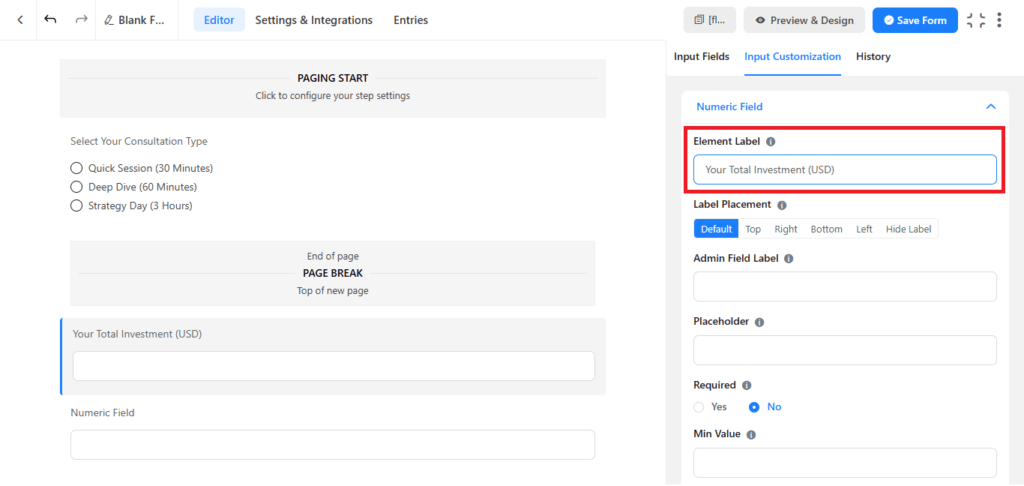
2. Click on the field to open its settings and change the label to “Your Total Investment (USD).”
3. In the settings panel, look for Advanced Options and check the box labeled Enable Calculation.
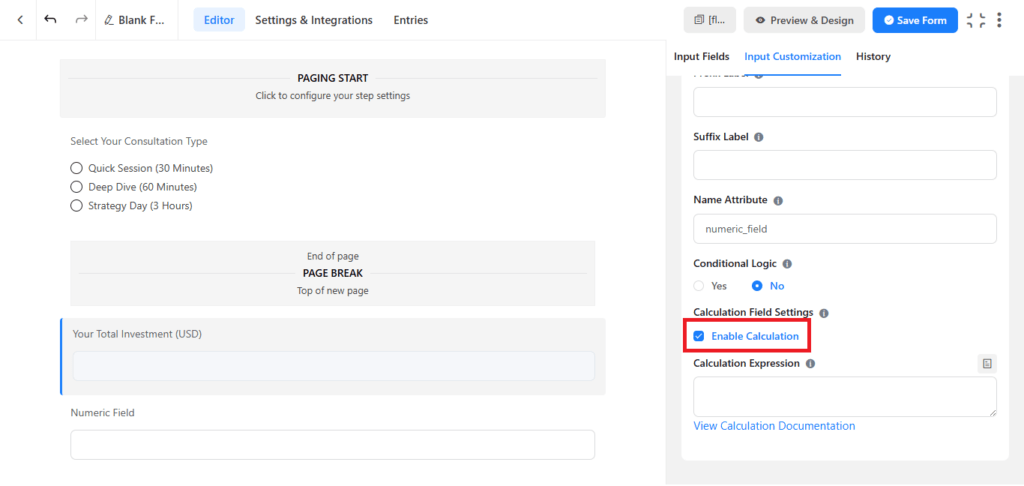
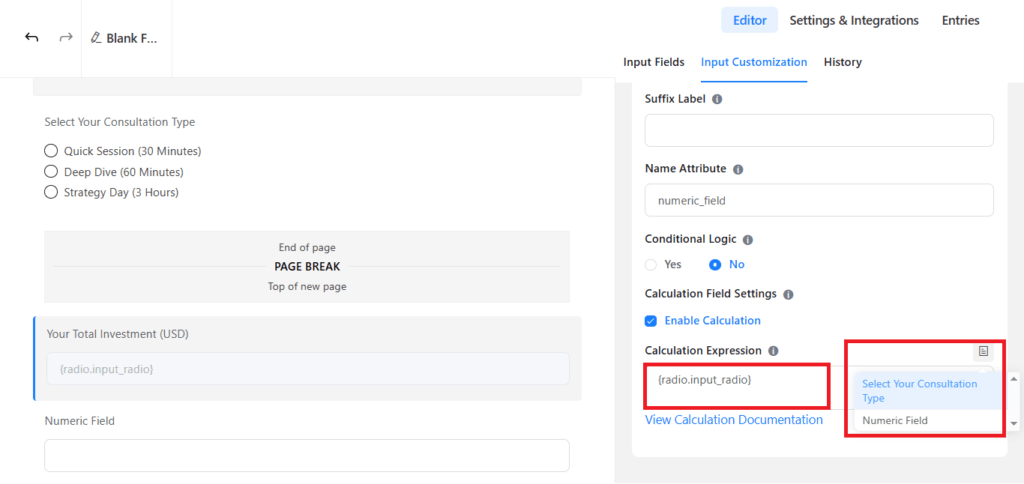
4. In the calculation formula box, click the input icon to select your consultation radio field. The formula will look similar to {inputs.radio_1}. This tells the form to display the exact price of the selected option in real-time.
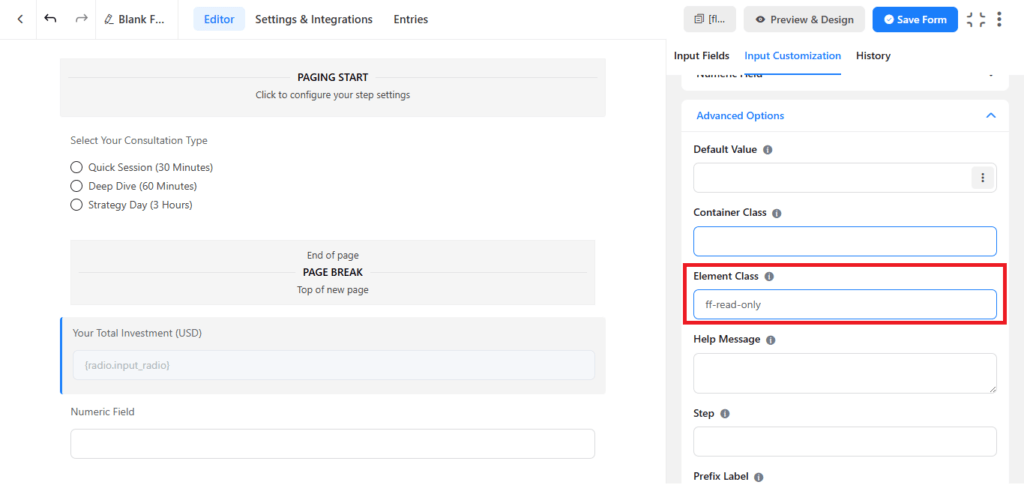
5. Scroll up until you find the input field labeled Element Class. Type in ff-read-only and click the blue Save Form button at the top right of your screen.
Step 4: Add Contact Fields and Publish
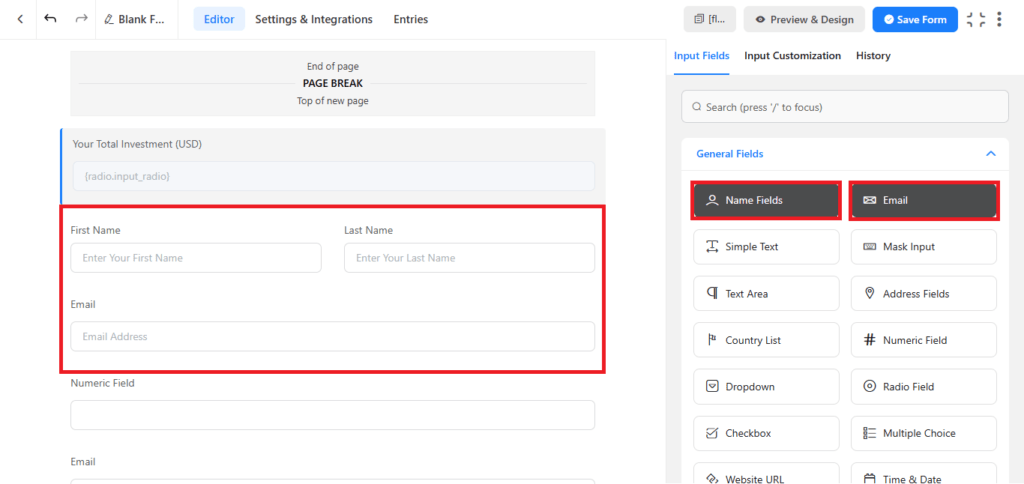
1. In the General Fields, drag the Name and Email Address fields into the second step, right below your calculation field. Click the Save Form button in the top right corner.
2. Copy the shortcode provided at the top of the editor, such as [fluentform id=”3″].
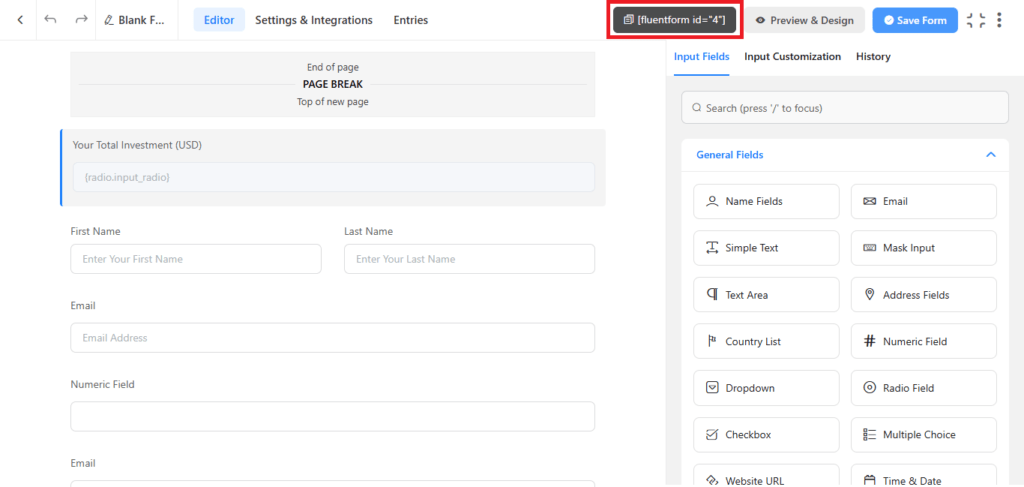
3. Paste this shortcode onto any page of your WordPress website to make your interactive booking calculator live.
Fluent Forms vs. The Competition
To make an educated buying decision, you need to understand how Fluent Forms compares to other major form builders in the WordPress space, specifically WPForms and Gravity Forms.
| Feature | Fluent Forms (Pro) | WPForms (Pro) | Gravity Forms (Pro) |
| Setup Process | Exceptionally Easy | Easy | Moderate |
| Builder Speed | Fast (VueJS Framework) | Average | Average |
| Conversational Forms | Included (Free & Pro) | Requires Pro Plan | Requires Elite Plan |
| AI Form Builder | Included | Not Included | Third-Party Only |
| PDF Generation | Natively Supported | Third-Party Only | Third-Party Only |
| Annual Price (1 Site) | $79/year for 1 site 20% on First Year | Annual Price for Unlimited Sites | $59/year for 1 site with standard support |
| Annual Price for Unlimted Sites | $299/year | $599/year | $259/year |
Why Fluent Forms Outperforms the Competition
- No Renewal Price Shock: Many form builders offer heavy discounts for your first year, only to double the price when your subscription renews. Fluent Forms maintains consistent, affordable pricing for renewals, which helps you plan your business expenses accurately.
- Fewer External Plugins Needed: Both WPForms and Gravity Forms require you to buy and manage separate third-party plugins if you want to generate PDFs or build conversational forms. Fluent Forms includes these features natively, keeping your site running faster and saving you money.
- Modern Interface: Built with VueJS, the Fluent Forms dashboard is snappy and responsive. You can make edits, adjust styling, and test conditional logic quickly without waiting for page refreshes.
Fluent Forms Pricing Plans

Pricing is where Fluent Forms truly sets itself apart. It offers flexible licensing options, including annual subscriptions and rare lifetime licenses, allowing you to choose the option that fits your budget best.
Get 20% OFF on Fluent Forms
WPdiscounts
Annual Pricing Plans
If you prefer a lower upfront cost, the annual plans are highly cost-effective and come with one year of priority support and plugin updates.
| License Type | Standard Annual Price | Included Domains | Key Features |
| Single Site | $79 | 1 Domain | All Pro features, 1 year of support & updates |
| Agency | $159 | 5 Domains | All Pro features, 1 year of support & updates |
| Unlimited | $299 | Unlimited Domains | All Pro features, 1 year of support & updates |
Lifetime Pricing Plans
For business owners looking to avoid recurring fees entirely, Fluent Forms offers lifetime plans. This means you pay once and get lifetime priority support and software updates.
| License Type | One-Time Lifetime Price | Included Domains | Support & Updates |
| Single Site | $349 | 1 Domain | Lifetime updates & priority support |
| Agency | $599 | 5 Domains | Lifetime updates & priority support |
| Unlimited | $899 | Unlimited Domains | Lifetime updates & priority support |
The Free Version: Surprisingly Capable
Unlike other plugins that severely limit what you can do for free, the free version of Fluent Forms is incredibly generous. It includes over 25 input fields, built-in spam protection, email notifications, multi-column layouts, and even basic conditional logic.
If you are a beginner with a tight budget, you can start with the free version and upgrade to Pro only when you need advanced features like payment collection, file uploads, or conversational layouts.
Pros and Cons
No product is perfect. To give you an honest overview, here is a balanced analysis of the strengths and weaknesses of Fluent Forms.
The Pros
- Superb Mobile Performance: The forms are fully responsive, meaning they adjust perfectly to any screen size, whether a tablet, smartphone, or laptop.
- Extensive Integration Library: It connects seamlessly with popular email marketing platforms like Mailchimp, ActiveCampaign, and FluentCRM, as well as thousands of other apps via Zapier.
- Built-in Spam Protection: It includes native integrations with Google reCAPTCHA, hCaptcha, and Cloudflare Turnstile, allowing you to stop spam bots without annoying your actual users.
- Interactive Styling Panel: You can change form colors, input margins, and button designs visually without needing to write custom CSS code.
The Cons
- Learning Curve for Advanced Logic: While building basic forms is straightforward, setting up highly complex calculations and deep multi-step conditional logic can take some practice for non-technical users.
- Fewer Niche Integrations: While all major payment and email services are covered, some highly specialized industry tools may require you to connect through Zapier rather than using a direct integration.
Who Should Buy Fluent Forms?
Based on our thorough analysis of the plugin, Fluent Forms is best suited for specific types of website owners looking to optimize their workflows.
The Course Creator or Educator
If you run online courses or membership sites, you can use Fluent Forms to handle student enrollment, collect feedback surveys, and automatically issue dynamic completion certificates via the PDF generator tool.
The Service-Based Small Business
Whether you are a consultant, virtual assistant, graphic designer, or photographer, you can use this plugin to build custom quote calculators. Clients can estimate their project costs on your site and pay their deposit immediately, automating your entire booking process.
The Digital Marketing Agency
For professionals managing multiple client websites, the Unlimited Lifetime license is incredibly valuable. It allows you to build high-converting forms on all your client projects without ever worrying about monthly bills or renewal price increases.
Final Thoughts
Fluent Forms is a breath of fresh air in the WordPress ecosystem. It challenges older form plugins by showing that a tool can be packed with advanced features while remaining incredibly lightweight and easy to use.
By avoiding complex setups, heavy scripts, and renewal price shocks, it respects both your website’s performance and your business budget. If you want to stop losing potential leads to slow, clunky forms and start building interactive, high-converting customer pathways, Fluent Forms is a tool you should absolutely consider.