The Next Generation Video Player for WordPress
FluentPlayer Coupon – 2026
FluentPlayer is a WordPress video player plugin that helps website owners embed, customize, and manage videos
The Next Generation Video Player for WordPress
FluentPlayer Coupon – 2026
FluentPlayer is a WordPress video player plugin that helps website owners embed, customize, and manage videos
Exclusive Discount
Only for WPdiscounts.io visitors.
Limited Time Offer
Claim this offer before it ends.
Offer Expired - Check back soon!
Table of Content
About
Founder: Shahjahan Jewel
Website: fluentplayer.com
Community: Community

What is FluentPlayer?
View FluentPlayer Coupons, Discounts, Promo Codes, & Pricing Plans below.
FluentPlayer is a WordPress video player plugin that helps website owners embed, customize, and manage videos without relying on the default YouTube or Vimeo player. It supports videos hosted on WordPress, YouTube, Vimeo, and several third-party video hosting platforms. You can use it to create a professional video-watching experience that matches your website’s branding.
But FluentPlayer does more than display videos. It gives you control over how visitors interact with your content. You can add video chapters, subtitles, custom player designs, playback controls, and interactive elements. It also lets you place email capture forms, promotional messages, and call-to-action buttons directly inside videos.
FluentPlayer offers both free and Pro versions. The free version covers basic video playback, player customization, chapters, and several useful tools. The Pro version unlocks advanced features such as playlists, additional video hosting integrations, detailed analytics, and more interactive elements. This gives beginners a way to try the plugin before investing in the premium version.
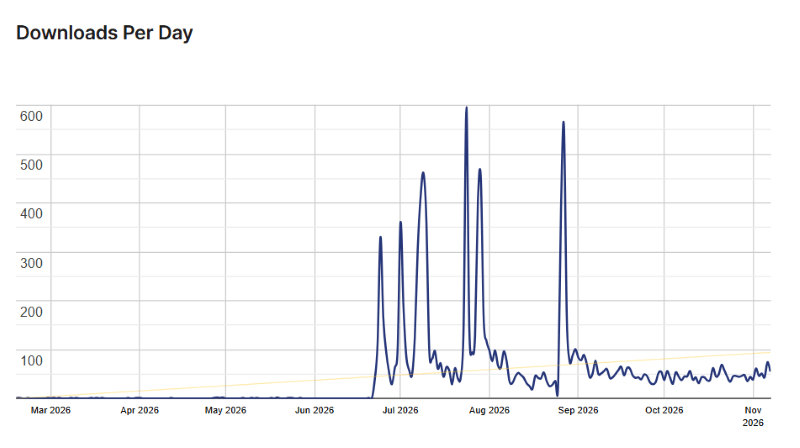
FluentPlayer Usage Statistics
Key Features of FluentPlayer
Here are some key features of FluentPlayer you should know:
- Multiple Video Sources: Play videos from WordPress uploads, YouTube, Vimeo, and supported third-party hosting services.
- Video Playlists: Organize multiple videos into playlists with different layouts, autoplay, and playback controls. Available in Pro.
- Video Chapters: Divide longer videos into chapters so visitors can jump directly to the sections they want to watch.
- Custom Player Branding: Customize the player with your own logo, brand colors, and reusable player presets.
- Interactive Video Layers: Add email capture forms, CTA buttons, promotional messages, clickable hotspots, and other elements over videos.
- Video Analytics: Track video plays, watch time, viewer engagement, and audience drop-offs with the built-in analytics dashboard. Available in Pro.
- Subtitles and Captions: Add captions and multiple language tracks to make your videos easier to understand.
- Playback Controls: Enable autoplay, playback speed adjustments, picture-in-picture, and resume playback.
- Conditional Display Rules: Show different video overlays based on selected conditions instead of displaying the same message to every visitor.
- Presto Player Migration: Move your media, player branding, presets, and supported analytics data from Presto Player.
FluentPlayer Coupons, Discounts, and Pricing Plan
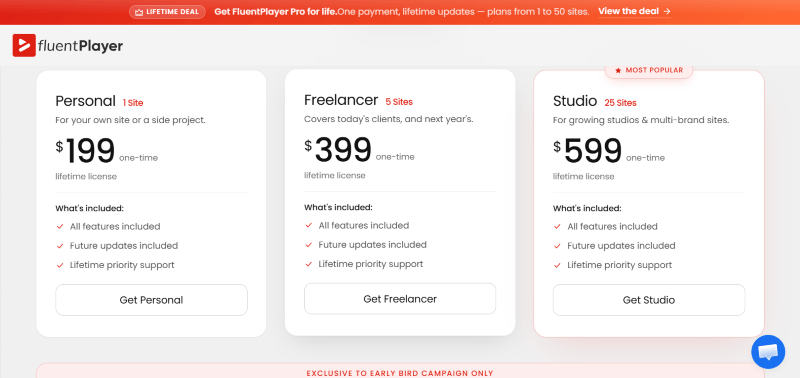
FluentPlayer has a very straightforward pricing plan.
| Plan | Website Limit | Price |
| Personal | 1 Website | $199 |
| Freelancer | 5 Websites | $399 |
| Studio | 25 Websites | $599 |
| Agency | 50 Websites | $799 |
FluentPlayer Discounts
There is no discount available on the FluentPlayer yearly pricing plan.
FluentPlayer Lifetime Deals
There are four lifetime deals available for FluentPlayer that are mention above in the pricing plan.
How To Avail The FluentPlayer Coupon?
Step 1: Go to the pricing page and select the plan you want to buy.
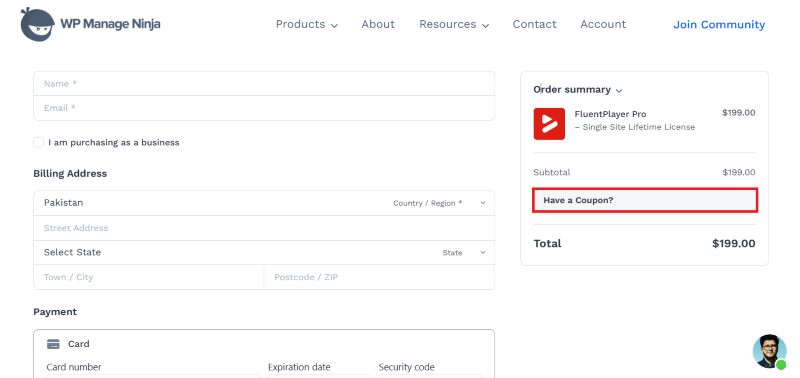
Step 2: On the FluentPlayer checkout page, click on “Have a discount code”
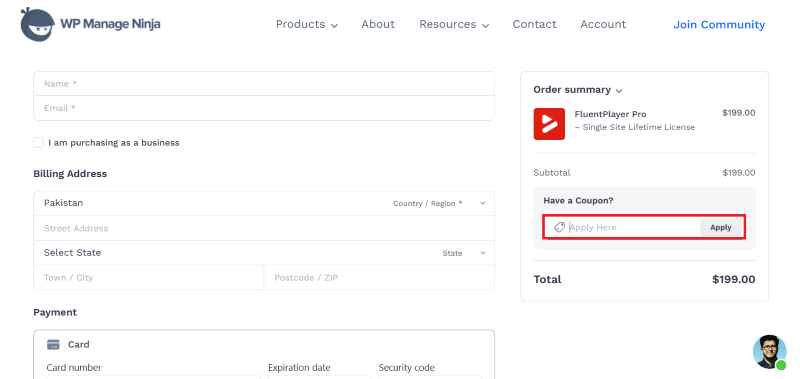
Step 3: Add the discount code in the field and click “Apply” to get the discount.
How To Install The FluentPlayer Plugin on WordPress?
Step 1: Visit the FluentPlayer website, choose the Pro or Free version, and download the plugin. You may receive the plugin as a zip file in your email or elsewhere.
Step 2: Log in to your WordPress dashboard
Step 3: Navigate to Plugins > Add New
Step 4: Click on Upload Plugin and select the FluentPlayer ZIP file you downloaded.
Step 5: Click Install Now.
Step 6: After installation, go to Plugins > Installed Plugins and activate FluentPlayer.
Step 7: Follow the prompts to configure FluentPlayer’s initial settings after activation. The plugin is now configured to be utilized.
For Whom This Product Is Built For?
This product is built for:
- Bloggers and Content Creators: Add videos to blog posts and create a consistent viewing experience across your website.
- Online Course Creators: Organize lessons into playlists, add chapters, and make educational videos easier to follow.
- Digital Marketers: Use video overlays, email capture forms, and CTA buttons to generate leads.
- Small Business Owners: Display product demonstrations, tutorials, and promotional videos with custom branding.
- Marketing Agencies: Manage video presentations across multiple client websites with reusable player presets.
FluentPlayer Alternatives
Here are some alternatives to the FluentPlayer plugin.
- Presto Player: A video player plugin with branding, interactive video features, and support for online courses and marketing websites.
- FV Player: A video player focused on self-hosted media, playlists, advertising, and advanced playback controls.
- HTML5 Video Player: A straightforward option for embedding responsive videos from MP4, WebM, YouTube, and Vimeo.
- All-in-One Video Gallery: A useful choice for website owners who want to create video galleries and organize content from multiple video platforms.
- Videopack: A WordPress plugin for self-hosted videos that offers video thumbnails and resolution switching.
What FluentPlayer Customers Say
“The support of this tool is second to none. I had several questions regarding CSS modifications and it took them only some minutes to come back to me on a sunday with CSS-snippets that were spot on. I am absolutely thrilled by this experience, which is really rare nowadays.”
“I have become a Fluent advocate over the last few months as I’ve been navigating different ways of hosting courses and community online without having to go all in on Kajabi. I took on FluentPlayer out of good faith because of their other products working so well for what I need (FluentCommunity, CRM, Cart). At first, it didn’t work for what I needed! Ouch. But after posting in the community and the raising a ticket, my issue was resolved within days and is now working perfectly! It’s clean, it’s slick, it works seamlessly with multiple integrations (Bunny, YouTube, etc). The product wasn’t perfect for my needs out of the box, but it is now… and the most reassuring thing is that their support truly have your back! I’ve never really encountered that with WP products and plugins, so I can only give these guys credit where it’s due. Well worth the spend to go lifetime on this one and join them on this journey.”
Read more FluentPlayer reviews on wordpress,org
We’d love to hear your thoughts and opinions on FluentPlayer. Share your experiences and insights in the comments below.
FluentPlayer
You Might Also Like
{post_title: link}

{post_title: link}

{post_title: link}
From the WPdiscounts Blog
 If your hosting provider includes an AI website builder, building a WordPress website can take less time. Instead of creating every page from scratch, you…
November 6, 2026
 Introduction Moving a WordPress website can look simple from the outside, but a working site includes more than pages and images. WordPress’s own documentation explains…
October 15, 2026
- WordPress is becoming easier for AI agents to work with. WordPress 6.9 introduced the Abilities API, which gives WordPress, themes, and plugins a standard way…
October 2, 2026