Automate & Build Anything Inside your WordPress
FlowMattic Coupon – 2026
FlowMattic is a WordPress workflow automation plugin that lets you connect your website with external services and automate tasks from inside the WordPress dashboard.
Automate & Build Anything Inside your WordPress
FlowMattic Coupon – 2026
FlowMattic is a WordPress workflow automation plugin that lets you connect your website with external services and automate tasks from inside the WordPress dashboard.
Exclusive Discount
Only for WPdiscounts.io visitors.
Limited Time Offer
Claim this offer before it ends.
Save up to 35% OFF on FlowMattic (Expired)
Table of Content
About
Founder: Nitin Yawalkar
Website: flowmattic.com
Community: Community

What is FlowMattic?
View FlowMattic Coupons, Discounts, Promo Codes, & Pricing Plans below.
FlowMattic is a WordPress workflow automation plugin that lets you connect your website with external services and automate tasks from inside the WordPress dashboard. You can create visual workflows using triggers, actions, filters, routers, loops, delays, and other tools without having to build every connection manually.
The plugin is designed as a self-hosted alternative to cloud automation platforms. Instead of sending your workflows to another automation service, FlowMattic runs on your WordPress server. This can be useful for businesses that want more control over their data and do not want their automation bill to increase every time a workflow runs.
FlowMattic also includes Jaadu, its AI-powered builder. You can describe an automation in plain English and Jaadu can help create the workflow, choose apps, and map fields. The same AI builder can also work with FlowMattic’s form, PDF, image, and email builders.
For WordPress users who want more than simple app-to-app connections, FlowMattic offers a fairly broad toolkit. Its current platform includes 859+ integrations, 60+ built-in modules, AI agents, workflow templates, custom apps, and MCP functionality.
Key Features of FlowMattic
Here are some key features of FlowMattic you should know:
- Visual Workflow Builder: Create multi-step automations using triggers, actions, routers, branches, loops, filters, delays, and error handling.
- Unlimited Workflows and Executions: Run as many workflows and task executions as your server can handle without a per-task billing meter.
- Jaadu AI Builder: Describe what you want in plain English and let the AI builder create the first version of your workflow.
- AI Agents: Build agents that can reason, use tools, and work with supported AI providers using your own API keys.
- MCP Server and Client: Connect AI assistants such as Claude, ChatGPT, and Cursor with your WordPress workflows and tools.
- Form Builder: Create forms with 23 field types, conditional logic, and conversational mode.
- PDF Template Builder: Generate documents such as invoices, contracts, and certificates using live workflow data.
- Image Template Builder: Create personalized images from workflow data, including social graphics and customer-specific coupon images.
- Email Template Builder: Design responsive emails using blocks and dynamic tags.
- Bookings: Create booking calendars and reminders, with bookings able to trigger automated workflows.
- Custom Apps: Build your own app connections from REST APIs or import OpenAPI, Swagger, and Postman specifications.
- Workflow Templates: Start with ready-made automation recipes instead of building every workflow from a blank canvas.
- Custom PHP Functions: Extend workflows with your own PHP functions when the built-in modules are not enough.
FlowMattic Coupons, Discounts, and Pricing Plan
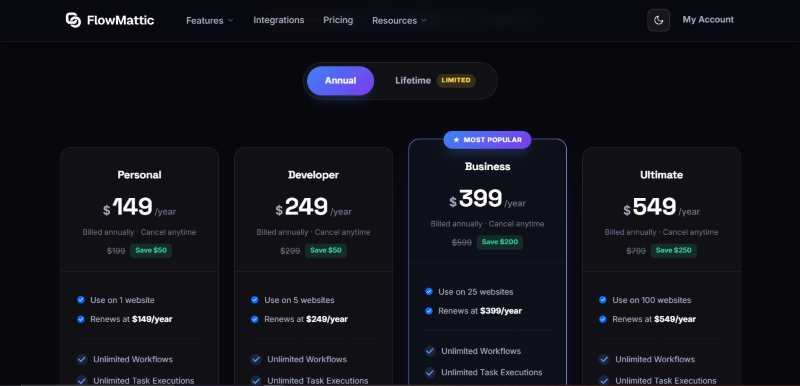
FlowMattic has a very straightforward pricing plan.
| Personal | Developer | Business | Ultimate |
$149/yr |
$249/yr |
$399/yr |
$549/yr |
| Use on 1 website | Use on 5 websites | Use on 25 websites | Use on 100 websites |
| Renews at $149/year | Renews at $249/year | Renews at $399/year | Renews at $549/year |
| Unlimited Workflows | Unlimited Workflows | Unlimited Workflows | Unlimited Workflows |
| Unlimited Task Executions | Unlimited Task Executions | Unlimited Task Executions | Unlimited Task Executions |
| All Premium Integrations | All Premium Integrations | All Premium Integrations | All Premium Integrations |
| Priority Email Support | Priority Email Support | Priority Email Support | Priority Email Support |
| 1 Year Updates & Support | 1 Year Updates & Support | 1 Year Updates & Support | 1 Year Updates & Support |
FlowMattic Discounts
There is up to a 35% discount available on the FlowMattic yearly pricing plan.
FlowMattic Lifetime Deals
There are no lifetime deals available for FlowMattic.
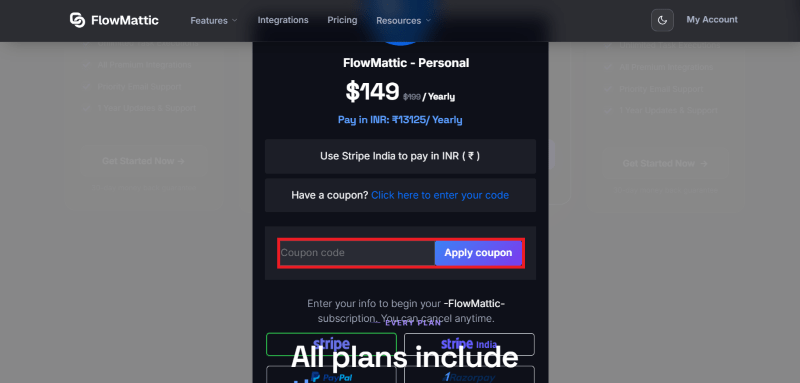
How To Avail The FlowMattic Coupon?
Step 1: Go to the pricing page and select the plan you want to buy.
Step 2: On the FlowMattic checkout page, click on “Have a coupon?”
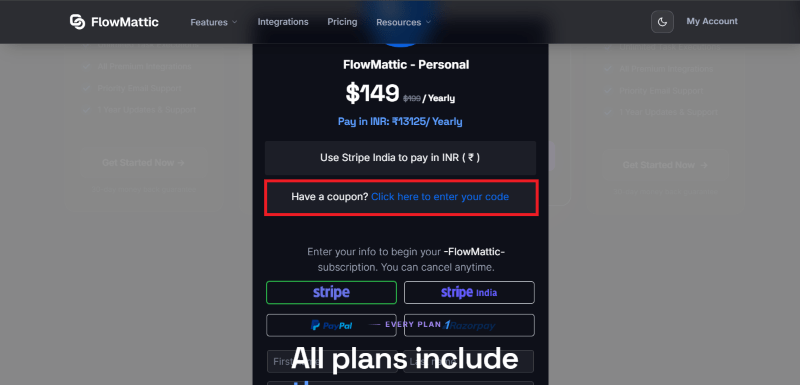
Step 3: Add the discount code in the field and click “Apply” to get the discount.
How To Install The FlowMattic Plugin on WordPress?
Step 1: Visit the FlowMattic website, choose the Pro or Free version, and download the plugin. You may receive the plugin as a zip file in your email or elsewhere.
Step 2: Log in to your WordPress dashboard
Step 3: Navigate to Plugins > Add New
Step 4: Click on Upload Plugin and select the FlowMattic ZIP file you downloaded.
Step 5: Click Install Now.
Step 6: After installation, go to Plugins > Installed Plugins and activate FlowMattic.
Step 7: Follow the prompts to configure FlowMattic’s initial settings after activation. The plugin is now configured to be utilized.
For Whom This Product Is Built For?
This product is built for:
- WordPress Website Owners: Automate routine website tasks without moving your workflows to another platform.
- WooCommerce Store Owners: Connect orders, customers, products, coupons, and other store data with external services.
- Marketing Teams: Send leads to CRMs, email platforms, spreadsheets, and communication tools automatically.
- Freelancers: Build reusable automations for multiple client websites from one automation system.
- Agencies: Manage workflows across many websites without paying a separate task fee for every execution.
- Developers: Use APIs, custom apps, PHP functions, webhooks, and other advanced tools to create more specialized workflows.
- AI-Focused Businesses: Use AI agents, Jaadu, and MCP tools to bring AI into WordPress workflows.
FlowMattic Alternatives
Here are some alternatives to the FlowMattic plugin.
- Uncanny Automator: A WordPress-focused option for connecting actions between WordPress plugins and website events.
- Zapier: A popular cloud-based automation platform with a large app ecosystem.
- Make: A visual automation platform designed for building more complex workflows.
- n8n: A flexible workflow automation platform suited to technical users and self-hosting.
- Pabbly Connect: An automation service focused on connecting apps without charging for every individual workflow in the same way as some competitors.
What FlowMattic Customers Say
“Support requests are answered very quickly, professionally, and kindly. “Kindly” is something I’ve never used in feedback before. Nitin genuinely cares about the success of his clients, and this shows in the quality of the product AND his thoughtful, helpful, timely replies. Flowmattic is great and just keeps getting better. Thanks Nitin.”
“I am loving it because it’s one of a few tools that work natively with my Voxel theme. As any automation tool it has its glitches but really pleased with Nitin’s personal support as we exchanged over 50 emails in which he not only upgraded the integration but also debugged the issue in my setup which turned out to be a block on my firewall. Great work ethics and care about their customers and software”
Read more FlowMattic reviews on WordPress.org
We’d love to hear your thoughts and opinions on FlowMattic. Share your experiences and insights in the comments below.
FlowMattic
You Might Also Like

{post_title: link}

{post_title: link}

{post_title: link}
From the WPdiscounts Blog
 Introduction Moving a WordPress website can look simple from the outside, but a working site includes more than pages and images. WordPress’s own documentation explains…
October 15, 2026
 WordPress is becoming easier for AI agents to work with. WordPress 6.9 introduced the Abilities API, which gives WordPress, themes, and plugins a standard way…
October 2, 2026
- WordPress gives website owners a large amount of control over how their sites look and work. According to WordPress.org, themes control the visual presentation of…
September 19, 2026