Turn Any API into an MCP Server
GetMCP Coupon – 2026
GetMCP is a self-hosted MCP server builder that connects AI assistants like Claude and ChatGPT with the applications and services you already use.
Turn Any API into an MCP Server
GetMCP Coupon – 2026
GetMCP is a self-hosted MCP server builder that connects AI assistants like Claude and ChatGPT with the applications and services you already use.
Exclusive Discount
Only for WPdiscounts.io visitors.
Limited Time Offer
Claim this offer before it ends.
Table of Content
About
Founder: Nitin Yawalkar
Website: getmcp.com
Community: Community

What is GetMCP?
View GetMCP Coupons, Discounts, Promo Codes, & Pricing Plans below.
GetMCP is a self-hosted MCP server builder that connects AI assistants like Claude and ChatGPT with the applications and services you already use. It turns your APIs into tools that AI assistants can access, helping you manage tasks, retrieve information, and automate everyday work without building custom integrations from scratch.
The platform uses the Model Context Protocol (MCP), an open standard that allows AI applications to communicate with external tools and services. You can connect your WordPress website, WooCommerce store, CRM, database, or other API-powered applications and interact with them through natural language.
GetMCP offers two installation options. You can install it as a WordPress plugin on an existing website or run it as a standalone application on your own hosting. The WordPress version works directly inside your dashboard and lets AI assistants access posts, pages, media, users, and other available WordPress data. WooCommerce users can also connect their products, orders, customers, and coupons.
Key Features of GetMCP
Here are some key features of GetMCP you should know:
- No-Code MCP Server Builder: Create MCP servers from API requests without writing protocol code. Import existing API configurations or use ready-made templates.
- WordPress Integration: Connect AI assistants to your WordPress website and access posts, pages, media, users, taxonomies, and other available REST API features.
- WooCommerce Support: Manage store information through AI assistants, including products, orders, customers, coupons, and reports.
- API Import Options: Import APIs using cURL, OpenAPI 3.0 and 3.1, Swagger 2.0, and Postman collections.
- Ready-Made Templates: Start with preconfigured integrations for popular services like Stripe, GitHub, Notion, Slack, Mailchimp, and WooCommerce.
- Multiple MCP Servers: Create separate servers for different projects, products, clients, or environments from one installation.
- Authentication and Security: Use API keys, Bearer authentication, Basic authentication, and OAuth 2.1, with additional security controls available on eligible plans.
- Analytics and Activity Logs: Monitor server and tool activity, check request performance, and review API calls from the dashboard.
- Built-In Playground: Test your MCP servers and tools before connecting them to your preferred AI assistant.
- Self-Hosted Platform: Run GetMCP on your own hosting instead of sending your API traffic through GetMCP’s servers.
GetMCP Coupons, Discounts, and Pricing Plan
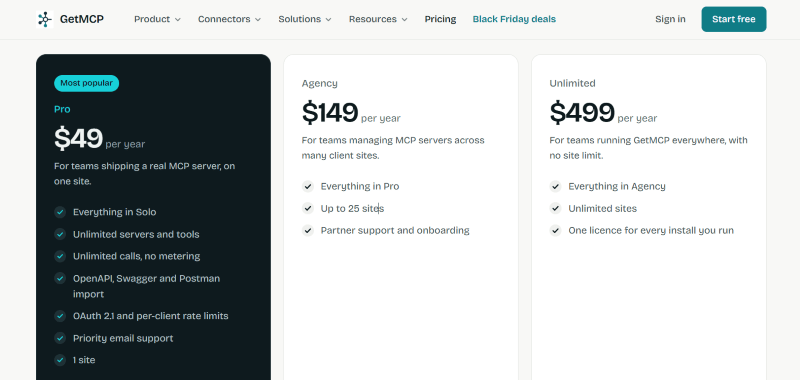
GetMCP has a very straightforward pricing plan.
| Plan | Price | Main Benefits |
| Solo | Free Forever | 1 MCP server, up to 10 tools, and 1,000 calls per month |
| Pro | $49/year | Unlimited servers, tools, and calls, API imports, and 1 site |
| Agency | $149/year | Everything in Pro, support for up to 25 sites, and partner onboarding |
| Unlimited | $499/year | Everything in Agency with unlimited site licenses |
GetMCP Discounts
There is no discount available on the GetMCP yearly pricing plan.
GetMCP Lifetime Deals
There are no lifetime deals available for GetMCP.
How To Avail The GetMCP Coupon?
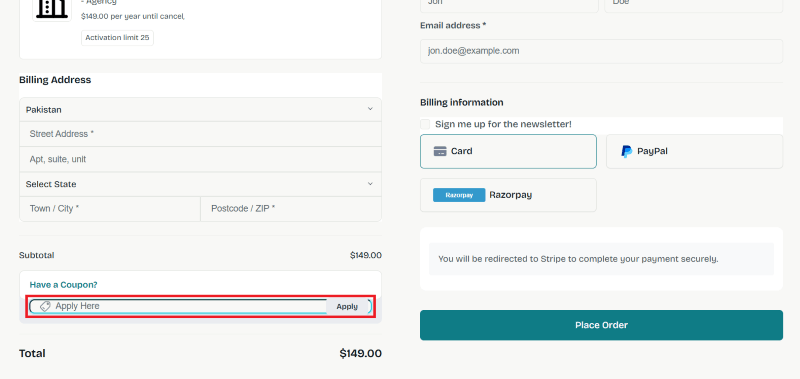
Step 1: Go to the pricing page and select the plan you want to buy.
Step 2: On the GetMCP checkout page, click on “Have a discount code”
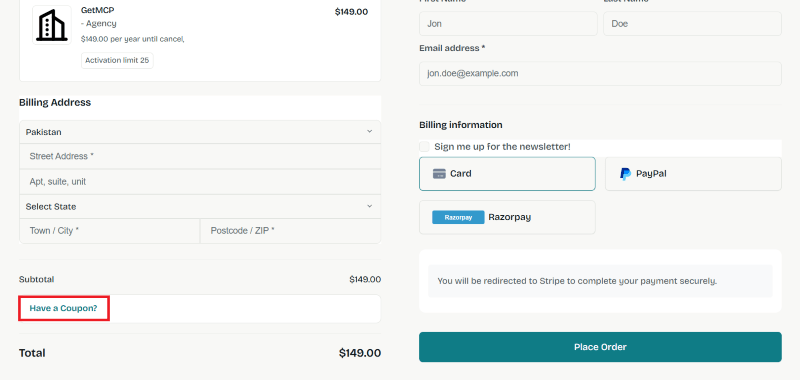
Step 3: Add the discount code in the field and click “Apply” to get the discount.
How To Install The GetMCP Plugin on WordPress?
Step 1: Visit the GetMCP website, choose the Pro or Free version, and download the plugin. You may receive the plugin as a zip file in your email or elsewhere.
Step 2: Log in to your WordPress dashboard
Step 3: Navigate to Plugins > Add New
Step 4: Click on Upload Plugin and select the GetMCP ZIP file you downloaded.
Step 5: Click Install Now.
Step 6: After installation, go to Plugins > Installed Plugins and activate GetMCP.
Step 7: Follow the prompts to configure GetMCP’s initial settings after activation. The plugin is now configured to be utilized.
For Whom This Product Is Built For?
This product is built for:
- WordPress Website Owners: Manage posts, pages, media, and other website information using compatible AI assistants.
- WooCommerce Store Owners: Access products, orders, customers, and store information through conversational commands.
- Digital Marketing Agencies: Connect client tools and websites to simplify reporting and daily management tasks.
- Business Owners and Founders: Bring information from different business applications into one AI-powered workflow.
- Developers: Convert existing APIs into MCP servers without building a custom protocol implementation.
- Freelancers: Manage client projects, tasks, and connected services without constantly switching between dashboards.
GetMCP Alternatives
Here are some alternatives to the GetMCP plugin.
- WordPress MCP Adapter: An official WordPress project that connects the Abilities API with the Model Context Protocol. It is a good option for developers who want to expose registered WordPress abilities to AI applications.
- Easy MCP AI: A WordPress plugin by Themeisle that connects Claude, ChatGPT, and other AI assistants with WordPress. It offers tools for website management, WooCommerce, SEO, and analytics.
- WPVibe: A WordPress MCP server by the SeedProd team. It helps AI assistants work with website content, themes, and supported WordPress features.
- Royal MCP: A self-hosted WordPress MCP plugin that provides tools for managing website content, WooCommerce, SEO, and supported third-party plugins.
What GetMCP Customers Say
“GetMCP is an absolute beast of a product! Being able to use almost any API documentation to turn it into an MCP server is allowing us to expedite workflows that we could only dream of before. For the platforms that are not using the API specs in the standard format we created a skill on claude to “port” any API documentation into OpenAPI and then create a yaml file we can easily use on GetMCP.”
“It is now so easy to set up MCP! I’m using it across all my application stacks that have an API but no native MCP support. It has saved me a tremendous amount of time and energy compared with building integrations myself, while also helping streamline my entire workflow.”
Read more GetMCP reviews on Trustpilot
We’d love to hear your thoughts and opinions on GetMCP. Share your experiences and insights in the comments below.
GetMCP
You Might Also Like
{post_title: link}

{post_title: link}

{post_title: link}
From the WPdiscounts Blog
 If your hosting provider includes an AI website builder, building a WordPress website can take less time. Instead of creating every page from scratch, you…
November 6, 2026
 Introduction Moving a WordPress website can look simple from the outside, but a working site includes more than pages and images. WordPress’s own documentation explains…
October 15, 2026
- WordPress is becoming easier for AI agents to work with. WordPress 6.9 introduced the Abilities API, which gives WordPress, themes, and plugins a standard way…
October 2, 2026