Power Up WordPress Speed with xSpeed Cache
xSpeed Cache Coupon – 2026
xSpeed Cache is a WordPress performance and caching plugin designed to make websites load faster and use server resources more efficiently.
Power Up WordPress Speed with xSpeed Cache
xSpeed Cache Coupon – 2026
xSpeed Cache is a WordPress performance and caching plugin designed to make websites load faster and use server resources more efficiently.
Exclusive Discount
Only for WPdiscounts.io visitors.
Limited Time Offer
Claim this offer before it ends.
Table of Content
About
Founder: M Asif Rahman
Website: xspeedcache.com
Community: Community

What is xSpeed Cache?
View xSpeed Cache Coupons, Discounts, Promo Codes, & Pricing Plans below.
xSpeed Cache is a WordPress performance and caching plugin designed to make websites load faster and use server resources more efficiently. It combines page caching, code optimization, browser caching, object caching, image optimization, CDN support, database cleanup, and other performance tools in one plugin. It works with Apache, nginx, LiteSpeed, IIS, and standard PHP hosting environments.
Instead of making website owners manage several separate performance plugins, xSpeed Cache brings many common speed tools into one dashboard. The plugin can cache pages, minify HTML, CSS, and JavaScript, defer JavaScript, enable browser caching, and warm the cache automatically from a sitemap. It also supports Redis and Memcached for persistent object caching.
For WooCommerce stores, content-heavy websites, blogs, business websites, and agencies managing multiple installations, xSpeed Cache offers tools for handling caching and optimization without requiring a collection of separate plugins. It also supports WordPress Multisite, while its compatibility documentation covers popular server and WordPress technologies.
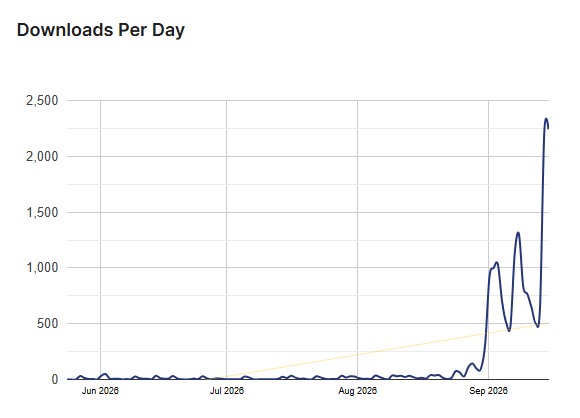
xSpeed Cache Usage Statistics
Key Features of xSpeed Cache
Here are some key features of xSpeed Cache you should know:
- Page Caching: Stores cached versions of pages so returning visitors can load website content faster.
- Advanced Cache Controls: Provides additional controls for caching 404 pages, search results, feeds, REST API responses, and other WordPress content.
- HTML, CSS, and JavaScript Optimization: Minifies website files and provides options to defer or delay JavaScript to reduce page-loading work.
- Browser Caching: Controls browser cache settings so static website files can be stored locally and reused on future visits.
- Cache Preloading: Automatically rebuilds cached pages from the website sitemap after the cache has been cleared.
- Redis and Memcached Support: Uses persistent object caching to reduce repeated database queries and improve website performance.
- Cloudflare Integration: Connects with Cloudflare and can clear the Cloudflare cache when the xSpeed Cache cache is purged.
- WebP and AVIF Conversion: Converts images into modern formats that can reduce file sizes and improve loading performance.
- Critical CSS: Generates Critical CSS to help deliver the styles needed for above-the-fold content more efficiently.
- Remove Unused CSS: Helps reduce unnecessary CSS that may increase page size and slow down rendering.
- AI Recommendations: Uses AI-powered recommendations to help users identify performance settings and optimization opportunities.
- MCP Server: Allows compatible AI assistants to interact with xSpeed Cache and perform supported performance-related actions.
- xSpeed Hub: Provides a central dashboard for managing connected WordPress websites and monitoring their performance.
- WordPress Multisite Support: Allows xSpeed Cache to work across WordPress Multisite installations with individual cache and configuration controls.
- Migration Tools: Helps import settings from other caching plugins, including WP Rocket, W3 Total Cache, WP Super Cache, and LiteSpeed Cache.
xSpeed Cache Coupons, Discounts, and Pricing Plan
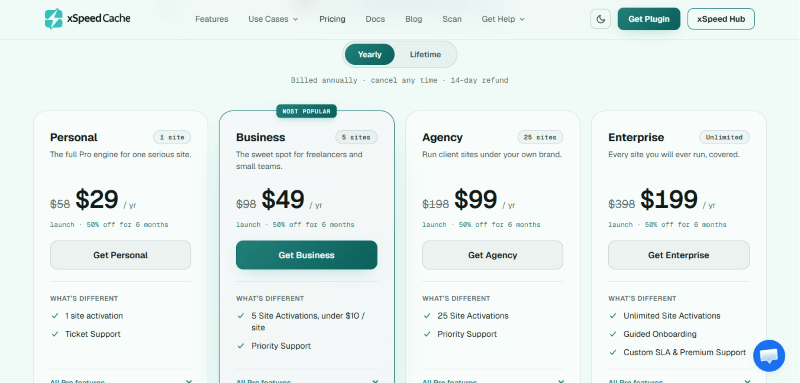
xSpeed Cache has a very straightforward pricing plan.
| Personal | Business | Agency | Enterprise |
$29/yr |
$49/yr |
$99/yr |
$199/yr |
| 1 site activation | 5 Site Activations, under $10/site | 25 Site Activations | Unlimited Site Activations |
| Ticket Support | Priority Support | Priority Support | Guided Onboarding |
| Custom SLA & Premium Support |
xSpeed Cache Discounts
There is up to 50% discount available on the xSpeed Cache yearly pricing plan.
xSpeed Cache Lifetime Deals
There are four lifetime deals available for xSpeed Cache.
| Personal | Business | Agency | Enterprise |
$79/yr |
$149/yr |
$249/yr |
$399/yr |
| 1 site activation | 5 Site Activations, under $10/site | 25 Site Activations | Unlimited Site Activations |
| Ticket Support | Priority Support | Priority Support | Guided Onboarding |
| Custom SLA & Premium Support |
How To Avail The xSpeed Cache Coupon?
Step 1: Go to the pricing page and select the plan you want to buy.
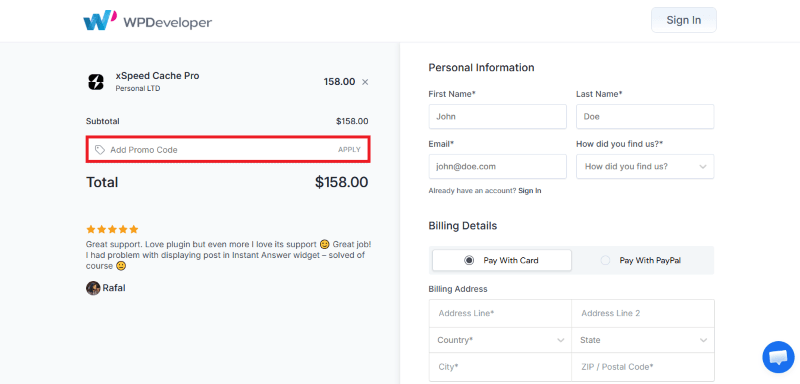
Step 2: On the xSpeed Cache checkout page, add the discount code in the field and click “Apply” to get the discount.
How To Install The xSpeed Cache Plugin on WordPress?
Step 1: Visit the xSpeed Cache website, choose the Pro or Free version, and download the plugin. You may receive the plugin as a zip file in your email or elsewhere.
Step 2: Log in to your WordPress dashboard
Step 3: Navigate to Plugins > Add New
Step 4: Click on Upload Plugin and select the xSpeed Cache ZIP file you downloaded.
Step 5: Click Install Now.
Step 6: After installation, go to Plugins > Installed Plugins and activate xSpeed Cache.
Step 7: Follow the prompts to configure xSpeed Cache’s initial settings after activation. The plugin is now configured to be utilized.
For Whom This Product Is Built For?
This product is built for:
- WooCommerce Store Owners: Helps online stores improve performance while providing controls for handling dynamic WooCommerce content.
- Small Business Owners: Suitable for businesses that want several website speed and optimization tools without installing multiple plugins.
- Freelancers: A practical choice for freelancers managing multiple WordPress websites for themselves or their clients.
- WordPress Agencies: The higher-tier plans support more website activations, making xSpeed Cache useful for agencies managing multiple client sites.
- Developers: Provides advanced caching controls, WP-CLI support, REST API options, filters, and an MCP server for more technical workflows.
xSpeed Cache Alternatives
Here are some alternatives to the xSpeed Cache plugin.
- WP Rocket
- LiteSpeed Cache
- W3 Total Cache
- WP Super Cache
- FlyingPress
- Swift Performance
- Hummingbird
What xSpeed Cache Customers Say
“It’s safe to say that I’ve tried most of the top level caching plugins out there, and they all work to a degree. However, I have found that in a lot of cases they seem to behave well for a couple of weeks and then just stop working. I’ve been giving xSpeed a good run for a while now, and I’m happy to say that it is not only loading pages faster, but it has an excellent pre-loader that runs on a frequent basis so the cache is never stale. This is definitely my new cache plugin of choice – I’ll be switching over quite a few sites to this over the coming weeks. Highly recommended. Give it a go – I’m pretty sure you won’t be dissapointed.”
“I would buy with confidence any plugin that comes from WPdeveloper. Your plugins rock guys. This new plugin is just incredible. Easy to follow, clear instructions and user friendly. It has increased my website speed tremendously. I definitely recommed this plugin if you are serious about website speed. Well done guys”
Read more xSpeed Cache reviews on WordPress
We’d love to hear your thoughts and opinions on xSpeed Cache. Share your experiences and insights in the comments below.
xSpeed Cache
You Might Also Like
xSpeed Cache Coupon – 2026

Semrush Coupon – 2026

Surfer Coupon – 2026
From the WPdiscounts Blog
 Visual content has become an important part of running a website. A blog needs featured images, an online store needs product visuals, and landing pages…
September 15, 2026
- Getting a website published is only the first step. The harder part is helping the right people find it. Search engine optimization involves keyword research,…
September 15, 2026
- A website can have a good design and still struggle if its content is weak. Product pages, blog posts, landing pages, emails, social posts, and…
September 8, 2026