Make WordPress Email Delivery Easy and Reliable
GoSMTP Coupon – 2026
GoSMTP is a WordPress SMTP and PHP Mailer plugin built to help websites send emails more reliably.
Make WordPress Email Delivery Easy and Reliable
GoSMTP Coupon – 2026
GoSMTP is a WordPress SMTP and PHP Mailer plugin built to help websites send emails more reliably.
Exclusive Discount
Only for WPdiscounts.io visitors.
Limited Time Offer
Claim this offer before it ends.
Offer Expired - Check back soon!
Table of Content
About
Website: gosmtp.net

What is GoSMTP?
View GoSMTP Coupons, Discounts, Promo Codes, & Pricing Plans below.
GoSMTP is a WordPress SMTP and PHP Mailer plugin built to help websites send emails more reliably. Instead of depending on WordPress’s default PHP mail function, it lets you connect your website to a trusted SMTP service and route outgoing messages through it. This can be useful for contact forms, password resets, order notifications, membership emails, and other messages that your website needs to send.
The plugin is designed to be lightweight and does not require coding skills. GoSMTP also supports WordPress Multisite, with settings that can be managed across the network or separately for individual sites.
Where GoSMTP gets more interesting is its email management tools. Paid plans add email logs, reports, open and click tracking, secondary connections, smart routing, and failure alerts, giving site owners more control over what happens after an email is sent.
For businesses that cannot afford to wonder whether an important email actually reached the customer, these tools can make GoSMTP worth a look. You can also connect it to a wide range of SMTP providers instead of being locked into one service.
GoSMTP Usage Statistics
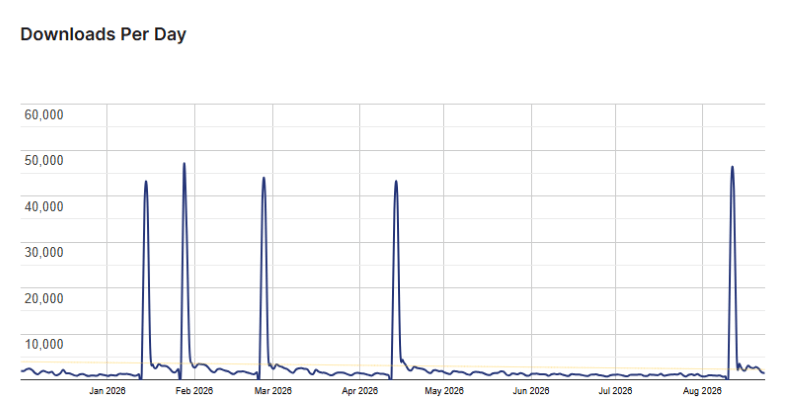
Key Features of GoSMTP
Here are some key features of GoSMTP you should know:
- Email Logs: Keeps a record of emails sent from your WordPress website so you can review delivery activity later.
- Email Reports: View graphs and delivery statistics to get a clearer picture of your site’s email performance.
- Open & Click Tracking: Lets you see whether recipients opened emails and clicked links inside them.
- Smart Routing: Send different types of emails through different providers using conditional rules.
- Secondary Connections: Add backup mail connections so another provider can be used when the primary connection fails.
- Failure Alerts: Get notified when WordPress emails fail to send, so problems do not stay hidden.
- Resend Emails: Failed messages can be resent directly from the email logs.
- Weekly Summaries: Receive regular email delivery updates in your inbox or view them from the dashboard.
- Expert Setup: GoSMTP offers a setup service where its support team can install and configure the plugin for you.
- WordPress Multisite Support: Manage GoSMTP across a WordPress Multisite network or configure individual sites separately.
GoSMTP Coupons, Discounts, and Pricing Plan
GoSMTP has a very straightforward pricing plan.
| Free | Personal | Professional | Business |
| $0/yr | $39/year | $75/year | $200/year |
| SendLayer | 1 Site | 5 Site | 100 Site(Own sites only) |
| SMTP.com | Email Logs | Email Logs | Email Logs |
| Sendinblue | Email Reports | Email Reports | Email Reports |
| Mailgun | Email Tracking | Email Tracking | Email Tracking |
| Postmark | Secondary Connections | Secondary Connections | Secondary Connections |
| SendGrid | Smart Routing | Smart Routing | Smart Routing |
| SparkPost | Failure Alerts | Failure Alerts | Failure Alerts |
| Maileroo | Gmail Workspace | Gmail Workspace | Gmail Workspace |
| All Other SMTP services | Amazon SES | Amazon SES | Amazon SES |
| Microsoft 365 / Outlook | Microsoft 365 / Outlook | Microsoft 365 / Outlook | |
| SMTP.com | SMTP.com | SMTP.com | |
| Zoho | Zoho | Zoho | |
| Brevo(formerly Sendinblue) | Brevo(formerly Sendinblue) | Brevo(formerly Sendinblue) |
GoSMTP Discounts
There is no discount available on the GoSMTP yearly pricing plan.
GoSMTP Lifetime Deals
There are no lifetime deals available for GoSMTP.
How To Install The GoSMTP Plugin on WordPress?
Step 1: Visit the GoSMTP website, choose the Pro or Free version, and download the plugin. You may receive the plugin as a zip file in your email or elsewhere.
Step 2: Log in to your WordPress dashboard
Step 3: Navigate to Plugins > Add New
Step 4: Click on Upload Plugin and select the GoSMTP ZIP file you downloaded.
Step 5: Click Install Now.
Step 6: After installation, go to Plugins > Installed Plugins and activate GoSMTP.
Step 7: Follow the prompts to configure GoSMTP’s initial settings after activation. The plugin is now configured to be utilized.
For Whom This Product Is Built For?
This product is built for:
- Small Business Websites: Useful for businesses that rely on contact forms, customer emails, and notifications.
- WooCommerce Stores: A reliable email setup can help keep order-related and customer messages moving.
- Membership Websites: Password resets, registration emails, and account notifications are too important to leave to chance.
- Agencies and Freelancers: The Professional and Business plans support multiple websites, making GoSMTP more practical for managing client projects.
- High Email Volume Websites: Multiple connections and smart routing can give larger sites more flexibility when managing email delivery.
- Non-Technical Website Owners: GoSMTP is built to be configured without writing code, which makes it approachable for users who do not want to deal with complicated SMTP settings.
GoSMTP Integrations
GoSMTP works with a broad selection of email services, including:
- Google Workspace / Gmail
- Zoho Mail
- Amazon SES
- Microsoft 365 / Outlook
- SMTP.com
- Mailgun
- Brevo
- Postmark
- SendGrid
- SparkPost
- SendLayer
- Resend
- Maileroo
- Custom SMTP providers
GoSMTP Alternatives
Here are some alternatives to the GoSMTP plugin.
- Post SMTP: Another established WordPress mail solution for sites looking for additional tools to improve email delivery and monitor outgoing messages.
- FluentSMTP: A free WordPress SMTP option that includes email logging, conditional routing, and secondary connections.
- WP Mail SMTP: A popular alternative with email logs, tracking, failure alerts, backup connections, and smart routing on its paid plans.
- Easy WP SMTP: A simpler alternative for WordPress users who mainly want to connect their website to an SMTP service without a large collection of advanced management tools.
| Product Name | Post SMTP | FluentSMTP | WP Mail SMTP |
| Number of Websites | 300,000+ | 600,000+ | 4+ million |
What GoSMTP Customers Say
“As other user said – simple and just works. No overkill with any ads that make it near impossible to use unless you get pro. We also use on reseller platforms for wordpress hosting and it works beautifully for business license. Software bundle makes it worth having. Thanks for a good plugin and not being overkill with your pro features leaving some value in your freemium plugins – perfect for start ups or beginners.”
“A simple SMTP plugin that just works. it’s easy to setup and configure. Unlike a lot of the more popular SMTP plugins, it doesn’t clutter your dashboard with useless menus that are only there to upsell their pro version. Thanks for the great plugin”
Read more GoSMTP reviews on WordPress.org
We’d love to hear your thoughts and opinions on GoSMTP. Share your experiences and insights in the comments below.
GoSMTP
You Might Also Like

{post_title: link}

{post_title: link}

{post_title: link}
From the WPdiscounts Blog
 Introduction Moving a WordPress website can look simple from the outside, but a working site includes more than pages and images. WordPress’s own documentation explains…
October 15, 2026
 WordPress is becoming easier for AI agents to work with. WordPress 6.9 introduced the Abilities API, which gives WordPress, themes, and plugins a standard way…
October 2, 2026
- WordPress gives website owners a large amount of control over how their sites look and work. According to WordPress.org, themes control the visual presentation of…
September 19, 2026