Create Your Dream Website With a Visual Website Builder
Spectra Coupon – 2026
Spectra is a comprehensive website-building toolkit designed specifically for the WordPress block editor.
Create Your Dream Website With a Visual Website Builder
Spectra Coupon – 2026
Spectra is a comprehensive website-building toolkit designed specifically for the WordPress block editor.
Exclusive Discount
Only for WPdiscounts.io visitors.
Limited Time Offer
Claim this offer before it ends.
Save up to 36% OFF on Spectra (Expired)
Table of Content
About
Founder: Sujay Pawar
Website: wpspectra.com
Community: Community

What is Spectra?
View Spectra Coupons, Discounts, Promo Codes, & Pricing Plans below.
Spectra is a comprehensive website-building toolkit designed specifically for the WordPress block editor. It started as a simple add-on but has grown into a full design system used by over a million people. It gives you access to professional blocks like sliders, forms, and galleries that the standard WordPress setup just does not offer on its own.
The plugin focuses on performance, meaning it does not load extra junk that slows down your server. Everything it builds is mobile-friendly from the start, so your site looks just as good on a phone as it does on a giant desktop monitor. It is built by the same team behind the famous Astra theme, so you know it is reliable and well-supported.
You can start with the free version to get a feel for how it works, but the Pro version is where the real power lies. With Pro, you get advanced features like dynamic content and a pop-up builder that can help you turn visitors into paying customers. It is basically like giving your WordPress site a professional makeover without hiring an expensive designer.
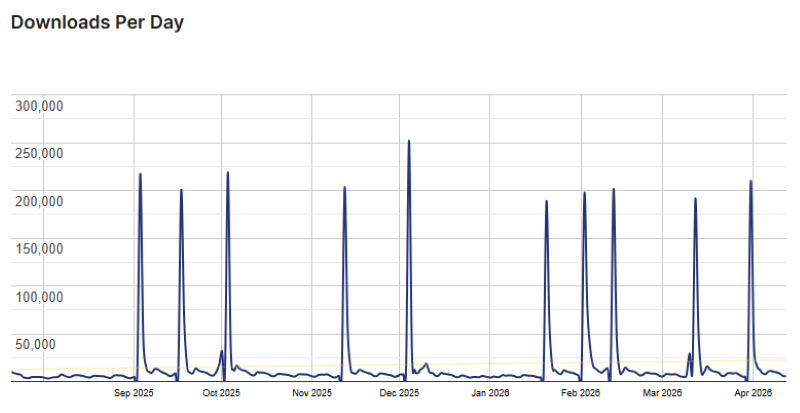
Spectra Usage Statistics
Key Features of Spectra
Here are some key features of Spectra you should know:
- Lightning Fast Performance: Spectra does not use heavy external scripts, ensuring your website loads almost instantly for every visitor.
- 100+ Pre-built Templates: You can import entire website designs with one click, giving you a head start so you do not have to design from scratch.
- Advanced Loop Builder: This tool lets you display your blog posts or products in beautiful, custom layouts that update automatically as you add new content.
- Popup and Modal Builder: Create eye-catching messages or sign-up forms that appear at just the right time to grab your readers’ attention.
- Responsive Design Controls: You can tweak exactly how your site looks on tablets and phones using simple toggles, ensuring a perfect experience on every device.
Spectra Coupons, Discounts, and Pricing Plan
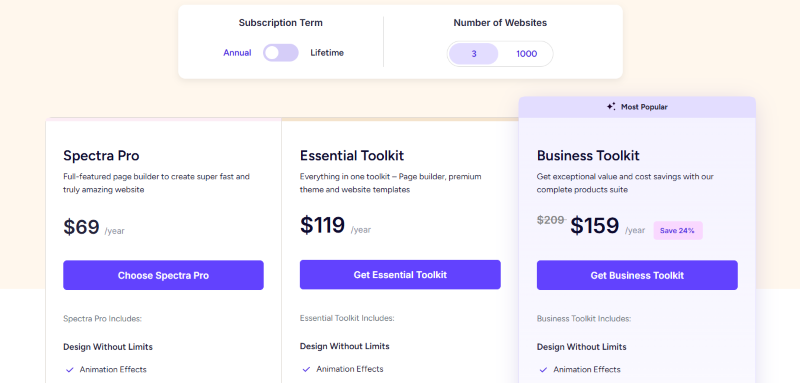
Spectra has a very straightforward pricing plan.
| Spectra Pro | Essential Toolkit | Business Toolkit |
| $69/yr | $119/yr | $159/yr |
| Animation Effects Dynamic Content. Loop Builder Slider Pro Modal Pro Register/Login Countdown Pro |
Animation Effects Dynamic Content. Loop Builder Slider Pro Modal Pro Register/Login Countdown Pro |
Animation Effects Dynamic Content. Loop Builder Slider Pro Modal Pro Register/Login Countdown Pro |
Spectra Discounts
There is up to 36% discount available on the Spectra yearly pricing plan.
Spectra Lifetime Deals
There are three lifetime deals available for Spectra.
- Get Spectra Pro for
$349$319 - Get Essential Toolkit for
$699$599 - Get Business Toolkit for
$1099$699
How To Avail The Spectra Coupon?
Step 1: Go to the pricing page and select the plan you want to buy.
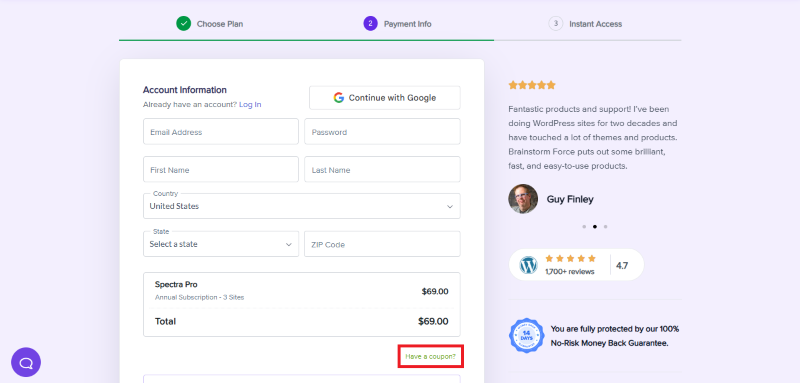
Step 2: On the Spectra checkout page, click on “Have a coupon?”
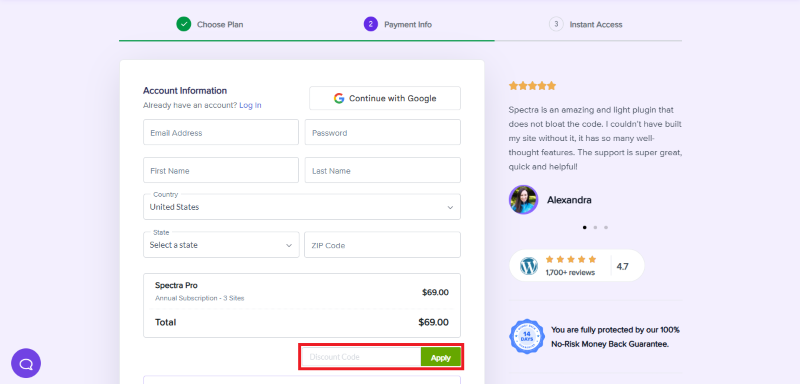
Step 3: Add the discount code in the field and click “Apply” to get the discount.
How To Install The Spectra Plugin on WordPress?
Step 1: Visit the Spectra website, choose the Pro or Free version, and download the plugin. You may receive the plugin as a zip file in your email or elsewhere.
Step 2: Log in to your WordPress dashboard
Step 3: Navigate to Plugins > Add New
Step 4: Click on Upload Plugin and select the Spectra ZIP file you downloaded.
Step 5: Click Install Now.
Step 6: After installation, go to Plugins > Installed Plugins and activate Spectra.
Step 7: Follow the prompts to configure Spectra’s initial settings after activation. The plugin is now configured to be utilized.
For Whom This Product Is Built For?
This product is built for:
- Small, Medium, and Enterprise Businesses
- E-commerce Store Owners
- Local Community Leaders
- Niche Bloggers
- Marketing Agencies
- Chambers of Commerce
- Event Organizers
Spectra Alternatives
Here are some alternatives to the Spectra plugin.
- Kadence Blocks
- GenerateBlocks
- Elementor
- Stackable
| Product Name | Kadence Blocks | GenerateBlocks | Elementor |
| Number of Websites | 600,000+ | 200,000+ | 10+ million |
What Spectra Customers Say
“This plugin is incredible because of its extensive customization options, along with other features that allow for a complete and flexible interface that adapts to all user needs. The only drawback I found was that it’s designed for slightly more advanced users rather than complete beginners. However, if a user is willing to learn this tool, they can do so quickly and easily thanks to its excellent learning curve.”
“Web dev here, expert with many WP builders.I’ve always worked with Astra and Elementor but since I began working with the sepctra one FSE theme and Spectra pro, I’m building websites even faster.It’s better, it’s faster. A pure pleasure.”
Read more Spectra reviews on WordPress.org
We’d love to hear your thoughts and opinions on Spectra. Share your experiences and insights in the comments below.
Spectra
You Might Also Like

{post_title: link}

{post_title: link}

{post_title: link}
From the WPdiscounts Blog
 Introduction Moving a WordPress website can look simple from the outside, but a working site includes more than pages and images. WordPress’s own documentation explains…
October 15, 2026
 WordPress is becoming easier for AI agents to work with. WordPress 6.9 introduced the Abilities API, which gives WordPress, themes, and plugins a standard way…
October 2, 2026
- WordPress gives website owners a large amount of control over how their sites look and work. According to WordPress.org, themes control the visual presentation of…
September 19, 2026