Build professional WooCommerce stores faster without coding.
Woohoo Coupon – 2026
Build a Professional WooCommerce Store in Hours, Not Weeks.
Build professional WooCommerce stores faster without coding.
Woohoo Coupon – 2026
Build a Professional WooCommerce Store in Hours, Not Weeks.
Exclusive Discount
Only for WPdiscounts.io visitors.
Limited Time Offer
Claim this offer before it ends.
Offer Expired - Check back soon!
Alternatives of Woohoo

No Coupon Available

What is Woohoo?
View Woohoo Coupons, Discounts, Promo Codes, & Pricing Plans below.
Building a truly custom WooCommerce store shouldn’t take weeks of development or expensive coding. Woohoo is a specialised tool designed for the Breakdance Builder that allows you to build high-converting, professional e-commerce stores in hours instead of weeks.
With its unique “Atomic Approach,” Woohoo breaks down complex WooCommerce layouts like the Cart, Checkout, and My Account pages into smaller, manageable parts. This gives you 100% control over every single element without ever touching a line of code. When you are a complete beginner or a seasoned agency owner, Woohoo helps you deliver “Shopify-like” checkout experiences that are fully responsive and optimised for sales right from the very first day.
Key Features of Woohoo
Here are some key features of Woohoo you should know:
- Atomic Checkout & Cart: Build any layout imaginable. Explore multi-step checkouts, address autocomplete, and advanced customisation for your cart templates using custom elements.
- Atomic Account: Completely redefine the user experience. Move away from traditional, rigid WooCommerce account pages and create a modern, branded dashboard for your customers.
- Email Builder: No more boring default emails. Design and customise every WooCommerce transactional email directly inside the familiar Breakdance builder interface.
- 100% Flexibility with Breakdance Elements: Build your shop using the controls you already know. Access specific Breakdance elements designed for deep shop customisation.
- Pre-made Templates: Need results fast? Use high-quality, pre-made templates for your checkout or cart and send them for client feedback on day one.
- Advanced “Under the Hood” Tools: Includes powerful conversion features like Order Bumps, Free Shipping Notices, International Phone Number validation, and Customizable Billing/Shipping fields.
Woohoo Coupons, Discounts, and Pricing Plan
Woohoo has a very straightforward pricing plan.
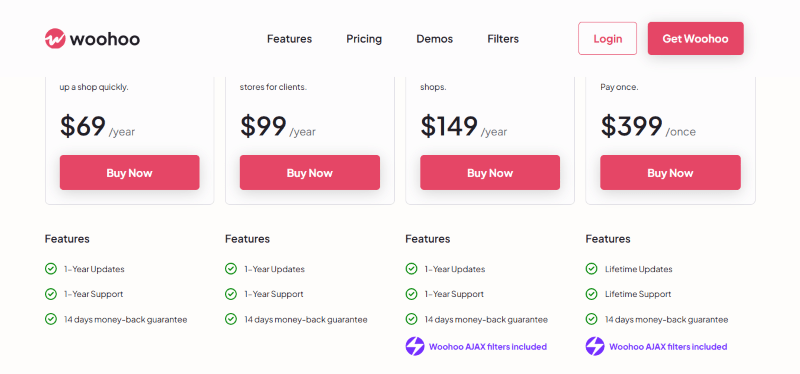
| Solo | Freelancer | Agency | Lifetime Deal |
| $69 Yearly | $99 Yearly | $149 Yearly | $399 Once |
| 14-Day Money-Back Guarantee | 14-Day Money-Back Guarantee | 14-Day Money-Back Guarantee | 14-Day Money-Back Guarantee |
Woohoo Discounts
There are no discounts available for Woohoo.
Woohoo Lifetime Deals
There are lifetime deals available for Woohoo.
How To Avail The Woohoo Coupon?
Step 1: Go to the Woohoo pricing page and select the plan you want to buy.
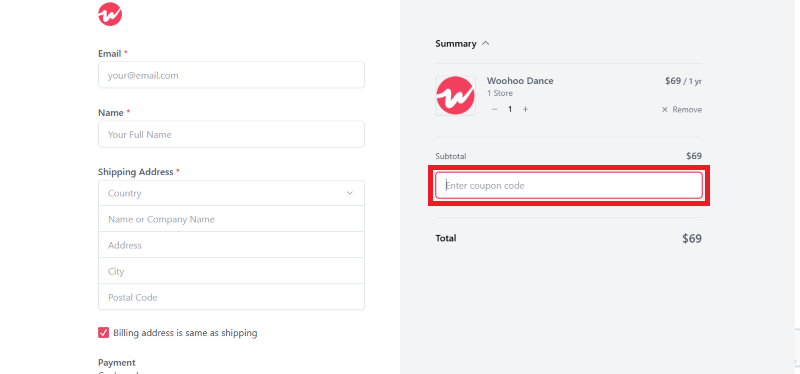
Step 2: On the Woohoo checkout page, click on “Have a Promotional code”
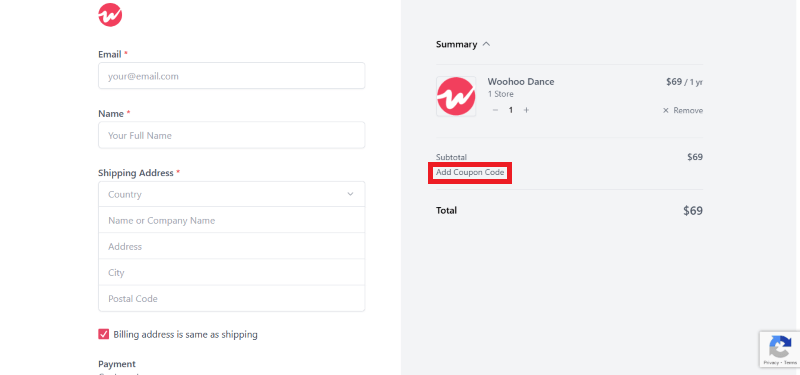
Step 3: Add the discount code in the field and click “Apply” to get the discount.
How To Install The Woohoo Plugin on WordPress?
Step 1: Visit the Woohoo website, choose your preferred plan, and download the plugin ZIP file.
Step 2: Log in to your WordPress dashboard.
Step 3: Navigate to Plugins > Add New.
Step 4: Click on Upload Plugin and select the Woohoo ZIP file.
Step 5: Click Install Now.
Step 6: After installation, go to Plugins > Installed Plugins and activate the plugin.
Step 7: Ensure you have Breakdance Builder active to begin using the Atomic elements and templates.
For Whom Is This Product Built?
This product is built for:
- Agencies
- Freelancers
- Small Businesses
- Web Designers
Woohoo Alternatives
Here are some alternatives to the Woohoo plugin.
- CheckoutWC
- FunnelKit (formerly WooFunnels)
- CartFlows
| Product Name | CheckoutWC By checkoutwc | FunnelKitBy funnelkit | CartFlows By cartflows |
| Number of Websites | 3,000+ | 40,000+ | 200,000+ |
Woohoo
You Might Also Like

Soro Coupon – 2026

Runway Coupon – 2026

Speechify Coupon
From the WPdiscounts Blog
 WordPress is becoming easier for AI agents to work with. WordPress 6.9 introduced the Abilities API, which gives WordPress, themes, and plugins a standard way…
October 2, 2026
- WordPress gives website owners a large amount of control over how their sites look and work. According to WordPress.org, themes control the visual presentation of…
September 19, 2026
- Audio is often overlooked when businesses plan their website content. Yet voice can be useful for product demonstrations, online courses, tutorials, podcasts, advertisements, accessibility, and…
September 19, 2026