Restaurant Online Food Ordering and Delivery WordPress Plugin
RestroFood Coupon – 2026
RestroFood is a comprehensive online food ordering and restaurant management system built specifically for WordPress and WooCommerce.
Restaurant Online Food Ordering and Delivery WordPress Plugin
RestroFood Coupon – 2026
RestroFood is a comprehensive online food ordering and restaurant management system built specifically for WordPress and WooCommerce.
Exclusive Discount
Only for WPdiscounts.io visitors.
Limited Time Offer
Claim this offer before it ends.
Save 50% OFF on all plans on RestroFood (Expired)
Table of Content
About
Founder: MD Fahad
Website: restrofood.io

What is RestroFood?
View RestroFood Coupons, Discounts, Promo Codes, & Pricing Plans below.
RestroFood is a comprehensive online food ordering and restaurant management system built specifically for WordPress and WooCommerce. It acts as a digital waiter and manager for your eatery, allowing you to take orders directly from your own website without paying high fees to third-party delivery apps. The plugin transforms a standard website into a fully functional ordering platform where customers can browse your menu, pick their favorite dishes, and pay for their meal in just a few clicks.
This tool is very popular because it focuses on making the ordering process as fast as possible for hungry customers. It includes a specialized quick checkout system and a mobile-friendly design that looks great on any smartphone screen. You do not need to be a tech expert to set it up because it comes with easy settings to manage your food categories, toppings, and delivery locations from one simple dashboard.
The software also helps you stay organized in the kitchen with real time order notifications and management tools. You can set specific delivery zones, manage your opening hours, and even offer different prices for pickup versus delivery. It is a fantastic solution for restaurant owners who want to take control of their online presence and build a direct relationship with their local diners.
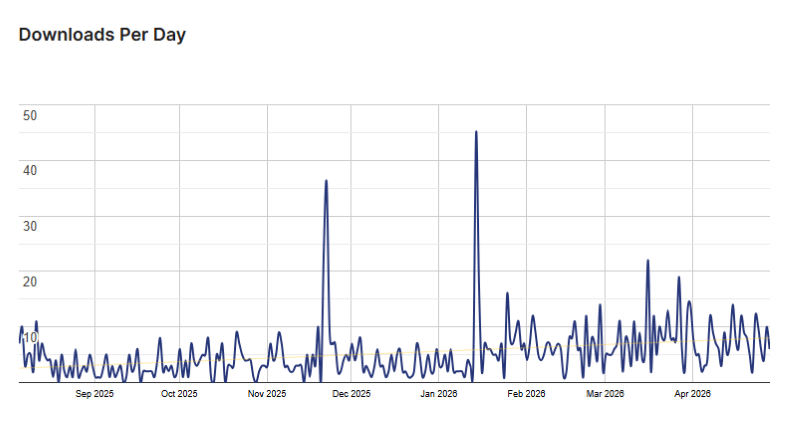
RestroFood Usage Statistics
Key Features of RestroFood
Here are some key features of RestroFood you should know:
- Quick Checkout System: The plugin uses a streamlined checkout process that allows customers to finish their orders quickly without jumping through multiple pages.
- Three Different Menu Layouts: you can choose between list, grid, or specialized restaurant styles to display your food items in the way that looks best for your brand.
- Service Options Management: You have the power to easily enable or disable options for delivery, pickup, or even takeaway, depending on your daily staff levels.
- Product Extra Options: This feature lets your customers customize their meals by adding extra toppings, choosing sides, or picking specific ingredients for an extra cost.
- Delivery Zone and Cost Limits: You can set specific delivery areas based on distance and decide if you want to charge more for deliveries that are further away from your shop.
- Real Time Order Alerts: The system provides instant desktop and sound notifications every time a new order comes in so your kitchen never misses a beat.
- Opening and Closing Hours: You can automate your shop by setting a schedule so that the ordering system only accepts payments when your kitchen is actually open.
- Invoices and Receipts: The tool automatically generates professional-looking invoices for both the customer and the restaurant staff to keep everyone on the same page.
- Order Status Tracking: Customers can check the progress of their meal from the moment it is received until it is out for delivery or ready for pickup.
RestroFood Coupons, Discounts, and Pricing Plan
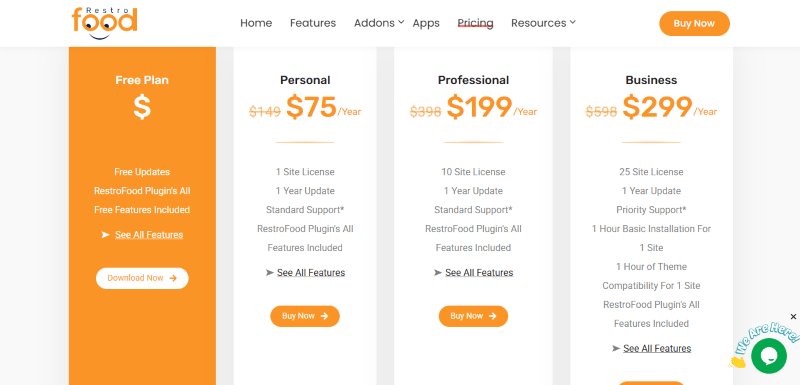
RestroFood has a very straightforward pricing plan.
| Standard | Premium | Agency |
$75/year |
$199/year |
$299/year |
| 1 Site License 1 Year Update Standard Support RestroFood Plugin’s All Features Included |
10 Site License 1 Year Update Standard Support RestroFood Plugin’s All Features Included |
25 Site License 1 Year Update Priority Support 1 Hour Basic Installation For 1 Site 1 Hour of Theme Compatibility For 1 Site RestroFood Plugin’s All Features Included |
RestroFood Discounts
There is 50% discount available on the RestroFood yearly pricing plan.
RestroFood Lifetime Deals
There are no lifetime deals available for RestroFood.
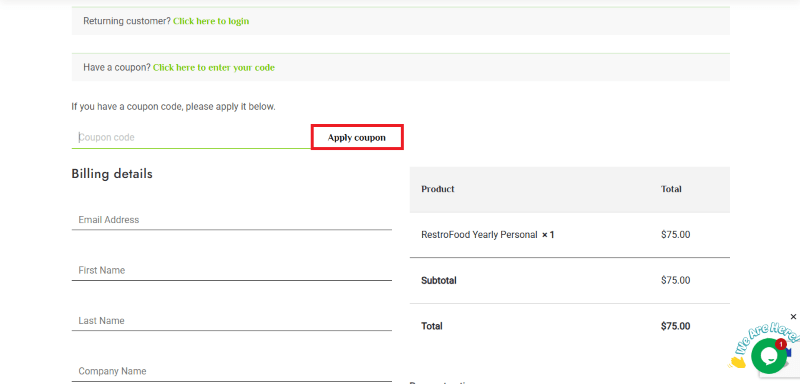
How to Avail the RestroFood Coupon?
Step 1: Go to the pricing page and select the plan you want to buy.
Step 2: On the RestroFood checkout page, click on “Have a discount code”
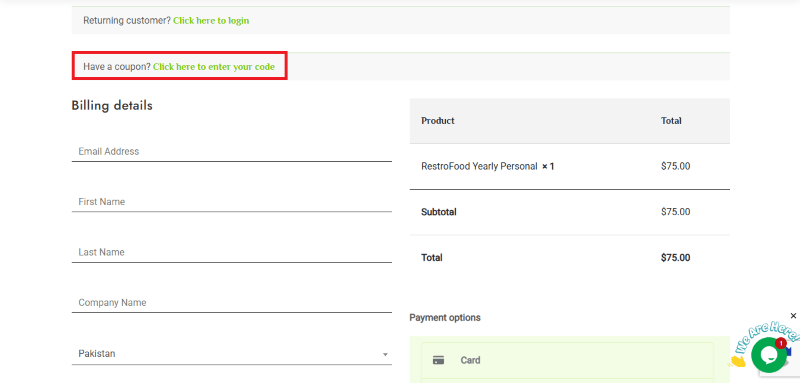
Step 3: Add the discount code in the field and click “Apply” to get the discount.
How To Install The RestroFood Plugin on WordPress?
Step 1: Visit the RestroFood website, choose the Pro or Free version, and download the plugin. You may receive the plugin as a zip file in your email or elsewhere.
Step 2: Log in to your WordPress dashboard
Step 3: Navigate to Plugins > Add New
Step 4: Click on Upload Plugin and select the RestroFood ZIP file you downloaded.
Step 5: Click Install Now.
Step 6: After installation, go to Plugins > Installed Plugins and activate RestroFood.
Step 7: Follow the prompts to configure RestroFood’s initial settings after activation. The plugin is now configured to be utilized.
For Whom This Product Is Built For?
This product is built for:
- Small, Medium, and Enterprise Businesses
- E-commerce Store Owners
- Local Community Leaders
- Niche Bloggers
- Marketing Agencies
- Chambers of Commerce
- Event Organizers
RestroFood Alternatives
Here are some alternatives to the RestroFood plugin.
- Orderable
- GloriaFood
- FoodBakery
We’d love to hear your thoughts and opinions on RestroFood. Share your experiences and insights in the comments below.
RestroFood
You Might Also Like

Runway Coupon – 2026

Speechify Coupon

Murf AI Coupon – 2026
From the WPdiscounts Blog
 WordPress gives website owners a large amount of control over how their sites look and work. According to WordPress.org, themes control the visual presentation of…
September 19, 2026
- Audio is often overlooked when businesses plan their website content. Yet voice can be useful for product demonstrations, online courses, tutorials, podcasts, advertisements, accessibility, and…
September 19, 2026
- Video can explain a product or service in a way that a block of text often cannot. Product demonstrations, tutorials, customer education, landing page videos,…
September 17, 2026