Track Clicks and boost Sales with Session Recordings
Nelio Session Recordings Coupon – 2026
A WordPress-native behaviour analytics solution that records real visitor sessions and allows website owners to replay how users navigate and interact with their websites.
Track Clicks and boost Sales with Session Recordings
Nelio Session Recordings Coupon – 2026
A WordPress-native behaviour analytics solution that records real visitor sessions and allows website owners to replay how users navigate and interact with their websites.
Exclusive Discount
Only for WPdiscounts.io visitors.
Limited Time Offer
Claim this offer before it ends.
Save 20% OFF on all yearly plans on Nelio Session Recordings (Expired)
Table of Content
About
Founder: Ruth Raventós
Website: neliosoftware.com
Community: Community

What is Nelio Session Recordings?
View Nelio Session Recordings Coupons, Discounts, Promo Codes, & Pricing Plans below.
Nelio Session Recordings is a WordPress-native behaviour analytics solution that records real visitor sessions and allows website owners to replay how users navigate and interact with their websites. Each recording shows the visitor’s complete journey across the website, including page navigation, scrolling, mouse movements, clicks, taps, and other interactions. Instead of relying exclusively on aggregated analytics, businesses can watch individual user experiences and understand what actually happened during a visit.
Session replays make it easier to identify usability problems, confusing navigation, broken interactions, unexpected errors, and points where users hesitate or abandon a process. They are also useful when investigating customer support reports that cannot be reproduced internally. Support and development teams can review the relevant session and see the exact sequence of actions that led to the problem.
The plugin works on desktop and mobile devices and is designed to capture user behavior without negatively affecting frontend performance. Website owners can start recording after installing the WordPress plugin and activating their license, without manually adding external tracking code.
Recordings can be used by marketing, design, development, support, and conversion optimization teams. Information can also be exported to CSV for additional analysis and reporting.
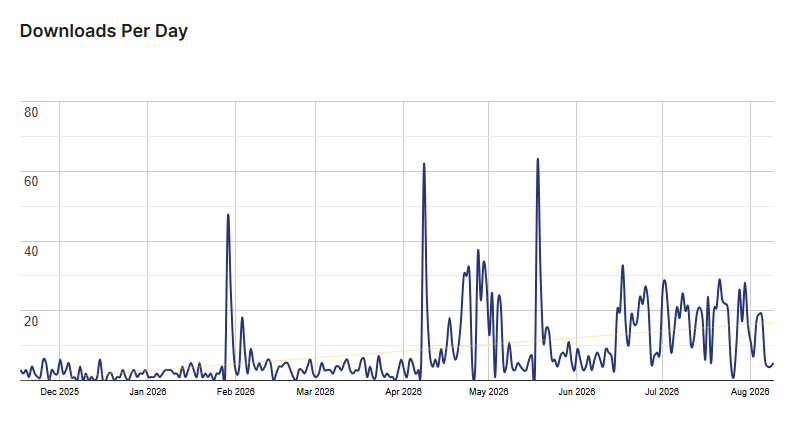
Nelio Session Recordings Usage Statistics
Key Features of Nelio Session Recordings
Here are some key features of Nelio Session Recordings you should know:
- Full Session Recording & Replay: Watch complete, video-like replays of real website visitors as they click, tap, scroll, and move their mouse across your pages.
- Multi-Page Journey Tracking: Follow a user’s exact step-by-step path from the moment they arrive on your homepage until the second they leave or complete a purchase.
- Desktop and Mobile Support: See how your site looks and functions across smartphones, tablets, and desktop computers so no screen size gets left out.
- Usability & Frustration Analysis: Spot rage clicks, dead elements, and frustrating design bottlenecks that cause visitors to leave without converting.
- Troubleshoot Tricky Errors: Replay actual user sessions right before a technical bug or form glitch happens so your team can fix issues fast.
- One-Year Data Retention: Keep your session recordings safely stored for up to 365 days, making it simple to compare user behaviour after making site redesigns.
- Lightweight Tracking: Uses a fast, non-intrusive tracking script on your site’s front end so your page loading speeds stay blazingly fast.
- WordPress-Native Management: Install, configure, and review all recordings directly inside your WordPress admin dashboard without needing external software.
- Traffic Sampling: Select what percentage of site traffic to record so you stay within your monthly view limits while gathering reliable insights.
- CSV Data Export: Easily download your session data into spreadsheets to share findings with team members, clients, or web developers.
- Flexible Traffic Plans: Choose an affordable subscription plan based on your site’s monthly page views and upgrade as your traffic grows.
- Priority Customer Support: Get fast, direct technical help from WordPress experts whenever you need setup advice or assistance.
Nelio Session Recordings Coupons, Discounts, and Pricing Plan
Nelio Session Recordings has a very straightforward pricing plan.
Monthly Plan
| 5,000 page views | 25,000 page views | 200,000 page views | 500,000 page views |
| $29/mo | $69/mo | $263/mo | $623/mo |
| Session recording | Session recording | Session recording | Session recording |
| Session replay | Session replay | Session replay | Session replay |
| Mobile support | Mobile support | Mobile support | Mobile support |
| Export to CSV | Export to CSV | Export to CSV | Export to CSV |
| One-year data retention | One-year data retention | One-year data retention | One-year data retention |
| Priority support | Priority support | Priority support | Priority support |
Yearly Plan
| 5,000 page views | 25,000 page views | 200,000 page views | 500,000 page views |
| $23/mo | $55/mo | $210.20/mo | $498.20/mo |
| Session recording | Session recording | Session recording | Session recording |
| Session replay | Session replay | Session replay | Session replay |
| Mobile support | Mobile support | Mobile support | Mobile support |
| Export to CSV | Export to CSV | Export to CSV | Export to CSV |
| One-year data retention | One-year data retention | One-year data retention | One-year data retention |
| Priority support | Priority support | Priority support | Priority support |
Nelio Session Recordings Discounts
There is no discount available on the Nelio Session Recordings yearly pricing plan.
Nelio Session Recordings Lifetime Deals
There are no lifetime deals available for Nelio Session Recordings.
How To Install The Nelio Session Recordings Plugin on WordPress?
Step 1: Visit the Nelio Session Recordings website, choose the Pro or Free version, and download the plugin. You may receive the plugin as a zip file in your email or elsewhere.
Step 2: Log in to your WordPress dashboard
Step 3: Navigate to Plugins > Add New
Step 4: Click on Upload Plugin and select the Nelio Session Recordings ZIP file you downloaded.
Step 5: Click Install Now.
Step 6: After installation, go to Plugins > Installed Plugins and activate Nelio Session Recordings.
Step 7: Follow the prompts to configure Nelio Session Recordings’s initial settings after activation. The plugin is now configured to be utilized.
For Whom This Product Is Built For?
This product is built for:
- E-commerce Store Owners: Online sellers who want to discover why shoppers leave checkout pages without finishing their purchases.
- UX Designers and Web Developers: Professionals needing visual proof of site bugs, layout flaws, or unresponsive buttons on client websites.
- Content Marketers and Bloggers: Creators aiming to see how far readers scroll down blog posts and which call-to-action sections get noticed.
- Small Business Owners: Busy entrepreneurs seeking simple, actionable feedback on site performance without studying complex mathematical reports.
Nelio Session Recordings Alternatives
Here are some alternatives to the Nelio Session Recordings plugin.
- Microsoft Clarity: A popular free user behavior tracking tool offering session replays and heatmaps with no traffic limits.
- Hotjar: A widely used SaaS behavior analytics tool featuring session recordings, heatmaps, and visitor feedback polls.
- Mouseflow: An advanced user experience platform providing session replays, click heatmaps, and conversion funnel analysis.
- Lucky Orange: An interactive analytics suite that combines session recordings, live chat, and dynamic heatmaps.
We’d love to hear your thoughts and opinions on Nelio Session Recordings. Share your experiences and insights in the comments below.
Nelio Session Recordings
Get 10% OFF on all plans
You Might Also Like

Runway Coupon – 2026

Speechify Coupon

Murf AI Coupon – 2026
From the WPdiscounts Blog
 WordPress gives website owners a large amount of control over how their sites look and work. According to WordPress.org, themes control the visual presentation of…
September 19, 2026
- Audio is often overlooked when businesses plan their website content. Yet voice can be useful for product demonstrations, online courses, tutorials, podcasts, advertisements, accessibility, and…
September 19, 2026
- Video can explain a product or service in a way that a block of text often cannot. Product demonstrations, tutorials, customer education, landing page videos,…
September 17, 2026