The Original WordPress Code Snippets Plugin
Code Snippets Coupon – 2026
Code Snippets is a WordPress plugin that allows you to run PHP code snippets on your site without directly editing your theme's functions.php file.
The Original WordPress Code Snippets Plugin
Code Snippets Coupon – 2026
Code Snippets is a WordPress plugin that allows you to run PHP code snippets on your site without directly editing your theme's functions.php file.
Exclusive Discount
Only for WPdiscounts.io visitors.
Lifetime Deal
Pay Once, Use Forever.
Limited Time Offer
Claim this offer before it ends.
Get 20% OFF on all plans. on Code Snippets (Expired)
Table of Content
About
Founders: Shea Bunge & Verdi Heinz
Website: codesnippets.pro
Community: Community

What is Code Snippets?
View Code Snippets Coupons, Discounts, Promo Codes, & Pricing Plans below.
Code Snippets is a WordPress plugin that helps you add, organize, and manage custom code without editing theme files. You can keep PHP, CSS, JavaScript, and HTML snippets in one place and control them directly from your WordPress dashboard.
A key part of Code Snippets Pro is Code Snippets AI, which helps you work with custom code using AI. You can use it to create snippets from plain-language instructions, explain existing code, and make changes without having to write everything manually. This can be especially useful for WordPress users who know what they want to achieve but are not comfortable writing code from scratch.
Code Snippets Pro also combines AI-powered code assistance with cloud syncing and customization tools. You can organize your snippets, import and export them, control when they run, and keep your code available across different WordPress websites. The result is a more convenient way to handle the small customizations that often require extra plugins or direct file editing.
For developers, freelancers, and website owners, Code Snippets provides a central place to manage custom code while making the process more accessible. With Code Snippets AI handling some of the technical work, users can spend less time figuring out code and more time improving their WordPress websites.
Code Snippets Usage Statistics
To view their stats, visit Code Snippets.
Key Features of Code Snippets
Here are some key features of the Code Snippets you should know:
- AI Code Generation: Create and explain code snippets with AI and use unlimited AI prompts with Pro.
- Cloud Synchronization and Backup: Sync snippets across multiple sites, organize them into bundles, and collaborate with team members through the Code Snippets Cloud platform.
- Multiple Snippet Types: Work with PHP, CSS, JavaScript, and HTML snippets from one interface.
- Conditional Logic: Control where and when a snippet runs with reusable conditions.
- Code Validation: Pro includes code validation and error hints to help catch problems before they turn into bigger issues.
- Snippet Bundles: Group multiple snippets together so related code is easier to manage.
- Elementor Widget: Pro users can insert content snippets directly through an Elementor widget.
- Multisite Support: Code Snippets can be used across WordPress multisite installations.
- WP-CLI and REST API: Pro adds REST API access for snippet data and support for workflow automation through WP-CLI.
- Community Snippet Library: Browse community-submitted snippets and use ready-made code to add functionality faster.
- Comprehensive Snippet Support: Manage various code types, including PHP, CSS, JavaScript, and HTML, all in one centralized location.
- Enhanced Security and Performance: By incorporating custom code, you can reduce reliance on multiple plugins, which improves site speed and minimizes security vulnerabilities.
- User-Friendly Interface: Activate snippets easily, eliminating the need for cumbersome child themes and direct file edits.
- Import and Export Functionality: Easily transfer snippets between sites using import and export features, facilitating efficient workflow management.
Code Snippets Coupons, Discounts, and Pricing Plan
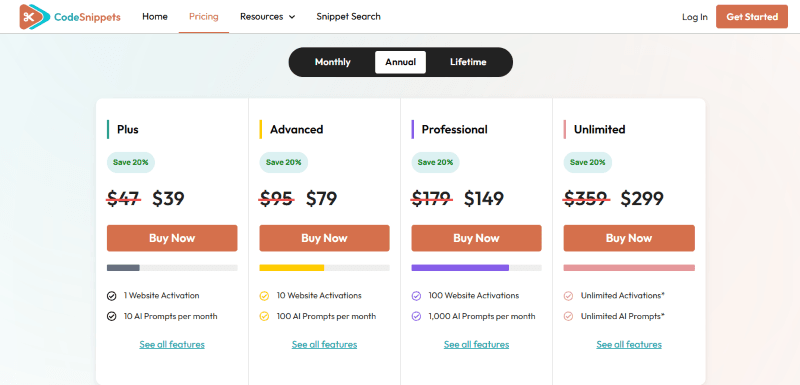
Code Snippets has a very straightforward pricing plan.
Yearly Plan
| Free | Pro | Pro | Pro | Pro |
| $0 | $39.00/yr | $79.00/yr | $149.00/yr | $299.00/yr |
| Basic Free support | 1 Website | 10 Website | 100 Website | Unlimited Website |
| Premium support and updates | Premium support and updates | Premium support and updates | Premium support and updates | |
| Unlimited AI prompts | Unlimited AI prompts | Unlimited AI prompts | Unlimited AI prompts | |
| Unlock all premium features | Unlock all premium features | Unlock all premium features | Unlock all premium features | |
| Full private cloud support | Full private cloud support | Full private cloud support | Full private cloud support |
Monthly Plan
| Pro | Pro | Pro | Pro |
| $3.90/mo | $7.90/yr | $14.90/yr | $29.90/yr |
| 1 Website | 10 Website | 100 Website | Unlimited Website |
| Premium support and updates | Premium support and updates | Premium support and updates | Premium support and updates |
| Unlimited AI prompts | Unlimited AI prompts | Unlimited AI prompts | Unlimited AI prompts |
| Unlock all premium features | Unlock all premium features | Unlock all premium features | Unlock all premium features |
| Full private cloud support | Full private cloud support | Full private cloud support | Full private cloud support |
Code Snippets Discounts
There is a 20% discount available for Code Snippets.
Code Snippets Lifetime Deals
There are four-lifetime deals available for Code Snippets.
| Pro | Pro | Pro | Pro |
| $137.00/Pay Once | $237.00/Pay Once | $447.00/Pay Once | $897.00/Pay Once |
| 1 Website | 10 Website | 100 Website | Unlimited Website |
| Premium support and updates | Premium support and updates | Premium support and updates | Premium support and updates |
| Unlimited AI prompts | Unlimited AI prompts | Unlimited AI prompts | Unlimited AI prompts |
| Unlock all premium features | Unlock all premium features | Unlock all premium features | Unlock all premium features |
| Full private cloud support | Full private cloud support | Full private cloud support | Full private cloud support |
How To Avail The Code Snippets Coupon?
Step 1: Go to the pricing page and select the plan you want to buy.
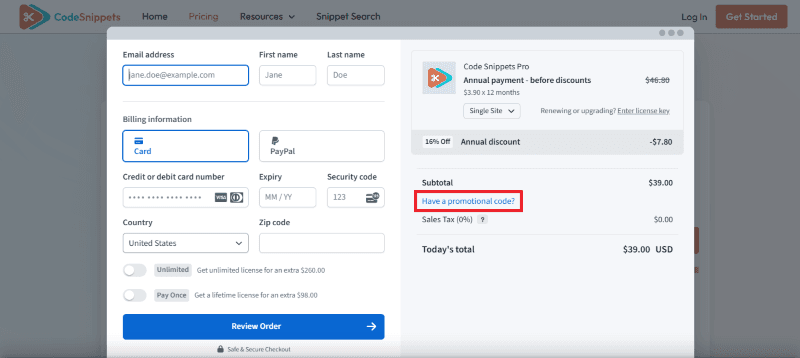
Step 2: On the Code Snippets checkout page, click on “Have a promotional code”
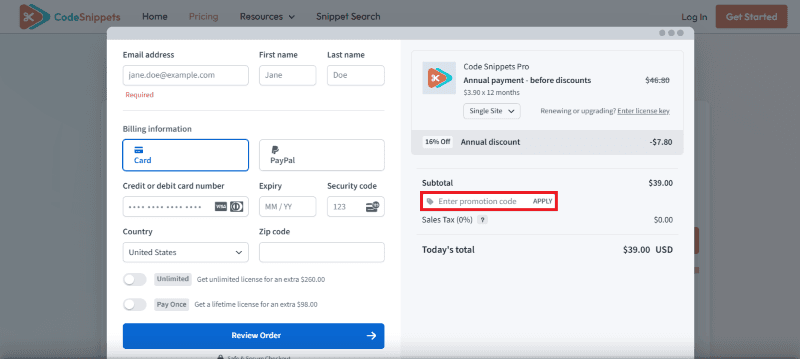
Step 3: Add the discount code in the field and click “Apply” to get the discount.
How To Install the Code Snippets Plugin on WordPress?
Step 1: Visit the Code Snippets website, choose the Pro or Free version, and download the plugin. You may receive the plugin as a zip file in your email or elsewhere.
Step 2: Log in to your WordPress dashboard
Step 3: Navigate to Plugins > Add New
Step 4: Click on Upload Plugin and select the Code Snippets ZIP file you downloaded.
Step 5: Click Install Now.
Step 6: After installation, go to Plugins > Installed Plugins and activate Code Snippets.
Step 7: Follow the prompts to configure Code Snippets’s initial settings after activation. The plugin is now configured to be utilized.
For Whom This Product Is Built For?
This product is built for:
- WordPress Developers: Manage custom PHP, CSS, JavaScript, and HTML without constantly editing theme files.
- Freelancers: Keep snippets for different client projects organized and easier to transfer between websites.
- Agencies: Use cloud syncing, bundles, multisite support, and multiple-site licensing for larger workflows.
- Site Owners: Make useful WordPress customizations without adding another plugin for every small task.
- Technical Marketers: Add tracking, styling, and custom functionality while keeping code in one manageable place.
- Teams: Cloud features make it easier to share, organize, and sync snippets across sites and team workflows.
Code Snippets Integrations
Code Snippets Pro supports several WordPress technologies and workflow tools, including:
- Elementor, with a dedicated Content Snippet widget for inserting snippets into Elementor layouts.
- WordPress Gutenberg, for working with blocks and snippet-based content.
- WordPress Multisite, including network-wide snippet management.
- REST API, for accessing snippet data programmatically.
- WP-CLI, for automating snippet-related workflows.
- Code Snippets Cloud, for syncing, backing up, organizing, and deploying snippets between connected websites.
Code Snippets Alternatives
Here are some alternatives to the Code Snippets plugin.
- WPCodeBox
- Advanced Scripts
- Post Snippets
- Woody Code Snippets
What Code Snippets Customers Say
“This plugin is great for non-coders like me, as it allows me to manage my code snippets in an organized way without touching the PHP files directly, which reduces the risk of fatal errors on my site (if you’ve ever broken your site when editing the functions.php file, you know what I’m talking about!). The interface is intuitive, and the ability to activate/deactivate snippets is super helpful for testing new features and apply customizations. In short: If you work with code snippets regularly, this plugin is a must-have.”
We’d love to hear your thoughts and opinions on Code Snippets. Share your experiences and insights in the comments below.
Code Snippets
20% OFF
You Might Also Like

Soro Coupon – 2026

Runway Coupon – 2026

Speechify Coupon
From the WPdiscounts Blog
 WordPress is becoming easier for AI agents to work with. WordPress 6.9 introduced the Abilities API, which gives WordPress, themes, and plugins a standard way…
October 2, 2026
- WordPress gives website owners a large amount of control over how their sites look and work. According to WordPress.org, themes control the visual presentation of…
September 19, 2026
- Audio is often overlooked when businesses plan their website content. Yet voice can be useful for product demonstrations, online courses, tutorials, podcasts, advertisements, accessibility, and…
September 19, 2026