All in One Visitor Conversion Engine for WordPress
Brave Coupon – 2026
Brave is a powerful WordPress conversion plugin that helps you build all sorts of interactive elements like popups, lead forms, and surveys.
All in One Visitor Conversion Engine for WordPress
Brave Coupon – 2026
Brave is a powerful WordPress conversion plugin that helps you build all sorts of interactive elements like popups, lead forms, and surveys.
Exclusive Discount
Only for WPdiscounts.io visitors.
Limited Time Offer
Claim this offer before it ends.
Offer Expired - Check back soon!
Table of Content
About
Founder: Towfiq I.
Website: getbrave.io

What is Brave?
View Brave Coupons, Discounts, Promo Codes, & Pricing Plans below.
Brave is a powerful WordPress conversion plugin that helps you build all sorts of interactive elements like popups, lead forms, and surveys. It functions like a complete marketing toolkit inside your website that allows you to grab your visitors’ attention without being annoying. Instead of just having a static page, you can use this tool to create dynamic messages that appear at just the right time to help grow your business.
The plugin has an intuitive drag and drop editor that makes designing complex pop-ups feel as easy as building a digital collage. You do not need to know any coding because you can simply move text, images, and buttons around until they look perfect. It is designed to be lightweight so your site stays fast, which is great for keeping both your visitors and search engines happy.
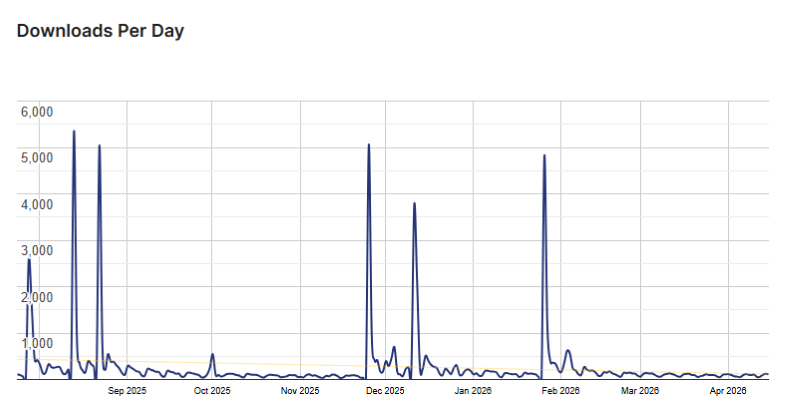
Brave Usage Statistics
Key Features of Brave
Here are some key features of Brave you should know:
- Visual Drag and Drop Builder: You can design your popups and forms from scratch using a simple interface where you just drag elements into place.
- Over 200 Ready-Made Templates: If you are in a hurry, you can choose from a massive library of professional designs that are ready to go in seconds.
- Smart Goal Tracking: The plugin tracks every click and signup automatically so you can see exactly which of your designs are making the most money.
- Advanced Targeting Rules: You have the ability to show different messages to people based on where they live, what device they use, or which page they are viewing.
- Interactive Elements: You can add unique items like spinning wheels, countdown timers, and even quizzes to make your website more fun for visitors.
- Integrated A/B Testing: This feature lets you run two different versions of a pop-up at the same time to see which one gets more signups from your crowd.
- Multi-Step Campaigns: You can create forms with multiple pages that guide your users through a process, which often leads to much higher conversion rates.
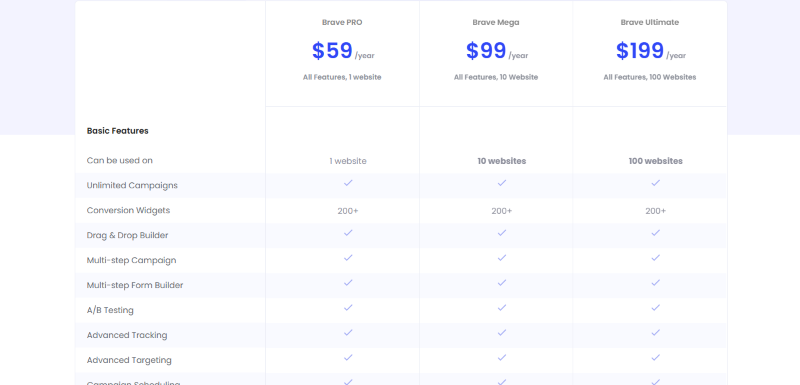
Brave Coupons, Discounts, and Pricing Plan
Brave has a very straightforward pricing plan.
| Brave PRO | Brave Mega | Brave Ultimate |
| $59/yr | $99/yr | $199/yr |
| Use on 1 website Unlimited Campaigns 200+ Conversion Widgets Drag & Drop Builder Multi-step Campaign Multi-step Form Builder A/B Testing Advanced Tracking |
Use on 10 website Unlimited Campaigns 200+ Conversion Widgets Drag & Drop Builder Multi-step Campaign Multi-step Form Builder A/B Testing Advanced Tracking |
Use on 100 website Unlimited Campaigns 200+ Conversion Widgets Drag & Drop Builder Multi-step Campaign Multi-step Form Builder A/B Testing Advanced Tracking |
Brave Discounts
There is no discount available on the Brave yearly pricing plan.
Brave Lifetime Deals
There is no lifetime deal available for Brave.
How To Avail The Brave Coupon?
Step 1: Go to the pricing page and select the plan you want to buy.
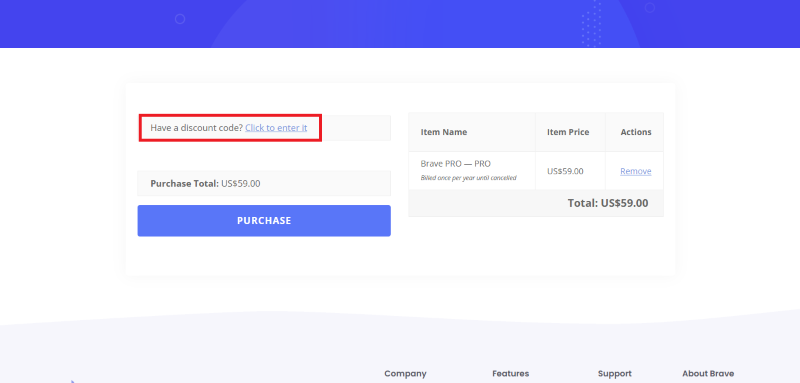
Step 2: On the Brave checkout page, click on “Have a discount code”
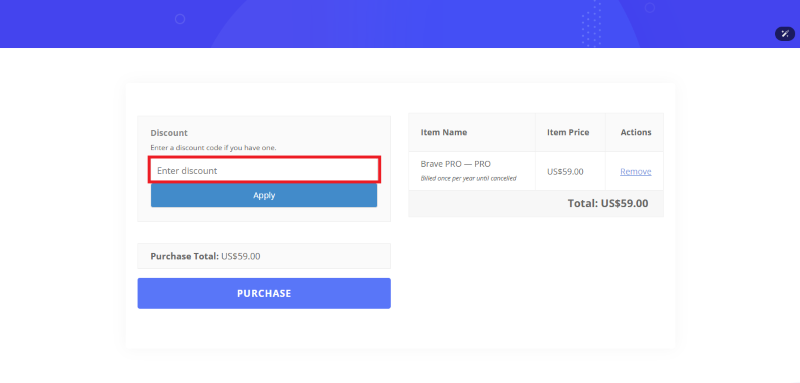
Step 3: Add the discount code in the field and click “Apply” to get the discount.
How To Install The Brave Plugin on WordPress?
Step 1: Visit the Brave website, choose the Pro or Free version, and download the plugin. You may receive the plugin as a zip file in your email or elsewhere.
Step 2: Log in to your WordPress dashboard
Step 3: Navigate to Plugins > Add New
Step 4: Click on Upload Plugin and select the Brave ZIP file you downloaded.
Step 5: Click Install Now.
Step 6: After installation, go to Plugins > Installed Plugins and activate Brave.
Step 7: Follow the prompts to configure Brave’s initial settings after activation. The plugin is now configured to be utilized.
For Whom This Product Is Built For?
This product is built for:
- Small, Medium, and Enterprise Businesses
- E-commerce Store Owners
- Local Community Leaders
- Niche Bloggers
- Marketing Agencies
- Chambers of Commerce
- Event Organizers
Brave Alternatives
Here are some alternatives to the Brave plugin.
- Convert Pro
- OptinMonster
- Poptin
- Getsitecontrol
| Product Name | OptinMonster | Thrive Leads | Elementor |
| Number of Websites | 600,000+ | 200,000+ | 10+ million |
What Brave Customers Say
“I started using this plugin a year ago after testing out a couple of others like it, and this one was definitely my favorite. The free version has everything you need as a small business: just simple conversion numbers and percentages of those completing the action you ask it to record.”
Read more Brave reviews on WordPress.org
We’d love to hear your thoughts and opinions on Brave. Share your experiences and insights in the comments below.
Brave
You Might Also Like

Semrush Coupon – 2026

Surfer Coupon – 2026

Rytr Coupon – 2026
From the WPdiscounts Blog
 Visual content has become an important part of running a website. A blog needs featured images, an online store needs product visuals, and landing pages…
September 15, 2026
- Getting a website published is only the first step. The harder part is helping the right people find it. Search engine optimization involves keyword research,…
September 15, 2026
- A website can have a good design and still struggle if its content is weak. Product pages, blog posts, landing pages, emails, social posts, and…
September 8, 2026