Automate WordPress support with an AI chatbot.
Resolver Coupon – 2026
Resolver is an AI-powered chatbot plugin for WordPress that answers visitor questions using your website's content.
Automate WordPress support with an AI chatbot.
Resolver Coupon – 2026
Resolver is an AI-powered chatbot plugin for WordPress that answers visitor questions using your website's content.
Exclusive Discount
Only for WPdiscounts.io visitors.
Limited Time Offer
Claim this offer before it ends.
Table of Content
About
Founder: Ben Sibley
Website: resolverchatbot.com
Community: Community

What is Resolver?
View Resolver Coupons, Discounts, Promo Codes, & Pricing Plans below.
Resolver is an AI-powered chatbot plugin for WordPress that answers visitor questions using your website’s content. It learns from your existing pages and automatically updates its training when you edit or publish new content. This allows it to provide relevant answers without requiring you to manually update its knowledge base every time your website changes.
The plugin connects with popular AI models, including ChatGPT, Claude, and Google Gemini. You can use your own API keys to power the chatbot instead of paying a separate monthly subscription to a chatbot service.
Resolver also gives you control over how the chatbot looks and where it appears on your website. You can customize its appearance, review previous conversations, and monitor token usage. Its automatic training feature can also process large amounts of website content, making it easier to get your chatbot ready without spending hours feeding it information.
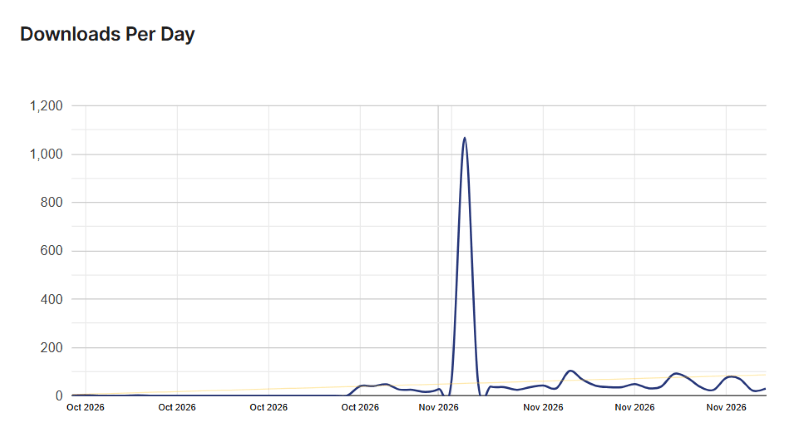
Resolver Usage Statistics
Key Features of Resolver
Here are some key features of Resolver you should know:
- AI Model Integrations: Connect your chatbot with OpenAI, Claude, Gemini, and supported Mistral models.
- Automatic Training: Train the chatbot using your website content. It automatically retrains when you update existing pages or publish new ones.
- Customizable Appearance: Change the chatbot’s name and appearance to match your website’s branding.
- Chat History: Review previous conversations to understand what visitors are asking and identify questions your website needs to answer.
- Visibility Settings: Choose which pages display the chatbot and which pages should remain free of it.
- Token Monitoring: Track AI token usage and set limits to keep your API expenses under control.
- Custom Fields: Train the chatbot using additional website information stored through custom fields.
- WooCommerce Product Data: Let your chatbot learn about product prices, dimensions, attributes, and variations.
- PDF Training: Add PDF documents from your WordPress Media Library to the chatbot’s training data.
- Chat Analytics: Review chat activity and message statistics to understand how visitors interact with your chatbot.
- Training Notes: Add extra information to improve the chatbot’s answers when your existing website content is not enough.
- User Feedback: Let visitors rate chatbot responses so you can identify areas that need improvement.
- Human Requests: Track how frequently visitors ask to speak with a real person.
Resolver Coupons, Discounts, and Pricing Plan
Resolver has a very straightforward pricing plan.
| Plans | Websites | Annual Price | Lifetime Price |
| Pro Standard | 1 | $49/year | $147 |
| Pro Builder | 3 | $79/year | $237 |
| Pro Agency | Unlimited | $199/year | $597 |
| Free Version | Unlimited | Free | Free |
Resolver Discounts
There is 33% discount available on the Resolver pricing plan.
Resolver Lifetime Deals
There are three lifetime deals available for Resolver.
How To Avail The Resolver Coupon?
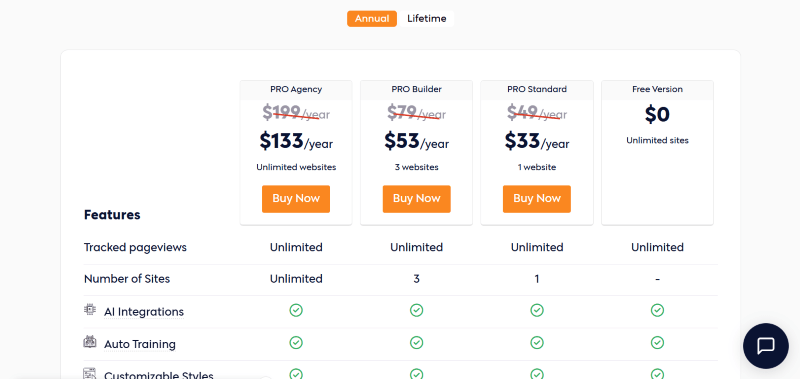
Step 1: Go to the pricing page and select the plan you want to buy.
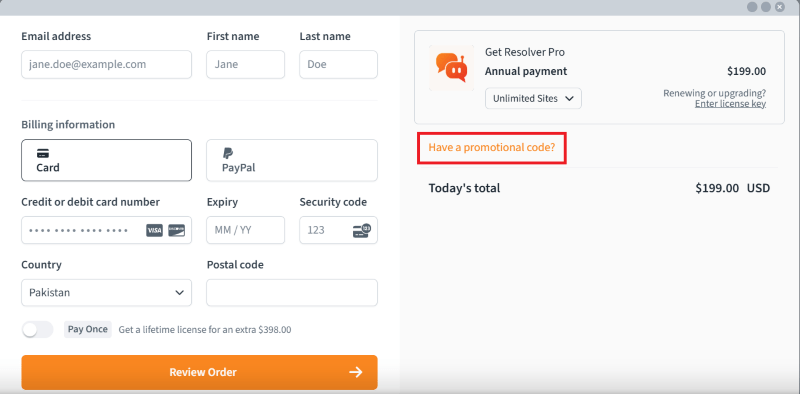
Step 2: On the Resolver checkout page, click on “Have a discount code”
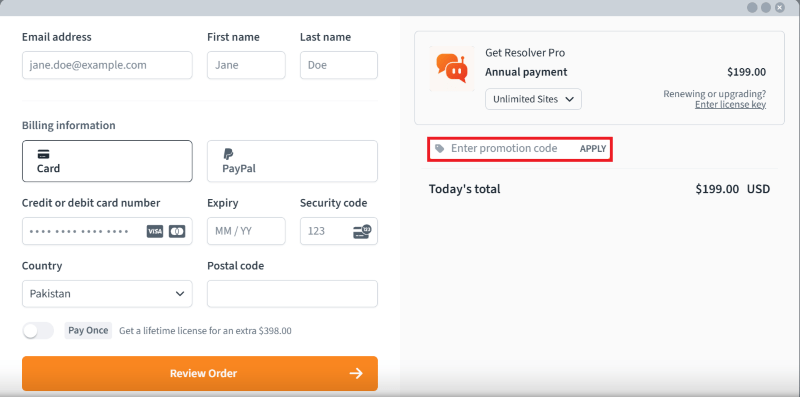
Step 3: Add the discount code in the field and click “Apply” to get the discount.
How To Install The Resolver Plugin on WordPress?
Step 1: Visit the Resolver website, choose the Pro or Free version, and download the plugin. You may receive the plugin as a zip file in your email or elsewhere.
Step 2: Log in to your WordPress dashboard
Step 3: Navigate to Plugins > Add New
Step 4: Click on Upload Plugin and select the Resolver ZIP file you downloaded.
Step 5: Click Install Now.
Step 6: After installation, go to Plugins > Installed Plugins and activate Resolver.
Step 7: Follow the prompts to configure Resolver’s initial settings after activation. The plugin is now configured to be utilized.
For Whom This Product Is Built For?
This product is built for:
- Small Business Owners: Answer common customer questions without spending hours responding to emails.
- WooCommerce Store Owners: Help shoppers find product information, prices, and other product details.
- WordPress Agencies: Add AI-powered customer support to client websites using the Agency license.
- Bloggers and Publishers: Help readers find information across articles, tutorials, and other website content.
- Membership Website Owners: Help members find answers using existing website content and documentation.
- SaaS and Software Businesses: Answer common questions about services, features, pricing, and product documentation.
- Website Developers: Build more helpful websites without developing a chatbot from scratch.
Resolver Alternatives
Here are some alternatives to the Resolver plugin.
- AI Engine: AI Engine is a WordPress AI plugin that offers chatbot functionality, AI-powered content tools, and integrations with several AI providers. Its Pro version includes content-aware chatbots and additional AI features.
- WPBot: WPBot is a WordPress chatbot plugin that combines AI conversations, website search, FAQs, and lead collection. It also offers integrations with OpenAI, Gemini, Claude, and other AI platforms.
- Tidio: Tidio combines live chat, customer support tools, and its Lyro AI agent in one platform. It is suitable for businesses that want both automated responses and live customer support.
- Chatway: Chatway provides a live chat solution for WordPress websites, allowing businesses to communicate with visitors and manage customer conversations.
What Resolver Customers Say
“I’ve been using Resolver Pro for a short time now, and I’m really happy with it so far! It’s easy to use, works great, and I can definitely see the potential it has. Support and communications from the team is also great. What I’m most excited about is what’s still to come. I’ve seen some of the features planned for future updates, and I’m really looking forward to trying them out! It’s great to see a plugin like this being actively developed. Keep up the awesome work!”
Read more Resolver reviews on WordPress.org
We’d love to hear your thoughts and opinions on Resolver. Share your experiences and insights in the comments below.
Resolver
Get 33% OFF on all plans
You Might Also Like


From the WPdiscounts Blog
 A WordPress website needs more than a good design and useful content. The hosting behind it affects how quickly pages load, how safely it stores…
November 23, 2026
- A static website built with HTML and CSS gives developers control over page structure, layout, and appearance. However, making routine changes often requires editing code,…
November 10, 2026
- If your hosting provider includes an AI website builder, building a WordPress website can take less time. Instead of creating every page from scratch, you…
November 6, 2026