Best MCP Plugin for WordPress
Saddle Coupon – 2026
Saddle is a WordPress plugin that turns your website into an MCP server, letting AI apps such as Claude, ChatGPT, Cursor, and Gemini CLI work directly with WordPress.
Best MCP Plugin for WordPress
Saddle Coupon – 2026
Saddle is a WordPress plugin that turns your website into an MCP server, letting AI apps such as Claude, ChatGPT, Cursor, and Gemini CLI work directly with WordPress.
Exclusive Discount
Only for WPdiscounts.io visitors.
Limited Time Offer
Claim this offer before it ends.
Offer Expired - Check back soon!
Table of Content
About
Founder: Fahim Reza
Website: plugpress.io
Community: Community

What is Saddle?
View Saddle Coupons, Discounts, Promo Codes, & Pricing Plans below.
Saddle is a free WordPress plugin that turns your website into an MCP server, letting AI apps such as Claude, ChatGPT, Cursor, and Gemini CLI work directly with WordPress. You can ask an AI assistant to write posts, build pages, change content, manage media, and handle other WordPress tasks without constantly copying and pasting between tools.
Saddle works directly on your own WordPress site instead of sending your website through a third-party relay or proxy. It uses a fixed set of named tools, so an AI can only perform the actions you allow. The free version currently provides 61 tools, while Saddle Pro adds 47 Divi-focused tools for a total of 108.
The plugin is designed to keep you in control. New connections start in read-only mode, destructive actions require confirmation, and activity is recorded so you can see what the AI changed or tried to change. You can also switch off AI access whenever you need to.
Saddle is especially interesting for WordPress users who already work with AI tools and want those tools to do real work inside their websites. Everything it creates remains editable in WordPress, which makes it more useful than simply generating content in a separate chatbot.
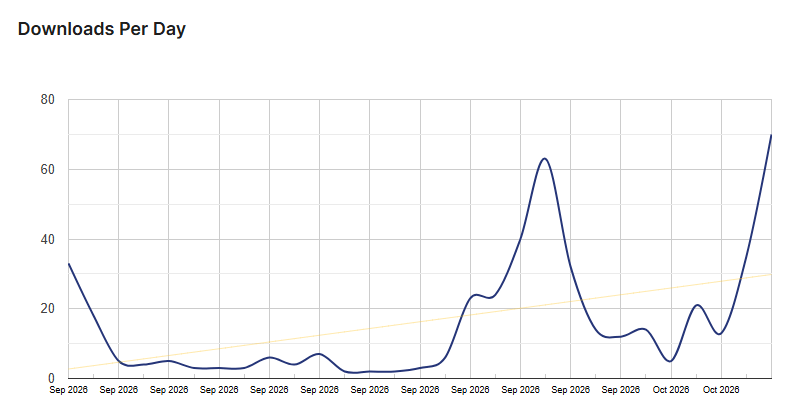
Saddle Usage Statistics
Key Features of Saddle
Here are some key features of Saddle you should know:
- AI-Powered WordPress Management: Connect an AI assistant and ask it to write posts, edit pages, manage media, or make other changes directly on your website.
- Starts Read-Only: New AI connections begin with read-only access, giving you a safer way to test the setup before allowing changes.
- Real WordPress Blocks: Saddle can create layouts using your site’s existing colors, fonts, spacing, and WordPress blocks, keeping the content editable afterward.
- Built-In Page Verification: It checks finished pages and can flag issues such as poor readability and contrast before you publish.
- SEO Support: With Pro, Saddle can fill SEO titles, descriptions, and focus keywords in Yoast, Rank Math, and AIOSEO.
- Unsplash Integration: Ask the connected AI for a suitable photo and Saddle can find an image, add it to the Media Library, and include photographer credit.
- Permission Controls: Decide how much access an AI connection gets and control individual tools from the WordPress dashboard.
- Activity Logging: See changes made through Saddle and attempts that were blocked, giving you a record of AI activity on your site.
- Divi 5 Support: Saddle Pro adds native Divi tools for building and editing real Divi modules, loops, the Divi Library, and Theme Builder elements.
Saddle Coupons, Discounts, and Pricing Plan
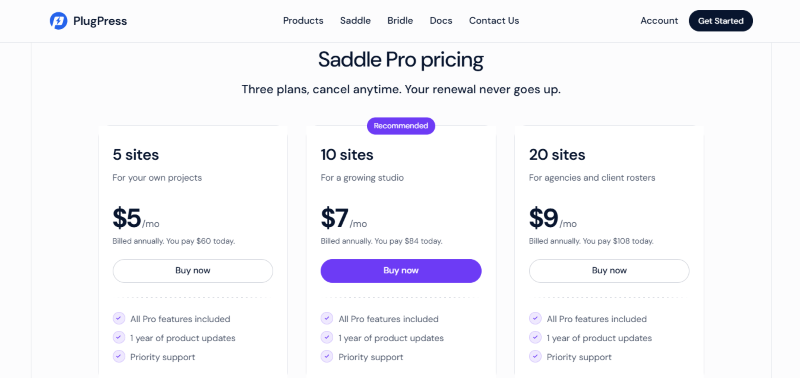
Saddle has a very straightforward pricing plan.
| 5 sites | 10 sites | 20 sites |
| $5/mo | $7/mo | $9/mo |
| All Pro features included | All Pro features included | All Pro features included |
| 1 year of product updates | 1 year of product updates | 1 year of product updates |
| Priority support | Priority support | Priority support |
Saddle Discounts
There is no discount available on the Saddle yearly pricing plan.
Saddle Lifetime Deals
There are no lifetime deals available for Saddle.
How To Avail The Saddle Coupon?
Step 1: Go to the pricing page and select the plan you want to buy.
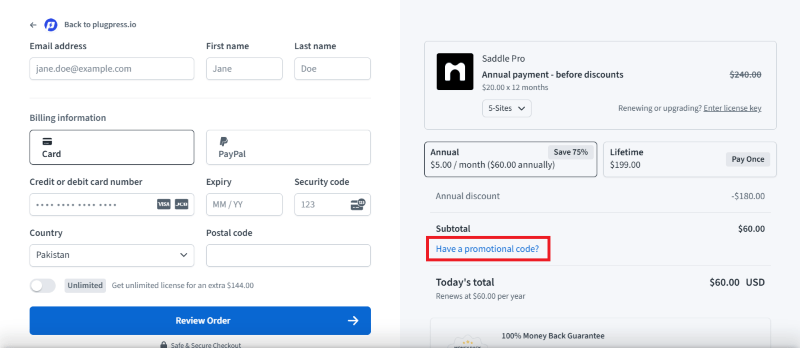
Step 2: On the Saddle checkout page, click on “Have a discount code”
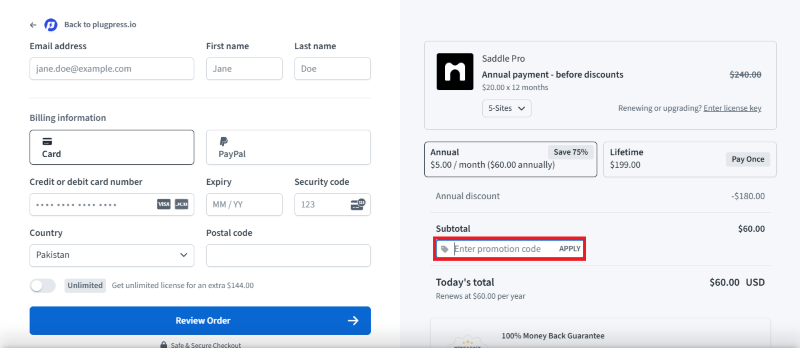
Step 3: Add the discount code in the field and click “Apply” to get the discount.
How To Install The Saddle Plugin on WordPress?
Step 1: Visit the Saddle website, choose the Pro or Free version, and download the plugin. You may receive the plugin as a zip file in your email or elsewhere.
Step 2: Log in to your WordPress dashboard
Step 3: Navigate to Plugins > Add New
Step 4: Click on Upload Plugin and select the Saddle ZIP file you downloaded.
Step 5: Click Install Now.
Step 6: After installation, go to Plugins > Installed Plugins and activate Saddle.
Step 7: Follow the prompts to configure Saddle’s initial settings after activation. The plugin is now configured to be utilized.
For Whom This Product Is Built For?
This product is built for:
- Small Business Owners: Helpful for businesses that need regular SEO content without hiring a full content team.
- Bloggers and Publishers: Useful for keeping a publishing schedule without writing every article manually.
- SEO Professionals: Can automate keyword research, content creation, optimization, and publishing as part of a larger SEO workflow.
- Agencies: Useful for teams managing content for multiple websites and customers.
- Online Businesses: A practical option for businesses that want to publish more content while spending less time on repetitive tasks.
Saddle Alternatives
Here are some alternatives to the Saddle plugin.
- WPVibe: A WordPress MCP option focused on broad remote WordPress administration, with a hosted connection model.
- Novamira: A stronger choice for developers who need deeper access to PHP, WP-CLI, databases, and the filesystem.
- Royal MCP: Focuses on a broader integration surface, including WooCommerce, Elementor, and ACF.
- AI Engine: A wider WordPress AI toolkit that also provides an MCP server for connecting AI with WordPress.
We’d love to hear your thoughts and opinions on Saddle. Share your experiences and insights in the comments below.
Saddle
You Might Also Like

AEO God Mode Coupon – 2026

Soro Coupon – 2026

WPVibe Coupon – 2026
From the WPdiscounts Blog
 WordPress is becoming easier for AI agents to work with. WordPress 6.9 introduced the Abilities API, which gives WordPress, themes, and plugins a standard way…
October 2, 2026
- WordPress gives website owners a large amount of control over how their sites look and work. According to WordPress.org, themes control the visual presentation of…
September 19, 2026
- Audio is often overlooked when businesses plan their website content. Yet voice can be useful for product demonstrations, online courses, tutorials, podcasts, advertisements, accessibility, and…
September 19, 2026