Build the Marketplace You’ve Been Imagining
Dokan Coupon – 2026
Dokan is a multi-vendor marketplace plugin for WordPress and WooCommerce.
Build the Marketplace You’ve Been Imagining
Dokan Coupon – 2026
Dokan is a multi-vendor marketplace plugin for WordPress and WooCommerce.
Exclusive Discount
Only for WPdiscounts.io visitors.
Limited Time Offer
Claim this offer before it ends.
Offer Expired - Check back soon!

What is Dokan?
View Dokan Coupons, Discounts, Promo Codes, & Pricing Plans below.
Dokan is a multi-vendor marketplace plugin for WordPress and WooCommerce. It lets you create a marketplace where multiple sellers can register, create their own stores, add products, manage orders, and receive payments while you control the marketplace from the WordPress dashboard.
Instead of building vendor management tools from scratch, Dokan provides a frontend dashboard where vendors can handle many daily tasks without constantly accessing the WordPress admin area. Store owners can manage vendors, commissions, withdrawals, products, orders, reports, and other marketplace settings from one place.
The plugin is available in a free Lite version as well as paid plans. The free version includes features such as unlimited vendors, a frontend vendor dashboard, order management, vendor withdrawals, store widgets, and basic marketplace functionality.
For larger marketplaces, Dokan Pro adds premium modules for things such as subscriptions, bookings, auctions, product advertising, vendor analytics, geolocation, staff management, payment gateways, and more. This modular approach lets businesses add more marketplace functionality as their needs increase.
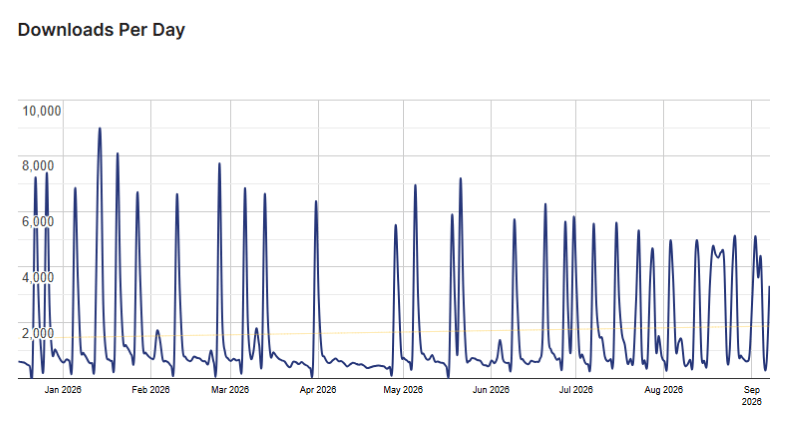
Dokan Usage Statistics
Key Features of Dokan
Here are some key features of Dokan you should know:
- Multi-Vendor Marketplace: Turn a WooCommerce website into a marketplace where multiple sellers can operate their own stores.
- Frontend Vendor Dashboard: Vendors can manage products, orders, earnings, and store information from the frontend.
- Vendor Management: Create, manage, verify, and control sellers from the WordPress admin area.
- Commission Management: Set percentage, flat-rate, or combined commissions to control how marketplace revenue is shared.
- Vendor Withdrawals: Give vendors a system for requesting and receiving their marketplace earnings.
- Product Management: Let vendors add and manage products without needing full WordPress administrator access.
- Vendor Analytics: Provide sellers with useful information about their store performance and earnings.
- Product Advertising: Allow vendors to pay to promote selected products across the marketplace.
- Bookings and Auctions: Add marketplace models beyond traditional product selling through dedicated modules.
- Mobile Marketplace Support: Dokan also offers mobile app options that allow marketplace operations to extend beyond the desktop.
Dokan Coupons, Discounts, and Pricing Plan
Dokan has a very straightforward pricing plan.
| Plan | Price | Sites | Main Offering |
| Lite | Free | Unlimited | Basic multi-vendor marketplace |
| Starter | $149/year | 1 | 4 premium modules |
| Professional | $249/year | 3 | 23 premium modules |
| Business | $499/year | 5 | 42+ premium modules |
| Enterprise | $999/year | 20 | All features and priority support |
Dokan Discounts
There is no discount available on the Dokan yearly pricing plan.
Dokan Lifetime Deals
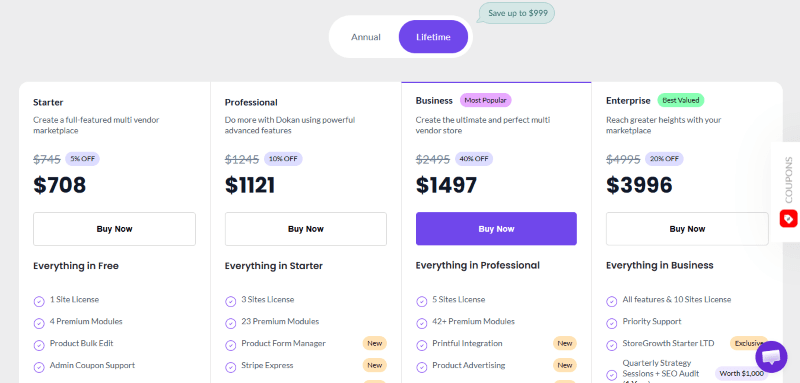
There are four lifetime deals available for Dokan.
| Plan | Price | Sites | Main Offering |
| Starter | $708/one-time | 1 | 4 premium modules |
| Professional | $1121/one-time | 3 | 23 premium modules |
| Business | $1497/one-time | 5 | 42+ premium modules |
| Enterprise | $3996/one-time | 10 | All features and priority support |
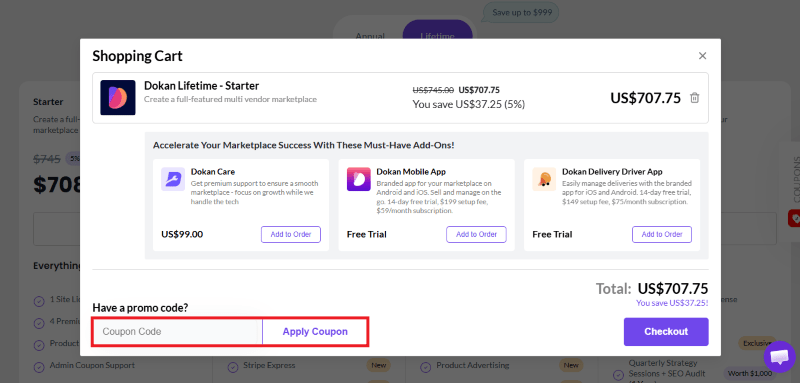
How To Avail The Dokan Coupon?
Step 1: Go to the pricing page and select the plan you want to buy.
Step 2: On the Dokan checkout page, add the discount code in the field and click “Apply” to get the discount.
How To Install The Dokan Plugin on WordPress?
Step 1: Visit the Dokan website, choose the Pro or Free version, and download the plugin. You may receive the plugin as a zip file in your email or elsewhere.
Step 2: Log in to your WordPress dashboard
Step 3: Navigate to Plugins > Add New
Step 4: Click on Upload Plugin and select the Dokan ZIP file you downloaded.
Step 5: Click Install Now.
Step 6: After installation, go to Plugins > Installed Plugins and activate Dokan.
Step 7: Follow the prompts to configure Dokan’s initial settings after activation. The plugin is now configured to be utilized.
For Whom This Product Is Built For?
This product is built for:
- Marketplace Owners: Build a website where multiple independent sellers can list and sell products.
- WooCommerce Store Owners: Add multi-vendor functionality to an existing WooCommerce website.
- Niche Marketplaces: Create marketplaces for specific industries, products, or communities.
- Local Marketplaces: Bring multiple local sellers together under one website.
- Wholesale Businesses: Build B2B marketplaces with vendor and product management features.
- Service Marketplaces: Use booking and related modules to support service-based businesses.
- Growing E-commerce Businesses: Start with the free version and add premium functionality as the marketplace expands.
Dokan Alternatives
Here are some alternatives to the Dokan plugin.
- WC Vendors: A WooCommerce-focused marketplace plugin with vendor management tools.
- YITH Multi Vendor: A marketplace solution from YITH with WooCommerce integration.
- WooCommerce Product Vendors: WooCommerce’s own vendor marketplace extension.
- WC Marketplace: Another WordPress option for adding multi-vendor functionality.
- MultiVendorX: A WooCommerce marketplace plugin with vendor management and marketplace features.
What Dokan Customers Say
“The support team is also commendable, providing timely assistance and guidance whenever needed. One area for improvement would be the implementation of a robust RTL (Right-to-Left) specification. This enhancement would significantly benefit users who operate in languages that read from right to left, ensuring a more inclusive experience for all vendors and customers. Overall, I wholeheartedly give Dokan a five-star rating! It’s a powerful tool that has made my e-commerce journey enjoyable and successful. Highly recommended for anyone looking to build a thriving online marketplace!”
Read more Dokan reviews on WordPress.org
We’d love to hear your thoughts and opinions on Dokan. Share your experiences and insights in the comments below.
Dokan
You Might Also Like

DoubleScale Coupon – 2026
Dokan Coupon – 2026

Lovable Coupon – 2026
From the WPdiscounts Blog
 Running a marketplace on WordPress is different from running a standard online store. A regular WooCommerce setup is usually managed by one store owner, while…
September 4, 2026
- Introduction Artificial intelligence is no longer limited to chatbots or content generators. It is now being built directly into WordPress tools, website builders, coding platforms,…
August 26, 2026
- A WordPress website can report that an email was sent without proving that the message actually reached its recipient. WordPress itself states that a successful…
August 21, 2026