WordPress CRM That Runs Entire Sales Pipeline
Bit CRM Coupon – 2026
Bit CRM is a self-hosted WordPress plugin that turns your site admin area into a complete sales hub.
Best Alternate

WPdiscounts
Exclusive Discount
Only for WPdiscounts.io visitors.
Limited Time Offer
Claim this offer before it ends.
Save 50% OFF on all plans on Bit CRM (Expired)
Alternatives of Bit CRM

WPdiscounts

No Coupon Available
Table of Content
About
Founder: Abdul Kaioum
Website: bit-crm.com
Community: Community

What is Bit CRM?
View Bit CRM Coupons, Discounts, Promo Codes, & Pricing Plans below.
Bit CRM is a self-hosted WordPress plugin that turns your site admin area into a complete sales hub. It allows you to collect leads, track contacts, manage companies, move deals through custom pipeline stages, and send invoices without paying recurring monthly fees for outside SaaS tools.
Created by the Bit Apps team, this tool replaces scattered spreadsheets by bringing every step of your customer journey inside one clean dashboard. If you operate an e-commerce shop, its native WooCommerce integration automatically imports store buyers as CRM contacts, updates order histories, and lets you drop store products straight into deal quotes or customer invoices. What really sets it apart from traditional options is its built-in Model Context Protocol (MCP) AI server connection. This allows you to hook up AI models like ChatGPT or Claude directly to your CRM data so you can summarize client notes, extract contact details, or inspect pipeline trends through simple conversational prompts.
Beyond basic deal tracking, the plugin comes loaded with engagement features including task logs, meeting managers, call history trackers, IMAP email syncing, and a dedicated branded Client Portal where clients can view pending bills. Even with these advanced systems running, the plugin is engineered using React and TypeScript to process heavy operations asynchronously in the background so your website page speeds remain fast.
Key Features of Bit CRM
Here are some key features of Bit CRM you should know:
- Visual Deals Pipeline: Track every sales opportunity across custom stages like proposal, negotiation, or won using a clean Kanban board or list view.
- Native WooCommerce Sync: Automatically turns store buyers into CRM contacts, updates order histories, and lets you drop store items directly into deal quotes and invoices.
- Dedicated Client Portal: Gives your customers a private login area where they can review pending invoices, check upcoming meetings, and view shared project notes.
- Visual Workflow Builder: Automates daily tasks by sending emails, setting follow-up tasks, assigning tags, and creating notes without manual work.
- Instant Invoicing System: Generates clean invoices with automatic taxes and discounts, sending downloadable PDFs and direct online payment links to client inboxes.
- AI MCP Server Integration: Connects your database directly with AI platforms like ChatGPT and Claude to quickly analyze sales trends and summarize records.
- Complete Engagement Hub: Keeps a history of every client interaction by logging phone calls, tracking emails through IMAP, setting calendar reminders, and storing file attachments.
Bit CRM Coupons, Discounts, and Pricing Plan
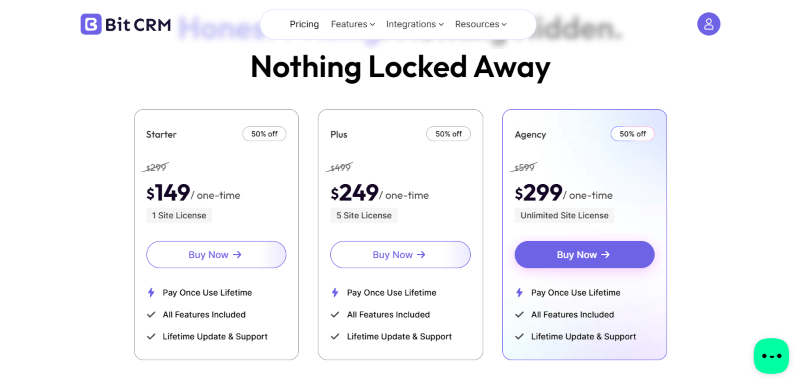
Bit CRM has a very straightforward pricing plan.
| Starter | Plus | Agency |
| $149/one-time | $249/one-time | $299/one-time |
| Normally $299 | Normally $499 | Normally $599 |
| 1 Site License | 5 Site License | Unlimited Site License |
| Pay Once, Use Lifetime | Pay Once, Use Lifetime | Pay Once, Use Lifetime |
| All Features Included | All Features Included | All Features Included |
| Lifetime Updates & Support | Lifetime Updates & Support | Lifetime Updates & Support |
Bit CRM Discounts
There is no discount available on the Bit CRM yearly pricing plan.
Bit CRM Lifetime Deals
There are no lifetime deals available for Bit CRM.
How To Avail The Bit CRM Coupon?
Step 1: Go to the pricing page and select the plan you want to buy.
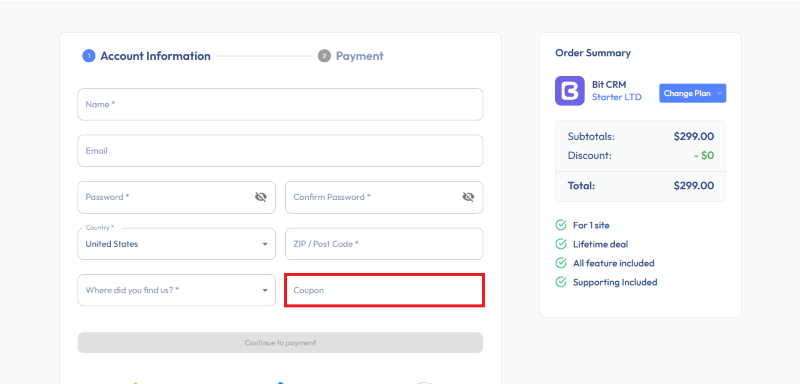
Step 2: On the Bit CRM checkout page, add the discount code in the field and click “Apply” to get the discount.
How To Install The Bit CRM Plugin on WordPress?
Step 1: Visit the Bit CRM website, choose the Pro or Free version, and download the plugin. You may receive the plugin as a zip file in your email or elsewhere.
Step 2: Log in to your WordPress dashboard
Step 3: Navigate to Plugins > Add New
Step 4: Click on Upload Plugin and select the Bit CRM ZIP file you downloaded.
Step 5: Click Install Now.
Step 6: After installation, go to Plugins > Installed Plugins and activate Bit CRM.
Step 7: Follow the prompts to configure Bit CRM’s initial settings after activation. The plugin is now configured to be utilized.
For Whom This Product Is Built For?
This product is built for:
- Freelancers: Solopreneurs who want to track prospective clients, organize project notes, and issue professional invoices without paying monthly SaaS subscriptions.
- Digital Agencies: Growing teams that need to manage multiple client pipelines, assign follow-up tasks to team members, and give clients secure portal access to view invoices and project updates.
- WooCommerce Store Owners: E-commerce sellers looking to automatically convert store buyers into CRM contacts, track order histories, and attach store products directly to sales deals and quotes.
- Small Business Owners: Busy entrepreneurs seeking an all-in-one sales dashboard inside WordPress to automate repetitive follow-ups, track phone calls, and close more deals.
- Sales Teams: Teams requiring a visual Kanban sales pipeline, custom field management, and email tracking to manage leads through every stage of the buyer journey.
Bit CRM Alternatives
Here are some alternatives to the Bit CRM plugin.
- FluentCRM: A self-hosted WordPress plugin focused on email marketing automation, contact tagging, and automated email campaigns.
- NextCRM: A WordPress marketing plugin that helps you send email campaigns, organize contact lists, and run automated follow-ups from your dashboard.
- Groundhogg: A WordPress CRM built to help small businesses create automated sales funnels, manage email lists, and capture leads.
- Jetpack CRM: A modular WordPress plugin designed for simple contact management, project quotes, and basic client billing.
- Perfex CRM: A standalone self-hosted CRM system focused on agency project management, lead tracking, and client invoicing.
- FunnelKit: A WooCommerce marketing plugin and funnel builder designed to optimize checkouts, create order bumps, and automate customer journeys.
We’d love to hear your thoughts and opinions on Bit CRM. Share your experiences and insights in the comments below.
Bit CRM
You Might Also Like

Soro Coupon – 2026

Runway Coupon – 2026

Speechify Coupon
From the WPdiscounts Blog
 WordPress is becoming easier for AI agents to work with. WordPress 6.9 introduced the Abilities API, which gives WordPress, themes, and plugins a standard way…
October 2, 2026
- WordPress gives website owners a large amount of control over how their sites look and work. According to WordPress.org, themes control the visual presentation of…
September 19, 2026
- Audio is often overlooked when businesses plan their website content. Yet voice can be useful for product demonstrations, online courses, tutorials, podcasts, advertisements, accessibility, and…
September 19, 2026