New WordPress Plugin Safely and Easily Connects AI to Your Website
WPVibe Coupon – 2026
WPVibe is the Model Context Protocol server for WordPress, connecting your self-hosted site to any AI assistant or AI agent.
New WordPress Plugin Safely and Easily Connects AI to Your Website
WPVibe Coupon – 2026
WPVibe is the Model Context Protocol server for WordPress, connecting your self-hosted site to any AI assistant or AI agent.
Exclusive Discount
Only for WPdiscounts.io visitors.
Limited Time Offer
Claim this offer before it ends.
Save up to 57% on yearly plan on WPVibe (Expired)
Table of Content
About
Founder: John Turner
Website: wpvibe.ai

What is WPVibe?
View WPVibe Coupons, Discounts, Promo Codes, & Pricing Plans below.
WPVibe is an AI-powered WordPress assistant that helps you build, edit, and manage WordPress websites using simple natural language commands. Instead of spending hours searching through menus or writing code, you can ask WPVibe to perform tasks like creating pages, editing layouts, updating content, and publishing changes directly from your WordPress dashboard. It is designed to make website management faster and easier for users of all skill levels.
Unlike traditional AI writing tools, WPVibe focuses on the entire WordPress workflow. It can generate content, work with Elementor and Gutenberg, run WP-CLI commands, edit themes, and automate repetitive website tasks from a single interface. This allows you to spend less time on manual work and more time growing your website or business.
Another standout feature is its ability to connect with multiple WordPress websites while offering specialized AI skills for content creation, website design, and development. Whether you manage one website or dozens of client projects, WPVibe helps streamline your daily workflow without requiring advanced technical knowledge.
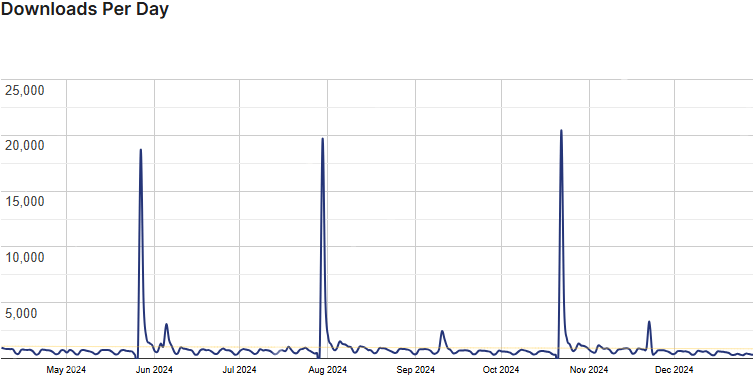
WPVibe Usage Statistics
Key Features of WPVibe
Here are some key features of WPVibe you should know:
- AI WordPress Assistant: Control your WordPress website using simple natural language commands instead of navigating complex settings.
- Content Generation: Create blog posts, landing pages, product descriptions, and other website content without leaving WordPress.
- Elementor Support: Build and edit Elementor pages with AI assistance to speed up website design and content updates.
- Gutenberg Integration: Create, edit, and organize Gutenberg blocks through AI-powered instructions.
- Theme Editing: Modify themes, update layouts, and make design improvements without manually editing template files.
- WordPress Publishing: Generate content, preview changes, and publish updates directly from your AI workflow.
- WP-CLI Integration: Run WordPress CLI commands through AI to simplify website maintenance and administrative tasks.
- Multi-Site Management: Connect and manage multiple WordPress websites from a single WPVibe account.
- AI Skills Library: Access specialized AI skills for website editing, design improvements, content writing, and workflow automation.
- Client Management: Agency plans allow you to invite clients, assign daily usage limits, and manage multiple client websites from one dashboard.
- Usage Analytics: Monitor daily tool usage and activity to better manage your AI resources across connected websites.
WPVibe Coupons, Discounts, and Pricing Plan
WPVibe has a very straightforward pricing plan.
| Plan | Price | Best For | Key Features |
| Free | $0 Forever | Beginners and personal websites | 100 daily tool calls, full feature set, Elementor and Gutenberg support, unlimited WordPress site connections, community support |
| Pro | $99/year | Freelancers and website owners | 500 daily tool calls, everything in Free, priority support, early access to new features |
| Power | $299/year | Developers and advanced users | 2,000 daily tool calls, optimized for large editing sessions, advanced publishing workflows, everything in Pro |
| Agency | $599/year | Agencies and multi-client businesses | 5,000 daily tool calls, client invitations, usage reports, VAT reverse-charge invoices, everything in Power |
WPVibe Discounts
There is up to a 57% discount available on the WPVibe yearly pricing plan.
WPVibe Lifetime Deals
There are no lifetime deals available for WPVibe.
How To Install The WPVibe Plugin on WordPress?
Step 1: Visit the WPVibe website, choose the Pro or Free version, and download the plugin. You may receive the plugin as a zip file in your email or elsewhere.
Step 2: Log in to your WordPress dashboard
Step 3: Navigate to Plugins > Add New
Step 4: Click on Upload Plugin and select the WPVibe ZIP file you downloaded.
Step 5: Click Install Now.
Step 6: After installation, go to Plugins > Installed Plugins and activate WPVibe.
Step 7: Follow the prompts to configure WPVibe’s initial settings after activation. The plugin is now configured to be utilized.
For Whom This Product Is Built For?
This product is built for:
- WordPress Website Owners: Manage your website, create content, and make updates faster with AI assistance.
- Bloggers and Content Creators: Write blog posts, improve existing content, and publish articles without switching between multiple tools.
- Freelancers: Speed up website development and content creation while managing multiple client projects more efficiently.
- Web Developers: Automate repetitive WordPress tasks, edit themes, run WP-CLI commands, and improve development workflows.
- Digital Agencies: Manage multiple client websites, invite clients, monitor usage, and streamline website maintenance from one platform.
- Marketing Teams: Generate marketing copy, landing pages, and website content while improving productivity with AI.
WPVibe Alternatives
Here are some alternatives to the WPVibe plugin.
- Novamira: Deep access including PHP execution and database queries, aimed mainly at dev and staging sites rather than production.
- AI Engine: A powerful WordPress AI plugin that offers chatbots, with MCP as a Pro add-on you host yourself.
- Royal MCP: Strong on-box security controls, but you install, secure, and update the MCP server plugin on every site yourself.
- Easy MCP AI: A self-hosted WordPress MCP server that runs entirely inside your own site for complete control without third-party cloud routing.
- NibWP: A self-hosted plugin featuring over 130 typed tools, deep plugin integrations, and an open MCP protocol approach.
What WPVibe Customers Say
“I can not rememver the last time I was so happy about finding a plugin. I just love it. It makes working so much easier and I am able to get more done in a shorter time. I could tell my AI client what he should do and magically it does. I am amazed and I hope the support stays as excellent like it is now. I would give even more stars.”
“I’ve been using WPVibe to let ChatGPT help audit and maintain a real production WordPress/WooCommerce site, and it has been genuinely useful rather than just an interesting demo. We’ve used it to inspect site health, update plugins safely, verify WooCommerce orders, audit SEO, install a fallback theme, identify stale scheduled tasks, and uncover production clutter that would have been very easy to miss manually. What impressed me most was how quickly the plugin is improving. We encountered an issue in an older version where updating a single plugin could leave it deactivated, upgraded from 1.4 to 1.13.3, and found that the exact problem had already been fixed. The newer safety and approval features are also thoughtful: WPVibe now warns when an operation would bypass a plugin’s normal workflow or make a risky database change, instead of simply handing the AI a chainsaw. It has already paid for itself in time saved, and I’m excited to see where it goes next.”
Read more WPVibe reviews on WordPress.org
We’d love to hear your thoughts and opinions on WPVibe. Share your experiences and insights in the comments below.
WPVibe
You Might Also Like

ElevenLabs Coupon – 2026

Scalenut Coupon – 2026

Ideogram Coupon
From the WPdiscounts Blog
 WordPress gives website owners a large amount of control over how their sites look and work. According to WordPress.org, themes control the visual presentation of…
September 19, 2026
- Audio is often overlooked when businesses plan their website content. Yet voice can be useful for product demonstrations, online courses, tutorials, podcasts, advertisements, accessibility, and…
September 19, 2026
- Video can explain a product or service in a way that a block of text often cannot. Product demonstrations, tutorials, customer education, landing page videos,…
September 17, 2026