Adds AI features to WordPress with AI Engine.
AI Engine Coupon – 2026
It helps you create AI chatbots, generate content and images, build smart forms, and automate everyday tasks without leaving your WordPress dashboard.
Adds AI features to WordPress with AI Engine.
AI Engine Coupon – 2026
It helps you create AI chatbots, generate content and images, build smart forms, and automate everyday tasks without leaving your WordPress dashboard.
Exclusive Discount
Only for WPdiscounts.io visitors.
Limited Time Offer
Claim this offer before it ends.
Offer Expired - Check back soon!
Table of Content
About
Founder: Jordy Meow
Website: meowapps.com
Community: Community

What is AI Engine?
View AI Engine Coupons, Discounts, Promo Codes, & Pricing Plans below.
AI Engine is a flexible WordPress plugin created by Meow Apps that brings artificial intelligence directly into your WordPress dashboard. Instead of forcing you to pay expensive monthly software fees, this tool connects your website to top AI services like OpenAI, Claude, Google Gemini, and Perplexity using your own API keys. You stay in full control of your settings, your customer data, and your spending without extra middleman fees.
With AI Engine, you can set up smart chatbots, build interactive AI forms, draft search friendly blog posts, and create custom images with simple prompts. It also places a handy writing copilot right inside your WordPress editor to rephrase text, fix grammar, or translate content instantly. Grabbing an AI Engine Coupon is an easy way to get all these advanced tools for your website while saving your hard earned money.
What makes this plugin special is how easily it adapts to your workflow. You can switch AI models with a single click, set strict usage caps for visitors, and train your own chatbot using your existing site posts and uploaded PDFs. Using an AI Engine Discount allows you to automate daily task routines, boost reader engagement, and scale your online business without hiring a team of developers.
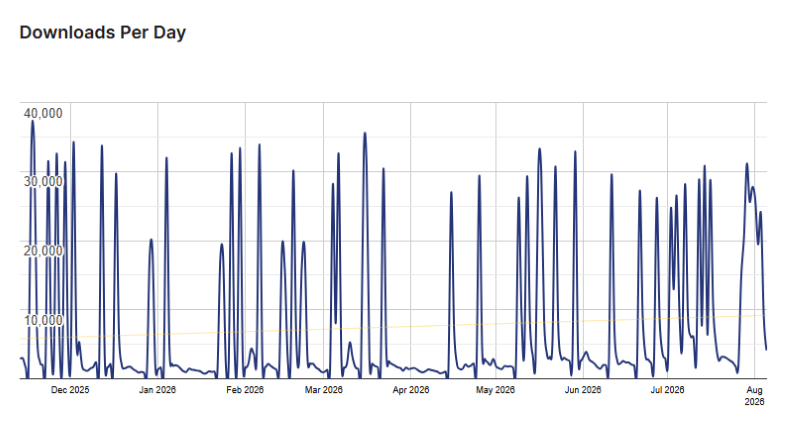
AI Engine Usage Statistics
Key Features of AI Engine
Here are some key features of AI Engine you should know:
- AI Chatbots: Create fully customizable AI chatbots with support for voice conversations, memory, image recognition, and personalized responses.
- AI Content Generator: Generate SEO-friendly blog posts, product descriptions, website copy, and other content directly inside WordPress.
- AI Image Generation: Create original images from simple text prompts or let AI analyze uploaded images for better interactions.
- AI Forms: Build intelligent forms that accept file uploads, understand user prompts, and generate AI-powered responses.
- Content Aware Chatbots: Train chatbots using your website content and PDF documents to provide more accurate and relevant answers.
- AI Copilot: Get real-time writing suggestions, translations, rewrites, and content improvements while working inside the WordPress editor.
- AI Playground: Access tools for translation, proofreading, brainstorming, text generation, image creation, and other AI tasks from one dashboard.
- Function Calling: Allow AI to interact with WooCommerce, WordPress functions, and custom APIs to automate complex workflows.
- Cross-Site Chatbots: Embed your AI chatbot on external websites while managing everything from a single WordPress installation.
- WordPress MCP Server: Connect AI assistants such as ChatGPT and Claude to your WordPress website so they can perform site management tasks through natural language.
- AI Assistants: Build custom AI assistants that can complete complex business tasks using your own instructions and knowledge base.
- Usage Analytics: Monitor AI token usage, costs, and user activity with detailed reports and controls to manage your AI budget efficiently.
AI Engine Coupons, Discounts, and Pricing Plan
AI Engine has a very straightforward pricing plan.
| Plan | Price | License | Best For |
| Starter | $79/year | 1 Website | Personal websites, bloggers, and freelancers |
| Standard | $99/year | 5 Websites | Small businesses and website owners managing multiple sites |
| Professional | $179/year | 20 Websites | Agencies, developers, and growing businesses |
| Standard Life | $499 (Lifetime) | 5 Websites | Users who prefer a one-time payment for multiple websites |
| Professional Life | $799 (Lifetime) | 20 Websites | Agencies and professionals managing several client websites |
| Developer Life | $999 (Lifetime) | 500 Websites | Developers and freelancers working on a large number of websites |
| Agency Life | $1,699 (Lifetime) | Unlimited Websites | Large agencies and enterprises managing unlimited client websites |
AI Engine Discounts
There is no discount available on the AI Engine yearly pricing plan.
AI Engine Lifetime Deals
There are three lifetime deals available for AI Engine.
- Get Professional plan for $799
- Get Developer plan for $999
- Get Agency plan for $1699
How To Avail The AI Engine Coupon?
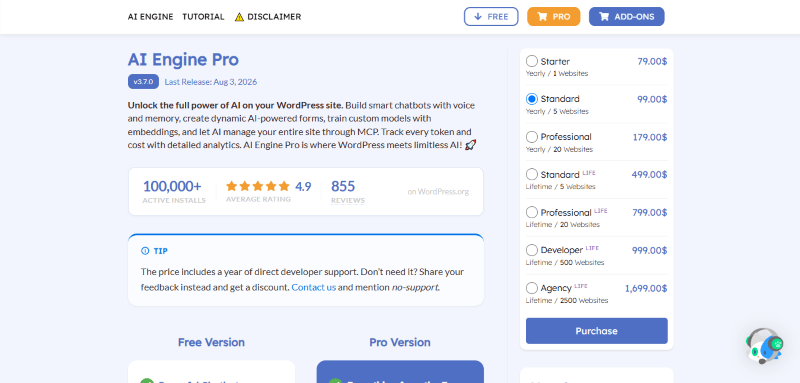
Step 1: Go to the pricing page and select the plan you want to buy.
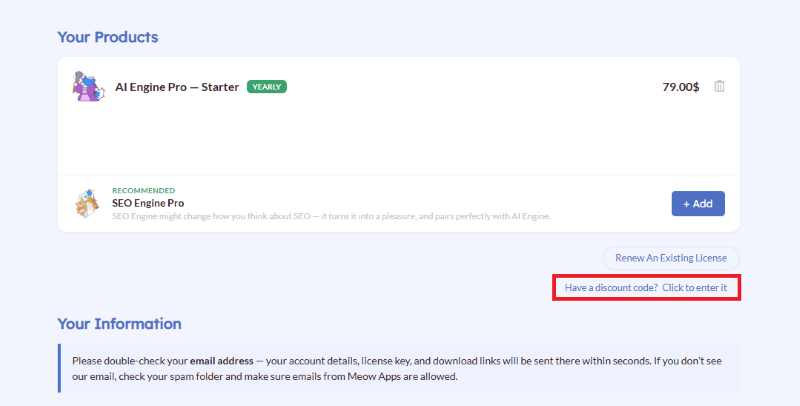
Step 2: On the AI Engine checkout page, click on “Have a discount code”
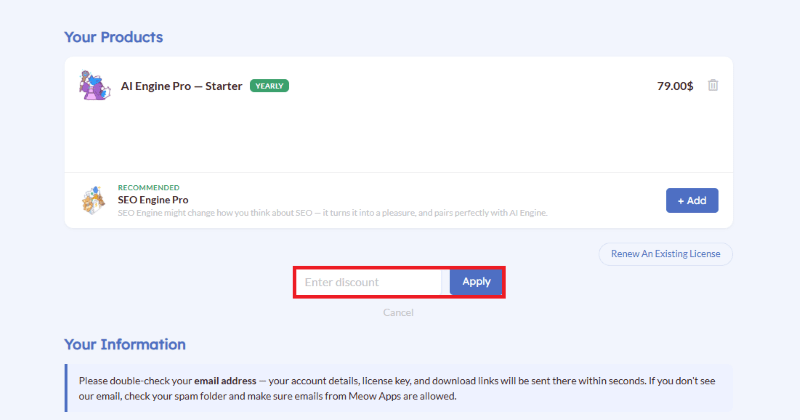
Step 3: Add the discount code in the field and click “Apply” to get the discount.
How To Install The AI Engine Plugin on WordPress?
Step 1: Visit the AI Engine website, choose the Pro or Free version, and download the plugin. You may receive the plugin as a zip file in your email or elsewhere.
Step 2: Log in to your WordPress dashboard
Step 3: Navigate to Plugins > Add New
Step 4: Click on Upload Plugin and select the AI Engine ZIP file you downloaded.
Step 5: Click Install Now.
Step 6: After installation, go to Plugins > Installed Plugins and activate AI Engine.
Step 7: Follow the prompts to configure AI Engine’s initial settings after activation. The plugin is now configured to be utilized.
For Whom This Product Is Built For?
This product is built for:
- Website Owners: Add AI features to your website without relying on multiple plugins or complicated coding.
- Bloggers and Content Creators: Generate articles, rewrite content, translate text, and create images directly inside WordPress.
- WooCommerce Store Owners: Build AI shopping assistants that answer product questions and improve the customer buying experience.
- Marketing Teams: Create marketing copy, landing pages, email campaigns, and social media content more efficiently.
- Agencies: Manage AI-powered websites for multiple clients and automate content creation, chatbots, and customer interactions.
- Developers: Build custom AI workflows using APIs, function calling, embeddings, and advanced WordPress integrations.
- Customer Support Teams: Deploy AI chatbots that answer common questions and provide instant support around the clock.
- Small Businesses: Save time by automating repetitive tasks while improving customer engagement and website productivity.
AI Engine Alternatives
Here are some alternatives to the AI Engine plugin.
- GetGenie AI: An SEO-focused AI assistant that helps generate optimized content, keyword ideas, and WooCommerce product descriptions.
- ZipWP AI Assistant: An AI-powered website builder that helps users create WordPress websites and generate content quickly.
- AI Power: A WordPress AI plugin that offers content generation, AI chatbots, image creation, and WooCommerce support.
- Bertha AI: An AI writing assistant designed to help create blog posts, product descriptions, and website copy directly inside WordPress.
- CodeWP: An AI coding assistant built specifically for WordPress developers who need help generating PHP, JavaScript, and WordPress code.
- AI Bud: A WordPress AI plugin that combines content writing, chatbot functionality, image generation, and workflow automation.
What AI Engine Customers Say
“Very good AI plugin without bloat, simple click to enable options, lots of features in this version.The only thing that needs to be added is specific instructions to use or use instructions save in the gemini api eg do not add medical advise, do not add medical claims, mainly used for AI features in SEO Engine Pro and now looking at getting AI Engine Pro.”
“AI Engine is hands down the best and most well-thought-out plugin for integrating artificial intelligence into WordPress. The sheer amount of work the team puts into weekly updates and implementing cutting-edge protocols (such as full MCP support in 2026) is truly impressive. Huge respect to the creators for their immense dedication to the community!”
Read more AI Engine reviews on WordPress.org
We’d love to hear your thoughts and opinions on AI Engine. Share your experiences and insights in the comments below.
AI Engine
You Might Also Like

ElevenLabs Coupon – 2026

Scalenut Coupon – 2026

Ideogram Coupon
From the WPdiscounts Blog
 WordPress gives website owners a large amount of control over how their sites look and work. According to WordPress.org, themes control the visual presentation of…
September 19, 2026
- Audio is often overlooked when businesses plan their website content. Yet voice can be useful for product demonstrations, online courses, tutorials, podcasts, advertisements, accessibility, and…
September 19, 2026
- Video can explain a product or service in a way that a block of text often cannot. Product demonstrations, tutorials, customer education, landing page videos,…
September 17, 2026