Enhance audience engagement with personalised asynchronous video and voice messaging conversational forms.
HelpGent Coupon – 2026
Transform your website communication with the ultimate HelpGent video messaging and screen recording toolkit.
Enhance audience engagement with personalised asynchronous video and voice messaging conversational forms.
HelpGent Coupon – 2026
Transform your website communication with the ultimate HelpGent video messaging and screen recording toolkit.
Exclusive Discount
Only for WPdiscounts.io visitors.
Limited Time Offer
Claim this offer before it ends.
Offer Expired - Check back soon!

What is HelpGent?
View HelpGent Coupons, Discounts, Promo Codes, and Pricing Plans below.
HelpGent is a specialised WordPress plugin designed to change how you talk to your audience. Instead of relying on old-school contact forms or live chats that require everyone to be online at once, it introduces a way to communicate on your own schedule. It brings video, voice, and text messaging together in one place so you can build real connections without the pressure of an instant reply.
The plugin focuses on asynchronous communication, which is just a fancy way of saying you and your customers can leave messages for each other whenever it is convenient. Whether you want to explain a complex fix through a screen recording or just want to send a friendly video welcome, this tool makes those interactions feel personal. It turns a boring support ticket into a meaningful back-and-forth conversation.
By using HelpGent , you are giving your visitors a much better experience. They can show you exactly what they mean using the screen record feature or leave a quick voice note if they are on the go. This level of flexibility helps reduce frustration and makes your business feel more human and approachable.
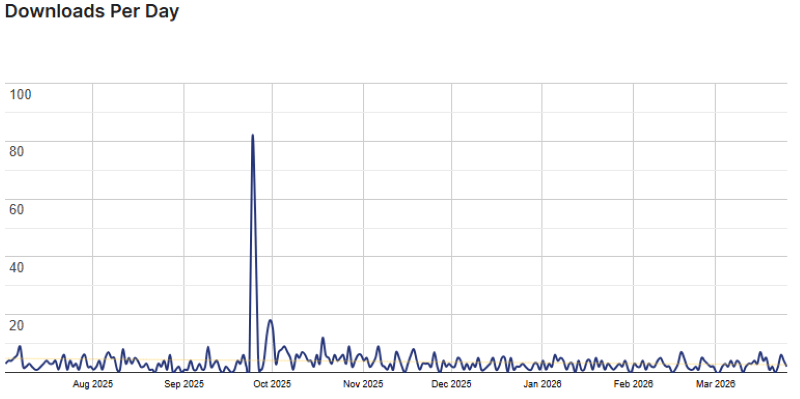
HelpGent Usage Statistics
Key Features of HelpGent
Here are some key features of HelpGent you should know:
- Video Messaging: Record and send high-quality videos directly on your site to add a real human touch to every support ticket.
- Voice Messaging: Let your customers leave quick audio clips so they can explain their needs without typing out long paragraphs.
- Screen Recording: Users can record their screens with a voiceover to show exactly where they are having trouble in real time.
- Conversational Forms: Break down long forms into a step-by-step process that feels more like a friendly chat than a data entry task.
- Conditional Logic: Show different questions based on the answers your users provide to keep their journey relevant and personalised.
- Frontend User Dashboard: Give your customers a dedicated space where they can see their message history and keep the conversation going.
- Incomplete Data Capture: Save information even if a user does not finish a form, so you can understand where people might be getting stuck.
- Admin Collaboration: Multiple team members can join the conversation to provide better support and insights for every single user inquiry.
- Personalised Support: Use asynchronous video and screen recording to see exactly what the customer sees while providing clear audio responses.
- Text Messaging: Send and receive messages at your own convenience to allow for more productive and stress-free business conversations.
- Workflow Integrations: Connect with tools like Google Drive and Bunny Cloud Storage to store your media files and keep things organised.
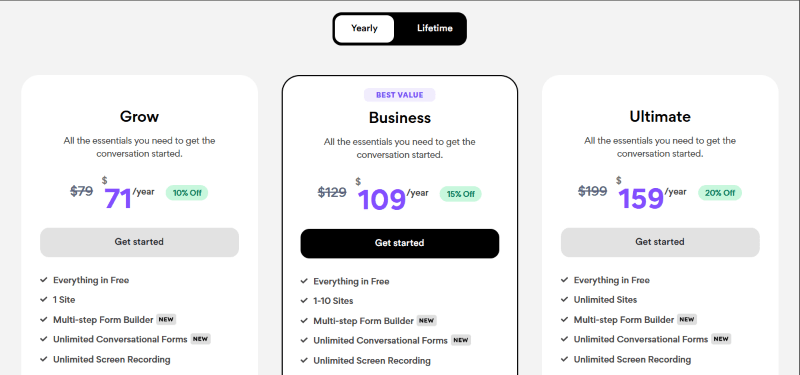
HelpGent Coupons, Discounts, and Pricing Plan
HelpGent has a very straightforward pricing plan.
| Grow | Business | Ultimate |
| $71 Yearly | $109 Yearly | $159 Yearly |
| 14-Day Money-Back Guarantee | 14-Day Money-Back Guarantee | 14-Day Money-Back Guarantee |
HelpGent Discounts
There are discounts available for HelpGent.
HelpGent Lifetime Deals
There are lifetime deals available for HelpGent.
How To Avail The HelpGent Coupon?
Step 1: Go to the HelpGent pricing page and select the plan you want to buy.
Step 2: On the HelpGent checkout page, click on “Have a discount code”
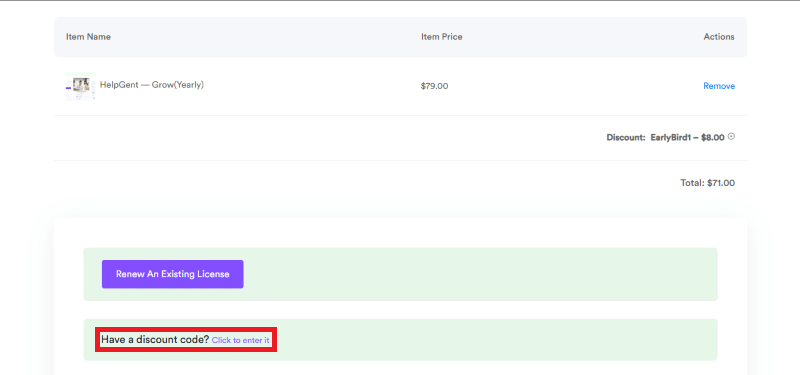
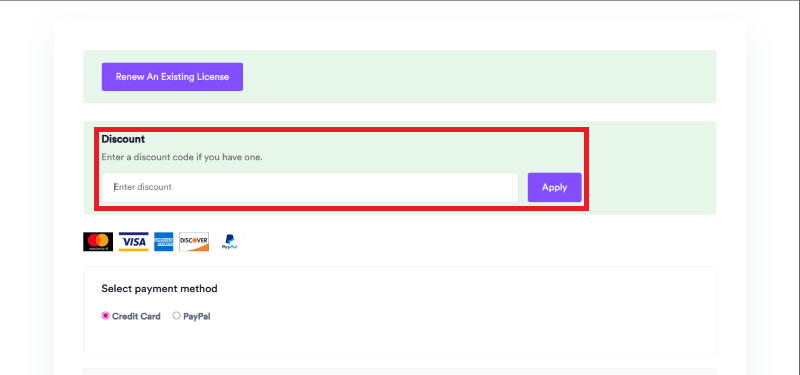
Step 3: Add the discount code in the field and click “Apply” to get the discount.
How To Install The HelpGent Plugin on WordPress?
Step 1: Visit the HelpGent website, choose your version, and download the plugin file. You will usually receive this as a zip file in your account or via email.
Step 2: Log in to your WordPress dashboard.
Step 3: Navigate to Plugins and click on Add New.
Step 4: Click on Upload Plugin and select the HelpGent ZIP file you just downloaded.
Step 5: Click Install Now to begin the process.
Step 6: After the installation is finished, go to your installed plugins list and activate HelpGent.
Step 7: Follow the setup wizard to configure your initial messaging settings and get the plugin ready for use.
For Whom Is This Product Built?
This product is built for:
- Online Service Providers
- Digital Agencies
- Customer Support Teams
- Course Creators
- Freelancers
- E-commerce Store Owners
- Marketing Professionals
- Web Developers
HelpGent Alternatives
Here are some alternatives to the HelpGent plugin.
- VideoAsk
- Bonjoro
- Videoform
| Product Name | VideoAsk by Typeform | Bonjoro by bonjoro.com | Videoform by videoform |
| Number of Websites | 800+ | 30+ | N/A |
What HelpGent Customers Say
“Seems like a great tool for asynchronous video messaging and screen recording. One of the features that stood out to me was the ability to create interactive forms, which could be really helpful for collecting feedback or providing support.”
“Thinking Outside of the box, good on you guys.”
“I’ve picked the plugin lately, and I must say I’m thoroughly impressed with its features and capabilities. The ability to communicate via video, voice, and text messaging, along with the added functionality of screen recording, is a game-changer for customer support and online communication.
One of the standout features of HelpGent is the ability to record and share screen recordings with clients or team members, which has been incredibly helpful for demonstrating complex issues or providing visual aids for training purposes. The video and voice messaging options have also helped me to add a personal touch to customer support and overall communication. Thanks to Sazzadul Bari and his team, wpWax, for supporting me along the way!
Read more reviews on WordPress.org.
We’d love to hear your thoughts and opinions on HelpGent. Share your experiences and insights in the comments below.
HelpGent
You Might Also Like

Soro Coupon – 2026

Runway Coupon – 2026

Speechify Coupon
From the WPdiscounts Blog
 WordPress is becoming easier for AI agents to work with. WordPress 6.9 introduced the Abilities API, which gives WordPress, themes, and plugins a standard way…
October 2, 2026
- WordPress gives website owners a large amount of control over how their sites look and work. According to WordPress.org, themes control the visual presentation of…
September 19, 2026
- Audio is often overlooked when businesses plan their website content. Yet voice can be useful for product demonstrations, online courses, tutorials, podcasts, advertisements, accessibility, and…
September 19, 2026