The Best WordPress Directory Plugin
Business Directory Coupon – 2026
Business Directory Plugin is a powerful tool designed to turn any WordPress site into a professional listing hub.
The Best WordPress Directory Plugin
Business Directory Coupon – 2026
Business Directory Plugin is a powerful tool designed to turn any WordPress site into a professional listing hub.
Exclusive Discount
Only for WPdiscounts.io visitors.
Limited Time Offer
Claim this offer before it ends.
Save up to 40% OFF on Business Directory (Expired)
Table of Content
About
Founder: Steph Wells
Website: businessdirectoryplugin.com
Community: Community

What is Business Directory?
View Business Directory Coupons, Discounts, Promo Codes, & Pricing Plans below.
Business Directory Plugin is a powerful tool designed to turn any WordPress site into a professional listing hub. Whether you want to build a local guide, a real estate portal, or a niche professional index, this plugin handles the heavy lifting. It allows users to submit their own listings, which can include images, contact details, and descriptions, making it a favourite for those wanting to grow a community or earn money through paid submissions.
Setting up a directory used to require a lot of custom code or expensive themes, but this plugin changes that by working with almost any WordPress setup. You get a set of tools that help you organize entries into categories and tags so your visitors can find exactly what they need in seconds. It is built to be lightweight, meaning it won’t slow down your site while it manages thousands of listings.
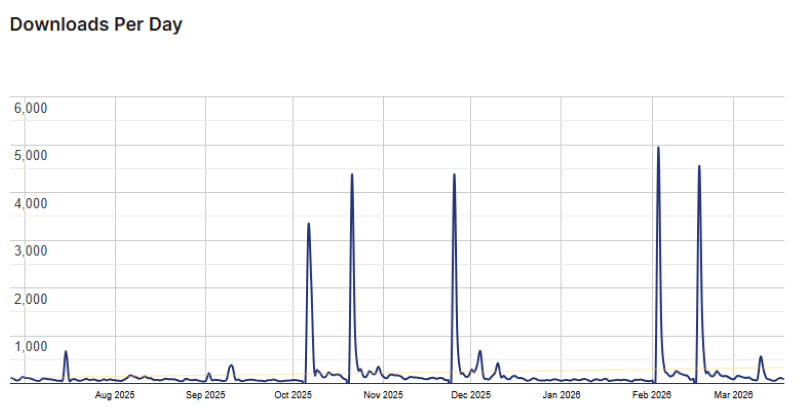
Business Directory Usage Statistics
Key Features of Business Directory
Here are some key features of Business Directory you should know:
- Fully Customizable Form Fields: You can create specific fields for your listings like phone numbers, office hours, or website links to capture the exact data you need.
- Paid and Free Listings: The plugin lets you charge users for featured spots or offer basic listings for free, helping you turn your website into a revenue stream.
- Advanced Search Functionality: Visitors can filter results by category, location, or custom keywords to find specific businesses without scrolling through endless pages.
- Image Support and Galleries: Every listing can include high-quality images that users can click through, giving each business a professional and polished look.
- SEO Friendly Structure: The tool is built with clean code that search engines love, which helps your directory pages show up higher in Google search results.
- Mobile Responsive Design: Your directory will look great and work perfectly on smartphones and tablets, which is where most local searches happen today.
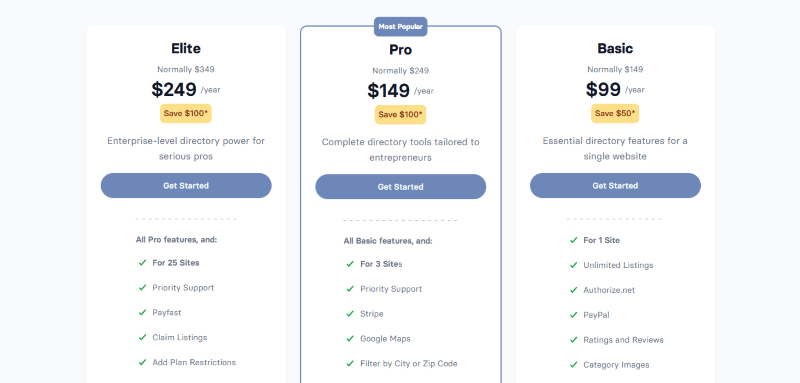
Business Directory Coupons, Discounts, and Pricing Plan
Business Directory has a very straightforward pricing plan.
| Starter | Builder | Enterprise |
$99/yr |
$149/yr |
$249/yr |
| For 1 Site Unlimited Listings Authorize.net PayPal Ratings and Reviews Category Images File Uploads Table & Grid Layouts WPML Integration Featured Listings |
For 3 Sites Priority Support Stripe Google Maps Filter by City or Zip Code Discount Codes Migrate & Backup |
For 25 Sites Priority Support Payfast Claim Listings Add Plan Restrictions WordPress Multisite All Directory Themes |
Business Directory Discounts
There is up to 40% discount available on the Business Directory yearly pricing plan.
Business Directory Lifetime Deals
There are no lifetime deals available for Business Directory.
How To Avail The Business Directory Coupon?
Step 1: Go to the pricing page and select the plan you want to buy.
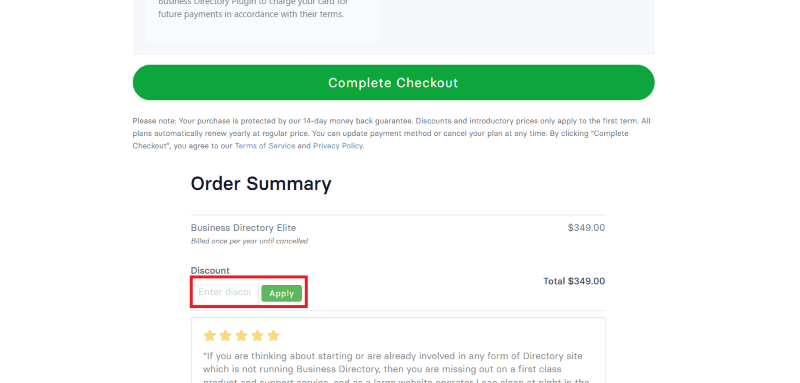
Step 2: On the Business Directory checkout page, click on “Have a coupon?”
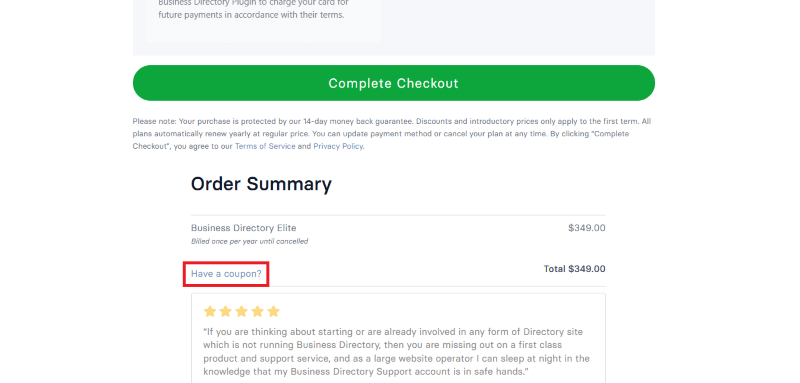
Step 3: Add the discount code in the field and click “Apply” to get the discount.
How To Install The Business Directory Plugin on WordPress?
Step 1: Visit the Business Directory website, choose the Pro or Free version, and download the plugin. You may receive the plugin as a zip file in your email or elsewhere.
Step 2: Log in to your WordPress dashboard
Step 3: Navigate to Plugins > Add New
Step 4: Click on Upload Plugin and select the Business Directory ZIP file you downloaded.
Step 5: Click Install Now.
Step 6: After installation, go to Plugins > Installed Plugins and activate Business Directory.
Step 7: Follow the prompts to configure Business Directory’s initial settings after activation. The plugin is now configured to be utilized.
For Whom This Product Is Built For?
This product is built for:
- Small, Medium, and Enterprise Businesses
- E-commerce Store Owners
- Local Community Leaders
- Niche Bloggers
- Marketing Agencies
- Chambers of Commerce
- Event Organizers
Business Directory Alternatives
Here are some alternatives to the Business Directory plugin.
- Directorist
- GeoDirectory
- Connections Business Directory
- HivePress
- Sabai Directory
| Product Name | Directorist | GeoDirectory | HivePress |
| Number of Websites | 20,000+ | 10,000+ | 10,000+ |
What Business Directory Customers Say
“I inherited this plugin from the previous webmaster who had literally done zero customisation or maintenance. I realised something wasn’t working in the “Regions” add-on and sent a support email on New Year’s Eve! My enquiry was replied to the same day, and by the 5th of January, their tech support had been onto the back end and the problem was resolved. It was an easy fix, but only if you know what you’re doing, as is often the case. I’m extremely grateful they responded so quickly and efficiently. Now our users who live in Belgium are visible to the world again!
“You can use it for a simple membership directory or a very complex resource reference directory. If you are adept in WordPress it is built on the same concepts so easy to understand. Has a decent chat bot for simple questions but Premium support is excellent with very quick response. Well worth it.”
Read more Business Directory reviews on WordPress.org
We’d love to hear your thoughts and opinions on Business Directory. Share your experiences and insights in the comments below.
Business Directory
You Might Also Like

Runway Coupon – 2026

Speechify Coupon

Murf AI Coupon – 2026
From the WPdiscounts Blog
 WordPress gives website owners a large amount of control over how their sites look and work. According to WordPress.org, themes control the visual presentation of…
September 19, 2026
- Audio is often overlooked when businesses plan their website content. Yet voice can be useful for product demonstrations, online courses, tutorials, podcasts, advertisements, accessibility, and…
September 19, 2026
- Video can explain a product or service in a way that a block of text often cannot. Product demonstrations, tutorials, customer education, landing page videos,…
September 17, 2026