Elevate Your Customer Support with AI
LiveChat Coupon – 2026
Connect with your visitors instantly using the ultimate omnichannel communication hub.
Elevate Your Customer Support with AI
LiveChat Coupon – 2026
Connect with your visitors instantly using the ultimate omnichannel communication hub.
Exclusive Discount
Only for WPdiscounts.io visitors.
Limited Time Offer
Claim this offer before it ends.
Offer Expired - Check back soon!

What is LiveChat?
View LiveChat Coupons, Discounts, Promo Codes, and Pricing Plans below.
In today’s fast-paced digital economy, your visitors aren’t just looking for products; they’re looking for an immediate connection. LiveChat is a premium customer service platform designed to bridge the gap between a cold website visit and a meaningful human interaction. It functions as a centralised communication hub, allowing your support and sales teams to manage every aspect of the customer journey from a single, intuitive dashboard. By moving away from basic chat boxes and embracing a full-scale SaaS solution, you can finally provide the instant gratification that modern online shoppers demand, ensuring no lead falls through the cracks.
The true power of this tool lies in its ability to scale your operations without inflating your overhead. By leveraging AI-powered chatbots to automate repetitive queries and tasks for as little as $1, you free up your human agents to focus on high-value conversations that require a personal touch. With seamless omnichannel support and deep integrations into over 200 popular tools like HubSpot and WhatsApp, the software aligns perfectly with your existing workflow. It’s about more than just “chatting”; it’s about creating a frictionless user experience that keeps your business responsive 24/7, regardless of your team’s actual office hours.
Ultimately, LiveChat transforms your website into a high-performance sales floor. Whether you’re a solo founder or managing a large enterprise, being available the exact moment a customer has a question is the most effective way to drive more conversions and build long-term brand loyalty. It’s a tool built for transparency and efficiency, matching your online presence with the reality of your professional service standards.
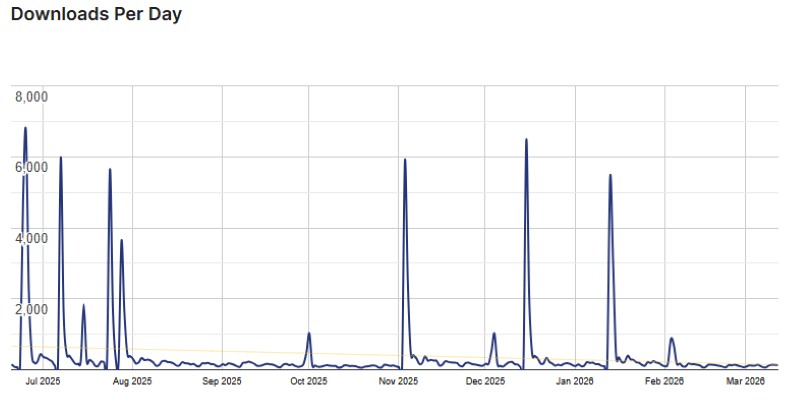
LiveChat Usage Statistics
Key Features of LiveChat
Here are some key features of LiveChat you should know:
- Multi-Channel Communication: Manage messages from WhatsApp, Facebook Messenger, and SMS all within the LiveChat interface.
- AI Chatbot Automation: Use the ChatBot integration to handle routine questions 24/7, allowing your human agents to focus on complex issues.
- Ticketing System (HelpDesk): Automatically turn unresolved chats or offline messages into support tickets so no customer is ever ignored.
- 200+ Integrations: Seamlessly connect with HubSpot, Salesforce, Shopify, and Google Analytics to keep your data synced.
- Rich Messages & Cards: Send attractive product cards, buttons, and quick replies to make the chat experience interactive.
- Agent Analytics: Track response times, chat satisfaction scores, and agent performance with detailed built-in reports.
LiveChat Coupons, Discounts, and Pricing Plan
LiveChat has a very straightforward pricing plan.
| Starter | Team | Business | Enterprise |
| $19/mo | $49/mo | $79/mo | Request a call |
| 24/7/365 Support | 24/7/365 Support | 24/7/365 Support | 24/7/365 Support |
LiveChat Discounts
There are no discounts available for LiveChat.
LiveChat Lifetime Deals
There are no lifetime deals available for LiveChat.
How To Install The LiveChat Plugin on WordPress?
Step 1: Visit the LiveChat website and sign up for a free trial account using your business email.
Step 2: Log in to your LiveChat dashboard and navigate to the Settings tab to find your unique tracking code.
Step 3: Copy the provided JavaScript code snippet to your clipboard.
Step 4: Open your website’s admin panel (such as WordPress, Shopify, or a custom CMS).
Step 5: Navigate to the “Theme Editor” or “Header/Footer” settings and paste the LiveChat code before the closing </body> tag.
Step 6: (Optional) If you are using WordPress, you can simply install the LiveChat Plugin from the repository and enter your License ID instead of manually adding code.
Step 7: Save your changes and refresh your website to see the LiveChat widget live. You can now begin customising the colours and greeting messages to match your brand.
For Whom Is This Product Built?
This product is built for:
- E-commerce Stores
- Customer Support Teams
- SaaS Companies
- Marketing Professionals
- Sales Teams
- Agencies
- Real Estate & Automotive
- Educational Institutions
- Small Businesses
LiveChat Alternatives
Here are some alternatives to the LiveChat plugin.
- Tidio
- Intercom
- Crisp
| Product Name | Tidio by Tidio | Intercom by Intercom | Crisp by crisp.chat |
| Number of Websites | 80,000+ | 6,000+ | 20,000+ |
What LiveChat Customers Say
“Very easy to use, installation process was simple(install, activate, login done pretty much), responsive staff who are very quick to answer any questions you need! Runs fast on the website and has plenty of features.”
“Livechat is the best in the world. I sed many different chat plugins, but functionality and customer support are the best on live chat. Really recommend.”
Read more reviews on WordPress.org.
We’d love to hear your thoughts and opinions on LiveChat. Share your experiences and insights in the comments below.
LiveChat
You Might Also Like

Soro Coupon – 2026

Runway Coupon – 2026

Speechify Coupon
From the WPdiscounts Blog
 WordPress is becoming easier for AI agents to work with. WordPress 6.9 introduced the Abilities API, which gives WordPress, themes, and plugins a standard way…
October 2, 2026
- WordPress gives website owners a large amount of control over how their sites look and work. According to WordPress.org, themes control the visual presentation of…
September 19, 2026
- Audio is often overlooked when businesses plan their website content. Yet voice can be useful for product demonstrations, online courses, tutorials, podcasts, advertisements, accessibility, and…
September 19, 2026