An AI-powered WordPress Translation Plugin
TrueLang Coupon – 2026
TrueLang is a high-tech WordPress translation plugin that uses advanced AI to turn your website into a multilingual powerhouse.
An AI-powered WordPress Translation Plugin
TrueLang Coupon – 2026
TrueLang is a high-tech WordPress translation plugin that uses advanced AI to turn your website into a multilingual powerhouse.
Exclusive Discount
Only for WPdiscounts.io visitors.
Limited Time Offer
Claim this offer before it ends.
Offer Expired - Check back soon!
Table of Content
About
Founder: Theo Dumont
Website: truelang.io

What is TrueLang?
View TrueLang Coupons, Discounts, Promo Codes, & Pricing Plans below.
TrueLang is a high-tech WordPress translation plugin that uses advanced AI to turn your website into a multilingual powerhouse. Unlike older plugins that rely on basic Google Translate, TrueLang connects directly to top-tier “Large Language Models” like Gemini, Claude, and GPT-4. This means your translations actually make sense, sound natural, and understand the context of your business.
The coolest part about this plugin is the “Bring Your Own Key” model. You aren’t paying the plugin developer for every word translated; instead, you connect your own AI account. Because AI costs have dropped so much, you can translate an entire store with thousands of words for less than the price of a cup of coffee.
Everything stays on your own server too. While other tools host your translations on their cloud—meaning if you stop paying, your translations disappear—TrueLang keeps everything inside your WordPress database. You own the content, you own the translations, and you stay in total control of your data.
Key Features of TrueLang
Here are some key features of TrueLang you should know:
- Native WordPress Integration: You can get the whole system up and running in about five minutes without touching a single line of code.
- Context-Aware AI: It uses models like Claude and GPT-4 that understand your brand’s tone rather than just swapping words.
- Front-End Focus: The tool translates exactly what your visitors see, ensuring 95% of your content is perfectly localized.
- SEO Optimized: It handles the tricky stuff like URL and meta-tag translation so your site can actually rank in other countries.
- One-Time Payment: Unlike most competitors, you pay for the license once and enjoy lifetime access and updates.
TrueLang Coupons, Discounts, and Pricing Plan
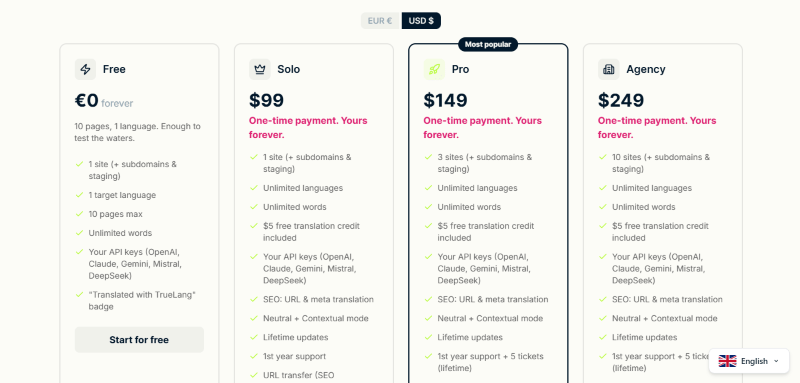
TrueLang has a very straightforward pricing plan.
| Free | Solo | Pro | Agency |
| $0 | $99/Lifetime | $149/Lifetime | $249/Lifetime |
| 1 site (+ subdomains & staging) 1 target language 10 pages max Unlimited words Your API keys (OpenAI, Claude, Gemini, Mistral, DeepSeek) Translated with TrueLang” badge |
1 site (+ subdomains & staging) Unlimited languages Unlimited words $5 free translation credit included Your API keys (OpenAI, Claude, Gemini, Mistral, DeepSeek) SEO: URL & meta translation Neutral + Contextual mode Lifetime updates 1st year support URL transfer (SEO preserved) |
3 site (+ subdomains & staging) Unlimited languages Unlimited words $5 free translation credit included Your API keys (OpenAI, Claude, Gemini, Mistral, DeepSeek) SEO: URL & meta translation Neutral + Contextual mode Lifetime updates 1st year support + 5 tickets (lifetime) URL transfer (SEO preserved) |
10 sites (+ subdomains & staging) Unlimited languages Unlimited words $5 free translation credit included Your API keys (OpenAI, Claude, Gemini, Mistral, DeepSeek) SEO: URL & meta translation Neutral + Contextual mode Lifetime updates 1st year support + 5 tickets (lifetime) URL transfer (SEO preserved) |
TrueLang Discounts
There is no discount available on the TrueLang pricing plan.
TrueLang Lifetime Deals
There are three lifetime deals available for TrueLang that are mentioned above the pricing table.
How To Avail The TrueLang Coupon?
Step 1: Go to the pricing page and select the plan you want to buy.
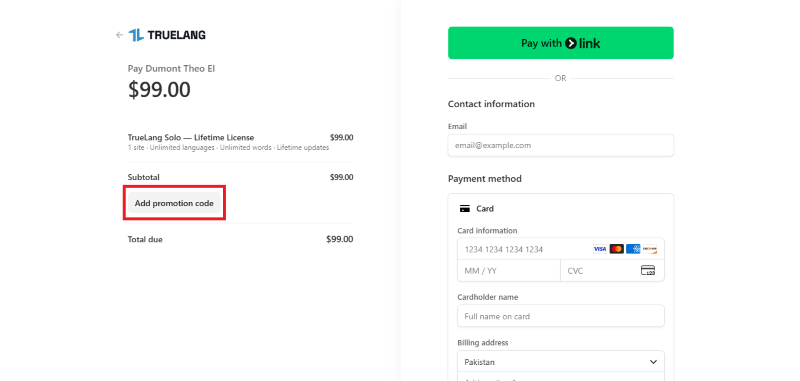
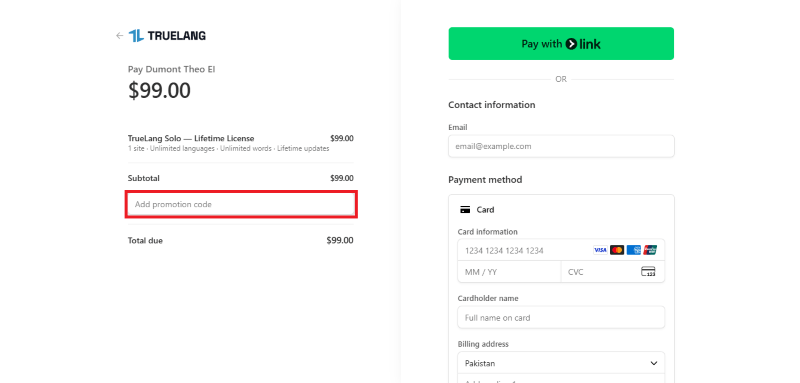
Step 2: On the TrueLang checkout page, click on “Add promotion code”
Step 3: Add the discount code in the field and click “Apply” to get the discount.
How To Install The TrueLang Plugin on WordPress?
Step 1: Visit the TrueLang website, choose the Pro or Free version, and download the plugin. You may receive the plugin as a zip file in your email or elsewhere.
Step 2: Log in to your WordPress dashboard
Step 3: Navigate to Plugins > Add New
Step 4: Click on Upload Plugin and select the TrueLang ZIP file you downloaded.
Step 5: Click Install Now.
Step 6: After installation, go to Plugins > Installed Plugins and activate TrueLang.
Step 7: Follow the prompts to configure TrueLang’s initial settings after activation. The plugin is now configured to be utilized.
For Whom This Product Is Built For?
This product is built for:
- Small, Medium, and Enterprise Businesses
- E-commerce Store Owners
- Government & Public Sector Organizations
- Educational Institutions (Schools, Colleges, Universities)
- Healthcare Providers
- Financial & Insurance Companies
- SaaS & Technology Companies
- Digital Agencies & Web Developers
- Non-Profit Organizations
- CMS, LMS, CRM & E-learning Platform Owners
TrueLang Alternatives
Here are some alternatives to the TrueLang plugin.
| Product Name | Polylang | TranslatePress | WPML |
| Number of Websites | 700,000+ | 300,000+ | 100,000+ |
We’d love to hear your thoughts and opinions on TrueLang. Share your experiences and insights in the comments below.
TrueLang
You Might Also Like

Runway Coupon – 2026

Speechify Coupon

Murf AI Coupon – 2026
From the WPdiscounts Blog
 WordPress gives website owners a large amount of control over how their sites look and work. According to WordPress.org, themes control the visual presentation of…
September 19, 2026
- Audio is often overlooked when businesses plan their website content. Yet voice can be useful for product demonstrations, online courses, tutorials, podcasts, advertisements, accessibility, and…
September 19, 2026
- Video can explain a product or service in a way that a block of text often cannot. Product demonstrations, tutorials, customer education, landing page videos,…
September 17, 2026