Easy-to-Use Website Accessibility Widget
All in One Accessibility Coupon – 2026
All in One Accessibility is an AI-powered Website accessibility solution for WCAG 2.0, 2.1, 2.2, EAA and ADA compliance.
Easy-to-Use Website Accessibility Widget
All in One Accessibility Coupon – 2026
All in One Accessibility is an AI-powered Website accessibility solution for WCAG 2.0, 2.1, 2.2, EAA and ADA compliance.
Exclusive Discount
Only for WPdiscounts.io visitors.
Limited Time Offer
Claim this offer before it ends.
Save 20% OFF on all plans on All in One Accessibility (Expired)
Table of Content
About
Founder: Rajesh Bhimani
Website: skynettechnologies.com

What is All in One Accessibility?
View All in One Accessibility Coupons, Discounts, Promo Codes, & Pricing Plans below.
All in One Accessibility is a powerful WordPress plugin designed to make your website usable for everyone, including people with disabilities. It acts like a digital helper that sits on your site and allows visitors to adjust how they see and interact with your content. From changing font sizes to adjusting color contrast, it puts the power of customization right into the hands of your users.
The tool uses smart AI technology to scan your website and fix accessibility issues in the background. This is huge because it helps you follow legal standards like WCAG 2.1, ADA, and Section 508 without needing to be a coding genius. You just install it, and the plugin starts doing the heavy lifting to ensure your site is welcoming to all types of visitors.
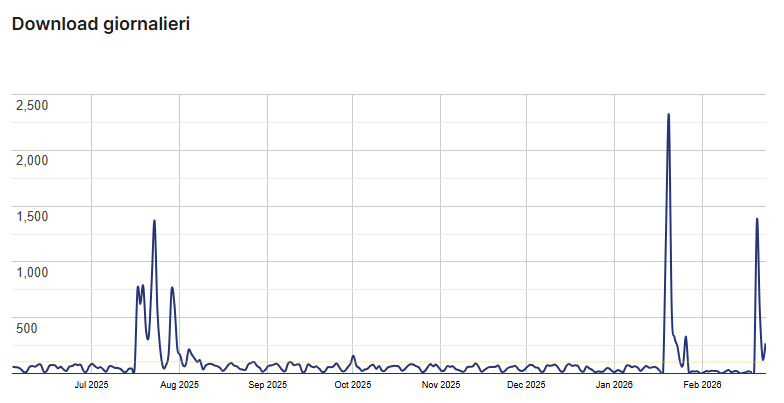
All in One Accessibility Usage Statistics
Key Features of All in One Accessibility
Here are some key features of All in One Accessibility you should know:
- Installs in just 2 minutes – No coding required
- Improves compliance with WCAG 2.0, 2.1, 2.2, ADA, Section 508, EAA EN 301 549, AODA, UK Equality Act, and global accessibility laws
- AI-powered Image Alt Text Remediation
- AI-based Text-to-Speech Screen Reader
- Voice Navigation & Talk & Type functionality
- Auto-detect language & supports 140+ languages
- Accessibility Interface for UI, contrast, color, and font adjustments
- Keyboard navigation enhancements
- Content, orientation & readability adjustments
- Built-in Accessibility Statement Generator
- Dashboard with automatic accessibility score
- Libras (Brazilian Portuguese) Sign Language support
- Customizable widget (color, size, position, icon type)
- Live site translation add-on
- PDF & Document Accessibility Remediation Add-On
- Manual Accessibility Audit & Remediation services
- VPAT / ACR Report support
- White-label subscription option
- Dedicated email support
All in One Accessibility Coupons, Discounts, and Pricing Plan
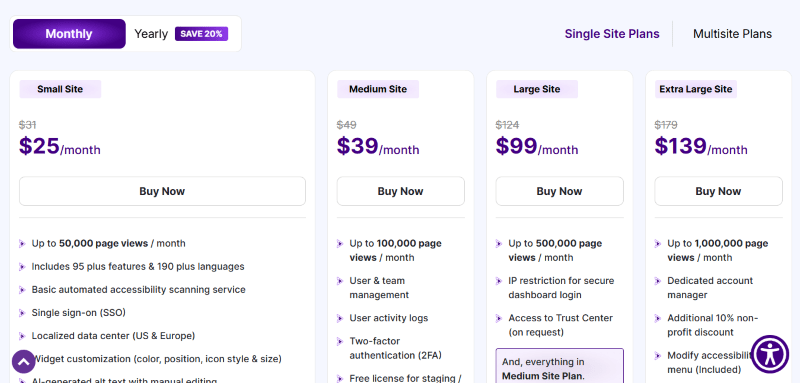
All in One Accessibility has a very straightforward pricing plan.
| Feature | Small Site | Medium Site | Large Site | Extra Large Site |
| Price | $250/year |
$390/year |
$999/year |
$1,390/year |
| Monthly Page Views | Up to 50,000 | Up to 100,000 | Up to 500,000 | Up to 1,000,000 |
| Core Features | 95+ features & 190+ languages | Includes Small Site | Includes Medium Site | Includes Large Site |
| Security & Admin | SSO, Localized data centers | User/Team management, Activity logs, 2FA | IP restriction, Trust Center access | Dedicated Account Manager |
| Customization | Widget colors, icon, size | – | – | Modify accessibility menu |
| Compliance Tools | AI Alt-text, Scanning service, Statement link | Staging/UAT license | – | Non-profit discount (10%) |
| Support | 24/7 Email & Online Help Center | – | – | Dedicated Manager |
All in One Accessibility Discounts
There is a 20% discount available on the All in One Accessibility pricing plan.
All in One Accessibility Lifetime Deals
There is no lifetime deal available for All in One Accessibility.
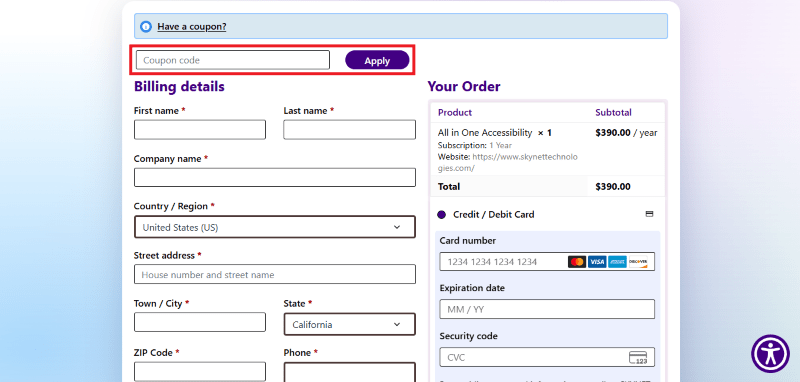
How To Avail The All in One Accessibility Coupon?
Step 1: Go to the pricing page and select the plan you want to buy.
Step 2: On the All in One Accessibility checkout page, add the discount code in the field and click “Apply” to get the discount.
How To Install The All in One Accessibility Plugin on WordPress?
Step 1: Visit the All in One Accessibility website, choose the Pro or Free version, and download the plugin. You may receive the plugin as a zip file in your email or elsewhere.
Step 2: Log in to your WordPress dashboard
Step 3: Navigate to Plugins > Add New
Step 4: Click on Upload Plugin and select the All in One Accessibility ZIP file you downloaded.
Step 5: Click Install Now.
Step 6: After installation, go to Plugins > Installed Plugins and activate All in One Accessibility.
Step 7: Follow the prompts to configure All in One Accessibility’s initial settings after activation. The plugin is now configured to be utilized.
For Whom This Product Is Built For?
This product is built for:
- Small, Medium, and Enterprise Businesses
- E-commerce Store Owners
- Government & Public Sector Organizations
- Educational Institutions (Schools, Colleges, Universities)
- Healthcare Providers
- Financial & Insurance Companies
- SaaS & Technology Companies
- Digital Agencies & Web Developers
- Non-Profit Organizations
- CMS, LMS, CRM & E-learning Platform Owners
All in One Accessibility Alternatives
Here are some alternatives to the All in One Accessibility plugin.
- UserWay Accessibility Widget
- Accessibility Checker
- Accessibility Suite by Equalize Digital
- WP Accessibility
- WP Accessibility Helper (WAH)
- Enable Accessibility
- Web Accessibility By accessiBe
- One-Click Accessibility
- WP Accessible
| Product Name | Accessibility Suite by Equalize Digital | UserWay Accessibility Widget | WP Accessibility |
| Number of Websites | 80,000+ | 10,000+ | 60,000+ |
We’d love to hear your thoughts and opinions on All in One Accessibility. Share your experiences and insights in the comments below.
All in One Accessibility
You Might Also Like

Runway Coupon – 2026

Speechify Coupon

Murf AI Coupon – 2026
From the WPdiscounts Blog
 WordPress gives website owners a large amount of control over how their sites look and work. According to WordPress.org, themes control the visual presentation of…
September 19, 2026
- Audio is often overlooked when businesses plan their website content. Yet voice can be useful for product demonstrations, online courses, tutorials, podcasts, advertisements, accessibility, and…
September 19, 2026
- Video can explain a product or service in a way that a block of text often cannot. Product demonstrations, tutorials, customer education, landing page videos,…
September 17, 2026