The easiest way to connect with your customers instantly using the world’s favorite messaging app.
ChatHelp Coupon – 2026
Boost your sales and build trust by adding a professional WhatsApp chat button to your WordPress site.
The easiest way to connect with your customers instantly using the world’s favorite messaging app.
ChatHelp Coupon – 2026
Boost your sales and build trust by adding a professional WhatsApp chat button to your WordPress site.
Exclusive Discount
Only for WPdiscounts.io visitors.
Lifetime Deal
Pay Once, Use Forever.
Starts from $47.60 /one time
Limited Time Offer
Claim this offer before it ends.
Offer Expired - Check back soon!
Table of Content
About
Founder: Foysal Imran
Website: ThemeAtelier
Community: Community

What is ChatHelp?
View ChatHelp Coupons, Discounts, and Pricing Plan below.
Not everyone likes waiting for an email response or calling a support line. Most customers today want a quick and easy way to ask a question before they buy. The ChatHelp plugin for WordPress makes this simple by adding a WhatsApp chat button directly to your site, so your visitors can start a conversation with you in a single click.
With this plugin, you can do more than just add a button. You can set up custom chat bubbles, create pre-set messages to save time, and even add multiple team members so the right person handles the right question. One of the best parts is the scheduling feature you to set specific hours for your chat to be active, ensuring that customers only see the option to message you when you’re actually available to reply.
For online shops, service providers, or small business owners, ChatHelp is a huge help for building trust. It takes the guesswork out of customer support and makes your business feel more “human” and approachable. By making it easy for people to reach you on a platform they already use every day, you can turn more visitors into happy customers without any complicated setup.
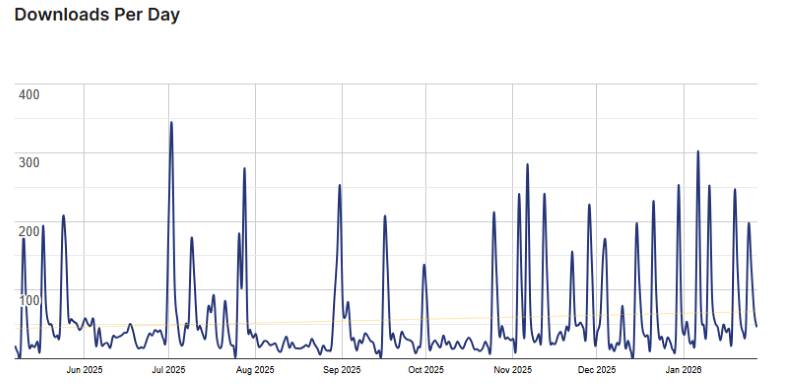
ChatHelp Usage Statistics
Key Features of ChatHelp
Here are the powerful features that make ChatHelp the ultimate WhatsApp tool for your business:
- WooCommerce Integration: Automatically pull product details like SKU, price, and stock status into WhatsApp messages. Display buttons specifically on product pages to drive sales.
- Multi-Agent Support: Display a list or grid of multiple team members. Users can choose exactly who they want to talk to based on department or availability.
- Flexible Layouts: Choose from Simple Buttons, Single Agent Bubbles, or Advanced Multi-Agent grids to match your brand’s style.
- Time-Based Availability: Set your working hours for each agent. The chat button will only appear when you are online, preventing missed expectations.
- Lead Generation Forms: Collect user data (Name, Email, Phone) inside the chat bubble before they start the WhatsApp conversation.
- Analytics & Tracking: Seamlessly integrate with Google Analytics to track how many users click your WhatsApp buttons and which pages convert the most.
ChatHelp Coupons, Discounts, and Pricing Plan
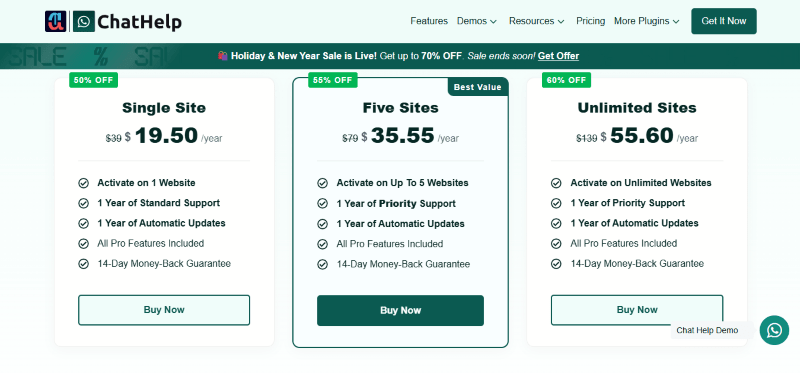
ChatHelp has a very straightforward pricing plan.
| Single Site | Five Sites | Unlimited Sites |
| $19.50 Yearly | $35.55 Yearly | $55.60 Yearly |
| 14-Day Money-Back Guarantee | 14-Day Money-Back Guarantee | 14-Day Money-Back Guarantee |
| Single Site | Five Sites | Unlimited Sites |
| $47.60 LifeTime | $69.65 LifeTime | $119.70 LifeTime |
| 14-Day Money-Back Guarantee | 14-Day Money-Back Guarantee | 14-Day Money-Back Guarantee |
ChatHelp Discounts
There are discounts available for ChatHelp.
ChatHelp Lifetime Deals
There are lifetime deals available for ChatHelp.
How To Avail The ChatHelp Coupon?
Step 1: Go to the ChatHelp pricing page and select the plan you want to buy.
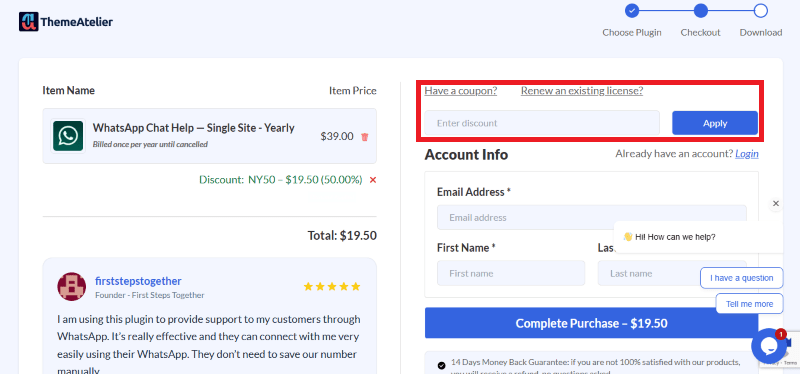
Step 2: On the ChatHelp checkout page, click on “Have a Coupon code”
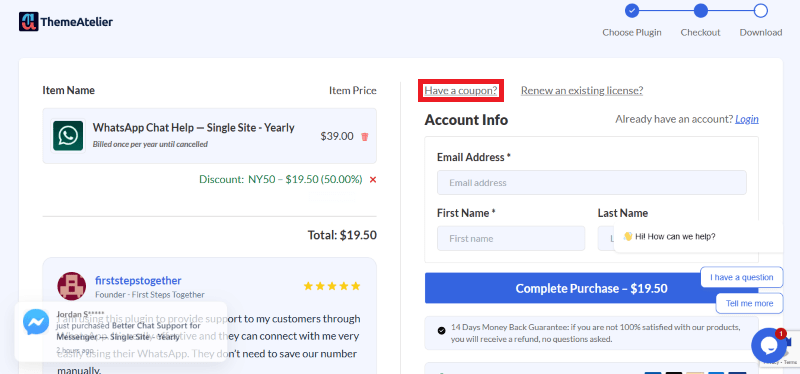
Step 3: Add the discount code in the field and click “Apply” to get the discount.
How To Install The ChatHelp Plugin on WordPress?
Step 1: Purchase your license from the ChatHelp Website and download the .zip file from your account dashboard.
Step 2: Log in to your WordPress Admin Dashboard.
Step 3: Navigate to Plugins > Add New > Upload Plugin.
Step 4: Select the ChatHelp .zip file you downloaded and click Install Now.
Step 5: Once installed, click Activate Plugin.
Step 6: Navigate to the ChatHelp menu in your sidebar to enter your License Key and start configuring your floating bubble!
For Whom Is This Product Built?
This product is built for:
- E-commerce Owners
- Agencies & Freelancers
- Small Businesses
- Marketing Professionals
ChatHelp Alternatives
Here are some alternatives to the ChatHelp plugin.
- Joinchat
- Click to Chat
- WP Social Chat
| Product Name | JoinChat by Creame | Click to Chat By holithemes | WP Social Chat by quadlayers |
| Number of Websites | 700,000+ | 700,000+ | 200,000+ |
What ChatHelp Customers Say
“I purchased the Pro version, and the experience has been excellent. The plugin works perfectly, and the team is very professional. I requested a couple of new features, and they developed them without any issues and in a short time. Support is fast, helpful, and truly listens to customers. Highly recommended.”
“This plugin worked great for my website, Order Via WhatsApp. It also provides a floating chat icon, which is helpful as well. Thanks”
“This plugin has so many essential features that exactly filled my needs! Amazing!”
Read more reviews on WordPress.org.
We’d love to hear your thoughts and opinions on ChatHelp. Share your experiences and insights in the comments below.
ChatHelp
You Might Also Like

Soro Coupon – 2026

Runway Coupon – 2026

Speechify Coupon
From the WPdiscounts Blog
 WordPress gives website owners a large amount of control over how their sites look and work. According to WordPress.org, themes control the visual presentation of…
September 19, 2026
- Audio is often overlooked when businesses plan their website content. Yet voice can be useful for product demonstrations, online courses, tutorials, podcasts, advertisements, accessibility, and…
September 19, 2026
- Video can explain a product or service in a way that a block of text often cannot. Product demonstrations, tutorials, customer education, landing page videos,…
September 17, 2026