The ultimate no-code solution to sync external data directly into your WordPress database.
API to Posts Coupon – 2026
Turn Any REST API Data into WordPress Posts or WooCommerce Products Automatically.
The ultimate no-code solution to sync external data directly into your WordPress database.
API to Posts Coupon – 2026
Turn Any REST API Data into WordPress Posts or WooCommerce Products Automatically.
Exclusive Discount
Only for WPdiscounts.io visitors.
Limited Time Offer
Claim this offer before it ends.
Offer Expired - Check back soon!
Table of Content
About
Founder: Brant
Website: WPGetAPI.Com

What is API to Posts?
View API to Posts, Coupons, Discounts, and Pricing Plans below.
Managing content manually is a thing of the past. For modern WordPress sites, the ability to pull data from external sources and turn it into usable content is essential. The API to Posts extension for WPGetAPI makes this effortless by allowing you to take any data from a REST API and automatically convert it into WordPress Posts, Pages, or Custom Post Types.
With this plugin, you can map API data fields directly to WordPress titles, content, categories, and even featured images. You can schedule these imports to run automatically at set intervals, ensuring your website is always up to date without you lifting a finger. Whether you are building a news aggregator, a real-estate directory, or a sports data site, this tool eliminates the need for manual data entry and custom coding.
For developers and site owners who need to sync external data regularly, the API to Posts is an invaluable asset. It provides a bridge between external databases and your WordPress site, giving you total control over how your content is generated and displayed.
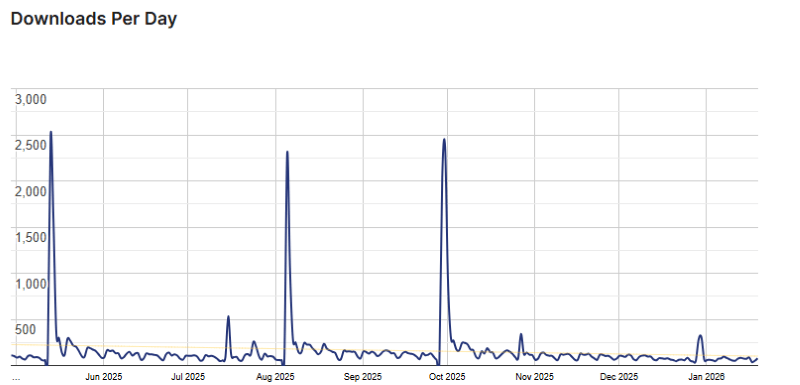
API to Posts Usage Statistics
Key Features of API to Posts
Here are some key features of the API to Posts you should know:
- Automated Content Creation: Take any JSON or XML data from a REST API and automatically convert it into WordPress Posts, Pages, or Custom Post Types.
- Flexible Field Mapping: Use a simple no-code interface to map API data fields directly to WordPress titles, content, excerpts, and dates.
- WooCommerce Integration: Fully supports creating and syncing WooCommerce products. You can map API data to prices, SKUs, stock levels, and other product attributes.
- Background Syncing: Keep your site updated automatically by setting sync intervals ranging from every few minutes to once a week. It uses the WordPress cron system to run imports in the background.
- ACF & Custom Field Support: Seamlessly import API data into Advanced Custom Fields (ACF) or standard WordPress custom fields for complex data displays.
- Image Handling: Automatically download and attach images from API URLs to your WordPress Media Library and set them as Featured Images.
- Unlimited Endpoints: Connect and import data from as many different API sources as you need.
- Deep Data Extraction: If your API data is nested within arrays, you can “step down” into those levels to extract exactly the value you need.
API to Posts Coupons, Discounts, and Pricing Plan
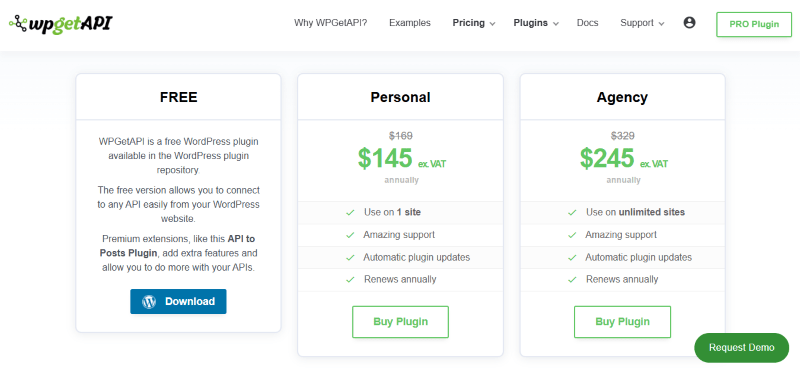
API to Posts has a very straightforward pricing plan.
| Basic | Personal | Agency |
| Free | $145 Yearly | $245 Yearly |
| Billed once per year until cancelled | Billed once per year until cancelled | Billed once per year until cancelled |
API to Posts Discounts
There are discounts available for the API to Posts.
API to Posts Lifetime Deals
There are lifetime deals available for API to Posts.
How To Avail The API to Posts Coupon?
Step 1: Go to the WP Get Api pricing page and select the plan you want to buy.
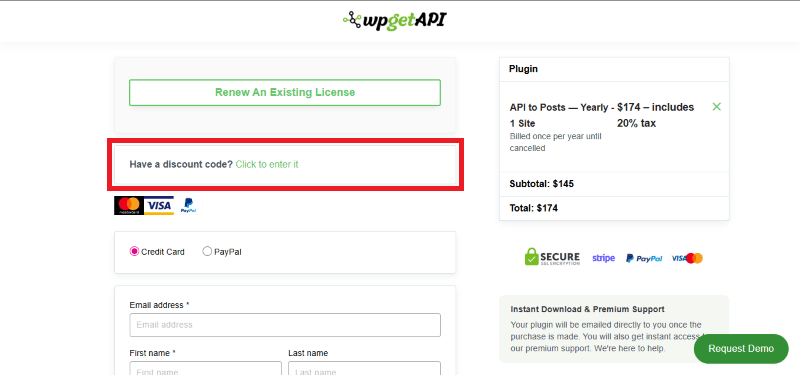
Step 2: On the API to Posts checkout page, click on “Have a discount code”
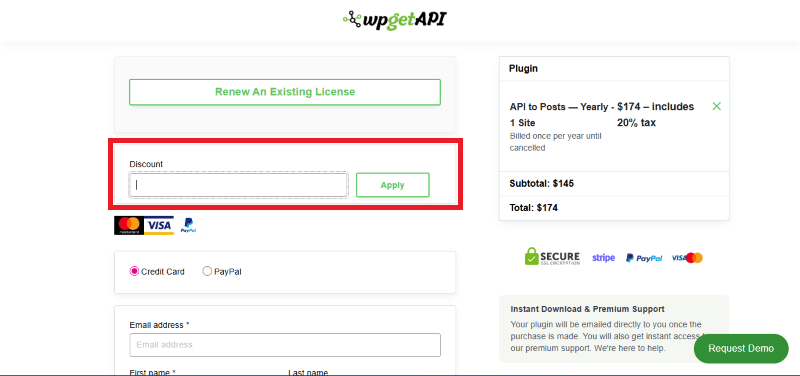
Step 3: Add the discount code in the field and click “Apply” to get the discount.
How To Install The API to Posts Plugin on WordPress?
Step 1: Purchase the extension from WPGetAPI and download the ZIP file from your account dashboard.
Step 2: Log in to your WordPress dashboard.
Step 3: Navigate to Plugins > Add New.
Step 4: Click on Upload Plugin and select the API to Posts ZIP file.
Step 5: Click Install Now and then Activate.
Step 6: Ensure the core (free) WPGetAPI plugin is also installed and active.
Step 7: Navigate to the WPGetAPI settings to begin mapping your API endpoints to posts.
For Whom Is This Product Built?
This product is built for:
- Website Owners
- Agencies
- E-commerce Stores
- Real Estate Directories
- Affiliate Marketers
- Developers
- Data Journalists
- SaaS Founders
API to Posts Alternatives
Here are some alternatives to the API to Posts plugin.
- WP All Import
- JSON Content Importer
- WP Import
| Product Name | WP All Import By WP All Import | JSON Content Importer By Json Content Importer | WP Import by Smackcoders |
| Number of Websites | 100,000+ | 6,000+ | 20,000+ |
What API to Posts Customers Say
“Really impressed with how easy this was to use. We have our login and user registration API working on a WordPress website, which felt like a huge obstacle overcome so quickly when starting our project. The documentation and hooks available had our bespoke needs covered, and the support has been outstanding. The Pro version is a bargain for what it provides. Thanks!”
“The team even went above and beyond to write a custom code and even made sure it worked on the site. Their service is exceptional, and I would recommend this plugin to anyone looking for an API Integration plugin.”
Read more reviews on WordPress.org.
We’d love to hear your thoughts and opinions on API to Posts. Share your experiences and insights in the comments below.
API to Posts
You Might Also Like

Soro Coupon – 2026

Runway Coupon – 2026

Speechify Coupon
From the WPdiscounts Blog
 WordPress is becoming easier for AI agents to work with. WordPress 6.9 introduced the Abilities API, which gives WordPress, themes, and plugins a standard way…
October 2, 2026
- WordPress gives website owners a large amount of control over how their sites look and work. According to WordPress.org, themes control the visual presentation of…
September 19, 2026
- Audio is often overlooked when businesses plan their website content. Yet voice can be useful for product demonstrations, online courses, tutorials, podcasts, advertisements, accessibility, and…
September 19, 2026