Best All-in-one Cloud for WordPress
InstaWP Coupons and Promo Code – 2026


InstaWP is one of the top platforms to develop and manage your WordPress websites.
Best Alternate

HOSTWP30
Limited Time Offer
Claim this offer before it ends.
50% OFF on InstaWP (Expired)
Alternatives of InstaWP
HOSTWP30

WPF15

No Coupon Req.

No Coupon Req.
Table of Content
About
Founder: Vikas Singhal
Website: instawp.com
Community: Facebook Group

What is InstaWP?
View InstaWP Coupons, Discounts, and Pricing Plan below.
InstaWP is an all-in-one WordPress platform designed to simplify the process of creating and managing WordPress sites from scratch. Its primary aim is to streamline the website development process, offer essential development tools, and supercharge your WordPress workflow. Whether you are a shopper looking for a demo or ready to upgrade, InstaWP offers a robust range of features and services geared towards achieving this goal:
WordPress Website Builder: Provides an intuitive website builder that allows users to create WordPress websites without the need for coding knowledge.
Hosting Services: InstaWP offers managed hosting services optimized for WordPress websites. This ensures that websites built using their platform perform well and are secure. Their hosting plans typically include features such as automatic updates, backup capabilities, and security monitoring.
WordPress Plugins: Develops and offers plugins that enhance the functionality of WordPress websites. These plugins cover a wide range of features, including SEO optimization, social media integration, e-commerce functionality, and more.
Support and Maintenance: Provides ongoing support and maintenance services to ensure that WordPress websites built using their platform remain up-to-date and secure. This includes troubleshooting issues, installing updates, and implementing security measures.
Trusted By
- Human Made
- Stellar WP
- Kadence WP
- Mediavine
- aThemes
- Restrict Content Pro
- Ollie
- Gravity

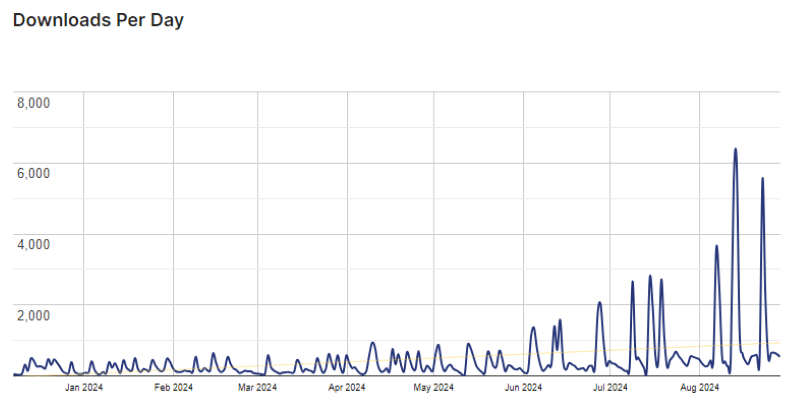
InstaWP Plugin Usage Statistics
Key Features of InstaWP
Here are some key features of InstaWP you may need to know to optimize your staging workflow and software development tasks:
- Easy Website Building: Offers a user-friendly website builder with drag-and-drop functionality, allowing users to create custom WordPress websites without any coding knowledge.
- WordPress Hosting: InstaWP offers optimized managed hosting services specifically tailored for WordPress websites, ensuring fast performance, reliability, and security.
- One-Click Install: Simplifies the process of setting up a WordPress website by offering 1-click installation, allowing users to get their sites up and running quickly.
- Customization Options: Allow users to customize their websites with ease, offering a range of features and options such as colors, fonts, layouts, and custom template selections.
- SEO Tools: InstaWP provides built-in SEO tools to help users optimize their websites for search engines, improving their visibility and ranking in search results.
- E-commerce Integration: InstaWP offers plugins and integrations for e-commerce functionality, allowing users to create online stores and sell products or services directly from their websites.
- Security Features: InstaWP includes security features such as malware scanning, firewall protection, and automatic backup systems to keep WordPress websites safe and secure.
- Performance Optimization: Optimizes website performance by offering additional features such as caching, content delivery network (CDN) integration, and image optimization.
- Customer Support: Provides dedicated customer support to assist users with any questions or issues they may encounter while building or managing their WordPress websites, enhancing the overall user experience.
InstaWP Coupons, Discounts, and Pricing Plans
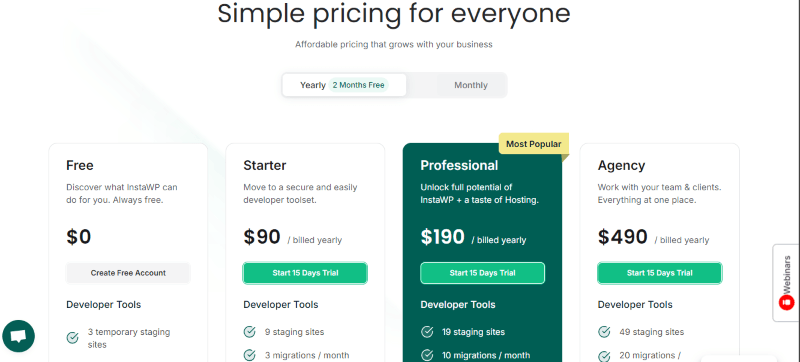
Choose the perfect plan for your needs. Whether you are looking to start for free or want to upgrade to premium development tools, you can easily apply an active InstaWP coupon to get an amazing InstaWP discount.
| Plan | Free | Starter | Professional | Agency |
|---|---|---|---|---|
| Price | $0 | $90/yearly | $190/yearly | $490/yearly |
| Staging Sites | 3 temporary staging sites | 9 staging sites | 19 staging sites | 49 staging sites |
| Migrations | 1 migration/mo | 3 migrations/month | 10 migrations/month | 20 migrations/month |
| Templates | 1 template | 5 templates | 15 templates | 30 templates |
| Disk Space | 1 GB disk space | 5 GB disk space | 15 GB disk space | 40 GB disk space |
| Sync / Features | – | 300 events for 2-way sync | 2500 events for 2-way sync Build WaaS | 5000 events for 2-way sync Build WaaS Team management Invite 10 team members |
| Hosting | – | – | 1 InstaWP Live website is free with this plan. | 3 InstaWP Live website is free with this plan. |
InstaWP Discount Code and Promo Code:
Looking to save money on your subscription? Shoppers can get an exclusive 20% discount on all Monthly and yearly plans by using the verified InstaWP promo code listed below. This is one of our best active coupons designed to help freelancers, developers and agencies save big on InstaWP’s powerful WordPress development suite.
If you want to try out InstaWP Pro, spin up a new staging site, or look for a working coupon during Black Friday or Cyber Monday sales, we keep our offers fresh and up-to-date.
If you have frequently asked questions (FAQs) about our deals, keep in mind that these are typically limited-time sitewide offers and can expire. Be sure to sign up for our newsletter to never miss a new InstaWP discount or special affiliate offer!
AFF20
How To Avail the InstaWP Coupon Code on WordPress?
Follow these simple steps to use a coupon and claim your InstaWP coupon codes or discount code:
Step 1: Go to the pricing page, copy the code, and select the plan you want to buy.
Step 2: On the InstaWP checkout page, click on “Apply Coupon” in the billing and payment section.
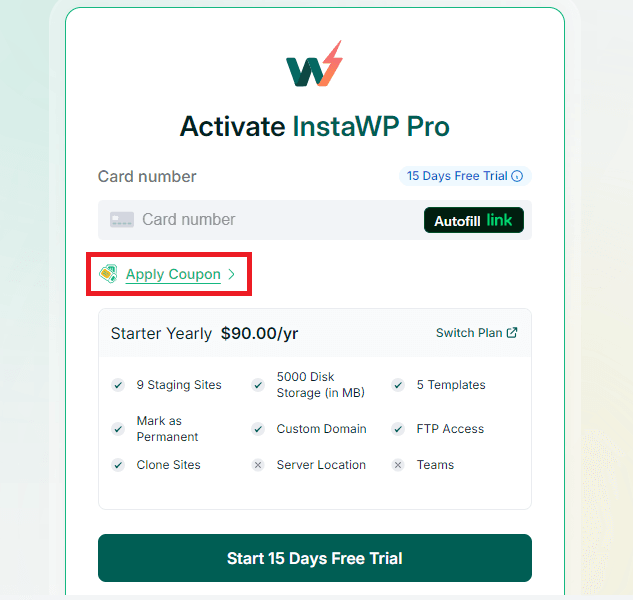
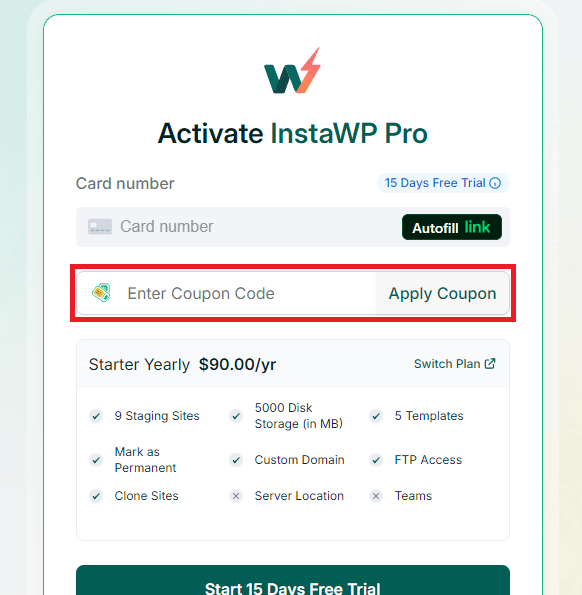
Step 3: Add the coupon code or promo code in the field and click “Apply Coupon” (or click ” Apply “) to get the discount. Be sure to run a quick verification to verify that the discount is successfully applied before finalizing your transaction.
How To Install InstaWP on WordPress?
Installation Steps
Setting up the plugin to streamline your WP development is easy. Follow these steps to quickly test a new template or build sites from scratch inside a secure staging environment:
- In the WordPress admin dashboard, go to the left-hand menu and click on “Plugins”.
- Then select “Add New” to open the plugin installation page.
- In the search bar, type “InstaWP”
- Find the official InstaWP plugin from the search results.
- Click the “Install Now” button next to the plugin.
- Once the installation is complete, click the “Activate” button to enable the plugin on your site.
- Connect it to your InstaWP account to begin creating a temporary sandbox or staging environment in seconds!
For Whom This Product Is Built For?
This powerful platform is built for:
- WordPress developers looking to optimize their software development and staging workflow.
- WordPress designers looking to build customized WordPress sites with minimal effort.
- Bloggers and content creators who need to quickly test a plugin or template without breaking their live site.
- E-commerce store owners wanting to run a temporary demo before launching updates.
Top InstaWP Alternatives
If you want to find the best solution for your projects, here are some alternatives for InstaWP in terms of WordPress hosting and staging environments:
- HostWP.io (Specialized WordPress staging and hosting platform)
- Cloudways (High-performance managed hosting solution)
- Hostinger (Affordable hosting options)
- TasteWP (Instantly spin up a free WordPress staging site)
Alternatives specifically for creating staging environments, migration, and backup management:
- WPvivid (Robust migration and staging plugin)
- Blogvault (Excellent automated backup and staging tool)
- TasteWP (Quick testing and staging environment builder)
What InstaWP Customers
Here is what real users have to say about using InstaWP’s development tools to save you money and optimize daily tasks:
“I’m fairly new to WordPress and InstaWP have been a fantastic support team for my new Agency business. They’ve been extremely patient always supportive always looking for a solution even when it’s kind of beyond their scope. I look forward to a long and successful journey with them.”
“I’m still learning how best to integrate this tool with my business, but I have no regrets and look forward to working with InstaWP long-term. They are professional, candid and helpful really good people and a great company.”
Read more verified InstaWP reviews on Trustpilot.
Frequently Asked Questions (FAQs)
Here are some frequently asked questions (FAQs) about InstaWP to help you understand how to utilize this platform in your daily workflow:
Q: Can I host my live, production WordPress websites on InstaWP?
Yes! While InstaWP is primarily known for building temporary staging environments and a quick sandbox, you can also host live production sites using InstaWP Live. Their managed hosting services feature secure cloud environments, automatic backup systems, and custom configurations to keep your live websites running smoothly.
Q: What are InstaWP Templates and how do they help?
An InstaWP template is a pre-configured WordPress environment containing your specific set of plugins, themes, and core configurations. Instead of building sites from scratch every time, you can use these templates to deploy a fresh development staging stage with a single click, saving you immense time during custom software development.
Q: What is the InstaWP Two-Way Sync feature?
Two-Way Sync is a game-changing tool for developers and agencies. It allows you to synchronize and merge database events, content updates, and file changes safely between your staging site and your live production environment, eliminating the risk of losing actual customer transactions or data.
Q: Does InstaWP offer a free version to test the tool?
Yes! Every shopper can get started with a free account that offers 3 temporary staging sites, 1 GB of disk space, and 1 template. It is a perfect way to run a short demo or test a plugin before deciding to upgrade to premium plans.
Q: Can I use an InstaWP coupon code on existing subscriptions?
Generally, an active InstaWP coupon or discount code is designated for new customer checkouts. However, if you are looking to upgrade your plan or transition to a yearly plan model, certain promotional codes can be applied during billing and checkout to help you save money.
We’d love to hear your thoughts and opinions on InstaWP. Share your experiences and insights in the comments below.

You Might Also Like

Soro Coupon – 2026

Runway Coupon – 2026

Speechify Coupon
From the WPdiscounts Blog
 WordPress is becoming easier for AI agents to work with. WordPress 6.9 introduced the Abilities API, which gives WordPress, themes, and plugins a standard way…
October 2, 2026
- WordPress gives website owners a large amount of control over how their sites look and work. According to WordPress.org, themes control the visual presentation of…
September 19, 2026
- Audio is often overlooked when businesses plan their website content. Yet voice can be useful for product demonstrations, online courses, tutorials, podcasts, advertisements, accessibility, and…
September 19, 2026