A Faster Way to Build Professional WordPress Websites.
Blocksy Coupon – 2026
The Most Customizable and Lightweight Theme for the Modern Block Editor
A Faster Way to Build Professional WordPress Websites.
Blocksy Coupon – 2026
The Most Customizable and Lightweight Theme for the Modern Block Editor
Exclusive Discount
Only for WPdiscounts.io visitors.
Limited Time Offer
Claim this offer before it ends.
Offer Expired - Check back soon!
Alternatives of Blocksy


No Coupon Available

No Coupon Available

KADENCE10
Table of Content
About
Founder: Sergiu Radu
Website: CreativeThemes.com
Community: Community

What is Blocksy?
View Blocksy Coupons, Discounts, and Pricing Plan below.
Most WordPress themes aren’t actually made to keep up with how websites are built today. A lot of them are heavy, slow down your site, and are a total pain to change unless you know how to write code. Blocksy is different because it’s lightweight and built to work perfectly with the WordPress block editor. It gives regular site owners and designers the ability to put together professional-looking websites quickly without needing to hire a developer or write any code themselves.
With this theme, you get an easy drag-and-drop tool to build your headers and footers, plenty of font and colour options, and it works great with WooCommerce. Whether you are starting a simple blog, a site for your business, or an online shop with lots of products, Blocksy makes sure your pages load fast and look right on both desktop and mobile screens. It’s built to stay fast even as you add more to your site, so you get plenty of design freedom without your website becoming sluggish.
For agencies handling lots of client work, small business owners, or anyone who just wants a website that works without the hassle, this theme is a huge help. It makes the whole building process much easier and clearer than most other themes. By keeping your site fast and easy to use, Blocksy helps you keep your customers happy and ensures your online shop or blog actually looks as good as the work you do.
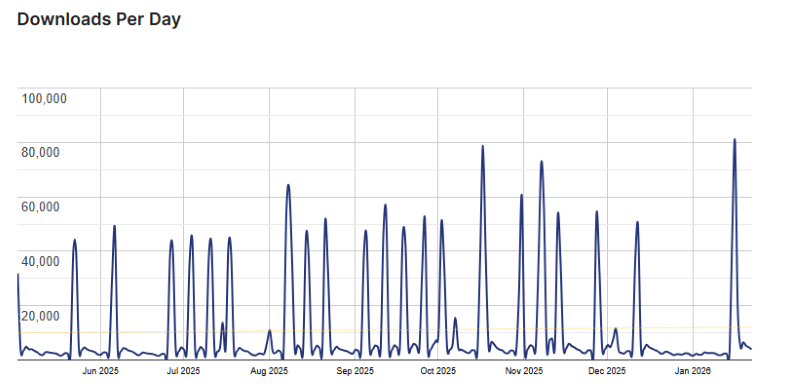
Blocksy Usage Statistics
Key Features of Blocksy
Here are some key features of Blocksy you should know:
- Lightning Fast Performance: This theme is built to be very lightweight. It doesn’t load unnecessary code, which helps your website open quickly, improves your Google rankings, and keeps visitors from leaving.
- Header & Footer Builder: You can design your site’s top and bottom sections using a simple drag-and-drop tool. You don’t need to be a coder to create complex layouts or add things like buttons and social icons.
- Deep Gutenberg Integration: Blocksy was made specifically to work with the standard WordPress block editor. This gives you much better control over how your pages look and how blocks behave.
- WooCommerce Extra Features: It comes with built-in tools for online stores, like a quick view for products, side-bar filters, and a floating cart that stays visible while customers shop.
- Fully Responsive & Retina Ready: Your website will automatically adjust its size to look sharp on everything from large computer monitors to small smartphones and tablets.
- Translation & RTL Ready: You can easily translate your site into other languages. It also supports “Right-to-Left” languages like Arabic or Hebrew without needing extra styling.
- One-Click Starter Sites: You get access to a library of ready-made website templates. You can import a full design in one click, so you don’t have to start your website from a blank page.
- Advanced Typography & Colours: You can change fonts and colours across your entire site from one place. It gives you total control over the look of your text and buttons without extra plugins.
- Multiple Layout Options: You can choose different layouts for your blog posts and pages, such as narrow content, full width, or adding sidebars on either side.
- Custom Post Types Support: If you use extra data like “Portfolios” or “Testimonials,” Blocksy lets you customise the design of those specific pages just as easily as a regular post.
- White Labelling: For agencies and developers, you can hide the Blocksy branding and replace it with your own company name to show your clients.
- Content Hooks: This allows you to insert custom code or blocks anywhere on your site, like adding an ad or a newsletter signup after a specific paragraph.
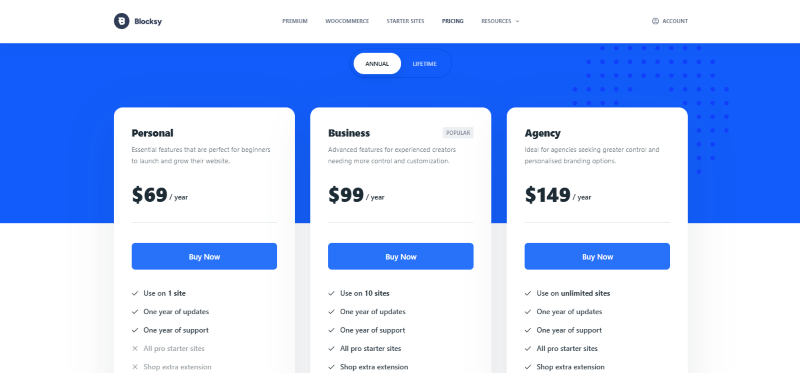
Blocksy Coupons, Discounts, and Pricing Plan
Blocksy has a very straightforward pricing plan.
| Personal | Business | Agency |
| $69 Yearly | $99 Yearly | $149 Yearly |
| 14-Day Money-Back Guarantee | 14-Day Money-Back Guarantee | 14-Day Money-Back Guarantee |
| Personal | Business | Agency |
| $199 LifeTime | $299 LifeTime | $499 LifeTime |
| 14-Day Money-Back Guarantee | 14-Day Money-Back Guarantee | 14-Day Money-Back Guarantee |
Blocksy Discounts
There are no discounts available for Blocksy.
Blocksy Lifetime Deals
There are lifetime deals available for Blocksy.
How To Avail The Blocksy Coupon?
Step 1: Go to the Blocksy pricing page and select the plan you want to buy.
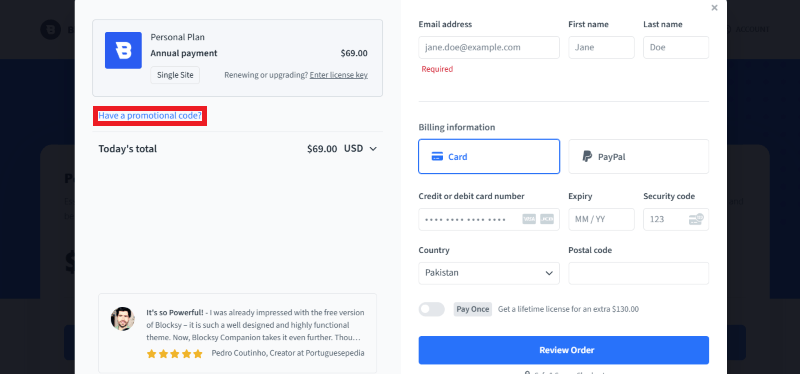
Step 2: On the Blocksy checkout page, click on “Have a Promotional code”
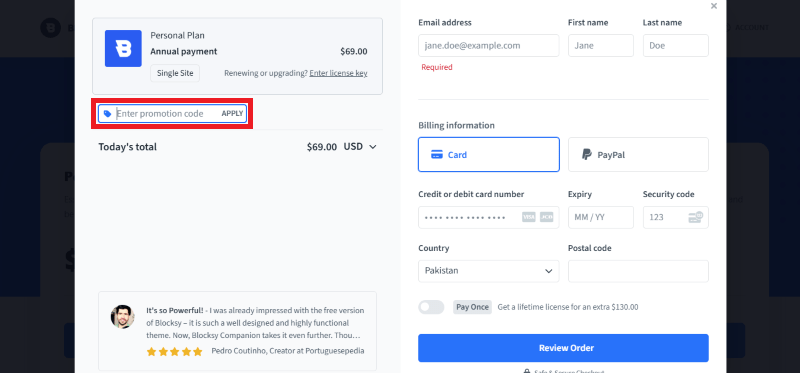
Step 3: Add the discount code in the field and click “Apply” to get the discount.
How To Install The Blocksy Plugin on WordPress?
Step 1: Download the Blocksy Theme. Visit the Creative Themes website or the WordPress repository to download the Blocksy theme ZIP file. Alternatively, you can search for it directly within your WordPress dashboard.
Step 2: Log in to your WordPress Dashboard. Access your site’s admin area (usually yourdomain.com/wp-admin) using your credentials.
Step 3: Navigate to Appearance > Themes. In the left-hand sidebar menu, hover over Appearance and click on Themes.
Step 4: Click on Add New and Upload. Click the Add New button at the top of the page, then click Upload Theme. Select the Blocksy ZIP file you downloaded or search for “Blocksy” in the search bar and click Install.
Step 5: Activate the Blocksy Theme. Once the installation is complete, click the Activate button to make Blocksy your live website theme.
Step 6: Install the Blocksy Companion Plugin. After activation, you will see a prompt at the top of your dashboard recommending the Blocksy Companion plugin. Click the Install Blocksy Companion button. This plugin is required to access starter sites and advanced header/footer features.
Step 7: Finalise Configuration. Navigate to the new Blocksy tab in your dashboard sidebar. From here, you can import starter sites, activate extensions, and follow the prompts to complete your initial setup. Your site is now ready for customisation!
For Whom Is This Product Built?
This product is built for:
- Web Designers & Agencies
- E-commerce Owners
- Bloggers
- Freelancers
Blocksy Alternatives
Here are some alternatives to the Blocksy plugin.
- Astra Theme
- GeneratePress
- Kadence WP
| Product Name | Astra Theme by wpastra | GeneratePress by generatepress | Kadence WP by kadencewp |
| Number of Websites | 1+ million | 500,000+ | 400,000+ |
What Blocksy Customers Say
“Blocksy has truly added great value to my website. It’s incredibly user-friendly, highly flexible, and allows customisation without needing advanced technical skills. It significantly improved both site performance and visitor experience. The frequent updates and fast, professional support team make it even more reliable. I highly recommend it to anyone looking for a modern design and powerful performance.”
“After using Blocky for free for a few years to my complete satisfaction, I switched to the Pro version for our webshop. I couldn’t figure it out. I emailed the service, and Serghei immediately took action. My settings were wrong, and they resolved it perfectly. It was definitely worth the money.”
Read more reviews on WordPress.org.
We’d love to hear your thoughts and opinions on Blocksy. Share your experiences and insights in the comments below.
Blocksy
You Might Also Like

Directorist Coupon – 2026

ConvertKit Coupon – 2026

ActiveCampaign Coupon – 2026
From the WPdiscounts Blog
 Building an online store in WordPress requires a reliable engine that can handle payments, security, and customer data without breaking. For many years, WooCommerce was…
March 5, 2026
 The way we do business has changed forever, and many business interactions have moved online. In 2026, a massive 70% of professionals are working in…
March 3, 2026
- Donorbox is popular because it is quick to set up and offers hosted donation pages, embeddable donation forms, and support for recurring donations. For many…
February 27, 2026