Instantly, Securely, Without Code.
Contact Form To API Coupon – 2026
Connect your form inputs to the matching API fields, ensuring the right data flows to your API when someone submits the form.
Instantly, Securely, Without Code.
Contact Form To API Coupon – 2026
Connect your form inputs to the matching API fields, ensuring the right data flows to your API when someone submits the form.
Exclusive Discount
Only for WPdiscounts.io visitors.
Limited Time Offer
Claim this offer before it ends.
Offer Expired - Check back soon!
Table of Content
About
Founder: Keyur Patel
Website: ContactFormtoAPI.Com
Community: Community

What is Contact Form To API?
View Contact Form To API Coupon, Discounts, Promo Codes, & Pricing Plans below.
Let’s be honest: paying a monthly subscription to a “middleman” service just to move your own data from point A to point B feels unnecessary. That’s exactly why IT Path Solutions created Contact Form To API. It’s a straightforward, powerful WordPress plugin that cuts out the expensive third-party apps and connects your Contact Form 7 submissions directly to any API or CRM you use.
When you need to send lead info to HubSpot, update a list in Mailchimp, or push data into your own custom database, this tool handles the heavy lifting with total precision. By removing the middleman, you aren’t just saving money, you’re taking full control of your workflow. You decide exactly how your data is formatted and where it goes the second a user hits “submit.”
For developers and agencies, it’s a massive time-saver. Instead of writing custom code for every project, you get a reliable toolkit that handles complex tasks like multi-endpoint routing and file conversions right from your WordPress dashboard. It’s about making enterprise-level automation accessible, fast, and, most importantly, affordable.
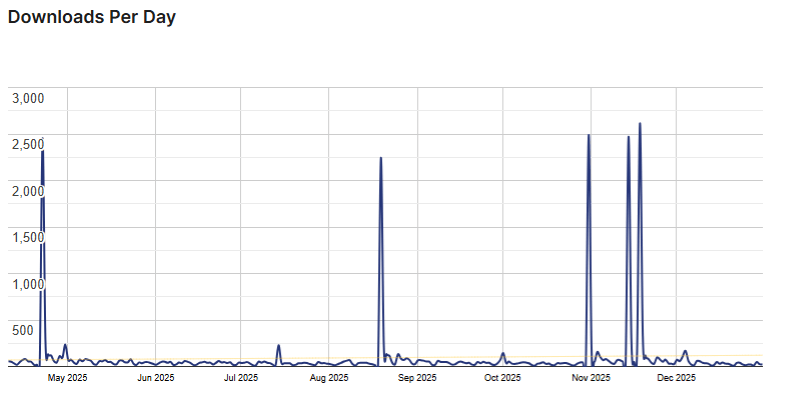
Contact Form To API Usage Statistics
Key Features of Contact Form To API
Here are some key features of Contact Form To API you should know:
- Universal POST/GET Requests: Send CF7 leads to any external API using standard POST or GET methods.
- Custom JSON Structures: Full support for multi-level and custom JSON formats to match any API requirement.
- BASE64 File Handling: Supports single and multiple file uploads with automatic BASE64 conversion for seamless transmission.
- Unlimited API Connections: Create as many connections as you need with no artificial limits on your workflow.
- Multi-API Syncing: Send a single lead to multiple APIs or endpoints simultaneously for maximum redundancy.
- Direct CRM Integration: Instantly push form inquiries into your CRM (HubSpot, Zoho, Pipedrive, etc.).
- Flexible Data Logging: Log submission details directly into Google Sheets or your own internal API.
- Standard Authentication: Full out-of-the-box support for both Basic and Bearer Token authentication.
- Enterprise Security: Access paid customisation support for advanced OAuth 2.0 and JWT Token authentication.
- Smart Field Mapping: Map and send form fields specifically as integers to satisfy strict data validation.
- Proven Compatibility: Extensively tested and verified to work with over 150+ different APIs.
Contact Form To API Coupons, Discounts, and Pricing Plan
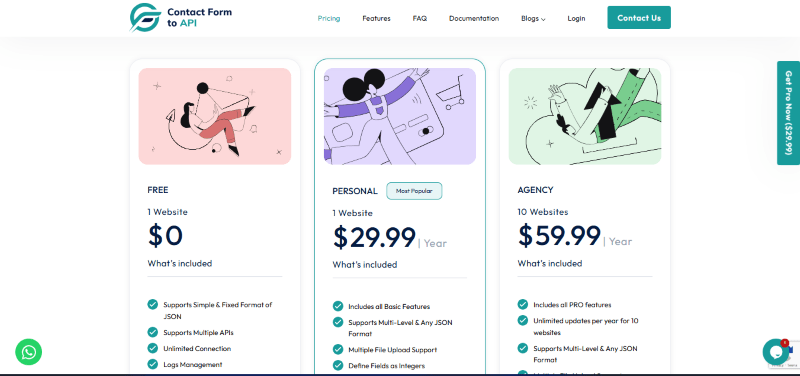
Contact Form To API has a very straightforward pricing plan.
| FREE | PERSONAL | AGENCY |
| $0 | $29.99 Yearly | $59.99 Yearly |
| 1 Website | 1 Website | 10 Website |
Contact Form To API Discounts
There are currently no discounts available for Contact Form To API.
Contact Form To API Lifetime Deals
There are no lifetime deals (LTD) available at this time.
How To Avail the Contact Form to API Coupon?
Step 1: Go to the pricing page and select the plan you want to buy.
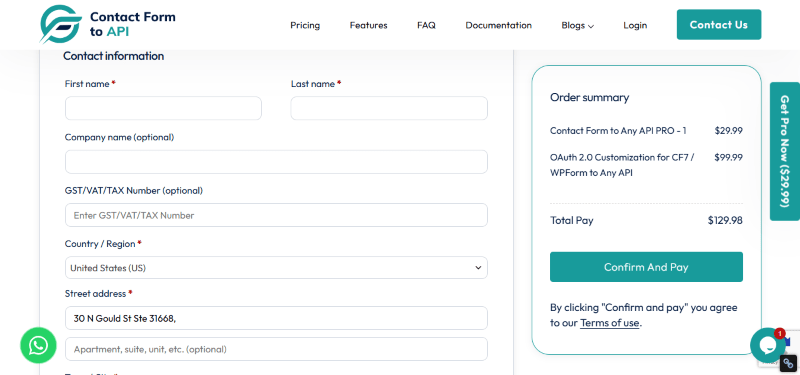
Step 2: Click the “Buy Now” button to be redirected to the secure checkout.
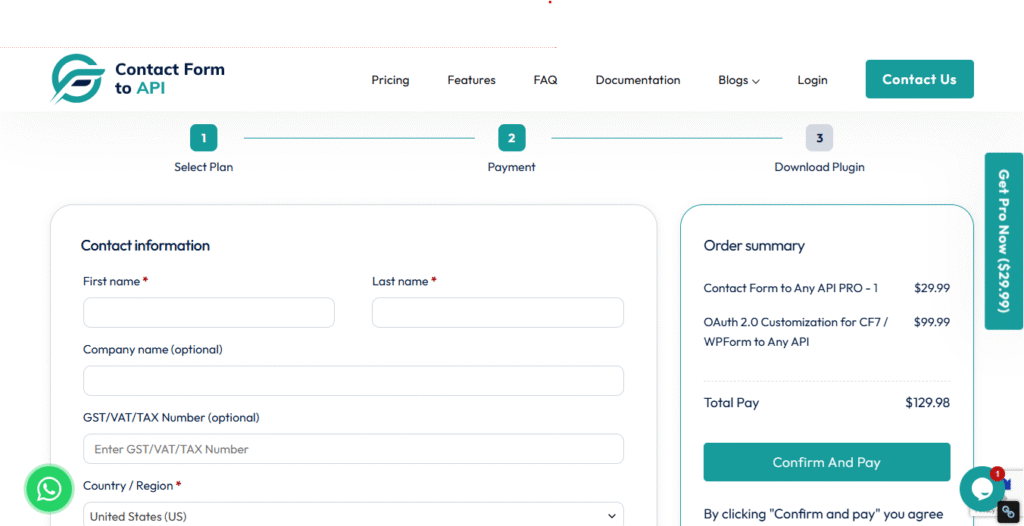
Step 3: Complete your payment details. Once the transaction is successful, you will receive your download link and license key via email.
How To Install The Contact Form To API Plugin on WordPress?
Step 1: Download the Plugin. Visit the Contact Form to API, choose your preferred version (Free or Pro), and download the ZIP file. If you purchased the Pro version, your download link and license key will be sent to your registered email.
Step 2: Access Your Dashboard Log in to your WordPress admin area.
Step 3: Go to the Plugins Menu. Navigate to Plugins in the left-hand sidebar and click on Add New.
Step 4: Upload the ZIP File. Click the Upload Plugin button at the top of the page. Select the contact-form-to-api.zip file you downloaded in Step 1.
Step 5: Install the Plugin. Click Install Now and wait for the process to complete.
Step 6: Activate the Plugin Once the installation is successful, click the Activate Plugin button. You can also find it later under Plugins > Installed Plugins.
Step 7: Configure Your First API After activation, look for the Contact Form to API menu in your dashboard. Enter your license key (if using Pro) and follow the prompts to start mapping your CF7 fields to your external API or CRM.
For Whom Is This Product Built?
This product is built for:
- Website Owners
- Agencies Owners
- Developers
Contact Form To API Alternatives
Here are some alternatives to the Contact Form To API plugin.
- WPGet API
- CF7 to Webhook
- Bit integrations
| Product Name | WPGet API By wpgetapi | CF7 to Webhook Mário Valney | Bit integrations by Bit Apps |
| Number of Websites | 10,000+ | 30,000+ | 20,000+ |
What Contact Form to API Customers Say
“The plugin is extremely easy to use, with only the essential settings and nothing cluttered. Performance is excellent, and the support team is truly outstanding. Highly recommended.”
“It’s nice to have a reliable CF7 to API plugin back on WordPress again. The support was very quick and helpful. Thank you!”
“I use a fairly new marketing automation platform, and as such, it doesn’t have a native WordPress plugin like HubSpot and Salesforce do.
So, I needed a way to get the information captured on the site into our CRM and Marketing Automation platform. This does the trick perfectly.
It’s a little tricky to set up with mapping fields across, but once you know what you’re looking for, it’s really easy.
When we moved site recently, we moved to WordPress Multi-site and had some issues. I shared this with the team, and they updated the plugin the same day to provide a fix and let me continue using it.
Strongly recommend to anyone in a similar situation.”
We’d love to hear your thoughts and opinions on Contact Form To API. Share your experiences and insights in the comments below.
Contact Form To API
You Might Also Like

Contact Form To API Coupon – 2026

Tourfic Coupon – 2025

Ultra Addons Coupon – 2025
From the WPdiscounts Blog
 Ever wondered what happens when buyers get to choose their own price? It feels strange at first. A bit wild. It could be risky. But…
December 31, 2025
- The digital landscape of 2026 demands more than just a functional website; it requires a visually stunning, technically optimised, and rapidly scalable online presence. NVMe-based…
December 30, 2025
- Choosing a Managed WordPress Host is one of the most critical decisions an entrepreneur, blogger, or small business owner will make for their online presence.…
December 19, 2025