
Grab the best Logo Showcase Coupon to save on premium brand sliders.
Logo Showcase Coupon – 2026
Build professional logo carousels and grids with an exclusive Logo Showcase Discount.
Grab the best Logo Showcase Coupon to save on premium brand sliders.
Logo Showcase Coupon – 2026
Build professional logo carousels and grids with an exclusive Logo Showcase Discount.
Exclusive Discount
Only for WPdiscounts.io visitors.
Limited Time Offer
Claim this offer before it ends.
Offer Expired - Check back soon!

What is Logo Showcase?
View Logo Showcase Coupons, Discounts, Promo Codes, and Pricing Plans below.
Logo Showcase Ultimate Pro is a specialised WordPress plugin designed to help business owners display partner logos, client brands, or sponsorships in a professional and organised manner. Instead of struggling with manual image alignments, this tool automates the process by creating sleek sliders or grids that fit perfectly into any page layout. It focuses on helping you build brand authority by showing off the reputable companies you work with.
The plugin provides an easy way to manage these images through a centralised dashboard, allowing you to categorise and sort them without touching a single line of code. It solves the common problem of messy, non-responsive logo sections that often break on mobile devices. By using this tool, you ensure that every brand you feature looks sharp and scales correctly across all screen sizes.
For anyone running a service-based business or an e-commerce store, social proof is everything. Logo Showcase Ultimate Pro gives you the technical flexibility to display your credentials through various themes and styles. Whether you need a simple grid or a fast-moving carousel, this plugin handles the heavy lifting so you can focus on growing your business.
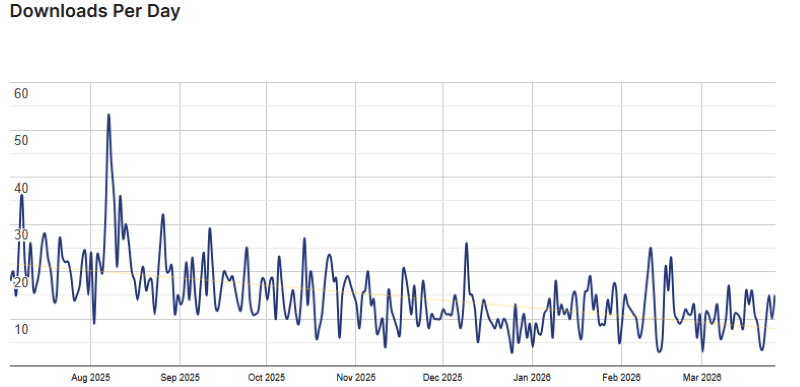
Logo Showcase Usage Statistics
Key Features of Logo Showcase
Here are some key features of Logo Showcase you should know:
- Shortcode Generator: Easily insert your logo sliders anywhere on your site using an automatically generated shortcode.
- Responsive Layouts: Every design is built to be 100% responsive, ensuring your logos look great on desktops, tablets, and smartphones.
- Diverse Theme Library: Access over 24 unique grid and carousel themes to match the specific look and feel of your website.
- Advanced Filtering: Organise and display logos based on categories, specific IDs, or even random selections to keep the layout fresh.
- Image Optimisation: Use built-in tools to auto-resize and crop images, which helps maintain a fast loading speed for your pages.
- Interactive Tooltips: Add helpful text that appears when users hover over a logo, providing more context about your partners.
- Ajax Pagination: Let users navigate through multiple pages of logos instantly without the need for a full page reload.
- Touch and Swipe Support: Provide a smooth experience for mobile users by allowing them to swipe through carousels effortlessly.
Logo Showcase Coupons, Discounts, and Pricing Plan
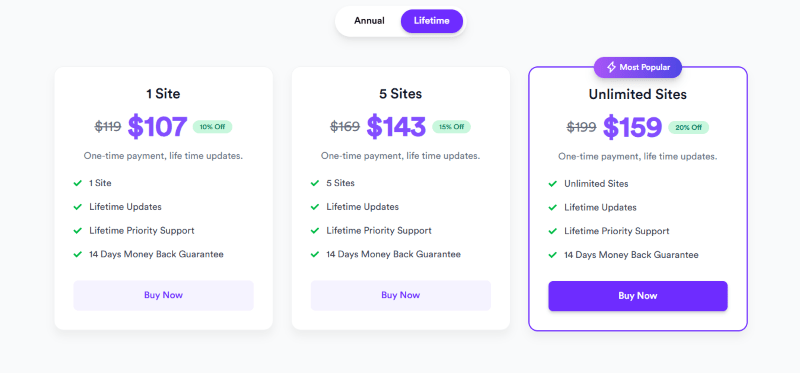
Logo Showcase has a very straightforward pricing plan.
| 1-Site | 5-Site | Unlimited Sites |
| $35 Yearly | $67 Yearly | $79 Yearly |
| 14-Day Money-Back Guarantee | 14-Day Money-Back Guarantee | 14-Day Money-Back Guarantee |
Logo Showcase Discounts
There are discounts available for Logo Showcase.
Logo Showcase Lifetime Deals
There are lifetime deals available for Logo Showcase.
How To Avail The Logo Showcase Coupon?
Step 1: Go to the Logo Showcase pricing page and select the plan you want to buy.
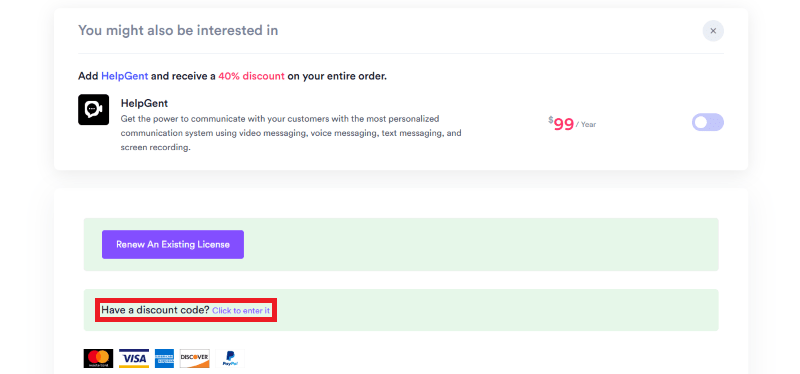
Step 2: On the Logo Showcase checkout page, click on “Have a discount code”
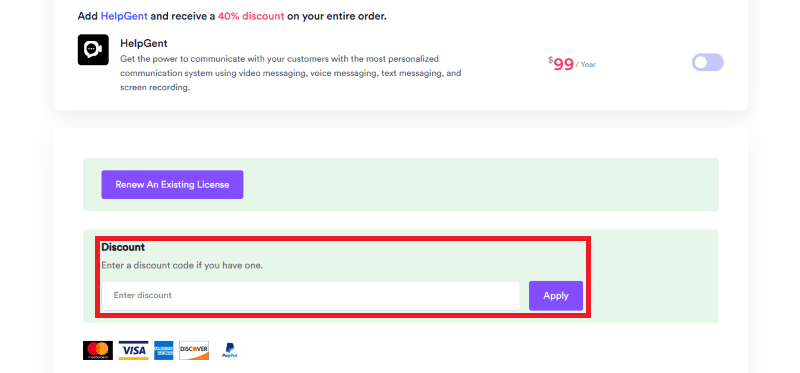
Step 3: Add the discount code in the field and click “Apply” to get the discount.
How To Install The Logo Showcase Plugin on WordPress?
Step 1: Visit the Logo Showcase Ultimate Pro website, choose your version, and download the plugin ZIP file.
Step 2: Log in to your WordPress dashboard.
Step 3: Navigate to Plugins, then select Add New.
Step 4: Click on Upload Plugin and select the ZIP file you just downloaded.
Step 5: Click Install Now to begin the process.
Step 6: After installation, go to your Installed Plugins list and click activate.
Step 7: Follow the setup prompts to configure your first logo gallery and start using the features.
For Whom Is This Product Built?
This product is built for:
- Small Business Owners
- Digital Agencies
- Freelance Developers
- E-commerce Store Managers
- Marketing Professionals
- Web Designers
- Content Creators
Logo Showcase Alternatives
Here are some alternatives to the Logo Showcase plugin.
- Logo Slider
- Smart Logo Showcase
- WP Logo Showcase Responsive Slider
| Product Name | Logo Slider by GSplugins | Logo Showcase by pickelements | WP Logo Showcase Responsive Slider by essentialplugin |
| Number of Websites | 30,000+ | 900+ | 30,000+ |
What Logo Showcase Customers Say
“Best Carousel plugin you would want! It does everything you need and is super flexible while providing a smooth experience to your website visitors. Would definitely recommend”
“The multiple filtering options are what sold it for me! With over 60 logos, the random order filtering really solved my issue. Happy so far!”
“Its a very fine plugin for logos on the website, I tried it for one project, and I think I’ll use it for different projects in the future.”
Read more reviews on WordPress.org.
We’d love to hear your thoughts and opinions on Logo Showcase. Share your experiences and insights in the comments below.
Logo Showcase
You Might Also Like

Canva Coupon – 2026
Logo Showcase Coupon – 2026

GetResponse Coupon – 2026
From the WPdiscounts Blog
 With rising customer expectations, faster checkout demands, and increasing security concerns, simply installing WooCommerce and listing products is no longer enough. Store owners need the…
March 17, 2026
- Free Website Builders are online platforms that allow you to create, design, and launch a fully functional website without any financial investment or coding expertise.…
March 12, 2026
- Success with a WordPress membership site goes beyond just providing access to exclusive content or services. The idea is to make the process of becoming…
March 12, 2026