Boost Performance & Accessibility
UserWay Accessibility Widget Coupon – 2026
Instead of you having to go into your site’s code and manually fix every single image tag or contrast issue, this widget does the heavy lifting for you.
Boost Performance & Accessibility
UserWay Accessibility Widget Coupon – 2026
Instead of you having to go into your site’s code and manually fix every single image tag or contrast issue, this widget does the heavy lifting for you.
Exclusive Discount
Only for WPdiscounts.io visitors.
Limited Time Offer
Claim this offer before it ends.
Save 30% OFF on all plans on UserWay Accessibility Widget (Expired)
Table of Content
About
Founder: Allon Mason
Website: userway.org
Community: Community

What is UserWay Accessibility Widget?
View UserWay Accessibility Widget Coupons, Discounts, Promo Codes, & Pricing Plans below.
UserWay is basically like a high-tech assistant for your website’s accessibility. Instead of you having to go into your site’s code and manually fix every single image tag or contrast issue, this widget does the heavy lifting for you.
Think about it this way: if a visitor has trouble reading small text, they can click the widget and instantly make everything bigger. If they are colorblind, they can swap the colors to something that actually makes sense to them. It’s all about giving your audience the power to fix their own browsing experience without you having to build ten different versions of your website from scratch.
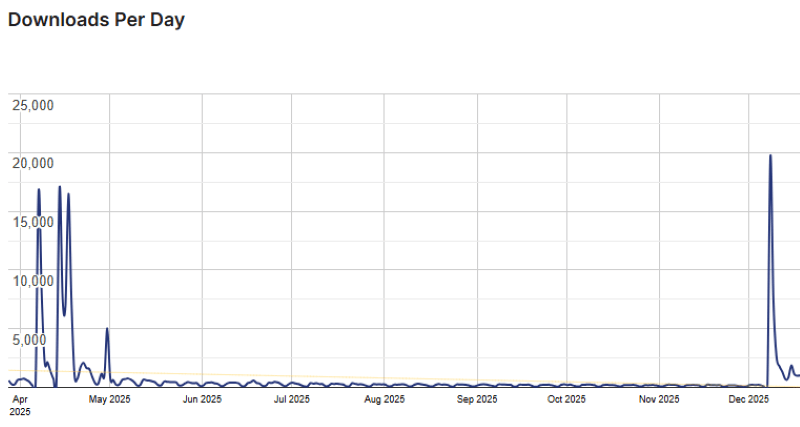
UserWay Accessibility Widget Usage Statistics
Key Features of UserWay Accessibility Widget
Here are some key features of UserWay Accessibility Widget you should know:
- AI-Powered Remediation: The widget’s “brain” scans your code and fixes accessibility violations automatically. It’s like having a tiny developer working 24/7.
- Screen Reader Integration: It comes with a built-in screen reader that reads your text aloud, which is a lifesaver for visually impaired users who might not have their own software installed.
- Dyslexia-Friendly Fonts: With one click, users can switch your site’s font to one that is specifically designed to be easier for people with dyslexia to read.
- Contrast & Color Controls: Visitors can toggle high contrast, desaturation, or dark mode to make your site comfortable for their eyes.
- Keyboard Navigation: For those who can’t use a mouse, UserWay makes sure your site is fully navigable using just the “Tab” key.
- Pause Animations: Users can stop any moving parts on your site, which helps people with ADHD or cognitive disabilities focus on your content without getting distracted.
UserWay Accessibility Widget Coupons, Discounts, and Pricing Plan
UserWay Accessibility Widget has a very straightforward pricing plan.
| Pro | Pro Plus | Ultimate |
$490/yr |
$1190/yr |
$2490/yr |
| Basic
Up to 100K page views/mo |
Advanced
Up to 100K page views/mo |
Comprehensive Up to 100K page views/mo Unlimited website pages Usage Stats add-on Modify Menu add-on Live Translations add-on Monitor 100 pages, with alerts |
UserWay Accessibility Widget Discounts
There is a 30% discount available on the UserWay Accessibility Widget pricing plan.
UserWay Accessibility Widget Lifetime Deals
There are no lifetime deals available for UserWay Accessibility Widget.
How To Install The UserWay Accessibility Widget Plugin on WordPress?
Step 1: Visit the UserWay Accessibility Widget website, choose the Pro or Free version, and download the plugin. You may receive the plugin as a zip file in your email or elsewhere.
Step 2: Log in to your WordPress dashboard
Step 3: Navigate to Plugins > Add New
Step 4: Click on Upload Plugin and select the UserWay Accessibility Widget ZIP file you downloaded.
Step 5: Click Install Now.
Step 6: After installation, go to Plugins > Installed Plugins and activate UserWay Accessibility Widget.
Step 7: Follow the prompts to configure UserWay Accessibility Widget’s initial settings after activation. The plugin is now configured to be utilized.
For Whom This Product Is Built For?
This product is built for:
- Website Owners
- Agencies
- Web Designers
- Small Businesses
- Developers
- Freelancer
- E-commerce
- Content Creators
- Marketing Professionals
UserWay Accessibility Widget Alternatives
Here are some alternatives to the UserWay Accessibility Widget plugin.
- Ally
- Accessibility Suite by Equalize Digital
- CookieYes
- WP Accessibility
- WP Accessibility Helper (WAH)
- Enable Accessibility
- Web Accessibility By accessiBe
- WP ADA Compliance
- One-Click Accessibility
- WP Accessible
| Product Name | Accessibility Suite by Equalize Digital | WP Accessibility | WP Accessibility Helper (WAH) |
| Number of Websites | 9,000+ | 50,000+ | 10,000+ |
What UserWay Accessibility Widget Customers Say
“We were looking for an accessibility solution for our corporate website, with a good look & feel for smartphones and all kind of devices, easy to install and use, and reasonable price, to improve the web user experience. UserWay has overexceeded our expectations, the installation and configutaion has been really simple and the support team completely disposed, answering inmediately any question. Very happy with the decision.”
“I installed it on my website and had some problem with stretch my website. I contacted support, first of all, reaching them was too fast and easy. they listened to issue and resolve it very fast (actually it was my fault!). I’m going to buy this plugin and recommend it to all who want to make their website easy for all specially for whom which is working with disable people or elderlies.”
Read more UserWay Accessibility Widget reviews on wordpress.org
We’d love to hear your thoughts and opinions on UserWay Accessibility Widget. Share your experiences and insights in the comments below.
UserWay Accessibility Widget
You Might Also Like

Verpex Coupon – 2026

Amazon Associates WordPress Plugin Coupon – 2026

Canva Coupon – 2026
From the WPdiscounts Blog
 Most people spend way too much time picking a WordPress theme when starting a blog. It’s easy to get pulled in by designs that look…
March 30, 2026
- The best directory plugins for WordPress help you build listing websites without writing a single line of code. They let visitors submit listings, search by…
March 27, 2026
- With rising customer expectations, faster checkout demands, and increasing security concerns, simply installing WooCommerce and listing products is no longer enough. Store owners need the…
March 17, 2026