Top Password Manager Plugin
Password Protected Coupon Code – 2026


The Password Protected plugin lets you easily password-protect your entire WordPress site, specific pages, posts, categories, and even WooCommerce products.
Top Password Manager Plugin
Password Protected Coupon Code – 2026
The Password Protected plugin lets you easily password-protect your entire WordPress site, specific pages, posts, categories, and even WooCommerce products.
Black Friday 2025
Exclusive Discount
Only for WPdiscounts.io visitors.
Limited Time Offer
Claim this offer before it ends.
Get 25% OFF on Password Protected (Expired)
Table of Content
About
Founder: Saad Iqbal
Website: passwordprotected.com

What is Password Protected?
View Password Protected Coupons, Discounts, and Pricing Plans below.
The Password Protected plugin lets you easily password-protect your entire WordPress site, specific pages, posts, categories, and even WooCommerce products. Whether you’re a blogger, business owner, or developer, this plugin provides comprehensive security with a user-friendly interface.
On top of that, you can add an extra layer of security to your WordPress login page (wp-admin).
Key Features of Password Protected
Here are some key features of the Password Protected you should know:
- Complete Site Protection: Password-protect your entire WordPress site with a single master password. Control access, set usage limits, and define permissions.
- WP-Admin Protection: Add an extra layer of security for your WordPress login page to secure sensitive site settings, user data, and administrative functions.
- Passwordless Admin Access: Admins can bypass the password requirement, which improves site management and enhances security by reducing the risk of unauthorized access.
- Google reCAPTCHA Integration: Add Google reCAPTCHA to make your password-protected page more secure. This prevents automated bots and spam from accessing the protected content.
- Specific Post/Page Protection: Easily restrict premium or sensitive content access. Offer exclusive content to subscribers or conduct private testing before publication.
- IP Address Whitelisting: Specify which IP addresses can access protected content so that only authorized users can view password-protected content.
Password Protected Coupons, Discounts, and Pricing Plan
Password Protected also has a very straightforward pricing plan. With the paid version you get additional features and support.
| Basic | Pro | Agency | Ultimate |
| $49.99/yr | $249.95/yr | $1,499.7/yr | $4,999/yr |
| Single Site Unlimited Support All Basic Features Included All Premium Features Included |
5 Sites Unlimited Support All Basic Features Included All Premium Features Included |
30 Sites Unlimited Support All Basic Features Included All Premium Features Included |
100 Sites Unlimited Support All Basic Features Included All Premium Features Included |
Password Protected Discounts and Coupon Code
Click below to get an Exclusive 10% discount on all pricing plans of Password Protected
Password Protected Lifetime deal
There are 4-lifetime deals available for Password Protected.
- Basic $149.99 (1 Site)
- Pro $749.95 (5 Site)
- Agency $4,499.7 (30 Site)
- Ultimate $14,999 (100 Site)
How To Avail The Password Protected Coupon?
Step 1: Go to the pricing page and select the plan you want to buy.
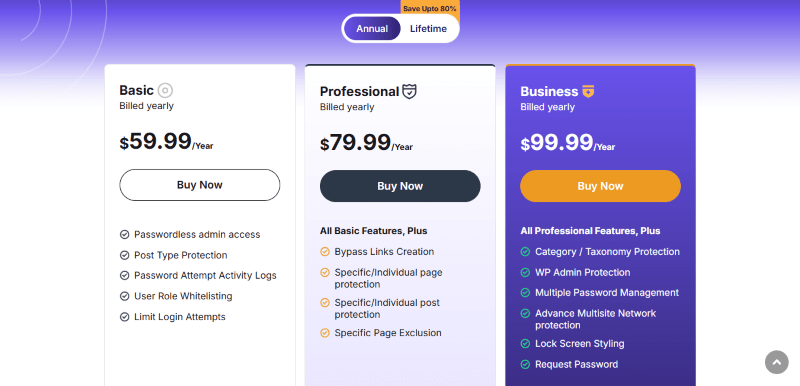
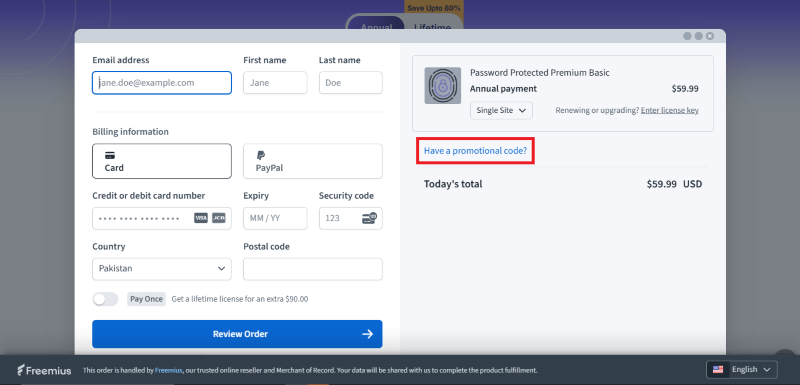
Step 2: On the Password Protected checkout page, click on “Have a coupon”
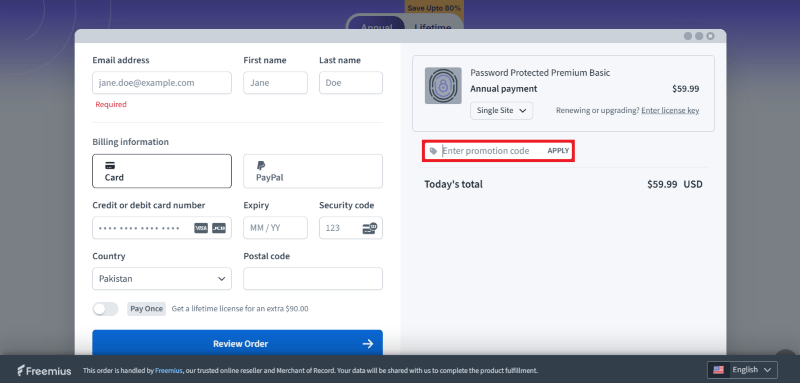
Step 3: Add the discount code in the field and click “Apply” to get the discount.
How To Install the Password Protected Plugin on WordPress?
Step 1: Visit the Password Protected website, choose the Pro or Free version, and download the plugin. You may receive the plugin as a zip file in your email or elsewhere.
Step 2: Log in to your WordPress dashboard
Step 3: Navigate to Plugins > Add New
Step 4: Click on Upload Plugin and select the Password Protected ZIP file you downloaded.
Step 5: Click Install Now.
Step 6: After installation, go to Plugins > Installed Plugins and activate Password Protected.
Step 7: Follow the prompts to configure Password Protected initial settings after activation. The plugin is now configured to be utilized.
For Whom Your Product Is Built For?
- WordPress website owners seeking enhanced security measures.
- Bloggers, business owners, and developers looking for easy-to-use security solutions.
- Administrators concerned about unauthorized access to sensitive site areas.
- Content creators aiming to restrict access to premium or sensitive content.
- Site managers interested in streamlining site management and reducing security risks.
Integrations or Addons
These are some Password Protected Addons:
- Compatibility with FunnelKit
- Compatibility with Square Terminal
- Compatibility With WooCommerce Pre-Orders Extension
- Compatibility with Cartflows
Password Protected Alternatives
Here are some alternatives to the Password Protected plugin.
- Passster plugin
- Password Strength Settings Plugin
- Frontend Reset Password Plugin
- Access Category Password Plugin
We’d love to hear your thoughts and opinions on Password Protected. Share your experiences and insights in the comments below.

You Might Also Like

Directorist Coupon – 2026

ConvertKit Coupon – 2026

ActiveCampaign Coupon – 2026
From the WPdiscounts Blog
 Building an online store in WordPress requires a reliable engine that can handle payments, security, and customer data without breaking. For many years, WooCommerce was…
March 5, 2026
 The way we do business has changed forever, and many business interactions have moved online. In 2026, a massive 70% of professionals are working in…
March 3, 2026
- Donorbox is popular because it is quick to set up and offers hosted donation pages, embeddable donation forms, and support for recurring donations. For many…
February 27, 2026