
Simple WordPress traffic insights without the Google Analytics headache.
Jetpack Stats Coupon – 2026
Get real-time stats and visitor data delivered right to your WordPress dashboard.
Simple WordPress traffic insights without the Google Analytics headache.
Jetpack Stats Coupon – 2026
Get real-time stats and visitor data delivered right to your WordPress dashboard.
Exclusive Discount
Only for WPdiscounts.io visitors.
Limited Time Offer
Claim this offer before it ends.
Offer Expired - Check back soon!
Alternatives of Jetpack Stats


WPDISCOUNTSIO

AnalytifyDiscount
Table of Content
About
Founder: Mike Stotte
Website: Jetpack.com
Community: Community

What is Jetpack Stats?
View Jetpack Stats Coupon, Discounts, Promo Codes, & Pricing Plans below.
Most website owners don’t have time to get lost in Google Analytics’ confusing menus. If you’re running a small business, a personal blog, or a local shop, you just need to know how many people are visiting and what they’re actually reading. Jetpack Stats makes this simple by putting a clean, easy-to-read dashboard right inside your WordPress site. You don’t even have to leave your website to see your traffic.
With this plugin, you can view your visitor counts and top posts in real time. It helps you figure out which articles are popular so you know what to write next. It also shows you exactly how people found you when they clicked a link on Facebook, searched on Google, or followed a recommendation from another site. Instead of guessing, you get clear data that helps you grow your audience.
When you’re a blogger trying to reach more people or a local business owner tracking customer interest, this tool takes the headache out of analytics. It gives you a professional way to track your growth without the steep learning curve, keeping everything synced perfectly with your WordPress site.
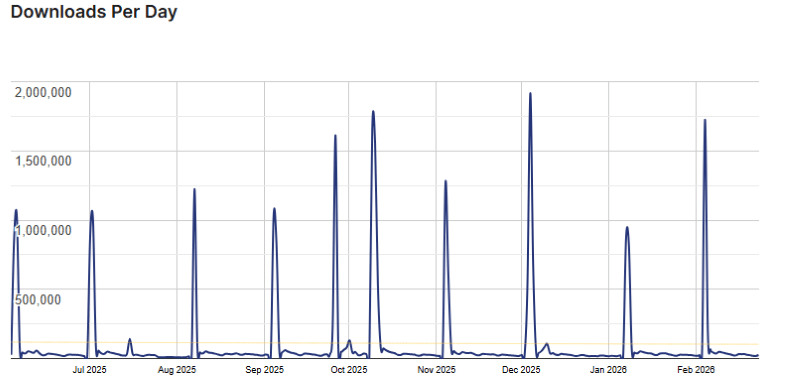
Jetpack Stats Usage Statistics
Key Features of Jetpack Stats
Here are some key features of Jetpack Stats you should know:
- Real-Time Traffic Monitoring: See your visitor counts and page views as they happen. Perfect for tracking the immediate impact of a new post or social share.
- Top Posts & Pages: Identify your most popular content at a glance. This helps you understand what your audience loves so you can create more of it.
- Referrer Tracking: Know exactly where your traffic is coming from, whether it’s Google, Facebook, or a niche blog, so you can focus your marketing efforts.
- Search Engine Terms: Gain insights into the keywords people use to find your site, helping you optimise your SEO strategy.
- Clicks and File Downloads: Track which external links your visitors are clicking and how many times your resources are being downloaded.
- Mobile App Integration: Monitor your site’s performance on the go with the Jetpack mobile app, keeping you connected to your data anywhere.
Jetpack Stats Coupons, Discounts, and Pricing Plan
Jetpack Stats has a very straightforward pricing plan.
| Basic | Personal | Commercial |
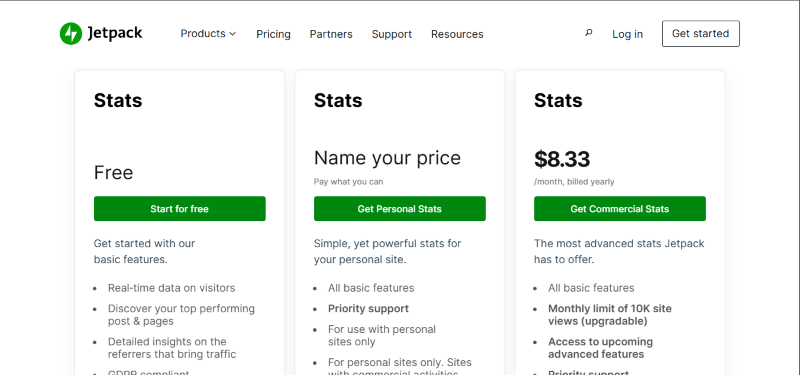
| Free | Free | $8.33 Yearly |
| 14-Day Money-Back Guarantee | 14-Day Money-Back Guarantee | 14-Day Money-Back Guarantee |
Jetpack Stats Discounts
There are discounts available for Jetpack Stats.
Jetpack Stats Lifetime Deals
There are no lifetime deals available for Jetpack Stats.
How To Avail The Jetpack Stats Coupon?
Step 1: Go to the Jetpack Stats pricing page and select the plan you want to buy.
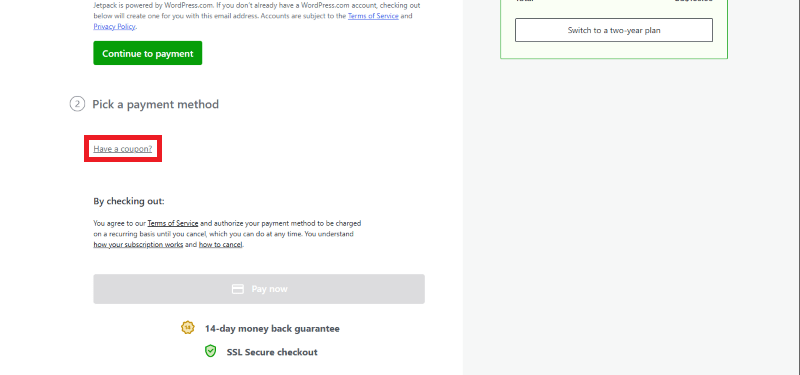
Step 2: On the Jetpack Stats checkout page, click on “Have a Coupon code”
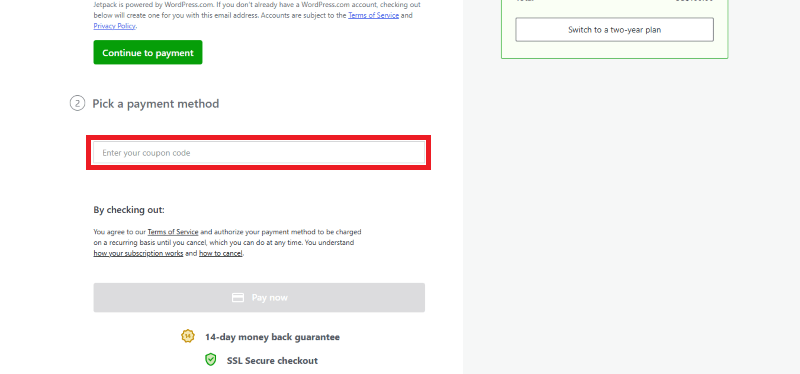
Step 3: Add the discount code in the field and click “Apply” to get the discount.
How To Install The Jetpack Stats Plugin on WordPress?
Step 1: Visit the Jetpack Stats website, choose your preferred plan (Free or Pro), and download the plugin. You will receive the Jetpack plugin as a ZIP file.
Step 2: Log in to your WordPress dashboard.
Step 3: Navigate to Plugins > Add New.
Step 4: Click on Upload Plugin and select the Jetpack ZIP file you downloaded.
Step 5: Click Install Now.
Step 6: After installation, go to Plugins > Installed Plugins and activate Jetpack.
Step 7: Follow the prompts to connect your WordPress.com account and configure Jetpack Stats’ initial settings after activation. The plugin is now configured to be utilised.
For Whom Is This Product Built?
This product is built for:
- Blogger & Journalists
- Agencies
- Small Business Owners
- E-commerce Stores
- Digital Marketers
- Non-Profit Organizations
Jetpack Stats Alternatives
Here are some alternatives to the Jetpack Stats plugin.
- Independent Analytics
- Analytify
- Burst Statistics
| Product Name | Independent Analytics independentwp | Analytify by analytify | Burst Statistics by burst-statistics |
| Number of Websites | 100,000+ | 10,000+ | 200,000+ |
What Jetpack Stats Customers Say
“Jetpack adds useful features like security, performance, and stats in one place. It’s easy to use and makes managing a WordPress site feel more complete and stress-free.”
“Jetpack is a very useful all-in-one plugin for security, backup, and performance. Easy to set up and works smoothly. Highly recommended for WordPress users.”
Read more reviews on WordPress.org.
We’d love to hear your thoughts and opinions on Jetpack Stats. Share your experiences and insights in the comments below.
Jetpack Stats
You Might Also Like
Jetpack Stats Coupon – 2026

All in One Accessibility Coupon – 2026

BreakFusion Coupon – 2026
From the WPdiscounts Blog
 If you are setting up a donation system for your WordPress site, you need a tool that is easy for your supporters to use, but…
February 25, 2026
- For a long time, Google Analytics was the only real choice for tracking a website. Most of us just installed it because everyone else did.…
February 24, 2026
- Running a job board on your WordPress website can turn into a profitable business or help you connect talented people with great opportunities. According to…
February 23, 2026