Finally, a Powerful & Easy Way to Showcase Events Sliders, Grids, Carousels & More Built for The Events Calendar.
Eventful Coupon – 2026
Make Your Events Stand Out With Eye-Catching Carousel, Grid, Slider, List, and Ticker Layouts & Advanced Filter Bar.
Finally, a Powerful & Easy Way to Showcase Events Sliders, Grids, Carousels & More Built for The Events Calendar.
Eventful Coupon – 2026
Make Your Events Stand Out With Eye-Catching Carousel, Grid, Slider, List, and Ticker Layouts & Advanced Filter Bar.
Exclusive Discount
Only for WPdiscounts.io visitors.
Limited Time Offer
Claim this offer before it ends.
Offer Expired - Check back soon!

What is Eventful?
View Eventful Coupons, Discounts, and Pricing Plan below.
Eventful is the ultimate design-focused addon for The Events Calendar, a platform trusted by over 700,000 users. While the core “The Events Calendar” plugin handles the logistics of event management, Eventful is purpose-built to transform those basic listings into visually captivating showcases. It allows you to create professional, high-conversion event displays without writing a single line of code.
With Eventful, you can move beyond standard views and display your events in modern layouts, including Grids, Sliders, Carousels, Lists, and scrolling Tickers. The plugin features an advanced Ajax Live Filter Bar, allowing your visitors to instantly sort through events by Category, Tag, Venue, or Organiser without refreshing the page. Engineered for performance, Eventful offers over 300 customization options and integrates seamlessly with popular page builders like Elementor, Gutenberg, Divi, WPBakery, Brizy, and Beaver Builder.
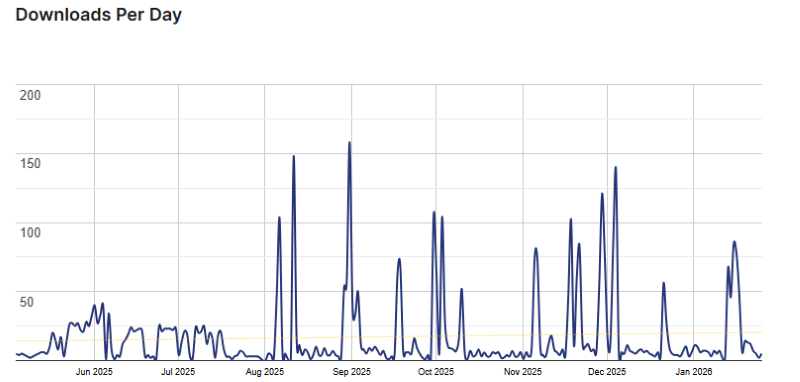
Eventful Usage Statistics
Key Features of Eventful
Here are some key features of Eventful you should know:
- Diverse Layout Options: Display your events in 6+ professional styles, including Grid, Carousel, List, Ticker, and Masonry. You can even create multi-row or centre-focus carousels to highlight featured events.
- Advanced Live Ajax Filters: Allow visitors to search and sort events instantly by Category, Tag, Venue, or Organiser without a page reload. It includes search bars and multiple filter types like dropdowns and checkboxes.
- Total Styling Control: Customise every detail, including typography (840+ Google Fonts), colours, borders, and spacing. No CSS knowledge is required to match the event displays to your brand’s identity.
- Event Details in Popup: Keep visitors on your page by displaying event details in a beautiful, customizable pop-up instead of redirecting them to a separate event page.
- Works Seamlessly with Page Builders: Fully compatible with Elementor, Gutenberg, Divi, WPBakery, and more. Use dedicated widgets or the powerful shortcode generator to place event showcases anywhere.
- Mobile & SEO Friendly: All layouts are fully responsive and optimized for speed. Built-in Events Schema support ensures your events are discoverable and look great on search engine results.
- Import & Export Wizard: Save time by effortlessly moving your custom event showcase settings from a local environment to a live site or between different projects with a few clicks.
- Dynamic Content Sorting: Take control of your display order with descending/ascending sorting and the ability to show only specific events, categories, or featured items.
Eventful Coupons, Discounts, and Pricing Plan
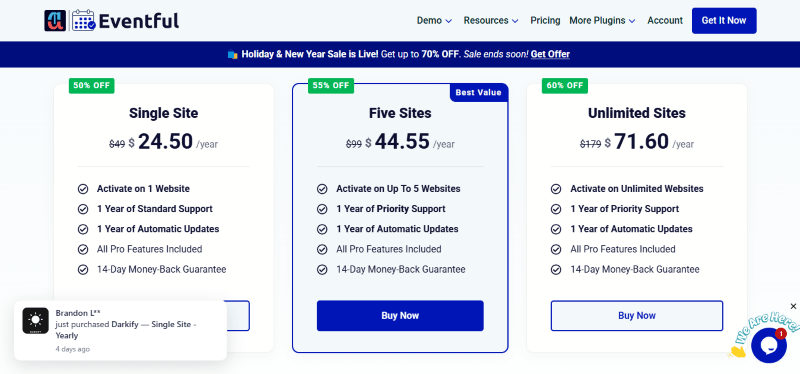
Eventful has a very straightforward pricing plan.
| Single Site | 5-Site License | Unlimited-Site License |
| $24.50 Yearly | $44.55 Yearly | $71.60 Yearly |
| 14-Day Money-Back Guarantee | 14-Day Money-Back Guarantee | 14-Day Money-Back Guarantee |
| Single Site | 5-Site License | Unlimited-Site License |
| $59.60 LifeTime | $87.15 LifeTime | $149.70 LifeTime |
| 14-Day Money-Back Guarantee | 14-Day Money-Back Guarantee | 14-Day Money-Back Guarantee |
Eventful Discounts
There are discounts available for Eventful.
Eventful Lifetime Deals
There are lifetime deals available for Eventful.
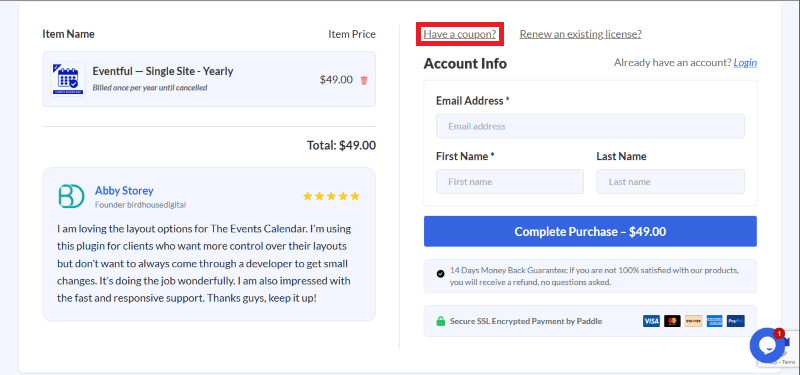
How To Avail The Eventful Coupon?
Step 1: Go to the Eventful pricing page and select the plan you want to buy.
Step 2: On the Eventful checkout page, click on “Have a Promotional code”
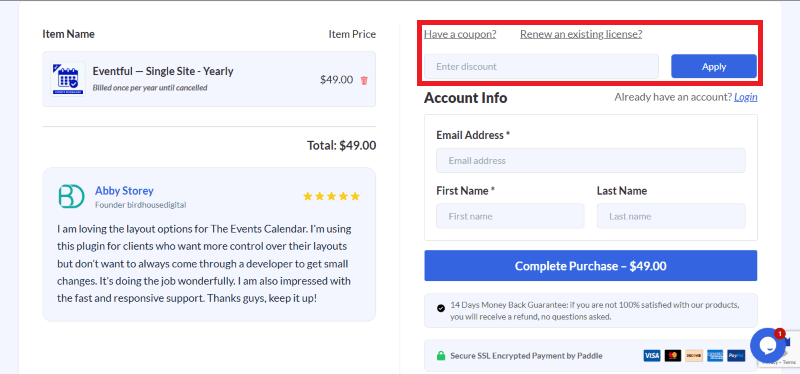
Step 3: Add the discount code in the field and click “Apply” to get the discount.
How To Install The Eventful Plugin on WordPress?
Step 1: Visit the Eventful website, choose your version, and download the plugin zip file.
Step 2: Log in to your WordPress dashboard.
Step 3: Navigate to Plugins > Add New.
Step 4: Click Upload Plugin and select the eventful-pro.zip file you downloaded.
Step 5: Click Install Now and then Activate.
Step 6: Navigate to the Eventful menu in your sidebar and enter your license key to unlock Pro layouts.
Step 7: Use the Shortcode Generator or Elementor Widget to start showcasing your events.
For Whom Is This Product Built?
This product is built for:
- Web Agencies
- Non-Profits
- Conference Organizers
- Local Businesses
- Developers
Eventful Alternatives
Here are some alternatives to the Eventful plugin.
- The Event Calendar
- WP Events Manager
- Eventin
| Product Name | The Event Calendar By theeventscalendar | WP Events Manager by thimpress | Eventin By Arraytics |
| Number of Websites | 700,000+ | 30,000+ | 10,000+ |
What Eventful Customers Say
“I’ve been searching for an event carousel layout like this for a long time, and I finally found it with this plugin! It displays my events beautifully across different sections of my site and offers extensive customisation options.”
“I am loving the layout options for The Events Calendar. I’m using this plugin for clients who want more control over their layouts but don’t want to always come through a developer to get small changes. It’s doing the job wonderfully. I am also impressed with the fast and responsive support. Thanks, guys, keep it up!.”
Read more reviews on WordPress.org.
We’d love to hear your thoughts and opinions on Eventful. Share your experiences and insights in the comments below.
Eventful
You Might Also Like

Canva Coupon – 2026

Logo Showcase Coupon – 2026

GetResponse Coupon – 2026
From the WPdiscounts Blog
 With rising customer expectations, faster checkout demands, and increasing security concerns, simply installing WooCommerce and listing products is no longer enough. Store owners need the…
March 17, 2026
- Free Website Builders are online platforms that allow you to create, design, and launch a fully functional website without any financial investment or coding expertise.…
March 12, 2026
- Success with a WordPress membership site goes beyond just providing access to exclusive content or services. The idea is to make the process of becoming…
March 12, 2026