eRoom — Meetings and Webinars via Zoom or Google meet on website
eRoom Coupon – 2026


Manage Zoom meetings, schedule conferences, and webinars and control users directly from your WordPress dashboard
eRoom — Meetings and Webinars via Zoom or Google meet on website
eRoom Coupon – 2026
Manage Zoom meetings, schedule conferences, and webinars and control users directly from your WordPress dashboard
Exclusive Discount
Only for WPdiscounts.io visitors.
Limited Time Offer
Claim this offer before it ends.
Save 30% OFF on eROOM Coupon (Expired)
Table of Content
About
Founder: Igor Ligay
Website: eRoom
Community: Facebook Group

What is the eRoom?
View eRoom Coupons, Discounts, Promo Codes, & Pricing Plans below.
eRoom is a feature-rich WordPress plugin that allows you to seamlessly integrate Zoom video conferencing and webinars into your website. It provides the ability to create, manage, and host online meetings directly from your WordPress dashboard, eliminating the need to switch between multiple platforms. With its intuitive interface, eRoom is ideal for educators, consultants, and businesses that rely on virtual communication to engage with clients, students, or team members. It is a top-rated solution for those who want a professional shopping experience for their digital services.
The plugin supports both live meetings and webinars, making it suitable for everything from one-on-one consultations to large-scale presentations. Its functionality includes embedding meetings into any page, enabling messaging during sessions, and generating detailed reports. For those looking to monetise their events, eRoom integrates with WooCommerce, allowing meetings and webinars to be sold as sale items.
Upgrading to eRoom Pro unlocks even more capabilities, including integration with Google Meet, the ability to create recurring meetings, and options to set up purchasable meeting slots. This makes it a powerful tool for organisations that host regular events or want to streamline online booking. With its blend of core features and premium enhancements, eRoom is a comprehensive solution. Whether you are looking for an eroom 3 site plan or an eroom 10 site plan, it is the perfect time to upgrade.
eRoom Usage Statistics
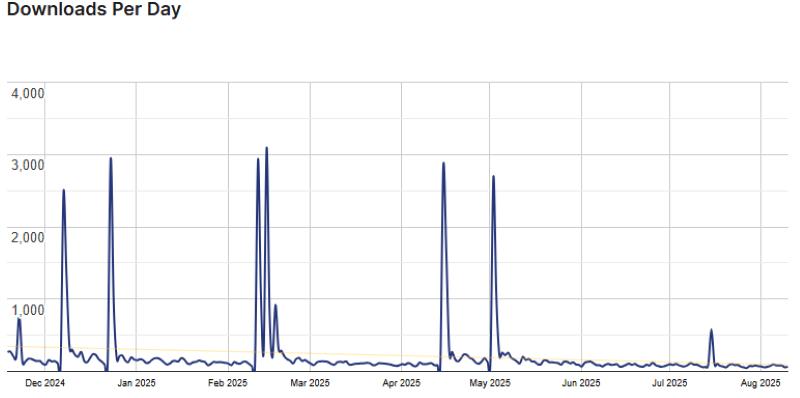
Key Features of eRoom
Here are some key features of the eRoom you should know to use your eRoom effectively:
- Provides integration of Zoom: Connects your website with Zoom for hosting meetings.
- Integration with Google Meet (Pro): Enables direct hosting of Google Meet sessions.
- Enables online purchases (Pro): Lets you sell meetings via WooCommerce sale prices.
- Messaging system: Allows participants to communicate during live sessions.
- Adds meetings on any page: Embed meetings using WordPress shortcodes.
- Recurring meetings (Pro): Schedule sessions to repeat automatically for multiple sites.
- Compatible with Zoom API: Create and manage meetings before they start.
- Detailed reports: Provide insights and verify meeting performance.
- Compatible with WooCommerce: Seamlessly integrates to sell virtual events.
- User-friendly admin panel: Easy control over meetings, webinars, and settings.
- Syncing with calendars: Coordinate meetings with iCal or Google Calendar.
eRoom coupon, Discounts, and Pricing Plan
eRoom has a very straightforward pricing plan.
| SINGLE SITE | 5 SITES | 10 SITES |
| $59 / Year | $139 / Year | $299 One Time |
| 1-year updates and support | 1-year updates and support | 1-year updates and support |
| 14-day Money Back Guarantee | 14-day Money Back Guarantee | 14-day Money Back Guarantee |
eRoom Discounts
No Discount Available.
eRoom Lifetime Deals
There are 3 limited-time lifetime deals available on the official eRoom website
- Get 1 site for $129
- Get 5 sites for $199
- Get 25 sites for $399
How to Redeem Your eRoom Coupon Code and Save Big
Step 1: Go to the eRoom pricing page and select the plan you want to buy.
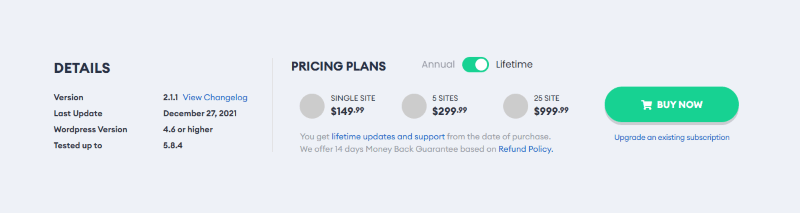
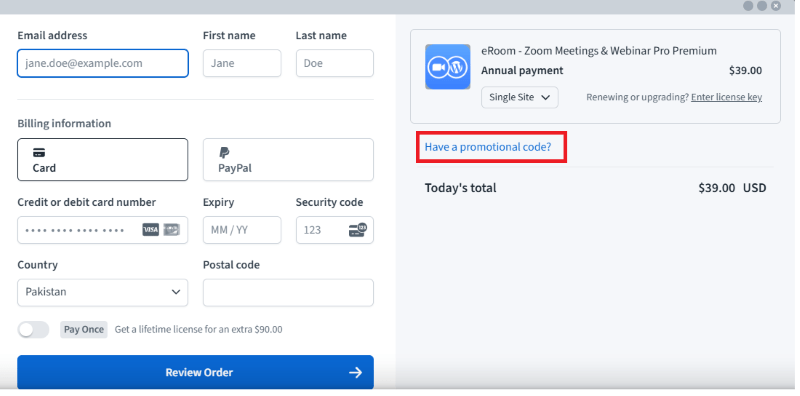
Step 2: On the eRoom checkout page (not Ultimate storekit), click on “Have a Promotional Code?”
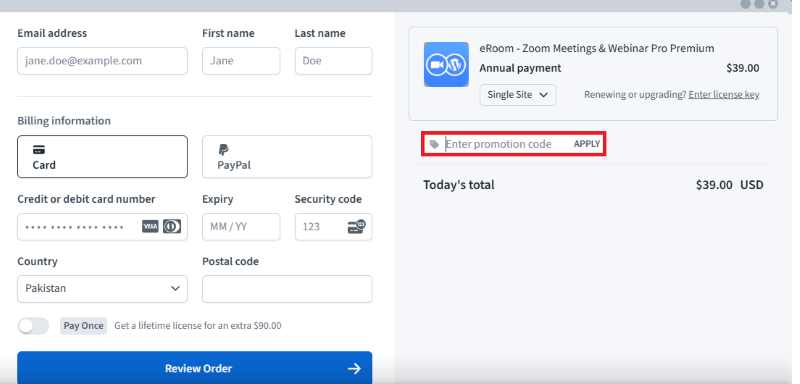
Step 3: Add the discount code in the field and click “Apply” to get the discount.
How to Install the eRoom Plugin on WordPress?
Step 1: Visit the eRoom website, choose the Pro or Free version, and download the plugin. You may receive the plugin as a zip file in your email or elsewhere.
Step 2: Log in to your WordPress dashboard
Step 3: Navigate to Plugins > Add New
Step 4: Click on Upload Plugin and select the eRoom ZIP file you downloaded.
Step 5: Click Install Now.
Step 6: After installation, go to Plugins > Installed Plugins and activate eRoom.
Step 7: Follow the prompts to configure settings. The plugin is now up-to-date and ready to be utilised.
For Whom This Product Is Built For?
This product is built for those looking for ways to save on virtual event management
- Educational institutions
- Consultants and coaches
- Corporate teams
- Event organizers
eRoom Alternatives
Here are some WordPress plugin alternatives to the eRoom plugin.
- Video Conferencing with Zoom
- GoToWebinar
- Microsoft Teams Integration
What eRoom Customers Say
“The eRoom plugin was exactly what I needed. I checked for new codes and special discounts before buying. Their support was helpful and accommodating! TY!!”
For more reviews, visit wordpress.org
We’d love to hear your thoughts and opinions. Share your experiences and insights in the comments below.

You Might Also Like

Verpex Coupon – 2026

Amazon Associates WordPress Plugin Coupon – 2026

Canva Coupon – 2026
From the WPdiscounts Blog
 Most people spend way too much time picking a WordPress theme when starting a blog. It’s easy to get pulled in by designs that look…
March 30, 2026
- The best directory plugins for WordPress help you build listing websites without writing a single line of code. They let visitors submit listings, search by…
March 27, 2026
- With rising customer expectations, faster checkout demands, and increasing security concerns, simply installing WooCommerce and listing products is no longer enough. Store owners need the…
March 17, 2026