The Most Complete WordPress Directory Plugin
Directorist Coupon – 2026
Directorist is a powerhouse WordPress plugin designed to help you create a directory website without touching a single line of code.
The Most Complete WordPress Directory Plugin
Directorist Coupon – 2026
Directorist is a powerhouse WordPress plugin designed to help you create a directory website without touching a single line of code.
Exclusive Discount
Only for WPdiscounts.io visitors.
Limited Time Offer
Claim this offer before it ends.
Table of Content
About
Founder: Masud Rana
Website: directorist.com
Community: Community

What is Directorist?
View Directorist Coupons, Discounts, Promo Codes, & Pricing Plans below.
Directorist is a powerhouse WordPress plugin designed to help you create a directory website without touching a single line of code. It acts as the backbone of your site, handling everything from listing submissions and user dashboards to complex maps and advanced search filters. Whether you are building a site like Yelp or a private employee directory, this tool gives you the flexibility to customize every single field to fit your specific vision.
What makes this plugin a favourite for many is how it grows with your business. You can start with the free version and then use a Directorist Discount to unlock advanced features like live chat or booking systems. It is built to be lightweight so your site stays fast, but it is also packed with enough features to handle thousands of listings across multiple categories without breaking a sweat.
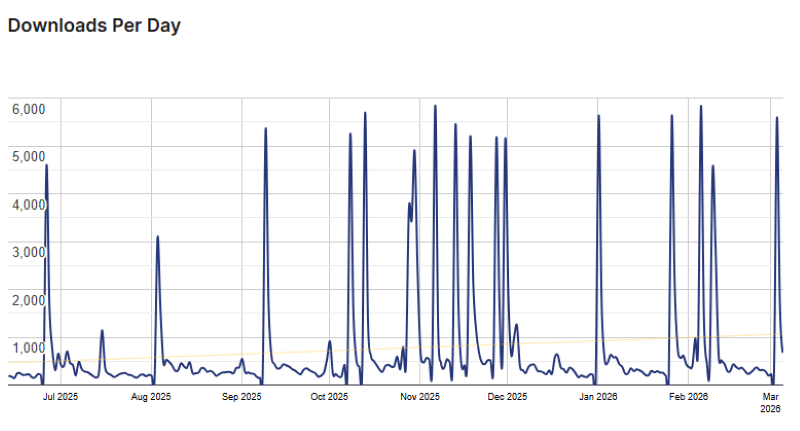
Directorist Usage Statistics
Key Features of Directorist
Here are some key features of Directorist you should know:
- Multi-Directory Capability You can run multiple types of directories on one site with different categories and fields for each one.
- AI-Powered Builder Create your listing forms and search filters within minutes using smart prompts that suggest the best fields for your niche.
- Advanced Search and Filters Your visitors can find exactly what they need using keyword suggestions, category filters, and location-based searches.
- Monetization Tools Easily charge users for listing submissions, featured spots on your homepage, or access to premium directory content.
- Responsive Mobile App The team offers native iOS and Android apps so your directory looks and works perfectly on smartphones.
- Frontend Listing Submission Business owners can manage their own profiles and details through a private dashboard without ever seeing the WordPress backend.
Directorist Coupons, Discounts, and Pricing Plan
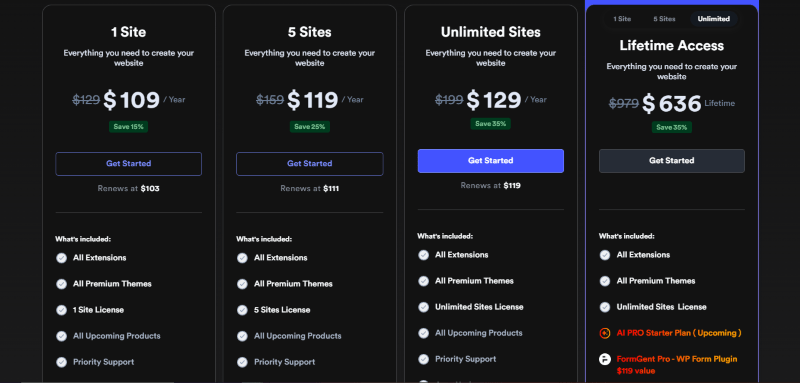
Directorist has a very straightforward pricing plan.
| 1 Site | 5 Sites | Unlimited Sites |
$109/yr |
$119/yr |
$129/yr |
| All Extensions All Premium Themes 1 Site License All Upcoming Products Priority Support Auto Updates 14 Days Guarantee |
All Extensions All Premium Themes 5 Sites License All Upcoming Products Priority Support Auto Updates 14 Days Guarantee |
All Extensions All Premium Themes Unlimited Sites License All Upcoming Products Priority Support Auto Updates 14 Days Guarantee |
Directorist Discounts
There is up to a 35% discount available on the Directorist pricing plan.
Directorist Lifetime Deals
There are three lifetime deals available for Directorist.
- Get 1 site license for $322
$379 - Get 5 sites license for $509
$679 - Get an unlimited site license for $636
$979
How To Avail The Directorist Coupon?
Step 1: Go to the pricing page and select the plan you want to buy.
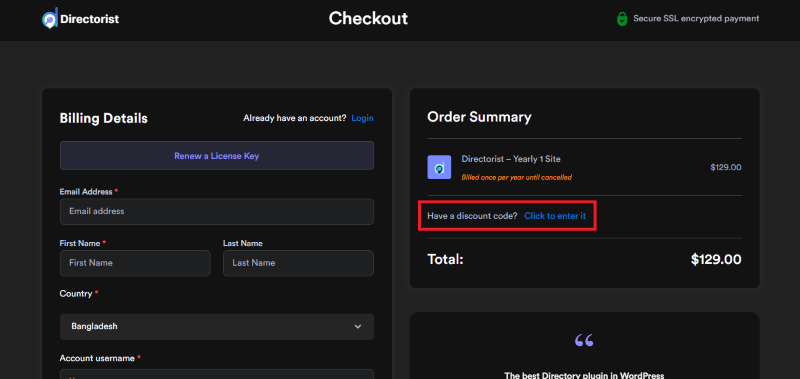
Step 2: On the Directorist checkout page, click on “Have a discount code”
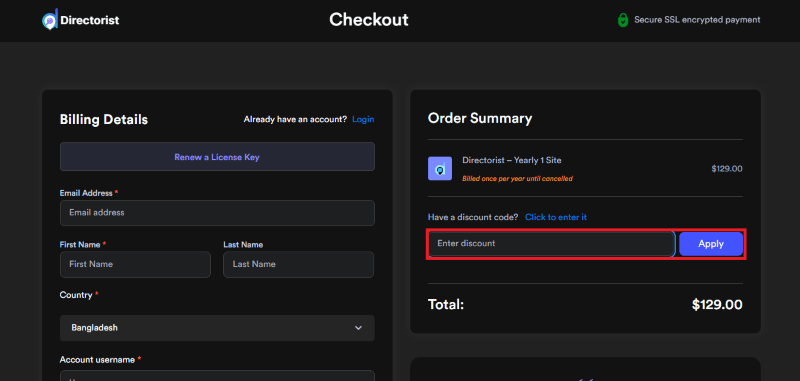
Step 3: Add the discount code in the field and click “Apply” to get the discount.
How To Install The Directorist Plugin on WordPress?
Step 1: Visit the Directorist website, choose the Pro or Free version, and download the plugin. You may receive the plugin as a zip file in your email or elsewhere.
Step 2: Log in to your WordPress dashboard
Step 3: Navigate to Plugins > Add New
Step 4: Click on Upload Plugin and select the Directorist ZIP file you downloaded.
Step 5: Click Install Now.
Step 6: After installation, go to Plugins > Installed Plugins and activate Directorist.
Step 7: Follow the prompts to configure Directorist’s initial settings after activation. The plugin is now configured to be utilized.
For Whom This Product Is Built For?
This product is built for:
- Small, Medium, and Enterprise Businesses
- E-commerce Store Owners
- Government & Public Sector Organizations
- Educational Institutions (Schools, Colleges, Universities)
- Healthcare Providers
- Financial & Insurance Companies
- SaaS & Technology Companies
- Digital Agencies & Web Developers
- Non-Profit Organizations
- CMS, LMS, CRM & E-learning Platform Owners
Directorist Alternatives
Here are some alternatives to the Directorist plugin.
- Business Directory Plugin
- GeoDirectory
- ListingPro
- Listeo
What Directorist Customers Say
“I’ve been using Directorist for my directory website for over a year now, and I can honestly say it’s one of the most reliable and feature-rich directory plugins I’ve worked with.I currently manage over 19,000 listings, and the plugin has handled them efficiently without major performance issues. The interface is clean, user-friendly, and easy to customize, even for large-scale directories like mine. and their support team. They’re always responsive, polite, and willing to go the extra mile. I recently reached out about making all my listings “never expire,” and they immediately offered to create a custom script for me free of charge. That level of customer care is rare and truly appreciated.If you’re looking for a directory plugin that’s powerful, flexible, and backed by a great team, I definitely recommend giving Directorist a try!”
“I’m really happy with this Plugging; it has a lot of great features, and the after-sales service is excellent, which is rare. When I needed help, they responded immediately and fixed the issue I requested.”
Read more Directorist reviews on WordPress.org
We’d love to hear your thoughts and opinions on Directorist. Share your experiences and insights in the comments below.
Directorist
You Might Also Like
Directorist Coupon – 2026

ConvertKit Coupon – 2026

ActiveCampaign Coupon – 2026
From the WPdiscounts Blog
 Building an online store in WordPress requires a reliable engine that can handle payments, security, and customer data without breaking. For many years, WooCommerce was…
March 5, 2026
 The way we do business has changed forever, and many business interactions have moved online. In 2026, a massive 70% of professionals are working in…
March 3, 2026
- Donorbox is popular because it is quick to set up and offers hosted donation pages, embeddable donation forms, and support for recurring donations. For many…
February 27, 2026