Improve user experience and accessibility by adding a sleek, automatic dark theme to your website and admin dashboard.
Darkify Coupon – 2026
The Most Powerful and Lightweight Dark Mode Plugin for WordPress and WooCommerce.
Improve user experience and accessibility by adding a sleek, automatic dark theme to your website and admin dashboard.
Darkify Coupon – 2026
The Most Powerful and Lightweight Dark Mode Plugin for WordPress and WooCommerce.
Exclusive Discount
Only for WPdiscounts.io visitors.
Limited Time Offer
Claim this offer before it ends.
Offer Expired - Check back soon!
Table of Content
About
Founder: Foysal Imran
Website: ThemeAtelier
Community: Community

What is Darkify?
View Darkify Coupons, Discounts, and Pricing Plan below.
Staring at a bright white screen in a dark room is exhausting. When your visitors are browsing your blog late at night, or you’re pulling a long shift in your WordPress dashboard, eye strain is real. Darkify is a high-performance WordPress plugin designed to solve this by adding a sleek, accessible dark mode to both your website’s frontend and your admin dashboard.
It’s more than just a “colour flipper.” Darkify uses smart technology to analyse your site’s structure, ensuring that every element from text to buttons remains perfectly legible. You can give your users total control with a manual toggle, or set the plugin to act automatically based on their device’s system settings (OS-aware) or a specific time of day.
When you’re running a high-traffic WooCommerce store, a professional portfolio, or a membership site, Darkify helps you keep visitors on your page longer by providing a comfortable, modern viewing experience. It’s ultra-lightweight, SEO-friendly, and works out of the box with your favourite tools like Elementor, Gutenberg, and Divi.
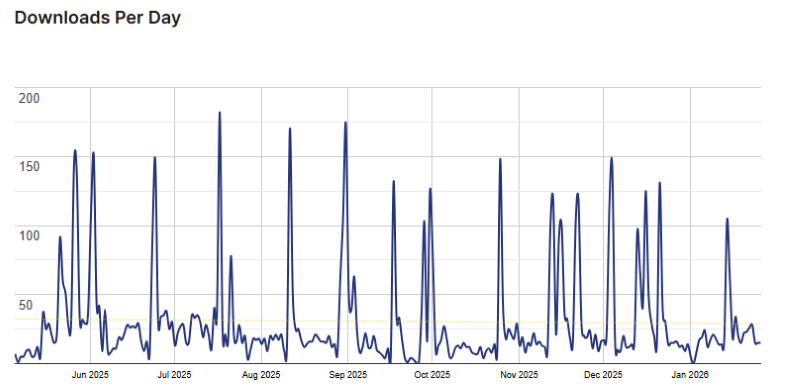
Darkify Usage Statistics
Key Features of Darkify
Here are some key features of Darkify you should know:
- Frontend & Admin Dark Mode: Unlike basic plugins, Darkify allows you to enable a sleek dark interface for both your visitors and your own WordPress backend dashboard.
- Intelligent OS-Aware Switching: Your website will automatically match your visitor’s system settings. If their device is set to dark mode, your site adapts instantly without them needing to click a button.
- Time-Based Scheduling: You can automate your site’s look based on the time of day. Set specific hours (like sunset to sunrise) for dark mode to activate, creating a perfect day-to-night transition.
- 16+ Stunning Switch Designs: Choose from over 16 professionally designed floating toggles. You can customise the size, colour, and placement to ensure the button fits your brand’s aesthetic perfectly.
- Advanced Media Controls: Images and videos can sometimes be too bright in dark mode. Darkify lets you adjust brightness and grayscale, or even replace specific logos and images with “dark-friendly” versions automatically.
- Granular Page & Element Targeting: You have total control over where dark mode appears. Include or exclude specific pages, posts, or even individual CSS elements (like specific sections or buttons) from being affected.
- Draggable Switch Position: Give your users the freedom to move the dark mode toggle anywhere on their screen, ensuring it never blocks important content or buttons on your site.
- Performance Optimised & Lightweight: Built for speed, Darkify is ultra-lightweight (under 550kb). It works seamlessly with major page builders like Elementor, Divi, and Gutenberg without slowing down your site.
- Keyboard Shortcut Support: Power users can quickly toggle between modes using simple keyboard commands (Ctrl + Alt + D), making your site more accessible and tech-forward.
Darkify Coupons, Discounts, and Pricing Plan
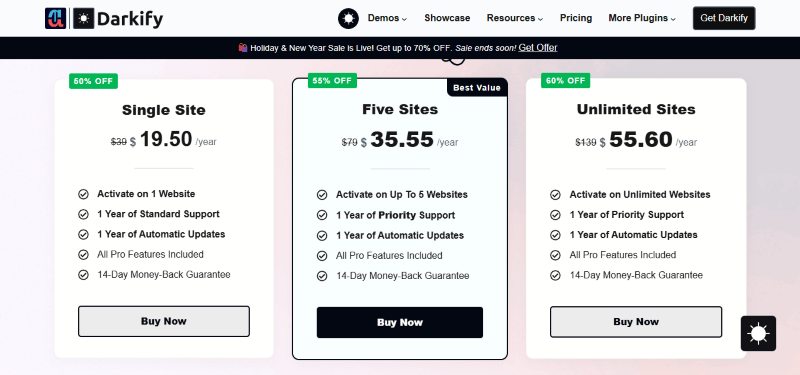
Darkify has a very straightforward pricing plan.
| Single Site | 5-Site License | Unlimited Sites License |
| $19.50 Yearly | $35.55 Yearly | $55.60 Yearly |
| 14-Day Money-Back Guarantee | 14-Day Money-Back Guarantee | 14-Day Money-Back Guarantee |
| Single Site | 5-Site License | Unlimited Sites License |
| $47.60 LifeTime | $69.65 LifeTime | $119.70 LifeTime |
| 14-Day Money-Back Guarantee | 14-Day Money-Back Guarantee | 14-Day Money-Back Guarantee |
Darkify Discounts
There are discounts available for Darkify.
Darkify Lifetime Deals
There are lifetime deals available for Darkify.
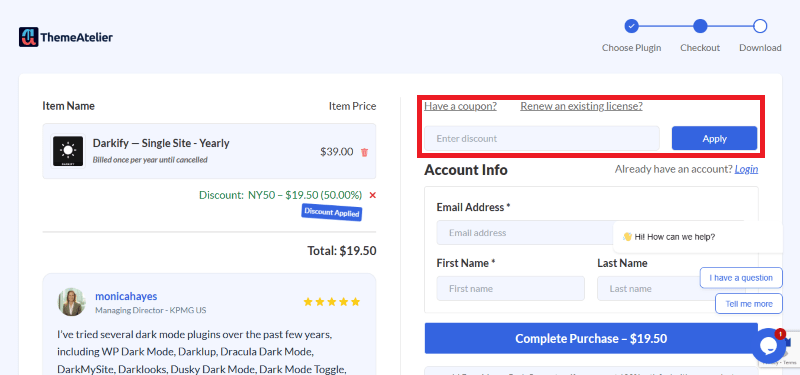
How To Avail The Darkify Coupon?
Step 1: Go to the Darkify pricing page and select the plan you want to buy.
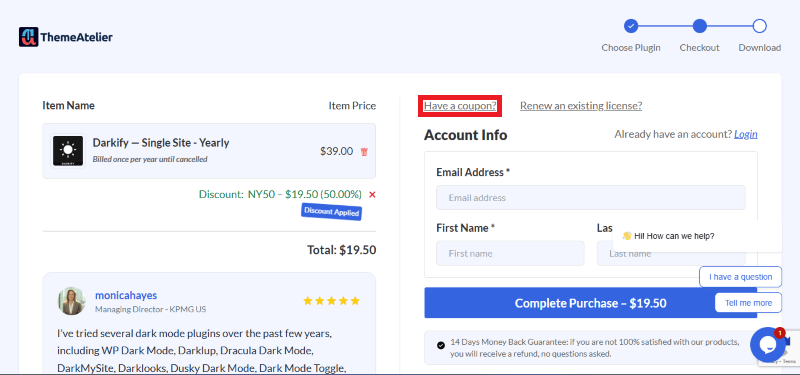
Step 2: On the Darkify checkout page, click on “Have a Coupon code”
Step 3: Add the discount code in the field and click “Apply” to get the discount.
How To Install The Darkify Plugin on WordPress?
Step 1: Download the Darkify Pro ZIP file from your account or the free version from the WordPress repository.
Step 2: Log in to your WordPress Dashboard.
Step 3: Navigate to Plugins > Add New.
Step 4: Click Upload Plugin and select the darkify.zip file.
Step 5: Click Install Now and then Activate.
Step 6: Go to the new “Darkify” menu in your sidebar to configure your switches and colour presets.
For Whom Is This Product Built?
This product is built for:
- Bloggers & Content Creators
- E-commerce Stores
- Web Developers & Agencies
- Membership Sites
Darkify Alternatives
Here are some alternatives to the Darkify plugin.
- WP Dark Mode
- DarkMySite
- Dracula Dark Mode
| Product Name | WP Dark Mode by wppool | DarkMySite by DarkMySite | Dracula Dark Mode by princeahmed |
| Number of Websites | 20,000+ | 1,000+ | 4,000+ |
What Darkify Customers Say
“I had tried several dark mode plugins in the past, but felt they were far too bloated or wanted me to upgrade to access very basic features. I had even begun designing my own dark mode plugin myself, but quickly realised that it was going to be more difficult than I’d hoped for, so I tested out a few more and was delighted when I came across Darkify!
Darkify was the first dark mode plugin that I’d tried that successfully recoloured 99% of my website and elements added by third-party plugins, and the default setup almost worked perfectly out of the box. There were a few tricky elements that were being stubborn and refusing to recolour, but the support from the plugin author has been first-class. Within a few minutes of opening a chat ticket on their website, my issue was resolved, and the support team also helped point me in the right direction to identify the correct selectors myself next time.
The plugin has an intuitive interface and many advanced options to help perfect your site. The author is also very receptive to suggestions and feedback. I rarely review
plugins, but this one definitely deserves it!”
“I’ve tried several dark mode plugins over the past few years, including WP Dark Mode, Darklup, Dracula Dark Mode, DarkMySite, Darklooks, Dusky Dark Mode, Dark Mode Toggle, Dark Reader and a few lightweight CSS-only solutions. Many of them looked promising at first, but they always seemed to come with some trade-offs, either too heavy, too many ads in the admin panel, compatibility issues with Elementor or limited custom control.
After switching to Darkify Dark Mod,e it’s the first time I’ve actually stuck with a dark mode plugin and didn’t feel the need to look for alternatives.”
Read more reviews on WordPress.org.
We’d love to hear your thoughts and opinions on Darkify. Share your experiences and insights in the comments below.
Darkify
You Might Also Like

Wordfence Coupon – 2026

LiveChat Coupon – 2026

Teachable Coupon – 2026
From the WPdiscounts Blog
 Free Website Builders are online platforms that allow you to create, design, and launch a fully functional website without any financial investment or coding expertise.…
March 12, 2026
- Success with a WordPress membership site goes beyond just providing access to exclusive content or services. The idea is to make the process of becoming…
March 12, 2026
- You have likely heard of Yoast SEO or Rank Math. These two tools have controlled the market for years. However, a new player called SureRank…
March 10, 2026