The creative engine for high-end Breakdance websites.
Dancepad Coupon – 2026
Pushing the boundaries of what’s possible with Breakdance.
The creative engine for high-end Breakdance websites.
Dancepad Coupon – 2026
Pushing the boundaries of what’s possible with Breakdance.
Exclusive Discount
Only for WPdiscounts.io visitors.
Limited Time Offer
Claim this offer before it ends.
Offer Expired - Check back soon!
Table of Content
About
Founder: Jose Tamu
Website: dancepad.io
Community: Community

What is Dancepad?
View Dancepad Coupon, Discounts, Promo Codes, & Pricing Plans below.
Not every website needs to look like a standard template. Most modern web design trends like liquid backgrounds, text reveals, and interactive cursors usually require complex custom coding that slows down your site. Dancepad changes that by bringing these high-end creative effects directly into the Breakdance website builder as native elements.
It is a specialised element pack designed for users who want to push the boundaries of what’s possible in WordPress. Instead of just “building a page,” Dancepad helps you create an interactive experience. Whether it’s a button that reacts to your mouse or text that elegantly blurs into view as you scroll, these elements are built to grab attention without you having to touch a single line of CSS or JavaScript.
What makes Dancepad truly different is its “native” approach. Every element integrates perfectly with the Breakdance drag-and-drop interface, meaning you can customise them using the same controls you’re already familiar with. Plus, it’s built with performance, SEO, and accessibility in mind so your site stays fast, searchable, and easy for everyone to use.
Key Features of Dancepad
Here are some key features of Dancepad you should know:
- Liquid & Gradient Backgrounds: Move away from static colours. Create fluid, animated mesh gradients that react to mouse movement or scroll.
- Advanced Typography FX: Grab attention the moment the page loads. Use Blur Reveals, Letter Staggering, and Clip-path animations that trigger as the user scrolls.
- Interactive Mouse Follower: Add a custom cursor that interacts with links, buttons, or images. It’s a small detail that makes a site feel premium.
- Magnetic Elements: Make your buttons and icons “pull” toward the user’s cursor. It’s a subtle UX trick used by top-tier design agencies.
- Horizontal Scroll Sections: Break the vertical grid. Easily set up smooth horizontal scrolling sections that work perfectly on mobile and desktop.
- Performance First: Everything is built to be lightweight. You get high-end animations without the “bloat” that usually kills your Google PageSpeed scores.
- SEO & Accessibility: Unlike many animation plugins, Dancepad allows you to keep your HTML tags (H1, H2, etc.) intact, so your site stays readable for search engines and screen readers.
Dancepad Coupons, Discounts, and Pricing Plan
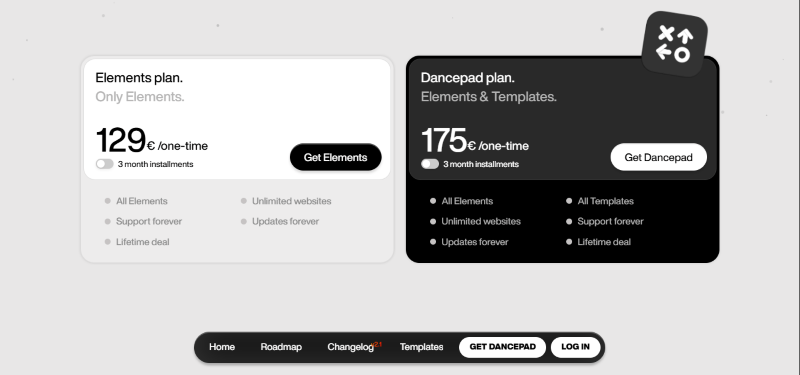
Dancepad has a very straightforward pricing plan.
| Only Elements | Only Elements | Elements & Templates. | Elements & Templates. |
| €45 /per month | €129 / LifeTime | €60 /per month | €175 / LifeTime |
| All Elements Unlimited websites Support forever Updates forever Lifetime deal |
All Elements Unlimited websites Support forever Updates forever Lifetime deal |
All Elements All Templates Unlimited websites Support forever Updates forever Lifetime deal |
All Elements All Templates Unlimited websites Support forever Updates forever Lifetime deal |
Dancepad Discounts
There are no discounts available for Dancepad.
Dancepad Lifetime Deals
There are lifetime deals available for Dancepad.
How To Avail The Dancepad Coupon?
Step 1: Go to the Dancepad pricing page and select the plan you want to buy.
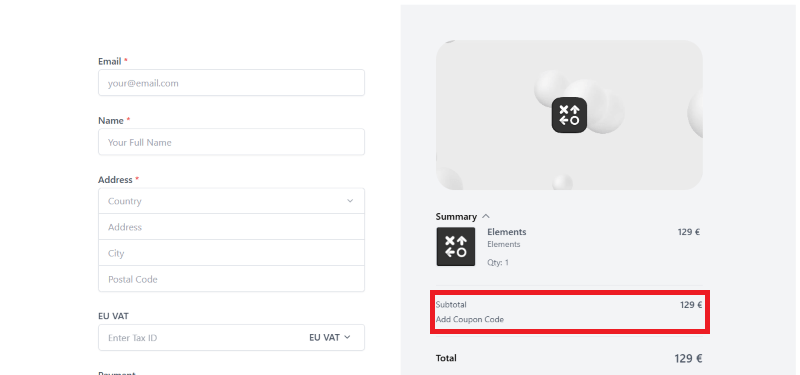
Step 2: On the Dancepad checkout page, click on “Add Coupon code”
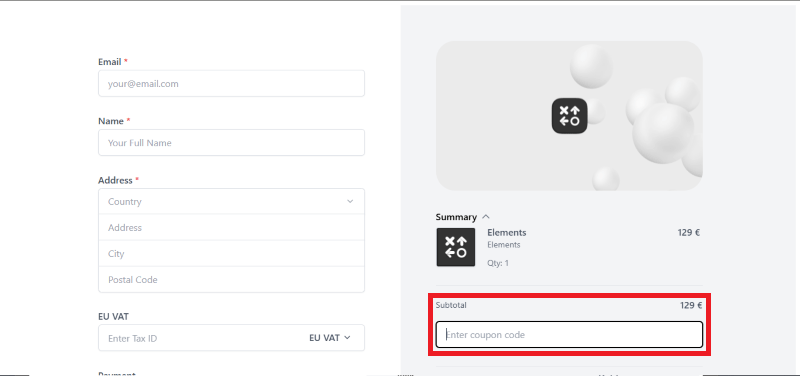
Step 3: Add the discount code in the field and click “Apply” to get the discount.
How To Install The Dancepad Plugin on WordPress?
Step 1: Visit the Dancepad.io website, log in to your account, and download the plugin. You will receive the plugin as a zip file in your customer dashboard or via your purchase email.
Step 2: Log in to your WordPress dashboard.
Step 3: Navigate to Plugins > Add New.
Step 4: Click on Upload Plugin and select the Dancepad ZIP file you downloaded.
Step 5: Click Install Now.
Step 6: After installation, click Activate Plugin. You will now see the “Dancepad” menu in your WordPress sidebar.
Step 7: Go to the Dancepad settings and enter your license key to enable the elements. The plugin is now configured, and the new elements will appear automatically inside your Breakdance Builder editor.
For Whom Is This Product Built?
This product is built for:
- UI/UX Designers
- Web Design Agencies
- Freelancers
- Breakdance Builder Users
- Small Business Owners
- Frontend Developers
- Creative Professionals
Dancepad Alternatives
Here are some alternatives to the Dancepad plugin.
- Elements Hive for Breakdance
- Destiny Elements
- Breakin’ Elements
| Product Name | Elements Hive for Breakdance by elementshive | Destiny Elements by Destiny | Breakin’ Elements by breakdance4fun |
| Number of Websites | 1,000+ | N/A | N/A |
Dancepad
You Might Also Like

BreakFusion Coupon – 2026
Dancepad Coupon – 2026

easy.jobs Coupon – 2026
From the WPdiscounts Blog
 If you are searching for a reliable hosting provider that also takes sustainability seriously, this HostPapa Review will give you a complete picture. HostPapa is…
February 19, 2026
- When your goal is to grow your online business, your hosting provider becomes one of the most important decisions you will ever make. For low-tech…
February 6, 2026
- Elementor is a famous WordPress page builder that empowers users to design visually stunning websites without coding skills. However, its potential is only fully unlocked…
February 2, 2026