The Visual Development Environment for WordPress Professionals.
Builderius Coupon – 2026
Stop Building "Div Soup." Start Building High-Performance Web Applications.
The Visual Development Environment for WordPress Professionals.
Builderius Coupon – 2026
Stop Building "Div Soup." Start Building High-Performance Web Applications.
Exclusive Discount
Only for WPdiscounts.io visitors.
Limited Time Offer
Claim this offer before it ends.
Offer Expired - Check back soon!
Alternatives of Builderius

No Coupon Available
Table of Content
About
Founder: Vitalii Kiiko
Website: Builderius
Community: Community

What is Builderius?
View Builderius Coupon, Discounts, Promo Codes, & Pricing Plans below.
Most WordPress page builders force you to choose between speed and code quality. You either hand-code everything to keep it clean, or you use a visual builder and get stuck with “div soup” and bloated markup. Builderius changes that.
Builderius is a high-performance visual site builder designed for developers and power users who want the speed of a drag-and-drop interface without losing the precision of hand-coding. Built on React and focused on clean, semantic HTML and CSS, Builderius lets you build complex, dynamic templates and landing pages that load blazingly fast and adhere to modern web standards.
Whether you’re building a bespoke client site or a complex data-driven application, Builderius gives you a professional-grade workflow complete with built-in staging and version control directly inside WordPress.
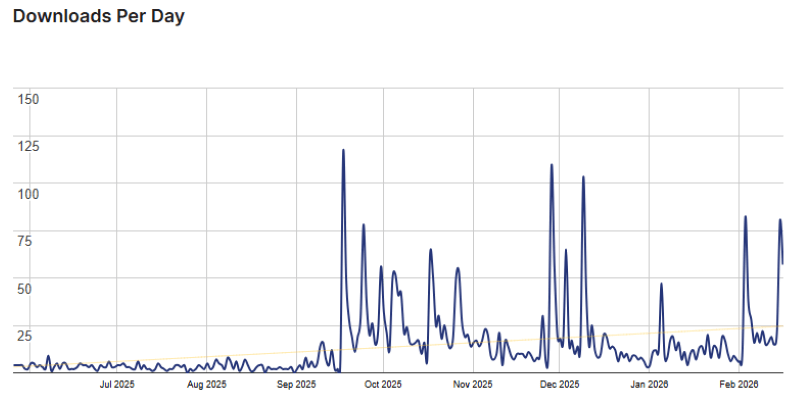
Builderius Usage Statistics
Key Features of Builderius
Here are some key features of Builderius you should know:
- Semantic HTML & Clean Markup: Tired of “div soup”? Builderius is built for performance. Every module renders exactly one HTML tag, giving you 100% control over the DOM. Your site stays lightweight, accessible, and SEO-friendly.
- Built-in Staging & Version Control: A game-changer for professional workflows. You can work in a “Development” environment without affecting your live site. Create “Releases” to track versions and deploy changes only when they are ready.
- GraphQL-Powered Dynamic Data: For complex sites, standard WordPress queries can be slow. Builderius uses a customised GraphQL system with an intelligent editor and autocomplete. It allows you to fetch exactly the data you need in a single request, perfect for data-heavy projects.
- True Component Architecture: Build reusable components with scoped CSS and data isolation. Change a button or header once, and it updates across your entire site instantly. You can even define custom properties for your components to keep your designs flexible.
- Professional CSS Control: Access every CSS property, create global variables, and manage responsive breakpoints through a UI that feels like an IDE. You can switch between visual controls and direct “Code Mode” seamlessly.
- Selective Theme Hijack: You don’t have to replace your entire WordPress theme. Use Builderius to build specific landing pages or dynamic templates while your existing theme handles the rest of the site.
- React-Based Performance: The builder itself is powered by React, making the editing experience blazingly fast. No more waiting for “Photoshop-heavy” interfaces to load inside your WordPress dashboard.
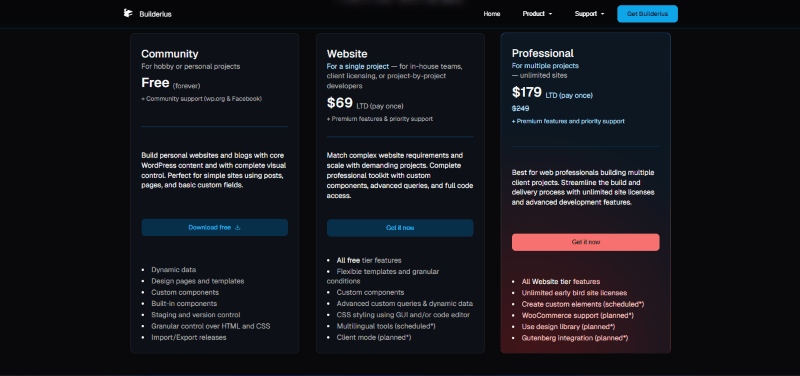
Builderius Coupons, Discounts, and Pricing Plan
Builderius has a very straightforward pricing plan.
| Community | Website | Professional |
| Free | $69 LTD (pay once) | $179 LTD (pay once) |
| 30-Day Money-Back Guarantee | 30-Day Money-Back Guarantee | 30-Day Money-Back Guarantee |
Builderius Discounts
There are no discounts available for Builderius.
Builderius Lifetime Deals
There are lifetime deals available for Builderius.
How To Avail The Builderius Coupon?
Step 1: Go to the Builderius pricing page and select the plan you want to buy.
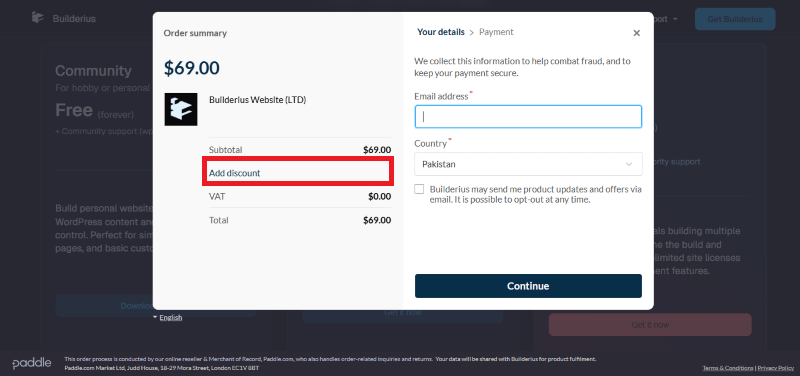
Step 2: On the Builderius checkout page, click on “Have a Promotional code”
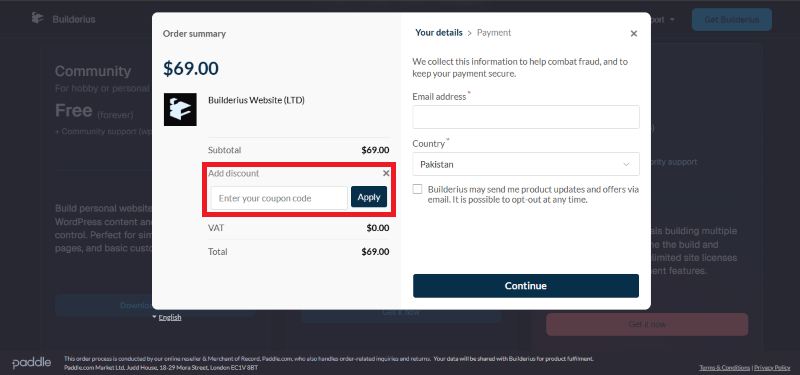
Step 3: Add the discount code in the field and click “Apply” to get the discount.
How To Install The Builderius Plugin on WordPress?
Step 1: Visit the Builderius website, choose the Free or Pro version, and download the plugin. You will receive the plugin as a ZIP file in your account dashboard or via email.
Step 2: Log in to your WordPress dashboard.
Step 3: Navigate to Plugins > Add New.
Step 4: Click on Upload Plugin and select the Builderius ZIP file you just downloaded.
Step 5: Click Install Now.
Step 6: After installation, go to Plugins > Installed Plugins and click Activate for Builderius.
Step 7: Follow the prompts to configure Builderius’s initial settings. You can now access the Builderius dashboard from your sidebar to start creating high-performance templates and “Releases.”
For Whom Is This Product Built?
This product is built for:
- Website Owners
- Agencies
- Web Designers
- Small Businesses
- Developers
- Freelancers
- E-commerce Stores
- Content Creators
- Marketing Professionals
Builderius Alternatives
Here are some alternatives to the Builderius plugin.
- Bricks Builder
- Kadence Blocks
- Spectra
| Product Name | Bricks Builder | Kadence Blocks | Spectra |
| Number of Websites | N/A | 600,000+ | 1+ million |
What Builderius Customers Say
“It’s just amazing! If you’re tired of bloated builders that dictate their rules and generate tons of “junk” code, you should definitely check it out. It gives you complete control over the structure and CSS (finally, you can work with CSS Variables properly!). It outputs the cleanest HTML. Seriously, for me, it’s probably one of the best and most flexible builders on WordPress right now. It will especially appeal to those who value clean code and real flexibility.”
“Builderius is pretty powerful and creates a clean HTML output. I also love the releases feature, which basically allows you to create branches of your website for good staging and version control. You also have the freedom to add any CSS property of your choice.”
Read more reviews on WordPress.org.
We’d love to hear your thoughts and opinions on Builderius. Share your experiences and insights in the comments below.
Builderius
You Might Also Like

Verpex Coupon – 2026

Amazon Associates WordPress Plugin Coupon – 2026

Canva Coupon – 2026
From the WPdiscounts Blog
 Most people don’t think much about form plugins until they actually need one. Then suddenly, it becomes a big decision. You start comparing features, pricing,…
April 4, 2026
- If you think your website design is the most important part of your store, think again. Many online shoppers drop their items and leave before…
April 3, 2026
- Most people spend way too much time picking a WordPress theme when starting a blog. It’s easy to get pulled in by designs that look…
March 30, 2026