The professional way to sync Bricks Builder designs across your local, staging, and live sites.
BricksSync Coupon – 2026
Stop wasting time with manual exports and risky database migrations by using our seamless, file-based sync system.
The professional way to sync Bricks Builder designs across your local, staging, and live sites.
BricksSync Coupon – 2026
Stop wasting time with manual exports and risky database migrations by using our seamless, file-based sync system.
Exclusive Discount
Only for WPdiscounts.io visitors.
Limited Time Offer
Claim this offer before it ends.
Offer Expired - Check back soon!
Table of Content
About
Founder: Gert Wierbos
Website: BricksSync
Community: Community

What is BricksSync?
View BricksSync Coupons, Discounts, and Pricing Plan below.
Most people using Bricks Builder are tired of the constant back-and-forth of exporting and importing JSON files or, worse, running risky database migrations just to make a few design changes. If you’re an agency or a freelancer working across local and staging sites, you know the fear of accidentally overwriting live WooCommerce orders or client data while trying to push a simple layout update. BricksSync fixes this by letting you sync your templates and styles directly between sites, making the whole process much faster and safer.
The plugin gives you a lot of control over what gets moved. You can sync everything, like your global colours and classes, with one click, or use the selective sync to only push a specific section you’ve been working on. This “site-to-site” connection means you don’t have to deal with manual file handling or messy SQL files anymore. It basically turns your Bricks designs into portable data that stays in sync across your entire workflow without breaking anything on the live site.
This tool is built for anyone who wants a more professional way to handle WordPress development. Pulling your design data out of the database and into clean files lets you use tools like Git for version control or just keep a solid backup of your styles. Whether you’re managing a dozen client sites or just want a reliable way to move work from your laptop to a live server, BricksSynchandles the heavy lifting so you can focus on building instead of migrating.
Key Features of BricksSync
Here are some key features of BricksSyncyou should know:
- Bidirectional Syncing: Effortlessly push or pull data between two WordPress sites. No more manual downloading and uploading of individual templates.
- Database-Free Migration: Move your Bricks data as clean code (JSON) rather than SQL. This avoids the risk of overwriting WooCommerce orders or user data on live sites.
- Global Styles & Classes Sync: Keep your entire design system in harmony. Sync your Global Styles, Colour Palettes, and Global Classes (including support for frameworks like ACSS or Frames) across all environments.
- Conflict-Free Transfers: BricksSync uses name-based slugs and unique identifiers to ensure that syncing a template doesn’t break existing IDs on the destination site.
- Git Integration: Since BricksSync turns design data into files, you can finally use GitHub or GitLab to version control your Bricks designs.
- Non-Invasive Architecture: BricksSync is built to be lightweight. It doesn’t bloat your site, and if you deactivate it, your designs remain perfectly intact.
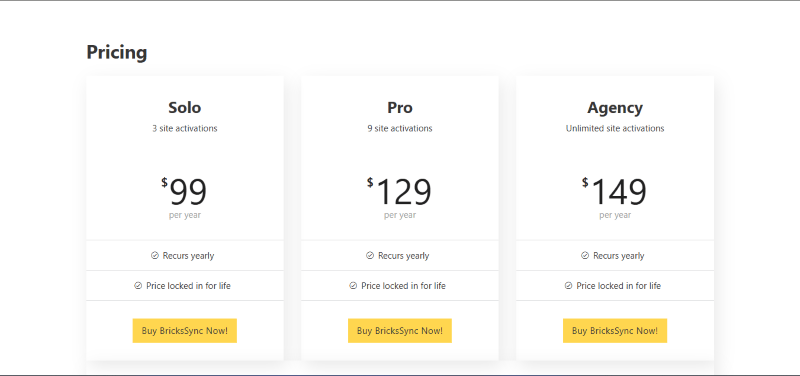
BricksSync Coupons, Discounts, and Pricing Plan
BricksSync has a very straightforward pricing plan.
| Solo | Pro | Agency | Developer Lifetime License |
| $99 per year | $129 per year | $149 per year | $199 once |
BricksSync Discounts
There are no discounts available for BricksSync.
BricksSync Lifetime Deals
There are lifetime deals available for BricksSync.
How To Avail The BricksSync Coupon?
Step 1: Go to the BricksSync pricing page and select the plan you want to buy.
Step 2: On the BricksSync checkout page, click on “Have a Promotional code”
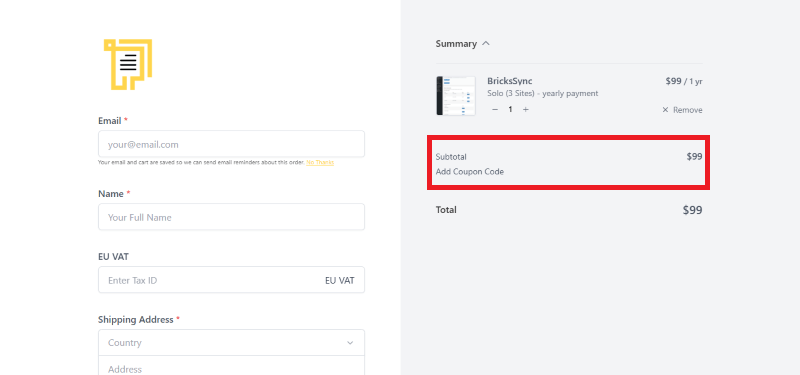
Step 3: Add the discount code in the field and click “Apply” to get the discount.
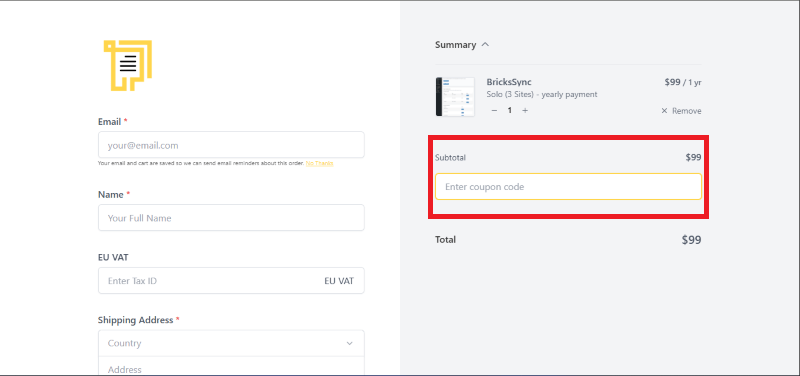
How To Install The BricksSync Plugin on WordPress?
Step 1: Visit the BricksSync website, choose your license plan (Single, 5-site, or 100-site), and download the plugin. You will receive the plugin as a zip file in your email or your account dashboard.
Step 2: Log in to your WordPress dashboard.
Step 3: Navigate to Plugins > Add New.
Step 4: Click on Upload Plugin and select the BricksSync ZIP file you downloaded.
Step 5: Click Install Now.
Step 6: After installation, go to Plugins > Installed Plugins and activate BricksSync.
Step 7: Follow the prompts to configure BricksSync’s initial settings after activation, such as entering your license key and setting your storage path. The plugin is now configured to be utilised for syncing your Bricks templates and styles.
For Whom Is This Product Built?
This product is built for:
- Bricks Builder Users
- WordPress Developers
- Web Design Agencies
- UI/UX Designers
- Freelancers
- E-commerce Store Owners
- DevOps Professionals
- Marketing Agencies
- Tech-Savvy Website Owners
BricksSync Alternatives
Here are some alternatives to the BricksSync plugin.
- WP Migrate Lite
- All-in-One WP Migration
- Bricks Navigator
| Product Name | WP Migrate Lite By WP Engine | All-in-One WP Migration By ServMask | Bricks NavigatorBy Sridhar Katakam |
| Number of Websites | 200,000+ | 5+ million | 8,000+ |
BricksSync
You Might Also Like

BricksSync Coupon – 2026

Bookings for WooCommerce Coupon – 2026

Trafft Coupon – 2026
From the WPdiscounts Blog
 When your goal is to grow your online business, your hosting provider becomes one of the most important decisions you will ever make. For low-tech…
February 6, 2026
- Elementor is a famous WordPress page builder that empowers users to design visually stunning websites without coding skills. However, its potential is only fully unlocked…
February 2, 2026
- The right WordPress theme in 2026 is important because website visitors now expect fast loading speeds, a clean design, and smooth navigation across all devices.…
January 31, 2026