
The fastest, most lightweight web application firewall for WordPress.
BBQ Pro Coupon – 2026
Protect your website from malicious attacks and bad queries with zero impact on speed.
The fastest, most lightweight web application firewall for WordPress.
BBQ Pro Coupon – 2026
Protect your website from malicious attacks and bad queries with zero impact on speed.
Exclusive Discount
Only for WPdiscounts.io visitors.
Limited Time Offer
Claim this offer before it ends.
Offer Expired - Check back soon!
Table of Content
About
Founder: Jeff Starr
Website: PluginPlanet.Com
Community: Community

What is BBQ Pro?
View BBQ Pro Coupons, Discounts, and Pricing Plan below.
Most WordPress security plugins are notorious for being “bloated”; they slow down your dashboard with heavy scans and complex settings that most users don’t actually need. BBQ Pro (Block Bad Queries) takes a completely different approach. It is built on a simple but powerful philosophy: stop the bad guys before they even reach your site. It works like a digital bouncer at the door, quietly scanning every incoming request and instantly blocking anything that looks suspicious, like SQL injections or malicious bot scripts, all without adding a millisecond of lag to your site speed.
What makes this plugin special is that it’s a “plug-and-play” solution that actually works. While other firewalls require you to spend hours configuring rules or editing sensitive server files like .htaccess, BBQ Pro is ready to go the moment you activate it. It uses an advanced logic engine (based on the famous 6G and 7G firewall rules) to distinguish between a real visitor and a hacker. It’s the perfect balance of high-level protection and total simplicity, ensuring your site stays safe while you focus on your business.
For anyone who has ever worried about their site getting hacked but didn’t want to deal with the headache of a “heavy” security suite, BBQ Pro is a breath of fresh air. It runs silently in the background, providing a transparent layer of defence that protects your SEO and your reputation. Whether you’re a blogger who wants peace of mind or a developer managing dozens of client sites, it provides enterprise-grade protection in a package that is incredibly lightweight and easy to manage.
BBQ Pro Usage Statistics
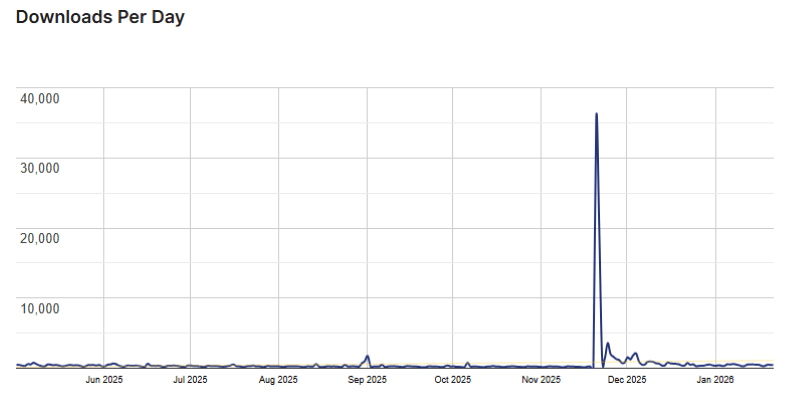
Key Features of BBQ Pro
Here are some key features of BBQ Pro you should know:
- Advanced Firewall Protection: Built-in rules from the 6G, 7G, and 8G firewalls protect you against SQL injections, directory traversal, and XSS attacks.
- Real-Time Statistics: Visualise your security. Track blocked requests with live hit counters and bar graphs to see exactly what threats are being stopped.
- Fully Customizable Rules: Unlike the free version, Pro allows you to add, edit, or disable specific patterns to create a custom-fit firewall for your needs.
- Zero Performance Impact: Designed for speed, BBQ Pro scans traffic in milliseconds, ensuring your visitors have a fast experience while hackers are kept out.
- Email Alerts: Stay informed even when you’re away. Receive instant notifications when the firewall blocks a suspicious request.
- IP Whitelisting & Blocking: Easily allow trusted IPs or block specific malicious ranges with a few clicks.
BBQ Pro Coupons, Discounts, and Pricing Plan
BBQ Pro has a very straightforward pricing plan.
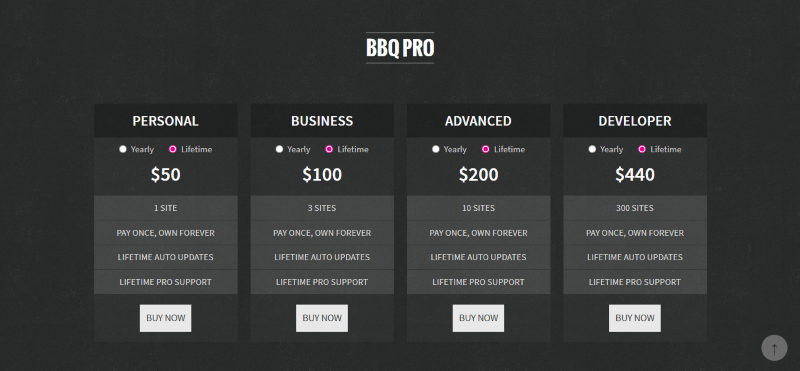
| Personal | Business | Advanced | Developer |
| 1 Site | 3 Sites | 10 Sites | 300 Sites |
| $30 Yearly | $70 Yearly | $160 Yearly | $380 Yearly |
| Personal | Business | Advanced | Developer |
| 1 Site | 3 Sites | 10 Sites | 300 Sites |
| $50 Lifetime | $100 Lifetime | $200 Lifetime | $440 Lifetime |
BBQ Pro Discounts
There are discounts available for BBQ Pro.
BBQ Pro Lifetime Deals
There are lifetime deals available for BBQ Pro.
How To Avail The BBQ Pro Coupon?
Step 1: Go to the Plugin Planet pricing page and select the plan you want to buy.
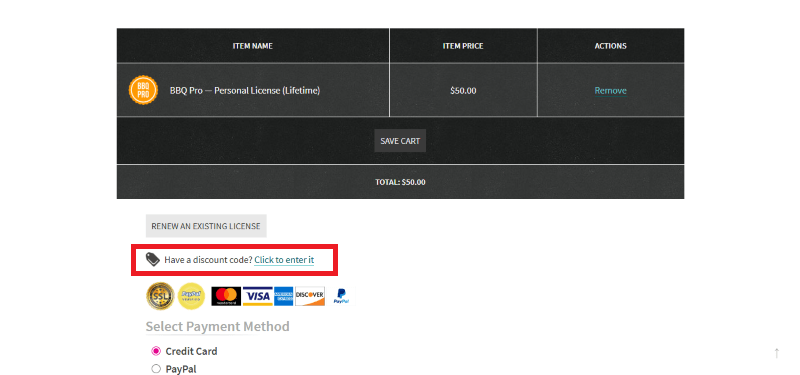
Step 2: On the BBQ Pro checkout page, click on “Have a Discount code”
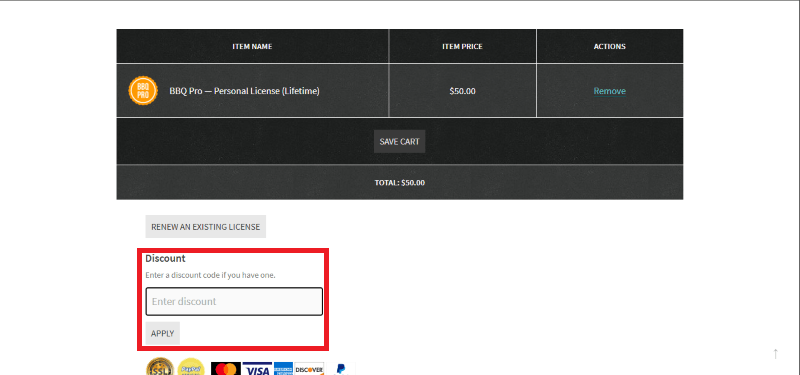
Step 3: Add the discount code in the field and click “Apply” to get the discount.
How To Install The BBQ Pro Plugin on WordPress?
Step 1: Purchase BBQ Pro from the official website and download the.zip file provided in your account.
Step 2: Log in to your WordPress dashboard.
Step 3: Navigate to Plugins > Add New > Upload Plugin.
Step 4: Choose the BBQ Pro ZIP file and click Install Now.
Step 5: Click Activate Plugin.
Step 6: Go to the BBQ Pro settings page to enable your 6G/7G/8G rules and start protecting your site.
For Whom Is This Product Built?
This product is built for:
- Speed-Conscious Developers
- Agency Owners
- Small Businesses
- Nginx/IIS Users
BBQ Pro Alternatives
Here are some alternatives to the BBQ Pro plugin.
- Wordfence Security
- NinjaFirewall
- All-In-One Security
| Product Name | Wordfence Security by Wordfence | NinjaFirewall by nintechnet | All-In-One Security by TeamUpdraft |
| Number of Websites | 5+ million | 100,000+ | 1+ million |
What BBQ Pro Customers Say
“I have used the BBQ Pro plugin for a few years to protect my website, and I appreciate the creators of this plugin. I recommend this plugin to everyone who has a WordPress website.”
“As firewalls go, BBQ is a unique brand plus style of operation, and it is very functional. No firewall stops everything, but this one excels because it is a little outside the box in its design doctrine, dodging the tricky parts of building a firewall inside a system-wide firewall for the specific and unique requirements of a WordPress site. I will send a donation and send my thanks to the developers, and best wishes for longevity and many happy days and years with this awesome project. Stick with it, folks, and have fun with our thanks.”
Read more reviews on WordPress.org.
We’d love to hear your thoughts and opinions on BBQ Pro. Share your experiences and insights in the comments below.
BBQ Pro
You Might Also Like

Directorist Coupon – 2026

ConvertKit Coupon – 2026

ActiveCampaign Coupon – 2026
From the WPdiscounts Blog
 Building an online store in WordPress requires a reliable engine that can handle payments, security, and customer data without breaking. For many years, WooCommerce was…
March 5, 2026
 The way we do business has changed forever, and many business interactions have moved online. In 2026, a massive 70% of professionals are working in…
March 3, 2026
- Donorbox is popular because it is quick to set up and offers hosted donation pages, embeddable donation forms, and support for recurring donations. For many…
February 27, 2026