Supercharge your WooCommerce store with unlimited product options and dynamic pricing.
Advanced Product Fields for WooCommerce Coupon – 2026
Add 16+ field types like file uploads and color swatches to let customers personalize orders directly on the product page.
Supercharge your WooCommerce store with unlimited product options and dynamic pricing.
Advanced Product Fields for WooCommerce Coupon – 2026
Add 16+ field types like file uploads and color swatches to let customers personalize orders directly on the product page.
Exclusive Discount
Only for WPdiscounts.io visitors.
Limited Time Offer
Claim this offer before it ends.
Offer Expired - Check back soon!
Table of Content
About
Founder: Maarten Belmans
Website: studiowombat.com
Community: Community

What is Advanced Product Fields for WooCommerce?
View Advanced Product Fields for WooCommerce Coupons, Discounts, and Pricing Plans below.
Standard WooCommerce product pages are often too limited for businesses that sell customizable goods. Whether you’re selling personalised jewellery, custom-built computers, or pizza with extra toppings, you need a way to collect specific data from your customers. Advanced Product Fields for WooCommerce (by Studio Wombat) is a powerful plugin that lets you add extra form fields to your product pages, allowing customers to personalise their orders before checking out.
With this plugin, you can go far beyond simple dropdowns. You can add over 16 field types, including text boxes, file uploads, date pickers, and colour swatches. It also features advanced conditional logic, meaning you can show or hide certain fields based on what the customer has already selected. This keeps your product pages clean and professional while ensuring you gather all the necessary information to fulfil an order perfectly.
For print shops, gift boutiques, or any e-commerce store offering tailor-made products, this tool is essential. It streamlines the customisation process, reduces back-and-forth emails with customers, and helps increase your average order value by allowing you to charge extra fees for specific add-ons.
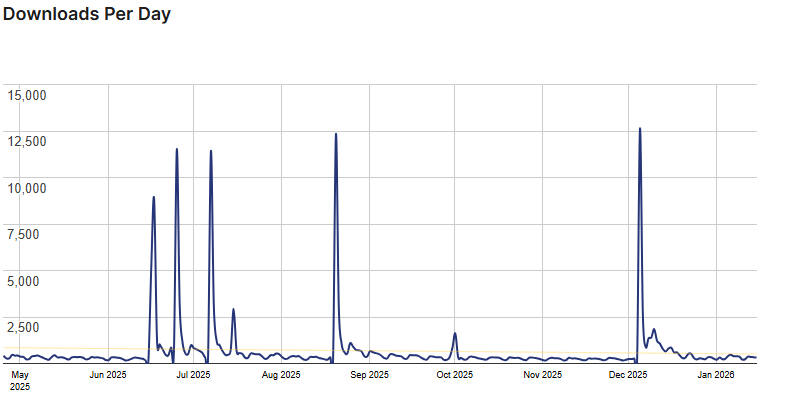
Advanced Product Fields for WooCommerce Usage Statistics
Key Features of Advanced Product Fields for WooCommerce
Here are some key features of Advanced Product Fields for WooCommerce you should know:
- 16+ Diverse Field Types: From simple text inputs and checkboxes to advanced file uploads, image swatches, and date pickers.
- Dynamic Pricing & Formulas: Adjust the final product price based on user input. You can add flat fees, percentage increases, or use complex mathematical formulas for measurements.
- Conditional Logic: Create interactive forms that change dynamically. Show or hide fields based on other field values or selected product variations.
- Main Image Switching: Change the product’s main image automatically when a customer selects a specific colour or image swatch.
- Optimised for Speed: Built to be lightweight and fast, ensuring your product pages load quickly without bloating your database.
- Repeatable Fields: Allow customers to add multiple rows of data (like adding multiple names for a set of team jerseys) with a single click.
Advanced Product Fields for WooCommerce Coupons, Discounts, and Pricing Plans
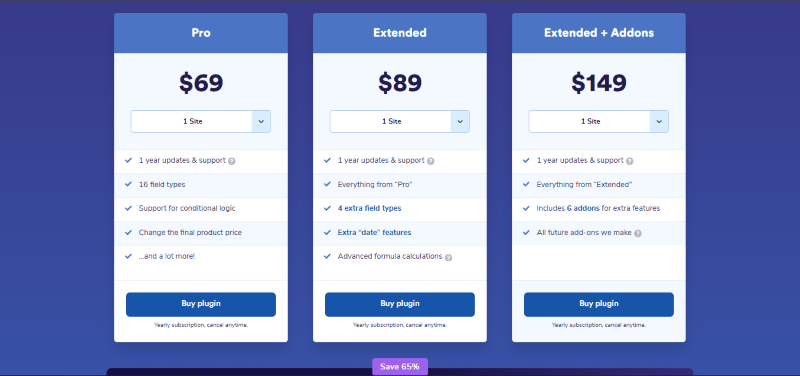
Advanced Product Fields for WooCommerce has a very straightforward pricing plan.
| Pro | Extended | Extended + Addons |
| $69 Yearly | $89 Yearly | $149 Yearly |
| 14-Day Money-Back Guarantee | 14-Day Money-Back Guarantee | 14-Day Money-Back Guarantee |
| Pro | Extended | Extended + Addons |
| $189 LifeTime | $229 LifeTime | $229 LifeTime |
| 14-Day Money-Back Guarantee | 14-Day Money-Back Guarantee | 14-Day Money-Back Guarantee |
Advanced Product Fields for WooCommerce Discounts
There is discounts available for Advanced Product Fields for WooCommerce.
Advanced Product Fields for WooCommerce Lifetime Deals
There are lifetime deals available for Advanced Product Fields for WooCommerce.
How To Avail The Advanced Product Fields for WooCommerce Coupon?
Step 1: Go to the Advanced Product Fields for WooCommerce page and select the plan you want to buy.
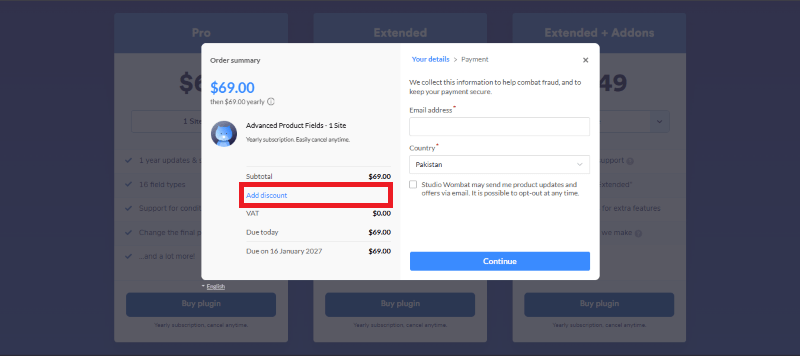
Step 2: On the Advanced Product Fields for WooCommerce checkout page, click on “Have a Discount code”
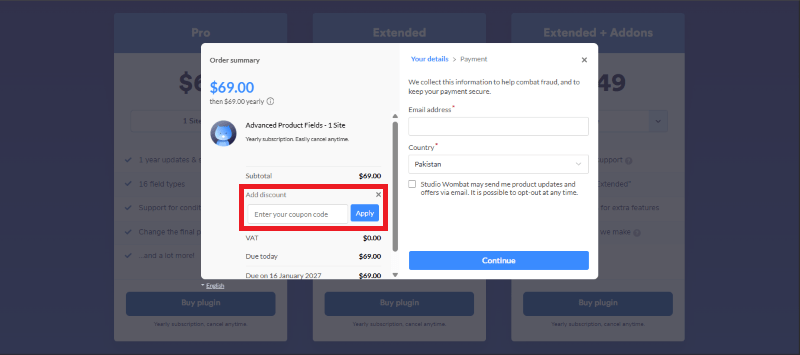
Step 3: Add the discount code in the field and click “Apply” to get the discount.
How To Install The Advanced Product Fields for WooCommerce Plugin on WordPress?
Step 1: Visit the Advanced Product Fields for WooCommerce website, choose the Pro or Free version, and download the plugin. You may receive the plugin as a zip file in your email or elsewhere.
Step 2: Log in to your WordPress dashboard
Step 3: Navigate to Plugins > Add New
Step 4: Click on Upload Plugin and select the Advanced Product Fields for WooCommerce ZIP file you downloaded.
Step 5: Click Install Now.
Step 6: After installation, go to Plugins > Installed Plugins and activate Advanced Product Fields for WooCommerce.
Step 7: Follow the prompts to configure Advanced Product Fields for WooCommerce’s initial settings after activation. The plugin is now configured to be utilized.
For Whom Is This Product Built?
This product is built for:
- Custom Print Shops
- E-commerce Store Owners
- Web Agencies
- Jewelry Designers
- Online Bakeries & Restaurants
- Dropshippers
- WordPress Developers
- Freelance Designers
Advanced Product Fields for WooCommerce Alternatives
Here are some alternatives to the Advanced Product Fields for WooCommerce plugin.
- Product Add-Ons for WooCommerce
- Extra Product Options for WooCommerce
- YITH WooCommerce Product Add-Ons
| Product Name | Product Add-Ons for WooCommerce | Extra Product Options for WooCommerceBy actpro | YITH WooCommerce Product Add-OnsBy YITHEMES |
| Number of Websites | N/A | 600+ | 20,000+ |
What Advanced Product Fields for WooCommerce Customers Say
“Don’t hesitate to buy it! It works great, UXUI is super friendly, and so is the customer service. I don’t use it anymore, only because I switched to an entirely different tech stack. Keep up the great work, Wombat”
“The customer support for this plugin is absolutely top-notch! I had a question about the setup, and their team responded quickly with clear and helpful instructions. They were patient, knowledgeable, and went the extra mile to ensure everything worked smoothly. Highly recommend both the plugin and their excellent support!”
Read more reviews on WordPress.org.
We’d love to hear your thoughts and opinions on Advanced Product Fields for WooCommerce. Share your experiences and insights in the comments below.
Advanced Product Fields for WooCommerce
You Might Also Like

Directorist Coupon – 2026

ConvertKit Coupon – 2026

ActiveCampaign Coupon – 2026
From the WPdiscounts Blog
 Building an online store in WordPress requires a reliable engine that can handle payments, security, and customer data without breaking. For many years, WooCommerce was…
March 5, 2026
 The way we do business has changed forever, and many business interactions have moved online. In 2026, a massive 70% of professionals are working in…
March 3, 2026
- Donorbox is popular because it is quick to set up and offers hosted donation pages, embeddable donation forms, and support for recurring donations. For many…
February 27, 2026